
CSS 笔记三(Tables/Box Model/Outline)
CSS Tables
border
border: border-width border-style border-color|initial|inherit;
border-width
border-width: medium|thin|thick|length|initial|inherit;
border-style
border-style:none|hidden|dotted|dashed|solid|double|groove|ridge|inset|outset|initial|inherit;
Table Borders
Example
 table, th, td {

    border: 1px solid black;

 }
border-collapse
- Specify whether the table borders are collapsed into a single border or detached as in standard HTML.
border-collapse: separate|collapse|initial|inherit;
border-spacing
- Specify the distance between the borders of adjacent cells (only for the "separated borders" model).
border-spacing: length|initial|inherit;
Example
 table {

     border-collapse: separate;

     border-spacing: 10px 50px;

 }
Horizontal Alignment
text-align: left|right|center;
Vertical Alignment
vertical-align: top|bottom|middle;
Caption-side
- Specify the placement of a table caption.
caption-side: top|bottom|initial|inherit;
Table-layout
- Specify the table layout algorithm to be used for a table.
table-layout: auto|fixed|initial|inherit;
| Value | Description |
|---|---|
| auto | Automatic table layout algorithm (this is default):
|
| fixed | Fixed table layout algorithm:
|
Empty-cells
- Specify whether or not to display borders and background on empty cells in a table (only for the "separated borders" model).
empty-cells: show|hide|initial|inherit;
Table Padding
- Control the space between the border and the content in a table
Example
th, td {

    padding: 15px;

    text-align: left;

}
- Use the
:hoverselector on <tr> to highlight table rows on mouse over
tr:hover {background-color: #f5f5f5}
Striped Tables
- Use the
nth-child()selector and add abackground-colorto all even (or odd) table rows
tr:nth-child(even) {background-color: #f2f2f2}
Responsive Table
- display a horizontal scroll bar if the screen is too small to display the full content
Example
 <div style="overflow-x:auto;">

 <table>

 ... table content ...

 </table>

 </div>
CSS Box Model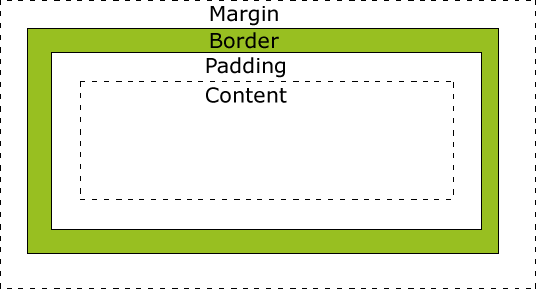
Explanation of the different parts:
- Content - The content of the box, where text and images appear
- Padding - Clears an area around the content. The padding is transparent
- Border - A border that goes around the padding and content
- Margin - Clears an area outside the border. The margin is transparent
Width and Height of an Element
Important:
When you set the width and height properties of an element with CSS, you just set the width and height of the content area. To calculate the full size of an element, you must also add padding, borders and margins.
Example
 div {

     width: 320px;

     padding: 10px;

     border: 5px solid gray;

     margin:;

 }
Total element width = width + left padding + right padding + left border + right border + left margin + right margin
CSS Outline
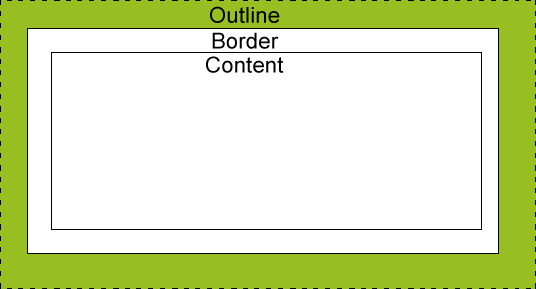
- An outline is a line drawn around an element - outside the border.
- The outline is NOT a part of an element's dimensions.
- the element's total width and height is not affected by the width of the outline.
outline-style values
dotted- Defines a dotted outlinedashed- Defines a dashed outlinesolid- Defines a solid outlinedouble- Defines a double outlinegroove- Defines a 3D grooved outline. The effect depends on the outline-color valueridge- Defines a 3D ridged outline. The effect depends on the outline-color valueinset- Defines a 3D inset outline. The effect depends on the outline-color valueoutset- Defines a 3D outset outline. The effect depends on the outline-color valuenone- Defines no outlinehidden- Defines a hidden outline
Example
 p {

     border: 1px solid black;

     outline-color: red;

 }

 p.dotted {outline-style: dotted;}

 p.dashed {outline-style: dashed;}

 p.solid {outline-style: solid;}

 p.double {outline-style: double;}

 p.groove {outline-style: groove;}

 p.ridge {outline-style: ridge;}

 p.inset {outline-style: inset;}

 p.outset {outline-style: outset;}
Result
A dotted outline.
A dashed outline.
A solid outline.
A double outline.
A groove outline. The effect depends on the outline-color value.
A ridge outline. The effect depends on the outline-color value.
An inset outline. The effect depends on the outline-color value.
An outset outline. The effect depends on the outline-color value.
Outline - Shorthand property
- same to border
Example
 p {

     border: 1px solid black;

     outline: 5px dotted red;

 }
- Specify the space between an outline and the edge or border of an element
outline-offset: length|initial|inherit;
Example:
div {

    border: 2px solid black;

    outline: 2px solid red;

    outline-offset: 15px;

}
CSS 笔记三(Tables/Box Model/Outline)的更多相关文章
- CSS 盒子模型(Box model)中的 padding 与 margin
本文将讲述 HTML 和 CSS 的关键—盒子模型 (Box model) .理解 Box model 的关键便是 margin 和 padding 属性,而正确理解这两个属性也是学习用 CSS 布局 ...
- HTML和CSS的盒子模型(Box model)
本文作为属性篇的最后一篇文章, 将讲述HTML和CSS的关键—盒子模型(Box model). 理解Box model的关键便是margin和padding属性, 而正确理解这两个属性也是学习用css ...
- 教你吃透CSS的盒子模型(Box Model)
CSS 盒子模型(Box Model) 所有HTML元素可以看作盒子,在CSS中,"box model"这一术语是用来设计和布局时使用. CSS盒模型本质上是一个盒子,封装周围的H ...
- CSS盒子模型(Box Model)
一.背景 作为CSS的重点,三大模块之一的盒子模型,这部分无论如何也要精通透彻.在任何一个网页当中,都有自己的布局方式,所谓网页布局方式就是如何把网页里面的文字.图片,很好的排版成美工设计的样式,这时 ...
- CSS盒模型(Box Model)
阅读目录 1. 什么是CSS盒模型 2. IE盒模型和W3C盒模型 3. CSS3属性box-sizing 4. 关于盒模型的使用 在最初接触CSS的时候,对于CSS盒模型的不了解,撞了很多次的南墙呀 ...
- CSS3与页面布局学习笔记(二)——盒子模型(Box Model)、边距折叠、内联与块标签、CSSReset
一.盒子模型(Box Model) 盒子模型也有人称为框模型,HTML中的多数元素都会在浏览器中生成一个矩形的区域,每个区域包含四个组成部分,从外向内依次是:外边距(Margin).边框(Border ...
- CSS魔法堂:重新认识Box Model、IFC、BFC和Collapsing margins
前言 盒子模型作为CSS基础中的基础,曾一度以为掌握了IE和W3C标准下的块级盒子模型即可,但近日在学习行级盒子模型时发现原来当初是如此幼稚可笑.本文尝试全面叙述块级.行级盒子模型的特性.作为近日 ...
- css盒模型(Box Model)
所有HTML元素可以看作盒子,在CSS中,"box model"这一术语是用来设计和布局时使用. CSS盒模型本质上是一个盒子,封装周围的HTML元素,它包括:边距,边框,填充,和 ...
- CSS Box Model(盒子模型)
CSS Box Model(盒子模型) 一.简介 所有HTML元素可以看作盒子,在CSS中,"box model"这一术语是用来设计和布局时使用. CSS盒模型本质上是一个盒子,封 ...
随机推荐
- JSP内置对象---request和 response
<%@page import="java.net.URLEncoder"%> <%@page import="com.hanqi.web.CardDAO ...
- 将普通工程转为mvn标准工程(main resources)
It is sometimes required to change the default source folder working on the java project. One best e ...
- Lrucache缓存技术
在Android中,有一个叫做LruCache类专门用来做图片缓存处理的. 它有一个特点,当缓存的图片达到了预先设定的值的时候,那么近期使用次数最少的图片就会被回收掉. 步骤: (1)要先设置缓存图片 ...
- mysql体系结构
mysql逻辑架构: 第一层,即最上一层,所包含的服务并不是MySQL所独有的技术.它们都是服务于C/S程序或者是这些程序所需要的:连接处理,身份验证,安全性等等. 第二层值得关注.这是MySQL的核 ...
- jquery实现获取手机验证码倒计时效果
<!DOCTYPE html PUBLIC "-//W3C//DTD XHTML 1.0 Transitional//EN" "http://www.w3.org/ ...
- html5 语义
页面示意图
- 求第N个素数
埃拉托斯特尼筛法 如果求第n 个素数,有一个数学公式可以得到第n 个素数的上界:uper=n*ln(n)+n*ln(ln(n)),n>=6.如果一个数是素数那么这个数的倍数是非素数因此例如2是素 ...
- BizTalk动手实验(十六)EDI-AS2解决文案开发配置
1 课程简介 通过本课程熟悉EDI.AS2解决文案的开发与配置,本动手实验步骤及内容采用微软官方SDK完成,学员在实验过程中结合官方教程来完成本实验 本实验基于BizTalk 2013(Windows ...
- 百度开源富文本编辑器 UEditor配置:图片上传和文件上传独立使用方法
使用UEditor编辑器自带的插件实现图片上传和文件上传功能,这里通过配置UEditor单独使用其内置的第三方插件swfupload来实现图片和文件的上传,通过对UEditor配置轻松实现图片批量上传 ...
- a标签实用方法详解
a:link { color: black } /* 未访问时的状态 */ a:visited { color: blue } /* 已访问过的状态 */ a:hover { color: red } ...