
CSS 笔记三(Tables/Box Model/Outline)
CSS Tables
border
border: border-width border-style border-color|initial|inherit;
border-width
border-width: medium|thin|thick|length|initial|inherit;
border-style
border-style:none|hidden|dotted|dashed|solid|double|groove|ridge|inset|outset|initial|inherit;
Table Borders
Example
 table, th, td {

    border: 1px solid black;

 }
border-collapse
- Specify whether the table borders are collapsed into a single border or detached as in standard HTML.
border-collapse: separate|collapse|initial|inherit;
border-spacing
- Specify the distance between the borders of adjacent cells (only for the "separated borders" model).
border-spacing: length|initial|inherit;
Example
 table {

     border-collapse: separate;

     border-spacing: 10px 50px;

 }
Horizontal Alignment
text-align: left|right|center;
Vertical Alignment
vertical-align: top|bottom|middle;
Caption-side
- Specify the placement of a table caption.
caption-side: top|bottom|initial|inherit;
Table-layout
- Specify the table layout algorithm to be used for a table.
table-layout: auto|fixed|initial|inherit;
| Value | Description |
|---|---|
| auto | Automatic table layout algorithm (this is default):
|
| fixed | Fixed table layout algorithm:
|
Empty-cells
- Specify whether or not to display borders and background on empty cells in a table (only for the "separated borders" model).
empty-cells: show|hide|initial|inherit;
Table Padding
- Control the space between the border and the content in a table
Example
th, td {

    padding: 15px;

    text-align: left;

}
- Use the
:hoverselector on <tr> to highlight table rows on mouse over
tr:hover {background-color: #f5f5f5}
Striped Tables
- Use the
nth-child()selector and add abackground-colorto all even (or odd) table rows
tr:nth-child(even) {background-color: #f2f2f2}
Responsive Table
- display a horizontal scroll bar if the screen is too small to display the full content
Example
 <div style="overflow-x:auto;">

 <table>

 ... table content ...

 </table>

 </div>
CSS Box Model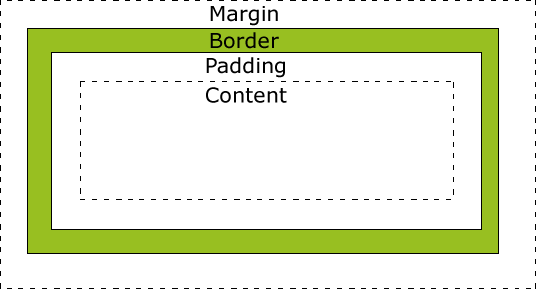
Explanation of the different parts:
- Content - The content of the box, where text and images appear
- Padding - Clears an area around the content. The padding is transparent
- Border - A border that goes around the padding and content
- Margin - Clears an area outside the border. The margin is transparent
Width and Height of an Element
Important:
When you set the width and height properties of an element with CSS, you just set the width and height of the content area. To calculate the full size of an element, you must also add padding, borders and margins.
Example
 div {

     width: 320px;

     padding: 10px;

     border: 5px solid gray;

     margin:;

 }
Total element width = width + left padding + right padding + left border + right border + left margin + right margin
CSS Outline
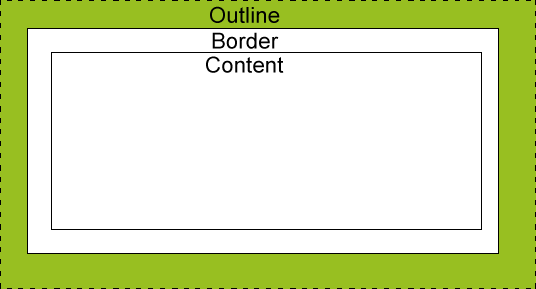
- An outline is a line drawn around an element - outside the border.
- The outline is NOT a part of an element's dimensions.
- the element's total width and height is not affected by the width of the outline.
outline-style values
dotted- Defines a dotted outlinedashed- Defines a dashed outlinesolid- Defines a solid outlinedouble- Defines a double outlinegroove- Defines a 3D grooved outline. The effect depends on the outline-color valueridge- Defines a 3D ridged outline. The effect depends on the outline-color valueinset- Defines a 3D inset outline. The effect depends on the outline-color valueoutset- Defines a 3D outset outline. The effect depends on the outline-color valuenone- Defines no outlinehidden- Defines a hidden outline
Example
 p {

     border: 1px solid black;

     outline-color: red;

 }

 p.dotted {outline-style: dotted;}

 p.dashed {outline-style: dashed;}

 p.solid {outline-style: solid;}

 p.double {outline-style: double;}

 p.groove {outline-style: groove;}

 p.ridge {outline-style: ridge;}

 p.inset {outline-style: inset;}

 p.outset {outline-style: outset;}
Result
A dotted outline.
A dashed outline.
A solid outline.
A double outline.
A groove outline. The effect depends on the outline-color value.
A ridge outline. The effect depends on the outline-color value.
An inset outline. The effect depends on the outline-color value.
An outset outline. The effect depends on the outline-color value.
Outline - Shorthand property
- same to border
Example
 p {

     border: 1px solid black;

     outline: 5px dotted red;

 }
- Specify the space between an outline and the edge or border of an element
outline-offset: length|initial|inherit;
Example:
div {

    border: 2px solid black;

    outline: 2px solid red;

    outline-offset: 15px;

}
CSS 笔记三(Tables/Box Model/Outline)的更多相关文章
- CSS 盒子模型(Box model)中的 padding 与 margin
本文将讲述 HTML 和 CSS 的关键—盒子模型 (Box model) .理解 Box model 的关键便是 margin 和 padding 属性,而正确理解这两个属性也是学习用 CSS 布局 ...
- HTML和CSS的盒子模型(Box model)
本文作为属性篇的最后一篇文章, 将讲述HTML和CSS的关键—盒子模型(Box model). 理解Box model的关键便是margin和padding属性, 而正确理解这两个属性也是学习用css ...
- 教你吃透CSS的盒子模型(Box Model)
CSS 盒子模型(Box Model) 所有HTML元素可以看作盒子,在CSS中,"box model"这一术语是用来设计和布局时使用. CSS盒模型本质上是一个盒子,封装周围的H ...
- CSS盒子模型(Box Model)
一.背景 作为CSS的重点,三大模块之一的盒子模型,这部分无论如何也要精通透彻.在任何一个网页当中,都有自己的布局方式,所谓网页布局方式就是如何把网页里面的文字.图片,很好的排版成美工设计的样式,这时 ...
- CSS盒模型(Box Model)
阅读目录 1. 什么是CSS盒模型 2. IE盒模型和W3C盒模型 3. CSS3属性box-sizing 4. 关于盒模型的使用 在最初接触CSS的时候,对于CSS盒模型的不了解,撞了很多次的南墙呀 ...
- CSS3与页面布局学习笔记(二)——盒子模型(Box Model)、边距折叠、内联与块标签、CSSReset
一.盒子模型(Box Model) 盒子模型也有人称为框模型,HTML中的多数元素都会在浏览器中生成一个矩形的区域,每个区域包含四个组成部分,从外向内依次是:外边距(Margin).边框(Border ...
- CSS魔法堂:重新认识Box Model、IFC、BFC和Collapsing margins
前言 盒子模型作为CSS基础中的基础,曾一度以为掌握了IE和W3C标准下的块级盒子模型即可,但近日在学习行级盒子模型时发现原来当初是如此幼稚可笑.本文尝试全面叙述块级.行级盒子模型的特性.作为近日 ...
- css盒模型(Box Model)
所有HTML元素可以看作盒子,在CSS中,"box model"这一术语是用来设计和布局时使用. CSS盒模型本质上是一个盒子,封装周围的HTML元素,它包括:边距,边框,填充,和 ...
- CSS Box Model(盒子模型)
CSS Box Model(盒子模型) 一.简介 所有HTML元素可以看作盒子,在CSS中,"box model"这一术语是用来设计和布局时使用. CSS盒模型本质上是一个盒子,封 ...
随机推荐
- 记录JVM内存模型,参数含义和优化
一.JVM内存模型 (图片来自网络) 根据Java虚拟机规范,JVM将内存划分为: New(年轻代) Tenured(年老代) Perm (永久代) 其中New和Tenured属于堆内存,堆内存会从J ...
- 演示一个导致ora-01555错误的场景
1创建一个undo表空间 2查看当前undo配置 3更该默认undo表空间 4确认更改的配置 5创建一张测试表 6模拟批量操作 7 查询2分钟前的数据 从这里可以到当查询2分钟前的数据时候,系统报出O ...
- 2016HUAS暑假集训训练2 A - Is It A Tree?
Description A tree is a well-known data structure that is either empty (null, void, nothing) or is a ...
- mysql时间格式化,按时间段查询MYSQL语句
描述:有一个会员表,有个birthday字段,值为'YYYY-MM-DD'格式,现在要查询一个时间段内过生日的会员,比如'06-03'到'07-08'这个时间段内所有过生日的会员. SQL语句: Se ...
- Java FTPClient实现文件上传下载
在JAVA程序中,经常需要和FTP打交道,比如向FTP服务器上传文件.下载文件,本文简单介绍如何利用jakarta commons中的FTPClient(在commons-net包中)实现上传下载文件 ...
- love your life
However mean your life is, meet it and live it ;do not shun it and call it hard names. It is not so ...
- BizTalk开发系列(二十九) 宏的使用
在BizTalk中可以使用宏集合动态的让BizTalk发送处理程序使用单独的值来替换宏.常用的使用宏的发送程序有:文件发送适配器和SMTP发送适 配器.在表达式中可以使用同时使用多个宏.例如:在文件发 ...
- document获取节点byTagName
/* *对于页面中的超链接,新闻链接通过新窗口打开 *当然是要获取其中被操作的超链接对象. *可是通过Document获取超链接,拿到的是页面中所有的超链接节点. *只想获取一部分如何办呢? *只要获 ...
- ceph命令
chen@admin-node:~$ ceph --help General usage: ============== usage: ceph [-h] [-c CEPHCONF] [-i INPU ...
- FastDFS connect timed out
java.net.SocketTimeoutException: connect timed outUpload file "1003.png"fails:connect time ...