
OpenCV中的神器Image Watch
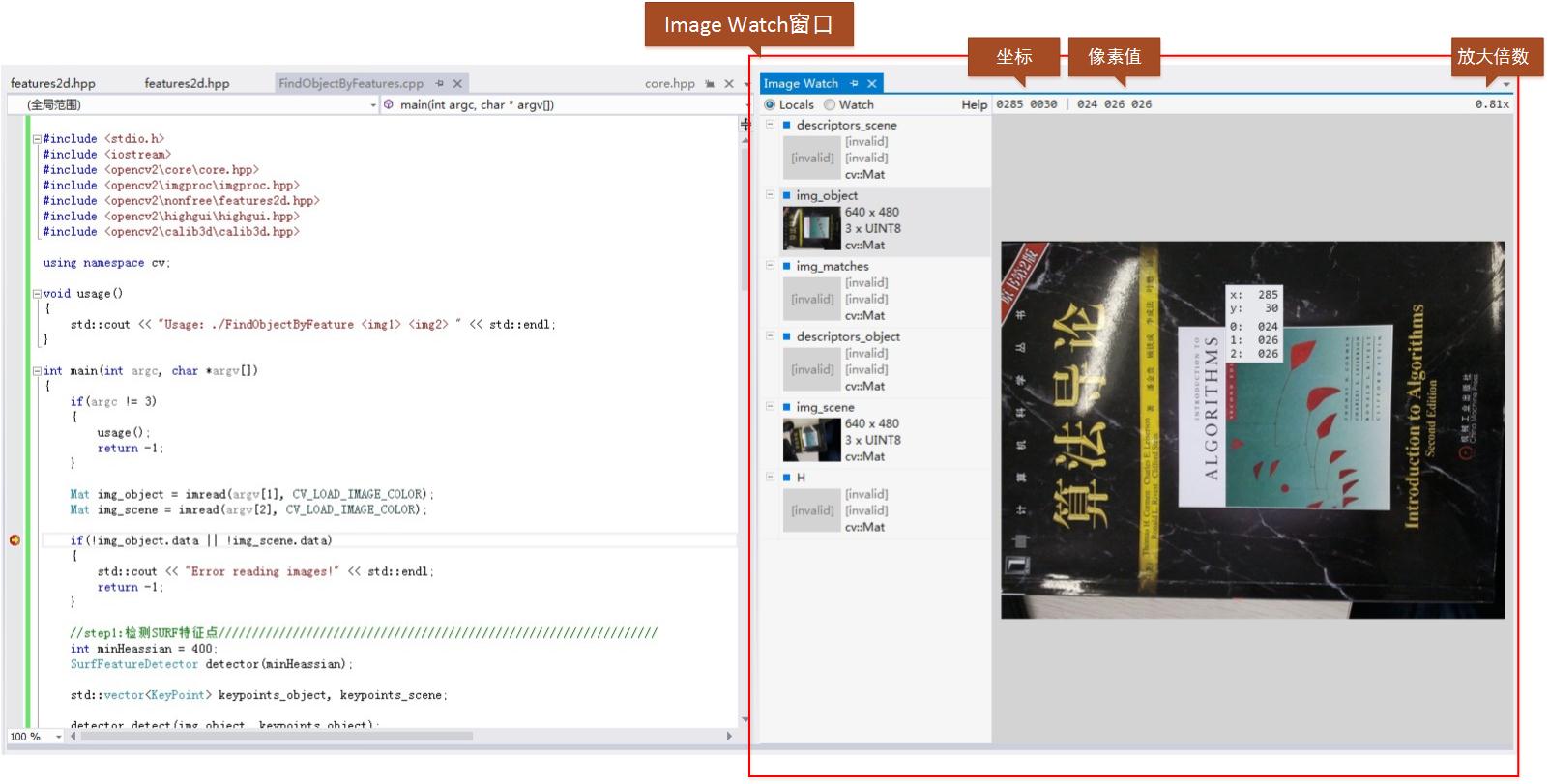
Image Watch是在VS2012上使用的一款OpenCV工具,能够实时显示图像和矩阵Mat的内容,跟Matlab很像,方便程序调试,相当好用。跟VS2012配合使用,简直就是一款神器!让我一下就爱上它了!
第一次看到Image Watch是今年3、4月份的时候,当时是在微博上看到新闻,点击链接的下载页面一直出问题,后面就忘了这事,昨天碰巧在OpenCV主页看到OpenCV2.4.5的Change Logs里面有链接,点进能下载果断试用下啊!
闲话少说,先看看部分相关链接。
1、Image Watch 的下载链接。
2、OpenCV关于Image Watch的介绍页面链接。
3、OpenCV2.4.5在线文档关于Image Watch的介绍文档。
4、更详细的信息参见Image Watch的官方网站。
直接上图,有个直观印象。
下面利用一个实际的例子,来说明下Image Watch。
利用二维SURF特征和单映射寻找已知物体。输入两幅图像,一幅是需要寻找的物体图像,另一幅是场景中包含此物体的图像。
SURF特征的特征描述方法封装在SurfFeatureDetector类中,利用成员函数detect函数检测出SURF特征的关键点,保存在vector容器中,再利用SurfDesciptorExtractor类进行特征向量的计算,将之前的vector变量变成矩阵形式保存在Mat中。
利用FLANN特征匹配算法进行匹配,此算法封装在FlannBaseMatcher类中,匹配后保留好的特征匹配点。利用findHomography获取匹配特征点之间的变换,最后利用perspectiveTransform定位到场景图中物体的4个点。
代码如下:
#include <stdio.h>

#include <iostream>

#include <opencv2\core\core.hpp>

#include <opencv2\imgproc\imgproc.hpp>

#include <opencv2\nonfree\features2d.hpp>

#include <opencv2\highgui\highgui.hpp>

#include <opencv2\calib3d\calib3d.hpp>

using namespace cv;

void usage()

{

    std::cout << "Usage: ./FindObjectByFeature <img1> <img2> " << std::endl;

}

int main(int argc, char *argv[])

{

    if(argc != )

    {

        usage();

        return -;

    }

    Mat img_object = imread(argv[], CV_LOAD_IMAGE_COLOR);

    Mat img_scene = imread(argv[], CV_LOAD_IMAGE_COLOR);

    if(!img_object.data || !img_scene.data)

    {

        std::cout << "Error reading images!" << std::endl;

        return -;

    }

    //step1:检测SURF特征点/////////////////////////////////////////////////////////////////

    int minHeassian = ;

    SurfFeatureDetector detector(minHeassian);

    std::vector<KeyPoint> keypoints_object, keypoints_scene;

    detector.detect(img_object, keypoints_object);

    detector.detect(img_scene, keypoints_scene);

    //step2:计算特征向量///////////////////////////////////////////////////////////////////

    SurfDescriptorExtractor extractor;

    Mat descriptors_object, descriptors_scene;

    extractor.compute(img_object, keypoints_object, descriptors_object);

    extractor.compute(img_scene, keypoints_scene, descriptors_scene);

    //step3:利用FLANN匹配算法匹配特征描述向量//////////////////////////////////////////////

    FlannBasedMatcher matcher;

    std::vector<DMatch> matches;

    matcher.match( descriptors_object, descriptors_scene, matches);

    double max_dist = ; double min_dist = ;

    //快速计算特征点之间的最大和最小距离///////////////////////////////////////////////////

    for(int i = ; i < descriptors_object.rows; i++)

    {

        double dist = matches[i].distance;

        if(dist < min_dist) min_dist = dist;

        if(dist > max_dist) max_dist = dist;

    }

    printf("---Max dist: %f \n", max_dist);

    printf("---Min dist: %f \n", min_dist);

    //只画出好的匹配点(匹配特征点之间距离小于3*min_dist)//////////////////////////////////

    std::vector<DMatch> good_matches;

    for(int i = ; i < descriptors_object.rows; i++)

    {

        if(matches[i].distance < *min_dist)

            good_matches.push_back(matches[i]);

    }

    Mat img_matches;

    drawMatches(img_object, keypoints_object, img_scene, keypoints_scene,

        good_matches, img_matches, Scalar::all(-), Scalar::all(-),

        vector<char>(), DrawMatchesFlags::NOT_DRAW_SINGLE_POINTS);

    //定位物体////////////////////////////////////////////////////////////////////////////

    std::vector<Point2f> obj;

    std::vector<Point2f> scene;

    for(int i = ; i < good_matches.size(); i++)

    {

        //从好的匹配中获取特征点/////////////////////////////////////

        obj.push_back(keypoints_object[good_matches[i].queryIdx].pt);

        scene.push_back(keypoints_scene[good_matches[i].trainIdx].pt);

    }

    //找出匹配特征点之间的变换///////////////////

    Mat H = findHomography(obj, scene, CV_RANSAC);

    //得到image_1的角点(需要寻找的物体)//////////

    std::vector<Point2f> obj_corners();

    obj_corners[] = cvPoint(,);

    obj_corners[] = cvPoint(img_object.cols, );

    obj_corners[] = cvPoint(img_object.cols, img_object.rows);

    obj_corners[] = cvPoint(, img_object.rows);

    std::vector<Point2f> scene_corners();

    //匹配四个角点/////////////////////////////////////

    perspectiveTransform(obj_corners, scene_corners, H);

    //画出匹配的物体///////////////////////////////////////////////////////////////////////

    line(img_matches, scene_corners[] + Point2f(img_object.cols, ), scene_corners[] + Point2f(img_object.cols, ), Scalar(,,), );

    line(img_matches, scene_corners[] + Point2f(img_object.cols, ), scene_corners[] + Point2f(img_object.cols, ), Scalar(,,), );

    line(img_matches, scene_corners[] + Point2f(img_object.cols, ), scene_corners[] + Point2f(img_object.cols, ), Scalar(,,), );

    line(img_matches, scene_corners[] + Point2f(img_object.cols, ), scene_corners[] + Point2f(img_object.cols, ), Scalar(,,), );

    imshow("Good Matches & Object detection", img_matches);

    waitKey();

    return ;

}
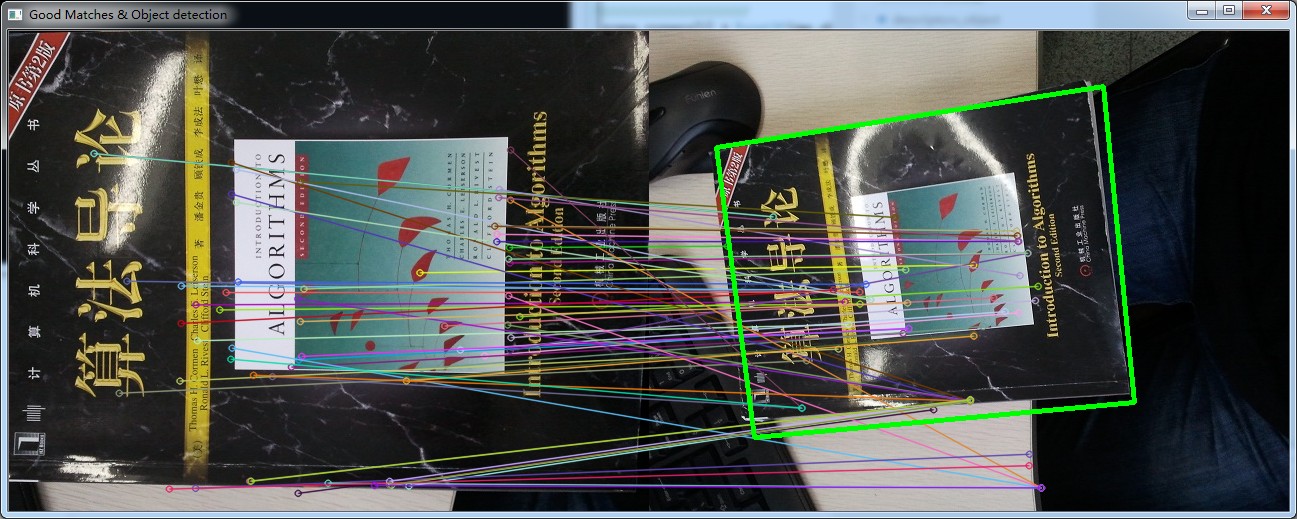
匹配结果图如下(下图中左边子图为待寻找的物体图像,右边子图场景中寻找到的物体图像):
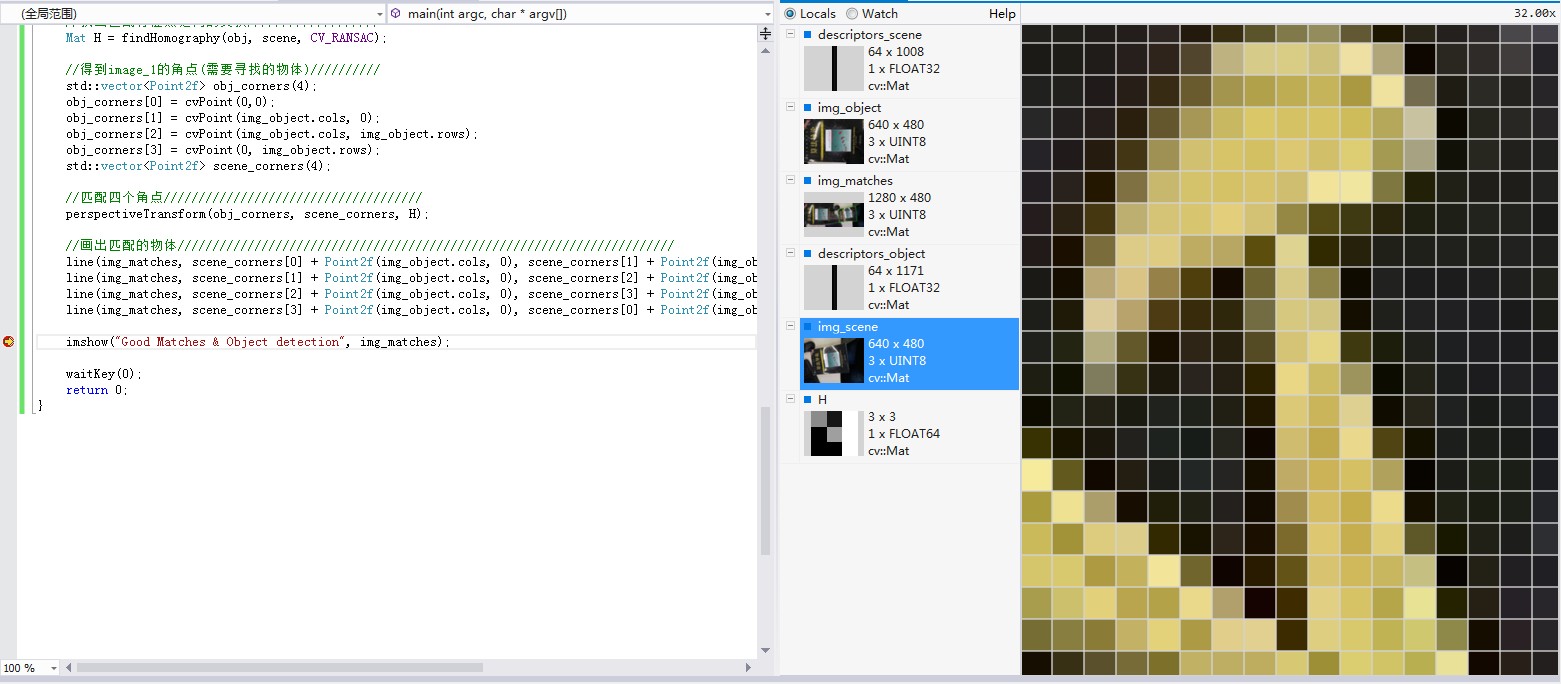
在Debug模式下,如果我们在程序某处设置调试断点,当程序运行到断点处时,可以在Image Watch窗口(View->Other Windows->Image Watch)查看已经分配内存的Mat图像。
还在将鼠标放置在所选图像上进行放大,最大能放大到像素级别。如下图所示:
在这个例子中,再稍微多说一点编译工程时我遇到的问题。
1、如果用的是OpenCV2.4以后版本,在程序include中包含:#include <opencv2/features2d/features2d.hpp>,可能会出现SurfFeatureDetector无法解析的情况。
这是因为OpenCV2.4后,SurfFeatureDetector类移到了opencv2/nonfree/features2d.hpp,而不是opencv2/features2d/features2d.hpp。因此需要把#include<opencv2/features2d/features2d.hpp>改为
#include <opencv2/nonfree/features2d.hpp>,另外还需要把opencv_nonfree245d.lib库文件链接进去。
2、另外,对于工程中有两个以上OpenCV版本的情况,加入#include <opencv2/nonfree/features2d.hpp>后编译又可能出现重定义的情况。开始我一直没搞清楚原因,后来在stackoverflow查了下。原因如下:
Your compiler and editor are confused by the two OpenCV versions installed on your system.

First, make sure that all the settings ( include paths in Visual Studio, lib path in Visual studio linker settings and bin path -probably an environment variable) point to the same version.

Next, make sure to include all the needed headers. In OpenCV 2.4 and above, SURF and SIFT have been moved to nonfree module, so you also have to install it. Do not forget that some functions may be moved to legacy.

And if you uninstall one version of OpenCV, the editor (which doesn't have all the parsing capabilities of the compiler) will not be confused anymore.
也就是说如果VS中安装了两个以上的OpenCV版本,VS可能会搞混,把include的地址解析到了两个不同OpenCV目录下的头文件,因此引起重定义。
于是在VS中把include目录下的OpenCV2.3.1的头文件地址删除,问题解决。
看来程序员真的应该多上下stackoverflow,能学到很多知识。
OpenCV中的神器Image Watch的更多相关文章
- opencv中Mat与IplImage,CVMat类型之间转换
opencv中对图像的处理是最基本的操作,一般的图像类型为IplImage类型,但是当我们对图像进行处理的时候,多数都是对像素矩阵进行处理,所以这三个类型之间的转换会对我们的工作带来便利. Mat类型 ...
- 解析opencv中Box Filter的实现并提出进一步加速的方案(源码共享)。
说明:本文所有算法的涉及到的优化均指在PC上进行的,对于其他构架是否合适未知,请自行试验. Box Filter,最经典的一种领域操作,在无数的场合中都有着广泛的应用,作为一个很基础的函数,其性能的好 ...
- OpenCV中IplImage图像格式与BYTE图像数据的转换
最近在将Karlsruhe Institute of Technology的Andreas Geiger发表在ACCV2010上的Efficent Large-Scale Stereo Matchin ...
- opencv中的SIFT,SURF,ORB,FAST 特征描叙算子比较
opencv中的SIFT,SURF,ORB,FAST 特征描叙算子比较 参考: http://wenku.baidu.com/link?url=1aDYAJBCrrK-uk2w3sSNai7h52x_ ...
- 混合高斯模型:opencv中MOG2的代码结构梳理
/* 头文件:OurGaussmix2.h */ #include "opencv2/core/core.hpp" #include <list> #include&q ...
- opencv中的.at方法
opencv中的.at方法是用来获取图像像素值得函数: interpolation:差值 histogram:直方图
- 【OpenCV】OpenCV中GPU模块使用
CUDA基本使用方法 在介绍OpenCV中GPU模块使用之前,先回顾下CUDA的一般使用方法,其基本步骤如下: 1.主机代码执行:2.传输数据到GPU:3.确定grid,block大小: 4.调用内核 ...
- openCV中IplImage的使用
http://blog.csdn.net/welcome_xu/article/details/7650680 IplImage结构详细分析 IplImage 结构解读: typedef stru ...
- Opencv中直线的表示方法
[blog算法原理]Opencv中直线的表示方法 一.问题的提出: 在实际项目编写过程中,需要对直线(Line)进行特定的处 ...
随机推荐
- linux命令 wget
Linux系统中的wget是一个下载文件的工具,它用在命令行下.对于Linux用户是必不可少的工具,我们经常要下载一些软件或从远程服务器恢复备份到本地服务器.wget支持HTTP,HTTPS和FTP协 ...
- Linux hostname对Oracle实例以及监听的影响
在Linux平台中,对hostname的修改,是否对ORACLE数据库实例或监听进程有影响呢?如果有影响,又要如何解决问题呢?另外/etc/hosts下相关内容的修改,是否也会影响实例或监听呢?这里涉 ...
- What every programmer should know about memory 笔记
What every programmer should know about memory, Part 1(笔记) 每个程序员都应该了解的内存知识[第一部分] 2.商用硬件现状 现在硬件的 ...
- Java 设计模式(示例代码)
Java 设计模式 项目实例:https://github.com/windwant/java-design-pattern
- MySql安装与MySQL添加用户、删除用户与授权
1.安装MySql 目前MySQL有两种形式的文件,一个是msi格式,一个是zip格式的.msi格式的直接点击setup.exe就好,按照步骤进行.但是很多人下了zip格式的解压发现没有s ...
- IDENT_CURRENT ,@@identity,SCOPE_IDENTITY() 之间对比
获取表的标识值,有3种比较常见的用法 IDENT_CURRENT ,@@identity,SCOPE_IDENTITY(),有啥不一样呢? 3个关键字在联机手册中的解释 IDENT_CURRENT ...
- IIS 500.19 错误
HTTP 错误 500.19 - Internal Server Error 错误代码 0x80070021 配置错误 不能在此路径中使用此配置节.如果在父级别上锁定了该节,便会出现这种情况.锁定是默 ...
- PHP生成器Generators
下文的第一个逐行读取文件例子用三种方式实现;普通方法,迭代器和生成器,比较了他们的优缺点,很好,可以引用到自己的代码中 ,支持的php版本(PHP 5 >= 5.5.0) 后面的yield讲解, ...
- Android之drawable state各个属性详解
android:drawable 放一个drawable资源android:state_pressed 是否按下,如一个按钮触摸或者点击.android:state_focused 是否取得焦点,比如 ...
- Linux 下子线程的 pthread_cleanup_push() 和 pthread_cleanup_pop() 研究
线程退出前可能有一些清理工作,但是这部分代码又不会放到线程主体部分,就需要挂接一个或者几个线程“清洁工”来做这部分事情.需要这对兄弟: #include<pthread.h> void p ...