
React Native实例之房产搜索APP
React Native 开发越来越火了,web app也是未来的潮流, 现在react native已经可以完成一些最基本的功能. 通过开发一些简单的应用, 可以更加熟练的掌握 RN 的知识. 在学习的过程,发现了一个房产搜索APP的实例,但只有ios版本,
本文主要是房产搜索APP的android版本实现。
原Ios版本
React Native 实例 - 房产搜索App Mystra
原版效果

主要内容:
- 使用Navigator栈跳转页面.
- 使用fetch请求网络数据.
- 使用ListView展示列表数据.
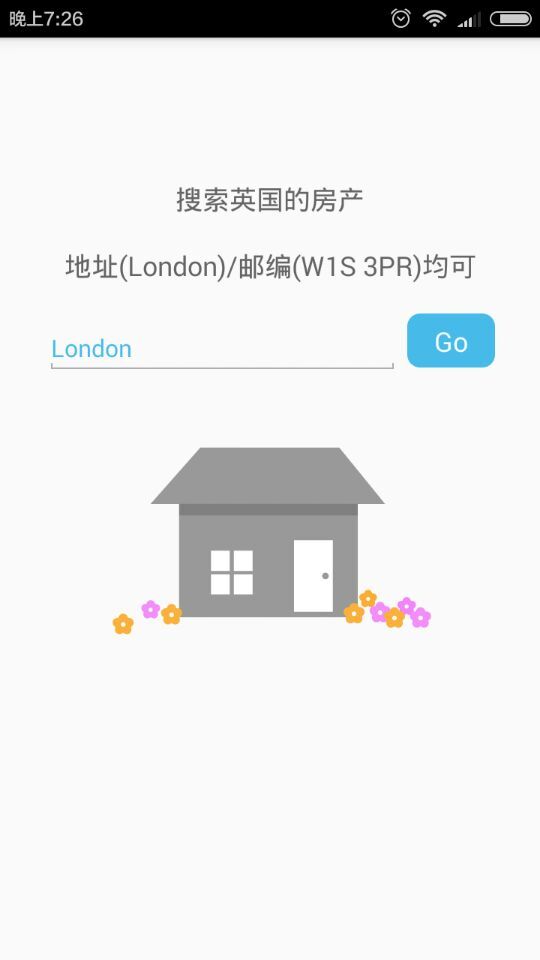
首页搜索
搜索页(SearchPage)包含一个搜索库, 可以使用地址或邮编搜索英国的房产信息.
通过输入框的参数创建网络请求URL, 并把请求发送出去, 获取信息.
/**

 * 访问网络服务的Api, 拼接参数

 * 输出: http://api.nestoria.co.uk/api?country=uk&pretty=1&encoding=json&listing_type=buy&action=search_listings&page=1&place_name=London

 *

 * @param key 最后一个参数的键, 用于表示地理位置

 * @param value 最后一个参数的值, 具体位置

 * @param pageNumber page的页面数

 * @returns {string} 网络请求的字符串

 */

function urlForQueryAndPage(key, value, pageNumber) {

  var data = {

    country: 'uk',

    pretty: '1',

    encoding: 'json',

    listing_type: 'buy',

    action: 'search_listings',

    page: pageNumber

  };

  data[key] = value;

  var querystring = Object.keys(data)

    .map(key => key + '=' + encodeURIComponent(data[key]))

    .join('&');

  return 'http://api.nestoria.co.uk/api?' + querystring;

}

class SearchPage extends Component {

  /**

   * 构造器

   * @param props 状态

   */

  constructor(props) {

    super(props);

    this.state = {

      searchString: 'London', // 搜索词

      isLoading: false, // 加载

      message: '' // 消息

    };

  }

  onSearchTextChanged(event) {

    this.setState({searchString: event.nativeEvent.text});

    console.log(this.state.searchString);

  }

 /**

   * 执行网络请求, 下划线表示私有

   * @param query url

   * @private

   */

  _executeQuery(query) {

    console.log(query);

    this.setState({isLoading: true});

    // 网络请求

    fetch(query)

      .then(response => response.json())

      .then(json => this._handleResponse(json.response))

      .catch(error => this.setState({

        isLoading: false,

        message: 'Something bad happened ' + error

      }));

  }

  /**

   * 处理网络请求的回调

   * @param response 请求的返回值

   * @private

   */

  _handleResponse(response) {

    const { navigator } = this.props;

    this.setState({isLoading: false, message: ''});

    if (response.application_response_code.substr(0, 1) === '1') {

      console.log('123');

      console.log('Properties found: ' + response.listings);

      // 使用listings调用结果页面SearchResults

      navigator.push({

        title: '搜索结果',

        component: SearchResults,

        index:1,

        params:{

                    listings:response.listings,

                    mynav:navigator

                }

      });

        console.log('456');

    } else {

      this.setState({message: 'Location not recognized; please try again.'});

    }

  }

  /**

   * 查询的点击事件

   */

  onSearchPressed() {

    var query = urlForQueryAndPage('place_name', this.state.searchString, 1);

    this._executeQuery(query);

  }

  render() {

    var spinner = this.state.isLoading ?

      (<ActivityIndicator size='large'/>) : (<View/>);

    return (

      <View style={styles.container}>

        <Text style={styles.description}>

          搜索英国的房产

        </Text>

        <Text style={styles.description}>

          地址(London)/邮编(W1S 3PR)均可

        </Text>

        <View style={styles.flowRight}>

          <TextInput

            style={styles.searchInput}

            value={this.state.searchString}

            onChange={this.onSearchTextChanged.bind(this)} // bind确保使用组件的实例

            placeholder='Search via name or postcode'/>

          <TouchableHighlight

            style={styles.button}

            underlayColor='#99d9f4'

            onPress={this.onSearchPressed.bind(this)}>

            <Text style={styles.buttonText}>Go</Text>

          </TouchableHighlight>

        </View>

        <Image source={require('./resources/house.png')}

               style={styles.image}/>

        {spinner}

        <Text style={styles.description}>

          {this.state.message}

        </Text>

      </View>

    );

  }

}
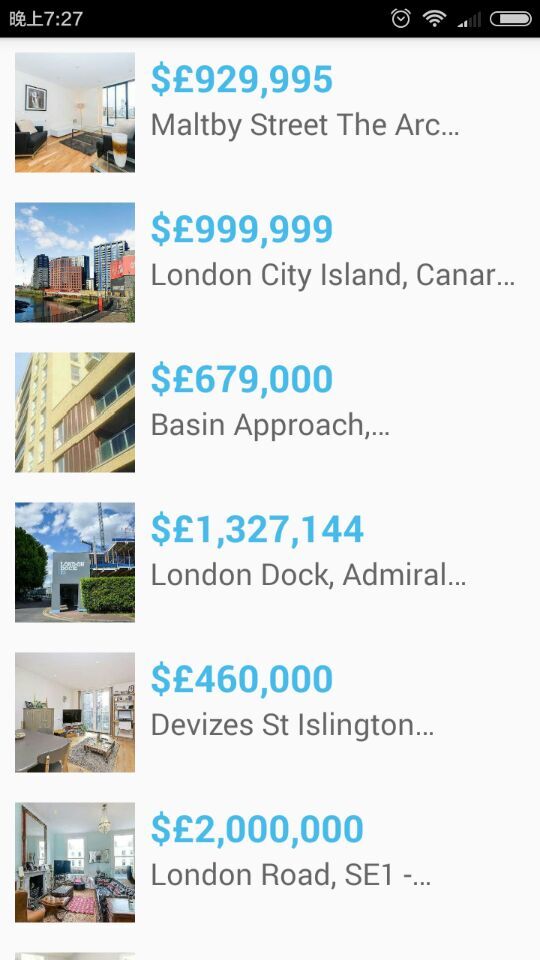
搜索结果
把获取的房产信息, 逐行渲染并显示于ListView中.
class SearchResults extends Component {

  /**

   * 构造器, 通过Navigator调用传递参数(passProps)

   * @param props 状态属性

   */

  constructor(props) {

    super(props);

    var dataSource = new ListView.DataSource(

      {rowHasChanged: (r1, r2) => r1.guid!== r2.guid}

    );

    this.state = {

      dataSource: dataSource.cloneWithRows(this.props.listings)

    };

  }

  /**

   * 点击每行, 通过行数选择信息

   * @param propertyGuid 行ID

   */

  rowPressed(propertyGuid) {

    //var property = this.props.listings.filter(prop => prop.guid == propertyGuid)[0];

    var property=this.props.listings[propertyGuid];

    var mynav=this.props.mynav;

    mynav.push({

      title: '房产信息',

      component: PropertyView,

     index:2,

      params:{

                    property:property,

                    //navigator:this.props.navigator

                    mynav2:mynav

                }

    });

  }

  /**

   * 渲染列表视图的每一行

   * @param rowData 行数据

   * @param sectionID 块ID

   * @param rowID 行ID

   * @returns {XML} 页面

   */

  renderRow(rowData, sectionID, rowID) {

    var price = rowData.price_formatted.split(' ')[0];

    return (

      <TouchableHighlight

        onPress={()=>this.rowPressed(rowID)}

        underlayColor='#dddddd'>

        <View style={styles.rowContainer}>

          <Image style={styles.thumb} source={{uri:rowData.img_url}}/>

          <View style={styles.textContainer}>

            <Text style={styles.price}>${price}</Text>

            <Text style={styles.title} numberOfLines={1}>

              {rowData.title}

            </Text>

          </View>

        </View>

      </TouchableHighlight>

    );

  }

  /**

   * 渲染, 每行使用renderRow渲染

   * @returns {XML} 结果页面的布局

   */

  render() {

    return (

      <ListView

        dataSource={this.state.dataSource}

        renderRow={this.renderRow.bind(this)}

        />

    );

  }

}
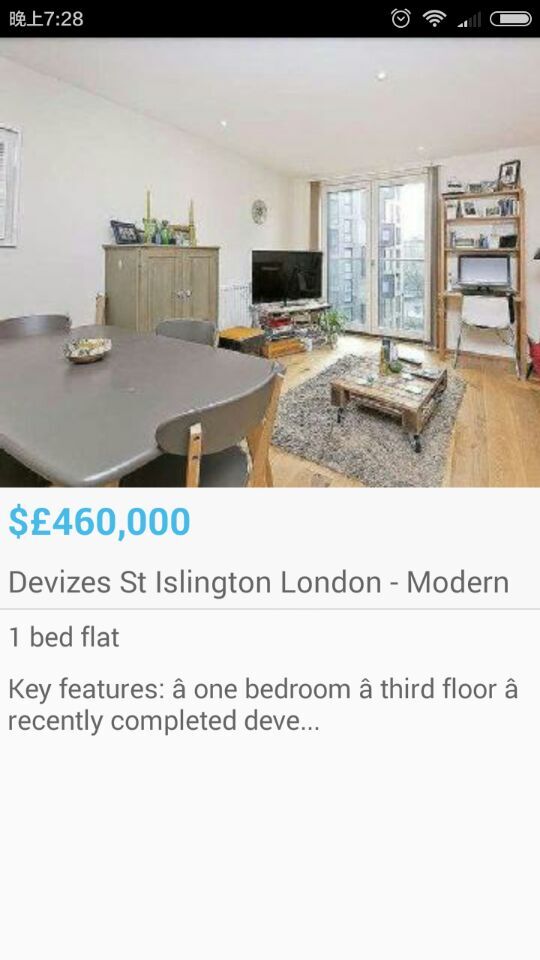
房产信息
房产信息是单纯显示页面, 显示图片和文字内容.
BackAndroid.addEventListener('hardwareBackPress', function() {

  if(_navigator == null){

    return false;

  }

  if(_navigator.getCurrentRoutes().length === 1){

    return false;

  }

  _navigator.pop();

  return true;

});

var _navigator ;

var PropertyView = React.createClass({

  getInitialState: function()

  {

     _navigator = this.props.mynav2;

    return {

    };

  },

  render: function() {

    var property = this.props.property; // 由SearchResult传递的搜索结果

    var stats = property.bedroom_number + ' bed ' + property.property_type;

    if (property.bathroom_number) {

      stats += ', ' + property.bathroom_number + ' ' +

        (property.bathroom_number > 1 ? 'bathrooms' : 'bathroom');

    }

    var price = property.price_formatted.split(' ')[0];

    return (

      <View>

      <View style={styles.container}>

        <Image style={styles.image}

               source={{uri: property.img_url}}/>

        <View style={styles.heading}>

          <Text style={styles.price}>${price}</Text>

          <Text style={styles.title}>{property.title}</Text>

          <View style={styles.separator}/>

        </View>

        <Text style={styles.description}>{stats}</Text>

        <Text style={styles.description}>{property.summary}</Text>

      </View>

      </View>

    );

  }

});
Codes
欢迎大家Follow,Star.
本文参考自wangchenlong
OK, that’s all! Enjoy it!
React Native实例之房产搜索APP的更多相关文章
- React Native实例
本文主要包括以下内容 View组件的实例 Text组件实例 Navigator组件实例 TextInput组件实例 View组件的实例 效果如下 代码如下 /** * Sample React Nat ...
- 使用React Native来撰写跨平台的App
React Native 是一个 JavaScript 的框架,用来撰写实时的.可原生呈现 iOS 和 Android 的应用.其是基于 React的,而 React 是 Facebook 的用于构建 ...
- NodeJS笔记(五) 使用React Native 创建第一个 Android APP
参考:原文地址 几个月前官方推出了快速创建工具包,由于对React Native不熟悉这里直接使用这2个工具包进行创建 1. create-react-native-app(下文简称CRNA): 2. ...
- React Native指南汇集了各类react-native学习资源、开源App和组件
来自:https://github.com/ele828/react-native-guide React Native指南汇集了各类react-native学习资源.开源App和组件 React-N ...
- React Native 教程:001 - 如何运行官方控件示例 App
原文发表于我的技术博客 本文主要讲解了如何运行 React Native 官方控件示例 App,包含了一些 React Native 的基础知识以及相关环境的配置. 原文发表于我的技术博客 React ...
- React Native初探
前言 很久之前就想研究React Native了,但是一直没有落地的机会,我一直认为一个技术要有落地的场景才有研究的意义,刚好最近迎来了新的APP,在可控的范围内,我们可以在上面做任何想做的事情. P ...
- React Native开发技术周报1
(一).资讯 1.React Native 0.21版本发布,最新版本功能特点,修复的Bug可以看一下已翻译 重要:如果升级 Android 项目到这个版本一定要读! 我们简化了 Android 应用 ...
- React Native资料汇总
React Native 官方文档中文版翻译 http://wiki.jikexueyuan.com/project/react-native/homepage.html REACT NATIVE开发 ...
- 现有iOS项目集成React Native过程记录
在<Mac系统下React Native环境搭建>配置了RN的开发环境,然后,本文记录在现有iOS项目集成React Native的过程,官方推荐使用Cocoapods,项目一开始也是使用 ...
随机推荐
- JQuery可见性过滤选择器:hidden无法获取通过visibility:hidden样式隐藏的元素-遁地龙卷风
1.版本问题 如果你可以获取下列元素 <input type="hidden"/> <div style="display:none"> ...
- oracle with as 用法
http://blog.itpub.net/28371090/viewspace-1190141/
- git 教程(12)--分支管理
分支就是科幻电影里面的平行宇宙,当你正在电脑前努力学习Git的时候,另一个你正在另一个平行宇宙里努力学习SVN. 如果两个平行宇宙互不干扰,那对现在的你也没啥影响.不过,在某个时间点,两个平行宇宙合并 ...
- 国外开源的PACS服务器
国外开源的PACS服务器 罗朝辉(http://www.cnblogs.com/kesalin/) 本文遵循"署名-非商业用途-保持一致"创作公用协议 名称:Dcm4che评级:★ ...
- CCF 模拟E DFS深搜
http://115.28.138.223:81/view.page?opid=5 这道题问的很怪. 起点DFS,每一个点还要DFS一次,统计不能到终点的个数 数据量不大这样做也能AC #includ ...
- BZOJ 3736: [Pa2013]Karty
Description 一个0/1矩阵,求能覆盖所有 \(1\) ,同时不覆盖所有 \(0\) 的矩阵,使这个面积最大. Sol DP/悬线法. 首先,所求的矩阵一定可以覆盖所有贴边的悬线. 用悬线法 ...
- django debug
django_debug_toolbar(略). debug toolbar还不够用,看下面. 1. 在对应的位置设置断点 import pdb pdb.set_trace() 2. runserve ...
- 【Linux】find grep 联合使用 过滤所有子目录、文件
find . -type f -name '*.*' | xargs grep --color -n 'Admin@123'find . -type f -name '*.*' | xargs sed ...
- 隐藏左侧快速导航除DMS导航树之外的其他区域
<style type="text/css"> /*隐藏左侧快速导航除DMS导航树之外的其他区域*/ .ms-quicklaunchouter { display: n ...
- zpf 获取表单等数据的用法
2015年4月12日 12:25:35 星期日 zpf框架中获取表单数据的方法 //获得get,post,url中的数据 private function setData() { $this-> ...