
个人技术博客(1/2)android布局技巧
(1)weight属性的合理应用
当使用match_parent(fill_parent)时,需要经过计算,否则会出现如下情况
代码:
<LinearLayout xmlns:android="http://schemas.android.com/apk/res/android"

    xmlns:tools="http://schemas.android.com/tools"

    android:id="@+id/LinearLayout1"

    android:layout_width="match_parent"

    android:layout_height="match_parent" >

    <TextView

        android:layout_weight="1"

        android:layout_width="fill_parent"

        android:layout_height="fill_parent"

        android:text="one"

        android:background="#98FB98"

        />

    <TextView

        android:layout_weight="2"

        android:layout_width="fill_parent"

        android:layout_height="fill_parent"

        android:text="two"

        android:background="#FFFF00"

        />

    <TextView

        android:layout_weight="3"

        android:layout_width="fill_parent"

        android:layout_height="fill_parent"

        android:text="three"

        android:background="#FF00FF"

        />

</LinearLayout>
效果如下
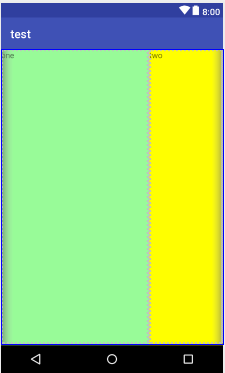
这个时候发现一个问题,three不见了?代码里面明明有 three的,还设置了3,而1和2的比例也不对,1:2:3变成了2:1:0,为什么会这样?查阅资料后我发现其实没那么简单的,这是需要计算的,网上给出的算法有几种 step 1:个个都是fill_parent,但是屏幕只有一个,那么1 - 3 = - 2 fill_parent step 2:依次比例是1/6,2/6,3/6 step 3:先到先得,先分给one,计算: 1 - 2 * (1/6) = 2/3 fill_parent 接着到two,计算: 1 - 2 * (2/6) = 1/3 fill_parent 最后到three,计算 1 - 2 * (3/6) = 0 fill_parent step 4:所以最后的结果是:one占了两份,two占了一份,three什么都没有。这就是为什么three没有出现的原因了。
若比例为1:1:1,效果如下
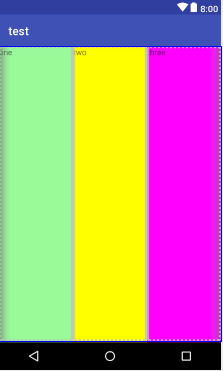
按照上面的计算方法算一次,结果是:1/3 1/3 1/3,没错
若比例为2:3:4,效果如下
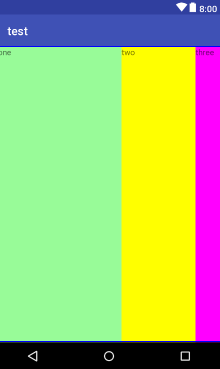
计算结果:5/9 3/9 1/9,对比效果图,5:3:1,也没错
(2)margin与padding的区别
对于这两个属性可能会有一点混淆,首先margin代表的是偏移,比如marginleft = "5dp"表示组件离容器左边缘偏移5dp; 而padding代表的则是填充,而填充的对象针对的是组件中的元素,比如TextView中的文字 比如为TextView设置paddingleft = "5dp",则是在组件里的元素的左边填充5dp的空间。margin针对的是容器中的组件,而padding针对的是组件中的元素。 下面通过简单的代码演示两者的区别:
<RelativeLayout xmlns:android="http://schemas.android.com/apk/res/android"

    xmlns:tools="http://schemas.android.com/tools"

    android:layout_width="match_parent"

    android:layout_height="match_parent"

    android:paddingBottom="@dimen/activity_vertical_margin"

    android:paddingLeft="@dimen/activity_horizontal_margin"

    android:paddingRight="@dimen/activity_horizontal_margin"

    android:paddingTop="@dimen/activity_vertical_margin"

    tools:context=".MainActivity" >

    <Button

        android:id="@+id/btn1"

        android:layout_height="wrap_content"

        android:layout_width="wrap_content"

        android:text="Button"/>

    <Button

        android:paddingLeft="100dp"

        android:layout_height="wrap_content"

        android:layout_width="wrap_content"

        android:text="Button"

        android:layout_toRightOf="@id/btn1"/>

    <Button

        android:id="@+id/btn2"

        android:layout_height="wrap_content"

        android:layout_width="wrap_content"

        android:text="Button"

        android:layout_alignParentBottom="true"/>

    <Button

        android:layout_marginLeft="100dp"

        android:layout_height="wrap_content"

        android:layout_width="wrap_content"

        android:text="Button"

        android:layout_toRightOf="@id/btn2"

        android:layout_alignParentBottom="true"/>

</RelativeLayout>
效果如下
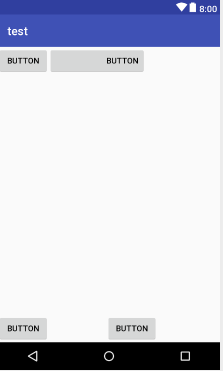
另外,margin可以设置为负数,比如进入软件后,弹出广告 页面的,右上角的cancle按钮的margin则是使用负数的,代码如下
    <ImageView

        android:id="@+id/imgBack"

        android:layout_width="200dp"

        android:layout_height="200dp"

        android:layout_centerInParent="true"

        android:background="@drawable/myicon" />

    <ImageView

        android:id="@+id/imgCancle"

        android:layout_width="28dp"

        android:layout_height="28dp"

        android:layout_alignRight="@id/imgBack"

        android:layout_alignTop="@id/imgBack"

        android:background="@drawable/cancel"

        android:layout_marginTop="-15dp"  //cancle按钮的margin使用负数

        android:layout_marginRight="-10dp" />
这是我在安卓布局中总结出的一些小技巧,比较low,仅供参考哈哈哈~
个人技术博客(1/2)android布局技巧的更多相关文章
- IT技术博客收藏
1. coolshell.cn 特点: 每篇都是精品 2. 云风 特点: 3. 阮一峰的博客 特点:高精深 3. offbye涛声依旧-全端技术博客 特点: android的开发技术比较多,非常值得一 ...
- [技术博客]Android 开发 Bug Log
[技术博客] Android 开发 Bug Log 大大小小的bug,聪明的愚蠢的都有, 持续记录中...... java.lang.IllegalArgumentException: The sty ...
- 【新版】Android技术博客精华汇总
[新版]Android技术博客精华汇总(原文链接内持续更新) http://www.apkbus.com/thread-313856-1-1.html Kotlin Kotlin学习资料汇总 http ...
- [技术博客] Android 自动化测试
[技术博客] Android 自动化测试 安卓自动化测试工具与平台的搭建 类似于网页端自动化,安卓测试的自动化也主要是针对控件的自动化.其原理就是通过python(其他语言) 的脚本来代替我们手动完成 ...
- [技术博客]采用Bootstrap框架进行排版布局
[技术博客]采用Bootstrap框架进行排版布局 网页的前端框架有很多很多种,比如Bootstrap.Vue.Angular等等,在最开始其实并没有考虑到框架这回事,开始阅读往届代码时发现其部分采用 ...
- 转: BAT等研发团队的技术博客
BAT 技术团队博客 1. 美团技术团队博客: 地址: http://tech.meituan.com/ 2. 腾讯社交用户体验设计(ISUX) 地址:http://isux.tencent.c ...
- [转]有哪些值得关注的技术博客(Java篇)
有哪些值得关注的技术博客(Java篇) 大部分程序员在自学的道路上不知道走了多少坑,这个视频那个网站搞得自己晕头转向.对我个人来说我平常在学习的过程中喜欢看一些教程式的博客.这些博客的特点: 1. ...
- 最值得收藏的java技术博客(Java篇)
第一个:java_my_life 作者介绍:找不到原作者信息.大概做了翻阅全部是2012年的博客. 博客主要内容:主要内容是关于Java设计模式的一些讲解和学习笔记,在相信对学习设计模式的同学帮助很大 ...
- 一文搞定scrapy爬取众多知名技术博客文章保存到本地数据库,包含:cnblog、csdn、51cto、itpub、jobbole、oschina等
本文旨在通过爬取一系列博客网站技术文章的实践,介绍一下scrapy这个python语言中强大的整站爬虫框架的使用.各位童鞋可不要用来干坏事哦,这些技术博客平台也是为了让我们大家更方便的交流.学习.提高 ...
随机推荐
- MVC初级知识之——Routing路由
实例产品基于asp.net mvc 5.0框架,源码下载地址:http://www.jinhusns.com/Products/Download 我们注意到地址栏的URL是Home/Index 路由可 ...
- git 拉取远程分支报错(fatal: '' is not a commit and a branch '' cannot be created from it)
问题描述从远程git上拉取某一个分支,然后报错,拉取不了这个分支. 拉取分支的命令: git checkout -b xxx-static-19 origin/xxx-static-19 其中xxx- ...
- [Linux] Linux系统(文件操作)
linux有三种文件类型,普通文件,目录,设备文件 查看文件 使用命令ls获取ll,查看文件列表,参数:-l(列表形式),-a(展示隐藏文件) 使用元字符* ? ,查看匹配的文件列表,例如:ll a* ...
- Java基础教程(21)--泛型
一.为什么使用泛型 泛型意味着编写的代码可以被很多不同类型的对象所重用.例如,我们不希望为存放String和Integer对象的集合设计不同的类.现在的ArrayList类可以存放任何类型的对象, ...
- ZAB 算法
ZAB (Zookeeper Atomic Broadcast ) zookeeper原子消息广播协议 保证:分布式数据一致性 所有事务请求必须由一个全局唯一的服务器来协调处理,这样的服务器被称为 ...
- Vue.js 的一些小技巧
给 props 属性设置多个类型 这个技巧在开发组件的时候用的较多,为了更大的容错性考虑,同时代码也更加人性化: export default { props: { width: { type: [S ...
- CSS样式之a标签(原文网址http://www.divcss5.com/shili/s57.shtml)
这是个人在做网站的时候整理的关于a标签的使用方法,整理一下,方便下次使用. 一.a超链接的代码 <a href="http://www.baidu.com" target=& ...
- vmware下载存储vmdk文件后缀变-flat处理方式
将vmware存储中的虚拟机vmdk文件下载到本地,下载完成后,下载了2个vmdk文件 一份为:xx.vmdk (通常1KB左右) 一份为:xx-flat.vmdk (此为源文件正常大小) ...
- arcgis 加载高德地图 es6的方式
目前很多arcgis 加载高德地图是dojo的方式 外部引入文件,现在改成这种方式 /** * Created by Administrator on 2018/5/14 0014. */ impor ...
- git报错:Pull is not possible because you have unmerged files解决方法
在git pull的过程中,如果有冲突,那么除了冲突的文件之外,其它的文件都会做为staged区的文件保存起来. 重现: $ git pull A Applications/Commerce/B ...