
Ladda 应用提交表单的时候显示loading载入中 包含不同位置,不同效果
Ladda 应用提交表单的时候显示loading载入中 包含不同位置,不同效果
不同大小。位置,效果,进度条等
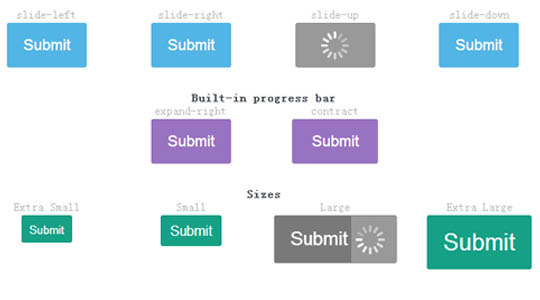
- <article class="examples" style="margin-top:0px;">
- <section class="button-demo">
- <h3>expand-left</h3>
- <button class="ladda-button" data-color="green" data-style="expand-left">Submit</button>
- </section>
- <section class="button-demo">
- <h3>expand-right</h3>
- <button class="ladda-button" data-color="green" data-style="expand-right">Submit</button>
- </section>
- <section class="button-demo">
- <h3>expand-up</h3>
- <button class="ladda-button" data-color="green" data-style="expand-up">Submit</button>
- </section>
- <section class="button-demo">
- <h3>expand-down</h3>
- <button class="ladda-button" data-color="green" data-style="expand-down">Submit</button>
- </section>
- <section class="button-demo">
- <h3>contract</h3>
- <button class="ladda-button" data-color="red" data-style="contract">Submit</button>
- </section>
- <section class="button-demo">
- <h3>contract-overlay</h3>
- <button class="ladda-button" data-color="red" data-style="contract-overlay" style="z-index: 10;">Submit</button>
- </section>
- <section class="button-demo">
- <h3>zoom-in</h3>
- <button class="ladda-button" data-color="red" data-style="zoom-in">Submit</button>
- </section>
- <section class="button-demo">
- <h3>zoom-out</h3>
- <button class="ladda-button" data-color="red" data-style="zoom-out">Submit</button>
- </section>
- <section class="button-demo">
- <h3>slide-left</h3>
- <button class="ladda-button" data-color="blue" data-style="slide-left">Submit</button>
- </section>
- <section class="button-demo">
- <h3>slide-right</h3>
- <button class="ladda-button" data-color="blue" data-style="slide-right">Submit</button>
- </section>
- <section class="button-demo">
- <h3>slide-up</h3>
- <button class="ladda-button" data-color="blue" data-style="slide-up">Submit</button>
- </section>
- <section class="button-demo">
- <h3>slide-down</h3>
- <button class="ladda-button" data-color="blue" data-style="slide-down">Submit</button>
- </section>
- <h3 id="progress">Built-in progress bar</h3>
- <section class="progress-demo">
- <h3>expand-right</h3>
- <button class="ladda-button" data-color="purple" data-style="expand-right">Submit</button>
- </section>
- <section class="progress-demo">
- <h3>contract</h3>
- <button class="ladda-button" data-color="purple" data-style="contract">Submit</button>
- </section>
- <h3 id="sizes">Sizes</h3>
- <section class="progress-demo">
- <h3>Extra Small</h3>
- <button class="ladda-button" data-color="mint" data-style="expand-right" data-size="xs">Submit</button>
- </section>
- <section class="progress-demo">
- <h3>Small</h3>
- <button class="ladda-button" data-color="mint" data-style="expand-right" data-size="s">Submit</button>
- </section>
- <section class="progress-demo">
- <h3>Large</h3>
- <button class="ladda-button" data-color="mint" data-style="expand-right" data-size="l">Submit</button>
- </section>
- <section class="progress-demo">
- <h3>Extra Large</h3>
- <button class="ladda-button" data-color="mint" data-style="expand-right" data-size="xl">Submit</button>
- </section>
- </article>
- <script src="dist/spin.min.js"></script>
- <script src="dist/ladda.min.js"></script>
- <script>
- // Bind normal buttons
- Ladda.bind( '.button-demo button', { timeout: 2000 } );
- // Bind progress buttons and simulate loading progress
- Ladda.bind( '.progress-demo button', {
- callback: function( instance ) {
- var progress = 0;
- var interval = setInterval( function() {
- progress = Math.min( progress + Math.random() * 0.1, 1 );
- instance.setProgress( progress );
- if( progress === 1 ) {
- instance.stop();
- clearInterval( interval );
- }
- }, 200 );
- }
- } );
- // You can control loading explicitly using the JavaScript API
- // as outlined below:
- // var l = Ladda.create( document.querySelector( 'button' ) );
- // l.start();
- // l.stop();
- // l.toggle();
- // l.isLoading();
- // l.setProgress( 0-1 );
- </script>
Ladda 应用提交表单的时候显示loading载入中 包含不同位置,不同效果的更多相关文章
- submit()提交表单时,显示警示框
我同事在实现submit()提交表单时,想要页面弹出警示框. 但是折腾了几小时后发现,submit()始终不执行. 她的代码如下: $(document).ready(function(){ $(&q ...
- 提交表单时的等待(loading)效果
$(document).ready(function () { $("body").prepend('<div id="overlay" class=&q ...
- PHP自学2——将用户提交表单存储到外部普通文件中
在上一节中我们已经实现了将用户的订单信息提交到服务器端,然后服务器端将提交信息返回并显示到页面上.这一节将把上一节用户的订单信息保存到外部的普通文件中(即.txt文本文件中). 本节代码将用户提交的订 ...
- MVC Post 提交表单 允许他提交参数包含html标记的解决方法
MVC Post 提交表单的时候,如果参数中包含html标记,则需要在控制器上方加上 [ValidateInput(false)]标记后就可以正常提交表单了例如: [HttpPost] [Valida ...
- PHP自学3——在html的<table>标签中显示用户提交表单
为了更好地显示用户提交表单,本节将在上一节的基础上将读取的用户表单显示在html的<table>标签中,这一节将用到和数组有关的知识. 本节代码将从外部文件(.txt文件)中读取信息于指定 ...
- jquery 通过submit()方法 提交表单示例
jquery 通过submit()方法 提交表单示例: 本示例:以用户注册作为例子.使用jquery中的submit()方法实现表单提交. 注:本示例仅提供了对表单的验证,本例只用选用了三个字段作为测 ...
- 4 django系列之HTML通过form标签来同时提交表单内容与上传文件
preface 我们知道提交表单有2种方式,一种直接通过submit页面刷新方法来提交,另一种通过ajax异步局部刷新的方法提交,上回我们说了通过ajax来提交文件到后台,现在说说通过submit来提 ...
- Jquery ajax提交表单几种方法
在jquery中ajax提交表单有post与get方式,在使用get方式时我们可以直接使用ajax 序列化表单$('#表单ID').serialize();就行了,下面我来介绍两个提交表单数据的方法. ...
- 解析:使用easyui的form提交表单,在IE下出现类似附件下载时提示是否保存的现象
之前开发时遇到的一个问题,使用easyui的form提交表单,在Chrome下时没问题的,但是在IE下出现类似附件下载时提示是否保存的现象. 这里记录一下如何解决的.其实这个现象不光是easyui的f ...
随机推荐
- N的阶乘末尾有多少个0
N的阶乘(N!)中的末尾有多少个0? N的阶乘可以分解为: 2的X次方,3的Y次方,4的5次Z方,.....的成绩.由于10 = 2 * 5,所以M只能和X和Z有关,每一对2和5相乘就可以得到一个10 ...
- 【LOJ】#2289. 「THUWC 2017」在美妙的数学王国中畅游
题解 我们发现,题目告诉我们这个东西就是一个lct 首先,如果只有3,问题就非常简单了,我们算出所有a的总和,所有b的总和就好了 要是1和2也是多项式就好了--其实可以!也就是下面泰勒展开的用处,我们 ...
- codeforces 603 A
题目大意:给你一个0,1串, 你可以反转一段连续的区间,问你最长的合法子串是多长, 合法字串相邻的两个不能相同. 思路:dp[ i ][ k ][ j ] 表示到第 i 个字符, 处于k这种状态, k ...
- thinkphp中I()方法的详解
I('post.email','','email'); int boolean float validate_regexp validate_url validate_email validate_i ...
- C#导出HTML到PDF组件Pechkin
http://www.knowsky.com/898441.html C#导出PDF功能是开发中经常遇到的功能,我们采用第三方的组件,比如 iTextSharp, aspose等,还能搜到一些开源的类 ...
- JAVA单向链表实现
JAVA单向链表实现 单向链表 链表和数组一样是一种最常用的线性数据结构,两者各有优缺点.数组我们知道是在内存上的一块连续的空间构成,所以其元素访问可以通过下标进行,随机访问速度很快,但数组也有其缺点 ...
- web服务端安全之文件上传漏洞
一.文件上传漏洞的原理 由于程序代码未对用户提交的文件进行严格的分析和检查,导致攻击者可以上传可执行的代码文件,从而获取web应用的控制权限. 常见于上传功能,富文本编辑器. 二.文件上传漏洞的防御 ...
- session效验
看代码... <?php $servername = "服务器名"; $username = "账户名"; $password = "密码&qu ...
- CF946D Timetable 动态规划
预处理出每一行去掉$k$个1能获得的最小代价 之后做一次分组背包$dp$即可 预处理可以选择暴力枚举区间... 复杂度$O(n^3)$ #include <set> #include &l ...
- [WC2014]时空穿梭(莫比乌斯反演)
https://www.cnblogs.com/CQzhangyu/p/7891363.html 不难推到$\sum\limits_{D=1}^{m_1}\sum\limits_{d|D}C_{d-1 ...