
[翻译] JTCalendar
JTCalendar
JTCalendar is a calendar control for iOS easily customizable.
JTCalendar 是一个很容易定制的日历的控件。
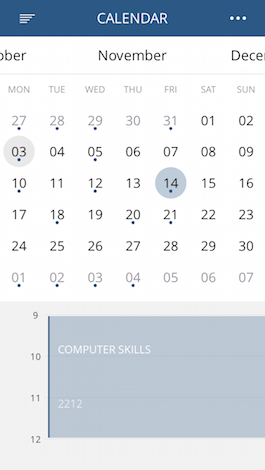
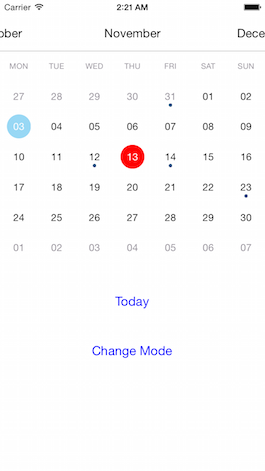
Usage
Basic usage - 基本使用方法
You have to create two views in your UIViewController.
你需要在你的UIViewController创建出两个view。
The first view is JTCalendarMenuView, it represents the months.
第一个view是JTCalendarMenuView,他代表着月份。
The second view is JTCalendarContentView, the calendar itself.
第二个view是JTCalendarContentView,这个是日历本身。
Your UIViewController must implement JTCalendarDataSource
你的UIViewController 必须实现JTCalendarDataSource代理。
#import <UIKit/UIKit.h>

#import "JTCalendar.h"

@interface ViewController : UIViewController<JTCalendarDataSource>

@property (weak, nonatomic) IBOutlet JTCalendarMenuView *calendarMenuView;

@property (weak, nonatomic) IBOutlet JTCalendarContentView *calendarContentView;

@property (strong, nonatomic) JTCalendar *calendar;

@end
JTCalendar is used to coordinate calendarMenuView and calendarContentView.
JTCalendar 是用来定位calendarMenuView与 calendarContentView的。
@implementation ViewController

- (void)viewDidLoad

{

    [super viewDidLoad];

    self.calendar = [JTCalendar new];

    [self.calendar setMenuMonthsView:self.calendarMenuView];

    [self.calendar setContentView:self.calendarContentView];

    [self.calendar setDataSource:self];

}

- (void)viewDidAppear:(BOOL)animated

{

    [super viewDidAppear:animated];

    [self.calendar reloadData]; // Must be call in viewDidAppear

}

- (BOOL)calendarHaveEvent:(JTCalendar *)calendar date:(NSDate *)date

{

    return NO;

}

- (void)calendarDidDateSelected:(JTCalendar *)calendar date:(NSDate *)date

{

    NSLog(@"%@", date);

}

@end
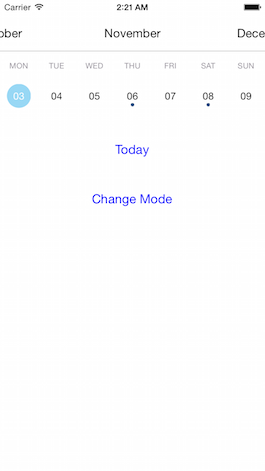
Switch to week view
切换到week
If you want see just one week at time you can switch when you want between the weekMode.
如果你只想看一周的时间,你可以切换到weekMode模式
self.calendar.calendarAppearance.isWeekMode = YES;

[self.calendar reloadAppearance];
WARNING
注意
When you change the mode, it doesn't change the height of calendarContentView, you have to do it yourself. See the project in example for more details.
当你切换样式时,他并没有改变calendarContentView的高度,你需要自己手动设置。你可以在项目中找到实现细节。
Customize the design
自定义设计
You have a lot of options available for personnalize the design. Check the JTCalendarAppearance.h file for see all options.
你有这很多很多的选项来定制设计。你可以再JTCalendarAppearance.h文件中找到这些配置选项。
self.calendar.calendarAppearance.calendar.firstWeekday = 2; // Monday

self.calendar.calendarAppearance.ratioContentMenu = 1.;

self.calendar.calendarAppearance.menuMonthTextColor = [UIColor whiteColor];

self.calendar.calendarAppearance.dayCircleColorSelected = [UIColor blueColor];

self.calendar.calendarAppearance.dayTextColorSelected = [UIColor whiteColor];

[self.calendar reloadAppearance];
Recommendation
推荐用法
The call to reloadAppearance is expensive, reloadAppearance is call by setMenuMonthsView andsetContentView.
调用reloadAppearance 开销很大,setMenuMonthsView 与andsetContentView会调用reloadAppearance 方法
For better performance define the appearance just after instanciate JTCalendar.
BAD example:
self.calendar = [JTCalendar new];

[self.calendar setMenuMonthsView:self.calendarMenuView];

[self.calendar setContentView:self.calendarContentView];

[self.calendar setDataSource:self];

self.calendar.calendarAppearance.calendar.firstWeekday = 2; // Monday

self.calendar.calendarAppearance.ratioContentMenu = 1.;

self.calendar.calendarAppearance.menuMonthTextColor = [UIColor whiteColor];

self.calendar.calendarAppearance.dayCircleColorSelected = [UIColor blueColor];

self.calendar.calendarAppearance.dayTextColorSelected = [UIColor whiteColor];

[self.calendar reloadAppearance]; // You have to call reloadAppearance
GOOD example:
self.calendar = [JTCalendar new];

self.calendar.calendarAppearance.calendar.firstWeekday = 2; // Monday

self.calendar.calendarAppearance.ratioContentMenu = 1.;

self.calendar.calendarAppearance.menuMonthTextColor = [UIColor whiteColor];

self.calendar.calendarAppearance.dayCircleColorSelected = [UIColor blueColor];

self.calendar.calendarAppearance.dayTextColorSelected = [UIColor whiteColor];

[self.calendar setMenuMonthsView:self.calendarMenuView];

[self.calendar setContentView:self.calendarContentView];

[self.calendar setDataSource:self];

// You don't have to call reloadAppearance
You may also want to open your calendar on a specific date, by defaut it's [NSDate date].
你也许想在打开日历的时候定位到指定的日期,默认值是[NSDate date]
[self.calendar setCurrentDate:myDate];
Requirements
- iOS 7 or higher
- Automatic Reference Counting (ARC)
[翻译] JTCalendar的更多相关文章
- 《Django By Example》第五章 中文 翻译 (个人学习,渣翻)
书籍出处:https://www.packtpub.com/web-development/django-example 原作者:Antonio Melé (译者@ucag注:大家好,我是新来的翻译, ...
- 《Django By Example》第四章 中文 翻译 (个人学习,渣翻)
书籍出处:https://www.packtpub.com/web-development/django-example 原作者:Antonio Melé (译者注:祝大家新年快乐,这次带来<D ...
- [翻译]开发文档:android Bitmap的高效使用
内容概述 本文内容来自开发文档"Traning > Displaying Bitmaps Efficiently",包括大尺寸Bitmap的高效加载,图片的异步加载和数据缓存 ...
- 【探索】机器指令翻译成 JavaScript
前言 前些时候研究脚本混淆时,打算先学一些「程序流程」相关的概念.为了不因太枯燥而放弃,决定想一个有趣的案例,可以边探索边学. 于是想了一个话题:尝试将机器指令 1:1 翻译 成 JavaScript ...
- 《Django By Example》第三章 中文 翻译 (个人学习,渣翻)
书籍出处:https://www.packtpub.com/web-development/django-example 原作者:Antonio Melé (译者注:第三章滚烫出炉,大家请不要吐槽文中 ...
- 《Django By Example》第二章 中文 翻译 (个人学习,渣翻)
书籍出处:https://www.packtpub.com/web-development/django-example 原作者:Antonio Melé (译者注:翻译完第一章后,发现翻译第二章的速 ...
- 《Django By Example》第一章 中文 翻译 (个人学习,渣翻)
书籍出处:https://www.packtpub.com/web-development/django-example 原作者:Antonio Melé (译者注:本人目前在杭州某家互联网公司工作, ...
- 【翻译】Awesome R资源大全中文版来了,全球最火的R工具包一网打尽,超过300+工具,还在等什么?
0.前言 虽然很早就知道R被微软收购,也很早知道R在统计分析处理方面很强大,开始一直没有行动过...直到 直到12月初在微软技术大会,看到我软的工程师演示R的使用,我就震惊了,然后最近在网上到处了解和 ...
- ASP.NET MVC with Entity Framework and CSS一书翻译系列文章之第一章:创建基本的MVC Web站点
在这一章中,我们将学习如何使用基架快速搭建和运行一个简单的Microsoft ASP.NET MVC Web站点.在我们马上投入学习和编码之前,我们首先了解一些有关ASP.NET MVC和Entity ...
随机推荐
- python笔记07-----打包模块(shutil,zipfile,tarfile)
1.shutil模块 复制删除 import shutil shutil.copy('filename', 'test2') # copy方法 f1 = open('filename',encodin ...
- Python的Django框架中forms表单类的使用方法详解
用户表单是Web端的一项基本功能,大而全的Django框架中自然带有现成的基础form对象,本文就Python的Django框架中forms表单类的使用方法详解. Form表单的功能 自动生成HTML ...
- Fiddler HTTPS抓包
现在很多带有比较重要信息的接口都使用了安全性更高的HTTPS,而Fiddler默认是抓取HTTP类型的接口,要想查看HTTPS类型接口就需要安装fiddler证书. fiddler安装教程可参考: ...
- mysql查看权限的命令
mysql查看用户权限的命令 1.这里用来查看用户存储过程: show grants for 用户; eg: show grants for root@'localhost';#这样就会把root用户 ...
- Ceph 存储集群 - 搭建存储集群
目录 一.准备机器 二.ceph节点安装 三.搭建集群 四.扩展集群(扩容) 一.准备机器 本文描述如何在 CentOS 7 下搭建 Ceph 存储集群(STORAGE CLUSTER). 一共4 ...
- Pipenv——最好用的python虚拟环境和包管理工具
pipenv 是Kenneth Reitz大神的作品,能够有效管理Python多个环境,各种包.过去我们一般用virtualenv搭建虚拟环境,管理python版本,但是跨平台的使用不太一致,且有时候 ...
- 一个快速搜索下载jar包的网站
在偶然的机会,我一个快速搜索下载jar包的网站.里面涵盖了所有的几乎全世界开源的jar包,感觉这个功能特别适合java.android开发者使用,共享出来給大家悄悄. 百度一下:manyjar,就可以 ...
- 表单提交.serialize()方法
html中<form id="myForm" action="..." method='POST'> <div><input ty ...
- Keepalived 无法自动转换主备角色,请关注 iptables 防火墙配置
最近在研究服务器高可用集群 (HA)…… 搭建了主备两台Keepalived,配置什么的全是网上照抄的,被验证过无数遍的示例…… 然而Master和Backup无法自动切换.两边会同时绑定浮动IP(V ...
- 常用工具说明--Java的常用工具
1.Eclipse.IntelliJ IDEA Eclipse是IDE领域的瑞士军刀,有着大量定制的接口和无数的插件.它无处不在,后面本文将推荐的其他所有工具都提供Eclipse插件. Eclipse ...