
在 Windows Server Container 中运行 Azure Storage Emulator(三):运行在容器中
上一节中,我们已经准备好了 SQL Server,那么接下来,我们要把 ASE 放到容器里了。
首先,新建 Start.ps1,内容如下:
 param(

     [Parameter(Mandatory=$true)][string]$HostName,

     [string]$AccountName,

     [string]$AuthKey,

     [string]$SqlServerInstance)

 # Initialized?

 if (Test-Path Initialized)

 {

     &"C:\Program Files (x86)\Microsoft SDKs\Azure\Storage Emulator\AzureStorageEmulator.exe" start -inporcess

 }

 if ([string]::IsNullOrEmpty($AccountName))

 {

     Write-Output "AccountName argument not specified, use the default: devstoreaccount1"

     $AccountName = "devstoreaccount1"

 }

 if ([string]::IsNullOrEmpty($AuthKey))

 {

     Write-Output "AuthKey argument not specified, use the default: Eby8vdM02xNOcqFlqUwJPLlmEtlCDXJ1OUzFT50uSRZ6IFsuFq2UVErCz4I6tq/K1SZFPTOtr/KBHBeksoGMGw=="

     $AuthKey = "Eby8vdM02xNOcqFlqUwJPLlmEtlCDXJ1OUzFT50uSRZ6IFsuFq2UVErCz4I6tq/K1SZFPTOtr/KBHBeksoGMGw=="

 }

 if ([string]::IsNullOrEmpty($SqlServerInstance))

 {

     Write-Output "SqlServerInstance argument not specified, use the default: (localdb)\MSSQLLocalDB"

     $SqlServerInstance = "(localdb)\MSSQLLocalDB"

 }

 # Replace the configuration

 $config = "C:\Program Files (x86)\Microsoft SDKs\Azure\Storage Emulator\AzureStorageEmulator.exe.config"

 (get-content $config)`

     -Replace "<service name=""Blob"" url=""http://127.0.0.1:10000/""/>", "<service name=""Blob"" url=""http://$AccountName.blob.$HostName/"" />"`

     -Replace "<service name=""Queue"" url=""http://127.0.0.1:10001/""/>", "<service name=""Queue"" url=""http://$AccountName.queue.$HostName/"" />"`

     -Replace"<service name=""Table"" url=""http://127.0.0.1:10002/""/>", "<service name=""Table"" url=""http://$AccountName.table.$HostName/"" />"`

     -Replace "<account name=""devstoreaccount1"" authKey=""Eby8vdM02xNOcqFlqUwJPLlmEtlCDXJ1OUzFT50uSRZ6IFsuFq2UVErCz4I6tq/K1SZFPTOtr/KBHBeksoGMGw=="" />",`

         "<account name=""$AccountName"" authKey=""$AuthKey"" />"`

         | Out-File $config

 # Init the emulator

 & "C:\Program Files (x86)\Microsoft SDKs\Azure\Storage Emulator\AzureStorageEmulator.exe" init -server $SqlServerInstance

 # Set Initialized flag

 New-Item Initialized

 # Start!

 & "C:\Program Files (x86)\Microsoft SDKs\Azure\Storage Emulator\AzureStorageEmulator.exe" start -inprocess
Dockerfile:
# escape=`

FROM microsoft/windowsservercore

ADD https://go.microsoft.com/fwlink/?linkid=717179&clcid=0x409 MicrosoftAzureStorageEmulator.msi

RUN msiexec /q /i MicrosoftAzureStorageEmulator.msi

RUN del MicrosoftAzureStorageEmulator.msi

COPY Start.ps1 .

# Azure Storage Emulator

EXPOSE 80

# Configure and launch

ENTRYPOINT powershell .\Start.ps1
或许把 AzureStorageEmulator.exe" init 放到 Dockerfile 里也是个好主意,但是这样每个环境都要 build 不同的 image,这不是我想要的。
现在可以 Build 我们的 image 了:
docker build -t charmsan/azurestorageemulator .
为了使用 gMSA 运行容器,还有一步(有关容器中使用 gMSA,请见我的另一篇博文:《在 Windows 容器中使用 gMSA》):
New-CredentialSpec -Name AseSvc -AccountName AseSvc
Launch!
docker run -it -h ASE-DEV --name AzureStorageEmulator-Dev --network external --ip 192.168.11.1 --dns 192.168.15.1 --dns 192.168.15.2 --security-opt "credentialspec=file://AseSvc.json" --restart unless-stopped charmsan/azurestorageemulator -HostName contoso.com -AccountName dev -SqlServerInstance CONTOSO-ENV-DB\CONTOSO_DEV
运行结果:
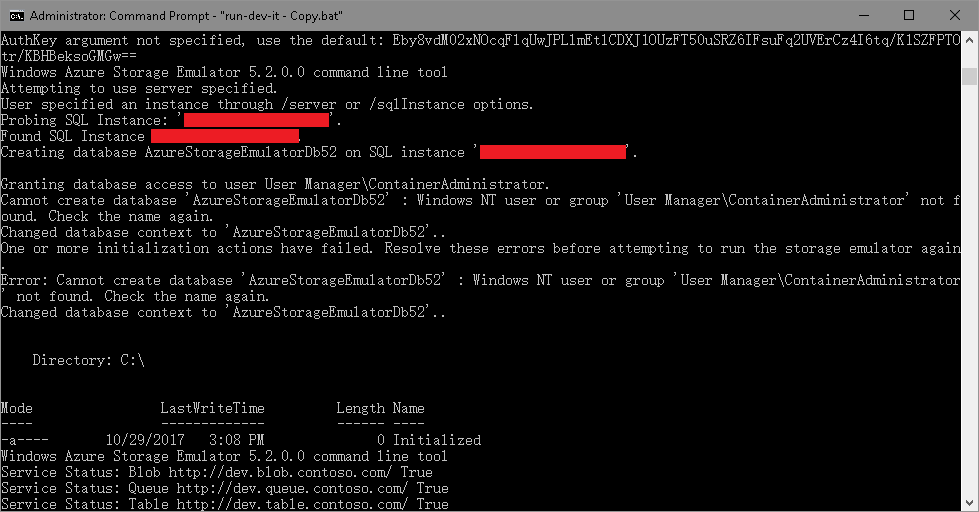
请无视掉里面的两个错误,配置 Azure Storage Explorer 连接:
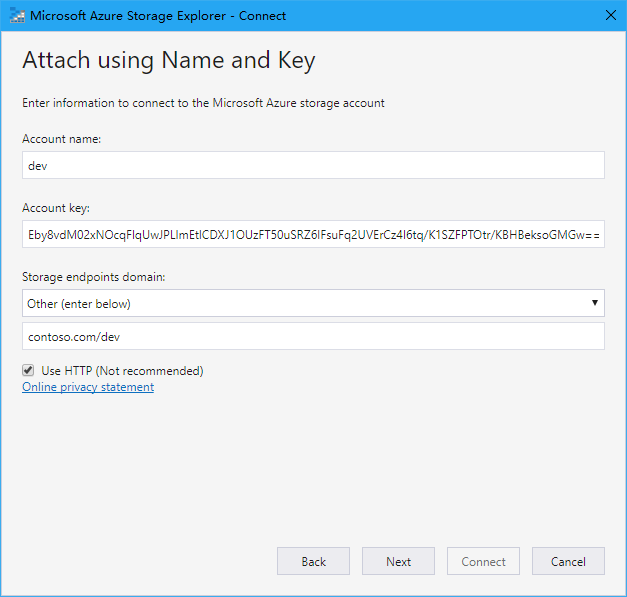
运行结果:
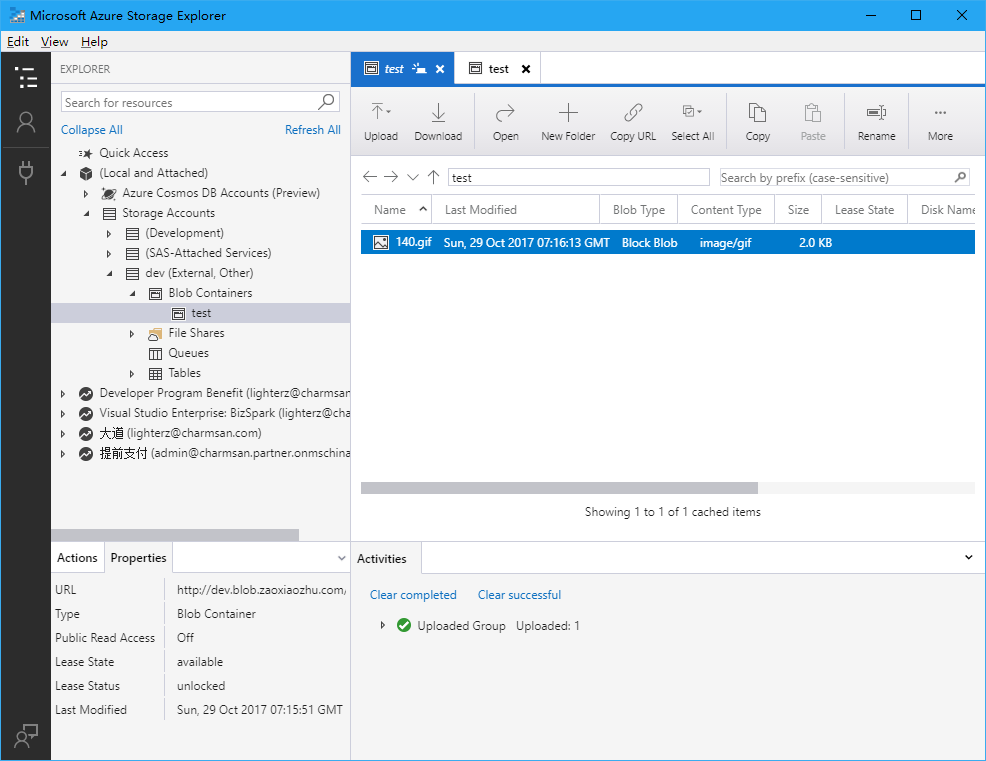
现在,我们可以修改 Web.Debug.config 来把连接串 transform 一下了:
<add xdt:Transform="SetAttributes" xdt:Locator="Match(key)" key="StorageAccountConnectionString" value="DefaultEndpointsProtocol=http;AccountName=dev;AccountKey=Eby8vdM02xNOcqFlqUwJPLlmEtlCDXJ1OUzFT50uSRZ6IFsuFq2UVErCz4I6tq/K1SZFPTOtr/KBHBeksoGMGw==;BlobEndpoint=http://dev.blob.contoso.com/dev;" />
不要问我连接串中的 URL 为什么长成这样子,因为你肯定没认真看第一节:)
在 Windows Server Container 中运行 Azure Storage Emulator(三):运行在容器中的更多相关文章
- 在 Windows Server Container 中运行 Azure Storage Emulator(二):使用自定义的 SQL Server Instance
上一节,我们解决了 Azure Storage Emulator 自定义监听地址的问题,这远远不够,因为在我们 DEV/QA 环境有各自的 SQL Server Instance,我们需要将 ASE ...
- 在 Windows Server Container 中运行 Azure Storage Emulator(一):能否监听自定义地址?
我要做什么? 改 ASE 的监听地址.对于有强迫症的我来说,ASE 默认监听的是 127.0.0.1:10000-10002,这让我无法接受,所以我要将它改成域名 + 80 端口的方式: 放到容器中. ...
- 如何在ASP.NET Core中自定义Azure Storage File Provider
文章标题:如何在ASP.NET Core中自定义Azure Storage File Provider 作者:Lamond Lu 地址:https://www.cnblogs.com/lwqlun/p ...
- Azure开发者任务之一:解决Azure Storage Emulator初始化失败
初学Windows Azure: 我打算开始学习Windows Azure.我安装了Azure SDK,然后在“Cloud”标签下选择Windows Azure模板,创建了一个项目,然后又创建了一个W ...
- 说一说windows原生docker及windows Server Container , Hyper Container 之间的关系(学习总结)
前一段时间学习netcore的时候解除到了docker,感觉真是不错的技术.百度了不少教程.因为我用windows就下载安装了一下试试.但是没有安装成功,才发现 需要安装virtualbox虚拟机,与 ...
- Windows Server 2016软件定义存储:Storage Spaces Direct的关键特性
[TechTarget中国原创] 微软在Windows Server 2016 Technical Preview 2中引入了Storage Spaces Direct.这个特性将本地存储扩展为高可用 ...
- Windows Server 2016-客户端退域的三种方法
前边我们提到了客户端加域的操作方法,本章为大家补充域客户端退域的操作过程,包含图形化.netdom remove.Powershell三种方法,具体内容如下: 图形化退域方法: 1.Win键,计算机右 ...
- [转]探索 Windows Azure Storage
本文转自:https://msdn.microsoft.com/zh-tw/jj573842 概觀 儲存服務 (Storage services) 在 Windows Azure 運算模擬器中提供了可 ...
- Visual Studio 2017 调试 windows server 2016 Docker Container
网上很多文章都是在win10下,用Docker for windows工具进行Docker的安装部署的.用知道windows server 2016已经原生支持Docker了,其windows Con ...
随机推荐
- juqery dragsort使用遇到的问题
1.destroy时,没给容器加id,不能执行成功--->修改源码如下: if (options == "destroy") { $(this).trigger(" ...
- XML 实体
实体可以简单的理解为引用数据项的方法,可以是普通的文本也可以是二进制数据. 实体可以分为通用实体和参数实体.通用实体用于XML当中,用于引用文本或者二进制数据,而参数实体只能在DTD中使用.通用实体与 ...
- Cacheable redis 宕机
使用Cacheable注解Redis方法时,如果Redis服务器挂了,就直接抛出异常了, java.net.ConnectException: Connection refused: connect ...
- docker-compose管理daocker
Docker-compose管理docker服务 1.安装docker-compose @首先确保服务器上已经安装docker环境,如果没有安装使用如下命令进行安装: # yum -y insta ...
- 利用OpenCV检测手掌(palm)和拳头(fist)
思路:利用训练好的palm.xml和fist.xml文件,用OpenCV的CascadeClassifier对每一帧图像检测palm和fist,之后对多帧中检测到的palm和fist进行聚类分组,满足 ...
- composer windows安装
一.下载安装包安装 https://getcomposer.org/download/(由于墙的限制,可能下载可执行文件失败,即使成功,由于网络的原因,安装的时候也可能会失败,所以建议用第二种方法) ...
- PowerDesigner设置默认值名称规则
一.需求背景: 使用PowerDesigner创建表时,若设置某列默认值时,自动生成规则的默认值名称.比如说:DF_表名_列名 二.设置步骤: 1.选择Database—>Edit Curren ...
- Wirshark 显示过滤器
二层显示过滤: eth.addr==<MAC Address>:只显示具有指定mac地址 eth.src==<MAC Address>:只显示具有指定源MAC地址的数据帧 et ...
- cmd下命令提示符下杀进程主要有三种方法
https://blog.csdn.net/sunboy2718/article/details/30056787 1.用taskkill命令 1.taskkill /im 进程名称 示例:用task ...
- MVC初级教程(二)
演示产品源码下载地址:http://www.jinhusns.com/Products/Download