
HTMl+CSS 模仿京东网登录页面
课后实践项目,仅页面效果,写博客纯属记录!
码云开源仓库地址:https://gitee.com/ynavc/jd
演示地址:https://ynavc.gitee.io/jd
效果图:
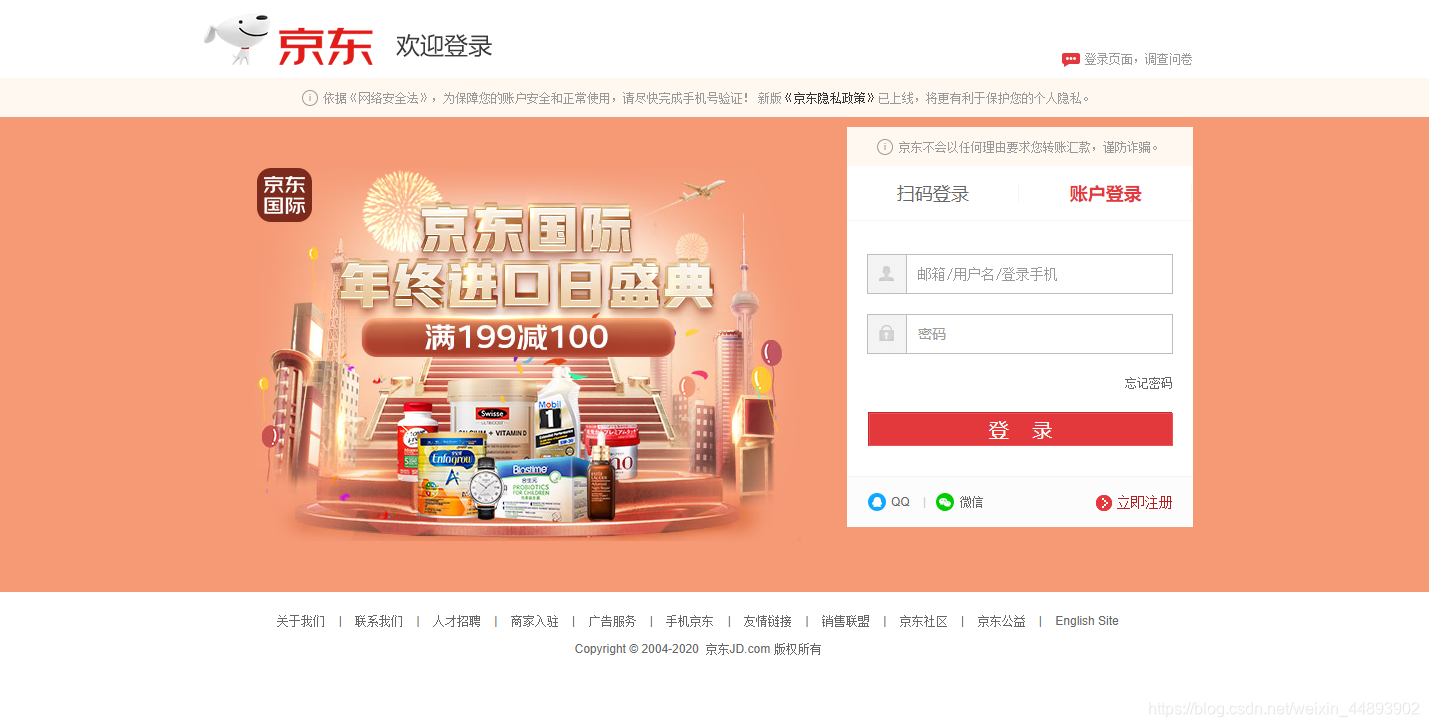
实现代码:
HTML:
<!DOCTYPE html>
<html>
<head>
<meta charset="utf-8" />
<meta name="viewport" content="width=device-width,initial-scale=1,minimum-scale=1,maximum-scale=1,user-scalable=no" />
<link rel="stylesheet" type="text/css" href="css/index.css"/>
<title>京东-欢迎登录</title>
</head>
<body>
<!-- 最外层的div -->
<div id="warp">
<!-- 顶部 -->
<div id="top">
<div class="top-left">
<a href="#"><img src="img/logo.png" ></a>
<a href="#"><img src="img/l-icon.png" ></a>
</div>
<div class="top-right">
<a href="#"><img src="img/q-icon.png" align="center"> 登陆页面,调查问卷</a>
</div>
</div>
<!-- 顶部下的提示文字 -->
<div class="cont-wrapper">
<p><img src="img/icon-tips.png" align="center"> 依据《网络安全法》,为保障您的账户安全和正常使用,请尽快完成手机号验证! 新版<a href="#">《京东隐私政策》</a>已上线,将更有利于保护您的个人隐私。</p>
</div>
<!-- 中间主要内容部分 -->
<div id="content">
<div class="login-wrap">
<!-- 中间背景图 -->
<div class="login-banner"></div>
<!-- 登陆表单部分 -->
<div class="login-form">
<!-- 表单顶部提示文字 -->
<div class="cont-wrapper">
<p><img src="img/icon-tips.png" align="center"> 京东不会以任何理由要求您转账汇款,谨防诈骗。</p>
</div>
<!-- 登陆选项 -->
<div class="login-tab">
<div class="login-tab-item login-tab-left">
<a href="#">扫码登录</a>
</div>
<div class="login-tab-item login-tab-right">
<a href="#">账户登录</a>
</div>
</div>
<!-- 登录框 -->
<div class="login-box">
<div class="login-box-1">
<label></label>
<input type="text" name="" class="itxt" value="" placeholder="邮箱/用户名/登录手机" />
</div>
<div class="login-box-2">
<label></label>
<input type="text" name="" class="itxt" value="" placeholder="密码" />
</div>
<div class="login-box-3">
<a href="#">忘记密码</a>
</div>
<div class="login-box-4">
<a href="#">登录</a>
</div>
</div>
<!-- 尾部其他登录方式 -->
<div class="form-foot">
<ul>
<li><a href="#"><b class="QQ-icon"></b><span>QQ</span></a><span class="line">|</span></li>
<li><a href="#"><b class="weixin-icon"></b><span>微信</span></a></li>
<li><a href="#"><b></b>立即注册</a></li>
</ul>
</div>
</div>
</div>
</div>
<!-- 网页尾部 -->
<div id="foot">
<div class="links">
<a rel="nofollow" target="_blank" href="//about.jd.com/">
关于我们
</a>
|
<a rel="nofollow" target="_blank" href="//www.jd.com/contact/">
联系我们
</a>
|
<a rel="nofollow" target="_blank" href="//zhaopin.jd.com/">
人才招聘
</a>
|
<a rel="nofollow" target="_blank" href="//lai.jd.com/">
商家入驻
</a>
|
<a rel="nofollow" target="_blank" href="//jzt.jd.com/">
广告服务
</a>
|
<a rel="nofollow" target="_blank" href="//app.jd.com/">
手机京东
</a>
|
<a target="_blank" href="//club.jd.com/links.aspx">
友情链接
</a>
|
<a target="_blank" href="//media.jd.com/">
销售联盟
</a>
|
<a href="//pro.jd.com/mall/active/3WA2zN8wkwc9fL9TxAJXHh5Nj79u/index.html" target="_blank">
京东社区
</a>
|
<a href="//gongyi.jd.com" target="_blank">
京东公益
</a>
|
<a target="_blank" href="//www.joybuy.com/" clstag="pageclick|keycount|20150112ABD|9">English Site</a>
</div>
<!-- 页脚 -->
<div class="copyright">
Copyright 2004-2020 京东JD.com 版权所有
</div>
</div>
</div>
</body>
</html>
CSS:
*{

	margin: 0;

	padding: 0;

}

/* 页面的外层 */

#warp{

	width: 100vw;

	height: 100vh;

}

/* —————顶部————— */

#top{

	margin: 0 auto;

	width: 1500px;

	height: 80px;

	background-color: white;

	display: flex;

	justify-content: space-around;

}

/* 顶部左边 */

.top-left{

	margin: 10px 50px 0px 0px;

}

/* 顶部右边边 */

.top-right a{

	position: relative;

	color: #999;

	float: right;

	top: 52px;

	line-height: 20px;

	text-decoration: none;

	font-size: 12px;

}

.top-right a:hover{

	color: #E4393C;

	text-decoration: underline;

}

/* —————顶部下面的提示文字————— */

.cont-wrapper{

	background: #fff8f0;

	width: 100%;

	padding-top: 10px;

	padding-bottom: 10px;

	text-align: center;

}

.cont-wrapper img{

	width: 17px;

	height: 17px;

	align-items: center;

}

.cont-wrapper p{

	vertical-align: middle;

	color: #999;

	font-size: 12px;

	display: inline-block;

}

.cont-wrapper a{

	color: #333;

	text-decoration: none;

}

.cont-wrapper a:hover{

	text-decoration: underline;

}

/* —————中间表单部分————— */

#content{

	/* width: 1200px; */

	height: 450px;

	margin: 0 auto;

	background-color: #c4893b;

	overflow: hidden;

}

/* 中间内容部分的外层 */

.login-wrap{

	width: 900px;

	height: 475px;

	margin: 0 auto;

	display: flex;

	position: relative;

}

/* 中间背景图 */

.login-banner{

	width: 100%;

	position: relative;

	z-index: 3;

	height: 475px;

	background: url(../img/bg.jpg) no-repeat;

	/* background-size: cover; */

	position: absolute;

	left: -50px;

	bottom: 22px;

}

/* ———登陆表单部分——— */

.login-form{

	width: 346px;

	/* height: 426px; */

	position: absolute;

	top: 20px;

	right: -30px;

	z-index: 4;

	background: #fff;

	overflow: visible;

}

/* 扫码登陆和账户登录选项 */

.login-tab{

	height: 54px;

	display: flex;

	line-height: 54px;

	text-align: center;

}

.login-tab div{

	width: 50%;

	border-bottom: 1px solid #f4f4f4;

}

.login-tab a{

	font-size: 18px;

	border-bottom: 1px solid #f4f4f4;

	color: #666;

	text-decoration: none;

}

.login-tab a:hover{

	color: #e4393c;

	font-weight: bold;

}

.login-tab-right a{

	color: #e4393c;

	font-weight: bold;

}

/* 中间主要表单部分 */

.login-box{

	margin-top: 30px;

	text-align: center;

	position: relative;

}

.login-box-1,.login-box-2{

	height: 38px;

	width: 304px;

	margin: 0 auto;

	border: 1px solid #bdbdbd;

	position: relative;

	margin-bottom: 20px;

}

.login-box-1 label{

	position: absolute;

	z-index: 3;

	top: 0;

	left: 0;

	width: 38px;

	height: 38px;

	border-right: 1px solid #bdbdbd;

	background: url(../img/pwd-icons-new.png);

}

.login-box-2 label{

	position: absolute;

	z-index: 3;

	top: 0;

	left: 0;

	width: 38px;

	height: 38px;

	border-right: 1px solid #bdbdbd;

	background: url(../img/pwd-icons-new.png);

	background-position: -48px 0;

}

/* 两个输入框 */

.itxt{

	line-height: 18px;

	height: 18px;

	border: 0;

	padding: 10px 0 10px 50px;

	width: 254px;

	float: none;

	overflow: hidden;

	font-size: 14px;

	font-family: '\5b8b\4f53';

	outline: none;

}

.login-box-3{

	margin: 0 auto;

	text-align: right;

	height: 38px;

	width: 304px;

}

.login-box-3 a{

	font: 12px/150% Arial,Verdana,"\5b8b\4f53";

	color: #666;

	text-decoration: none;

}

.login-box-3 a:hover{

	color: #e4393c;

	text-decoration: underline;

}

.login-box-4{

	margin: 0 auto;

	border: 1px solid #e85356;

	display: block;

	width: 302px;

	background: #e4393c;

	height: 31px;

}

.login-box-4 a{

	line-height: 31px;

	color: #fff;

	font-size: 20px;

	text-decoration: none;

}

/* ————表单底部———— */

.form-foot{

	margin-top: 30px;

	/* width: 100%; */

	padding-left: 20px;

	padding-right: 20px;

	line-height: 50px;

	border-top: 1px solid #f4f4f4;

	height: auto;

	background-color: #fcfcfc;

	display: flex;

	position: relative;

}

.form-foot{

	display: block;

}

.form-foot a:hover{

	color: #e4393c;

	text-decoration: underline;

}

.form-foot li{

	list-style: none;

	float: left;

	display: list-item;

	text-align: -webkit-match-parent;

}

.form-foot li:last-child{

	float: right;

	color: #b61d1d;

}

.form-foot li:last-child a{

	float: right;

	color: #b61d1d;

}

.form-foot li:last-child b{

	display: inline-block;

	width: 16px;

	height: 16px;

	overflow: hidden;

	background: url(/img/pwd-icons-new.png) -104px -75px no-repeat;

	vertical-align: middle;

	margin-right: 5px;

}

.line{

	color: #ccc;

	padding: 0 10px;

	font-size: 12px;

}

.QQ-icon,.weixin-icon{

	width: 19px;

	height: 18px;

	display: block;

	background: url(../img/QQ-weixin.png) no-repeat;

	margin: 0 auto;

	position: absolute;

	float: left;

	left: 0;

	top: 16px;

}

.weixin-icon{

	background: url(../img/QQ-weixin.png) no-repeat;

	background-position: -20px 0;

}

.form-foot a{

	color: #666;

	text-decoration: none;

	font-size: 12px;

	display: inline-block;

	position: relative;

	padding-left: 24px;

}

/* —————网页尾部————— */

#foot{

	padding-top: 30px;

	padding-bottom: 30px;

	text-align: center;

}

/* 尾部导航 */

.links{

	color: #666;

	font-size: 12px;

}

#foot a{

	margin: 0 10px;

	text-decoration: none;

	color: #666666;

	font-size: 12px;

}

#foot a:hover{

	color: #e4393c;

	text-decoration: underline;

}

/* 版权部分 */

.copyright{

	margin: 10px 0;

	font-size: 12px;

	color: #666666;

}
HTMl+CSS 模仿京东网登录页面的更多相关文章
- 微信小程序相关一、模仿京东静态登录页面
一.培训的第一天,基本上没有什么最新的东西,但是看到老师的代码收获的确实是不少. 1.1.首页代码很简洁,将共有的样式都提取的很好. 1.2.其次是每一个小块写样式的时候用到了好多子代选择器和后代选择 ...
- HTML模仿实现京东登录页面
<!DOCTYPE html> <html lang="en"> <head> <meta charset="UTF-8&quo ...
- 如何利用CSS选择器抓取京东网商品信息
前几天小编分别利用Python正则表达式.BeautifulSoup.Xpath分别爬取了京东网商品信息,今天小编利用CSS选择器来为大家展示一下如何实现京东商品信息的精准匹配~~ CSS选择器 目前 ...
- 原生js+css实现重力模拟弹跳系统的登录页面
今天小颖把之前保存的js特效视频看了一遍,跟着视频敲了敲嘻嘻,用原生js实现一个炫酷的登录页面.怎么个炫酷法呢,看看下面的图片大家就知道啦. 效果图: 不过在看代码之前呢,大家先和小颖看看css中的o ...
- HTML5实战教程———开发一个简单漂亮的登录页面
最近看过几个基于HTML5开发的移动应用,比如臭名昭著的12036移动客户端就是主要使用HTML5来实现的,虽然还是有点反应迟钝,但已经比较流畅了,相信随着智能手机的配置越来越高性能越来越好,会越来越 ...
- [Js插件]使用JqueryUI的弹出框做一个“炫”的登录页面
引言 查看项目代码的时候,发现项目中用到JqueryUi的弹出框,可拖拽,可设置模式对话框,就想着使用它弄一个登录页面. 弹出框 在Jquery Ui官网可定制下载弹出框,下载和弹出框下载相关的js文 ...
- AntDesign(React)学习-4 登录页面提交数据简单实现
github代码:https://github.com/zhaogaojian/jgdemo 全国肺炎,过节期间没地方去在家学习antd. 一.感觉antd pro项目太庞大了,可以学习下结构和代码风 ...
- ElasticSearch7.X.X-初见-模仿京东搜索的实战
目录 简介 聊聊Doug Cutting ES&Solr&Lucene ES的安装 安装可视化界面ES head插件 了解ELK 安装Kibana ES核心概念 文档 类型 索引 倒排 ...
- 解决使用IE8打开ADFS 3.0登录页面
系统上线前一天,发现客户竟然有XP系统和2003系统,这些系统都不能访问外网.测试时,客户端是IE8,打开我们系统ADFS的登录页面,一直在Loading,无法打开,也不报错.后来通过fiddler跟 ...
随机推荐
- C++ 德才论
输入样例: 14 60 80 10000001 64 90 10000002 90 60 10000011 85 80 10000003 85 80 10000004 80 85 10000005 8 ...
- c学习 - 第八章:函数
8.7 数组作函数的参数 1.数组元素作函数的参数--值传递,单向传递 2.数组名做函数的参数--地址传送 (1)实参:数组名做实参,传递的是数组首元素的地址 (2)形参:使用同类型的数组名或指针变量 ...
- Servlet(3):Cookie和Session
一. Cookie Cookie是客户端技术,程序把每个用户的数据以cookie的形式写给用户各自的浏览器.当用户使用浏览器再去访问服务器中的web资源时,就会带着各自的数据去.这样,web资源处理的 ...
- 【Linux】【Services】【Configuration】puppet
1. 简介 1.1. 官方网站:https://docs.puppet.com/ 1.2. puppet是IT基础设施自动化管理工具,他的整个生命周期包括:provisioning,configura ...
- 解决git push报错error: failed to push some refs to 的问题
这个问题发生的背景一般是: 想把自己本地的某个项目关联到远程仓库并推送上去,接着他会做如下操作: 本地项目->远程创建仓库->本地关联远程->推送最新代码 最后一个步骤发生问题: 那 ...
- Mysql资料 mysqldump
目录 一.简介 备份过程 优缺点 命令使用 myisam引擎 二.安装 配置 日志 三.日常使用 备份全库 备份单个库(带建立库的语句) 备份单个库(不自动建立库) 备份表合集 从全备中恢复单个库 其 ...
- Jenkins制品管理
目录 一.简介 二.Jenkins管理制品 三.Nexus maven上传 jenkins上传 管理Docker镜像 管理raw 四.拷贝制品 五.版本号 Version Number 一.简介 制品 ...
- 微信浏览器打开H5页面右上角隐藏转发功能
js设置转发开关 document.addEventListener('WeixinJSBridgeReady', function onBridgeReady() { WeixinJSBridge. ...
- NSData NSDate NSString NSArray NSDictionary 相互转化
// NSData NSDate NSString NSArray NSDictionary json NSString *string = @"hello word"; ...
- epoll 使用详解
epoll - I/O event notification facility在linux的网络编程中,很长的时间都在使用select来做事件触发.在linux新的内核中,有了一种替换它的机制,就是e ...