
Yarn 容量调度器多队列提交案例
Yarn 容量调度器多队列提交案例
默认只有一个default队列,不能满足生产要求。一般按照业务模块如登录注册、购物车等创建队列。
需求
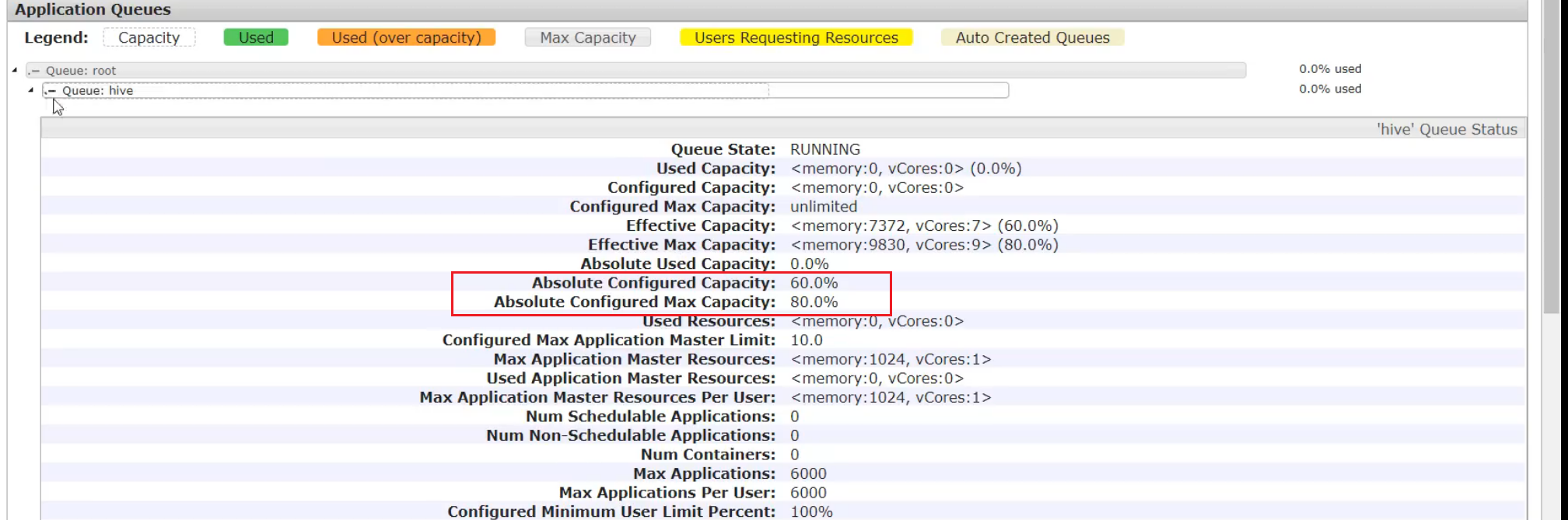
需求1:default队列占总内存的40%,最大资源容量占总资源60%(本身占40%可以再借用20%),hive队列占总内存的60%,最大资源容量占总资源80%
需求2:配置队列优先级
配置多队列的容量调度器
在/opt/module/hadoop-3.1.3/etc/hadoop下的capacity-scheduler.xml中配置
1 修改如下配置
直接配置不好配,我们先下载
[ranan@hadoop102 hadoop]$ sz capacity-scheduler.xml
修改如下配置
<property>

    <name>yarn.scheduler.capacity.root.queues</name>

	<!--增加hive队列 -->

    <value>default,hive</value>

    <description>

      The queues at the this level (root is the root queue).

    </description>

</property>

<property>

    <name>yarn.scheduler.capacity.root.default.capacity</name>

	<!--default队列占总内存的40%-->

    <value>40</value>

    <description>Default queue target capacity.</description>

</property>

<!--增加hive配置-->

<property>

    <name>yarn.scheduler.capacity.root.hive.capacity</name>

	<!--hive队列占总内存的40% -->

    <value>60</value>

    <description>Default queue target capacity.</description>

</property>

<!--新增hive配置,用户提交任务时可以占hive队列总资源的多少,1表示可以把hive队列的所有资源用尽-->

<property>

    <name>yarn.scheduler.capacity.root.hive.user-limit-factor</name>

    <value>1</value>

    <description>

      hive queue user limit a percentage from 0.0 to 1.0.

    </description>

</property>

<!--default最大可以占root资源的60%,本身有40%,最多可以借20%,最大资源容量-->

<property>

    <name>yarn.scheduler.capacity.root.default.maximum-capacity</name>

    <value>60</value>

    <description>

      The maximum capacity of the default queue.

    </description>

</property>

<!--新增-->

<property>

    <name>yarn.scheduler.capacity.root.hive.maximum-capacity</name>

    <value>80</value>

    <description>

      The maximum capacity of the hive queue.

    </description>

</property>

<!--新增,默认该队列是启动状态-->

<property>

   <name>yarn.scheduler.capacity.root.hive.state</name>

   <value>RUNNING</value>

   <description>

   The state of the hive queue. State can be one of RUNNING or STOPPED.

   </description>

</property>

<!--新增,配置哪些用户可以向该队列提交任务 * 表示所有用户-->

 <property>

   <name>yarn.scheduler.capacity.root.hive.acl_submit_applications</name>

   <value>*</value>

   <description>

   The ACL of who can submit jobs to the hive queue.

   </description>

</property>

<!--新增,配置哪些用户可以对该队列进行操作权限(管理员)-->

<property>

   <name>yarn.scheduler.capacity.root.default.acl_administer_queue</name>

   <value>*</value>

   <description>

   The ACL of who can administer jobs on the hive queue.

   </description>

</property>

<!--新增,哪些用户可以设置该队列的优先级-->

<property>

	<name>yarn.scheduler.capacity.root.hive.acl_application_max_priority</name>

    <value>*</value>

    <description>

      The ACL of who can submit applications with configured priority.

      For e.g, [user={name} group={name} max_priority={priority} default_priority={priority}]

    </description>

  </property>

<!-- 任务的超时时间设置: yarn application -appId appId -updateLifetime Timeout(Timeout自己设置)  到时间任务会被kill-->

<!-- 新增  Timeout不能随便指定,不能超过以下参数配置的时间。-->

   <property>

     <name>yarn.scheduler.capacity.root.hive.maximum-application-lifetime

     </name>

     <value>-1</value>

     <description>

        Maximum lifetime of an application which is submitted to a queue

        in seconds. Any value less than or equal to zero will be considered as

        disabled.

        This will be a hard time limit for all applications in this

        queue. If positive value is configured then any application submitted

        to this queue will be killed after exceeds the configured lifetime.

        User can also specify lifetime per application basis in

        application submission context. But user lifetime will be

        overridden if it exceeds queue maximum lifetime. It is point-in-time

        configuration.

        Note : Configuring too low value will result in killing application

        sooner. This feature is applicable only for leaf queue.

     </description>

   </property>

<!--新增 如果 application 没指定超时时间,则用 default-application-lifetime 作为默认值 -1表示不受限想执行多久就执行多久-->

   <property>

     <name>yarn.scheduler.capacity.root.hive.default-application-lifetime

     </name>

     <value>-1</value>

     <description>

        Default lifetime of an application which is submitted to a queue

        in seconds. Any value less than or equal to zero will be considered as

        disabled.

        If the user has not submitted application with lifetime value then this

        value will be taken. It is point-in-time configuration.

        Note : Default lifetime can't exceed maximum lifetime. This feature is

        applicable only for leaf queue.

     </description>

   </property>
补充:
容量调度器所有的队列从根目录开始?

SecureCRT的上传和下载
SecureCRT下载sz(send发送)
下载一个文件:sz filename
下载多个文件:sz filename1 filename2
下载dir目录下的所有文件,不包含dir下的文件夹:sz dir/*
rz(received)上传
2 上传到集群并分发
[ranan@hadoop102 hadoop]$ rz

[ranan@hadoop102 hadoop]$ xsync capacity-scheduler.xml
3 重启Yarn或yarn rmadmin -refreshQueues
重启Yarn或者执行yarn rmadmin -refreshQueues 更新yarn队列相关配置
[ranan@hadoop102 hadoop]$ yarn rmadmin -refreshQueues
4 向Hive队列提交任务
知识点:-D 表示运行时改变参数值
-D mapreduce.job.queuename=hive
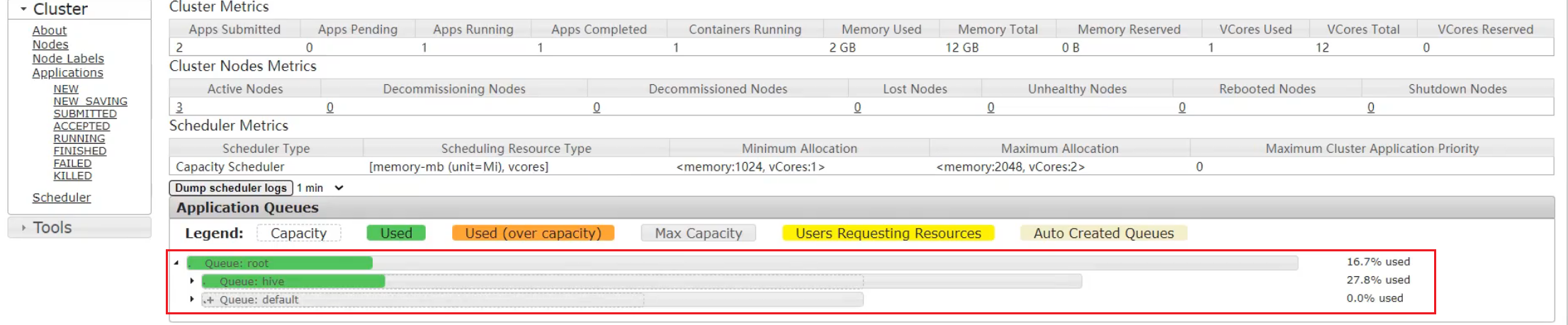
[atguigu@hadoop102 hadoop-3.1.3]$ hadoop jar share/hadoop/mapreduce/hadoop-mapreduce-examples-3.1.3.jar wordcount -D mapreduce.job.queuename=hive /input /output
提交到了hive队列,默认是default队列
提交方式-打jar包的方式
如果是自己写的程序,可以再打包的配置信息Driver中声明提交到哪个队列
public class WcDrvier {

	public static void main(String[] args) throws IOException,

		ClassNotFoundException, InterruptedException {

		Configuration conf = new Configuration();

		conf.set("mapreduce.job.queuename","hive");

		//1. 获取一个 Job 实例

		Job job = Job.getInstance(conf);

		....

		//6. 提交 Job

		boolean b = job.waitForCompletion(true);

		System.exit(b ? 0 : 1);

}

}
任务优先级
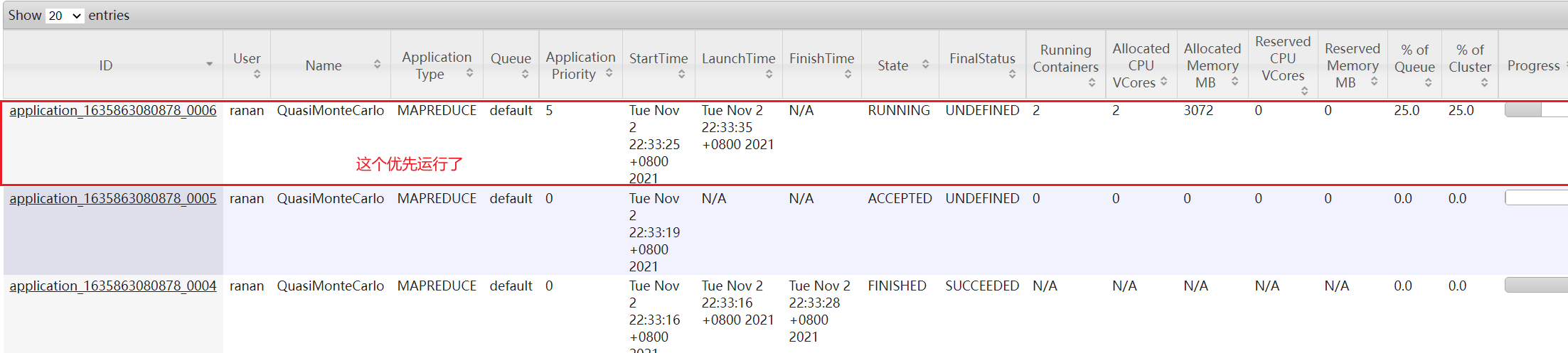
容量调度器,在资源紧张时,优先级高的任务将优先获取资源。
默认情况,所有任务优先级为0,如果需要使用任务优先级,需要做相关的配置。
任务优先级的使用
在/opt/module/hadoop-3.1.3/etc/hadoop下的yarn-site.xml中配置
1.修改 yarn-site.xml 文件,增加以下参数
<property>

<name>yarn.cluster.max-application-priority</name>

<!--设置有5个优先级等级,0最低5最高-->

<value>5</value>

</property>
2.分发配置,并重启 Yarn
[ranan@hadoop102 hadoop]$ xsync yarn-site.xml

//仅重启Yarn

[ranan@hadoop102 hadoop-3.1.3]$ sbin/stop-yarn.sh

[ranan@hadoop102 hadoop-3.1.3]$ sbin/start-yarn.sh
3.模拟资源紧张环境, 可连续提交以下任务,直到新提交的任务申请不到资源为止。
//求pi 执行了2000000次

[ranan@hadoop102 hadoop-3.1.3]$ hadoop jar /opt/module/hadoop-3.1.3/share/hadoop/mapreduce/hadoop-mapreduce-examples-3.1.3.jar pi 5 2000000
4.再次重新提交优先级高的任务,让优先级高的任务限制性
-D mapreduce.job.priority=5
[ranan@hadoop102 hadoop-3.1.3]$ hadoop jar /opt/module/hadoop-3.1.3/share/hadoop/mapreduce/hadoop-mapreduce-examples-3.1.3.jar pi -D mapreduce.job.priority=5 5 2000000
5.如果优先级高的任务已经提交到集群上了,也可以通过以下命令修改正在执行的任务的优先级。
yarn application -appID <ApplicationID> -updatePriority 优先级
[ranan@hadoop102 hadoop-3.1.3]$ yarn application -appID application_1611133087930_0009 -updatePriority 5
Yarn 容量调度器多队列提交案例的更多相关文章
- MapReduce多用户任务调度器——容量调度器(Capacity Scheduler)原理和源码研究
前言:为了研究需要,将Capacity Scheduler和Fair Scheduler的原理和代码进行学习,用两篇文章作为记录.如有理解错误之处,欢迎批评指正. 容量调度器(Capacity Sch ...
- Yarn 公平调度器案例
目录 公平调度器案例 需求 配置多队列的公平调度器 1 修改yarn-site.xml文件,加入以下从参数 2 配置fair-scheduler.xml 3 分发配置文件重启yarn 4 测试提交任务 ...
- 大数据之Yarn——Capacity调度器概念以及配置
试想一下,你现在所在的公司有一个hadoop的集群.但是A项目组经常做一些定时的BI报表,B项目组则经常使用一些软件做一些临时需求.那么他们肯定会遇到同时提交任务的场景,这个时候到底如何分配资源满足这 ...
- Hadoop-2.2.0中文文档—— MapReduce 下一代--容量调度器
目的 这份文档描写叙述 CapacityScheduler,一个为Hadoop能同意多用户安全地共享一个大集群的插件式调度器,如他们的应用能适时被分配限制的容量. 概述 CapacitySchedul ...
- yarn的调度器
三种调度器 1.FIFO Scheduler 把应用按提交的顺序排成一个队列,这是一个先进先出队列,在进行资源分配的时候,先给队列中最头上的应用进行分配资源,等最前面的应用需求满足后再给下一个分配,以 ...
- YARN的三种调度器的使用
YRAN提供了三种调度策略 一.FIFO-先进先出调度器 YRAN默认情况下使用的是该调度器,即所有的应用程序都是按照提交的顺序来执行的,这些应用程序都放在一个队列中,只有在前面的一个任务执行完成之后 ...
- Hadoop Yarn调度器的选择和使用
一.引言 Yarn在Hadoop的生态系统中担任了资源管理和任务调度的角色.在讨论其构造器之前先简单了解一下Yarn的架构. 上图是Yarn的基本架构,其中ResourceManager是整个架构的核 ...
- yarn的学习之2-容量调度器和预订系统
本文翻译自 http://hadoop.apache.org/docs/r2.8.0/hadoop-yarn/hadoop-yarn-site/CapacityScheduler.html 和http ...
- 第1节 yarn:14、yarn集群当中的三种调度器
yarn当中的调度器介绍: 第一种调度器:FIFO Scheduler (队列调度器) 把应用按提交的顺序排成一个队列,这是一个先进先出队列,在进行资源分配的时候,先给队列中最头上的应用进行分配资源 ...
随机推荐
- 洛谷 P4587 [FJOI2016]神秘数
大鸽子 llmmkk 正在补8.3号咕掉的题 时隔两个月,再看到这道题,我又是一脸懵,这种思维的培养太重要了 链接: P4587 题意: 给出 \(n\) 个点的序列,\(m\) 次询问区间神秘数. ...
- Ubuntu下在当前用户下安装JDK1.8
Oracle官网的JDK下载需要用户登录才能下载,JDK1.8的下载地址:https://www.oracle.com/cn/java/technologies/javase/javase-jdk8- ...
- 【行人惯性导航】关于行人导航中IMU位姿推导的知识点及相关代码
IMU姿态惯性推导 最近从事行人惯性导航的研究,本人也是一个小白,其中看了很多文献,有很多个人思考很费时间的地方,撰写此随笔的目的不仅是给自己做一个笔记,也是给各位有需要的仁兄一点个人理解. 本文只关 ...
- sed初理多行合并+sed之G、H、g、h使用+sed n/N使用说明
转载:[shell]sed处理多行合并 - seyjs - 博客园 (cnblogs.com) 文件格式 table=t1 name owner address table=t2 id text co ...
- AtCoder Grand Contest 055题解
我太菜啦!!!md,第一题就把我卡死了...感觉对构造题不会再爱了... A - ABC Identity 先来看这个题吧,题意就是给定你一个字符串,让你将这个字符串最多分成6个子串,使得每个字符都在 ...
- DeWeb 电脑和手机动态适配
DeWeb 做多平台适配很方便! 多平台适配代码在OnMouseUp中. X,Y分别表示当前设备的Width/Height: Button : mbLeft : 屏幕纵向, mbRight:屏幕横向: ...
- springcloud3(六) 服务降级限流熔断组件Resilience4j
代码地址:https://github.com/showkawa/springBoot_2017/tree/master/spb-demo/spb-gateway/src/test/java/com/ ...
- 好好的 Tair 排行榜不用,非得自己写?20 行代码实现高性能排行榜
TairZset 是阿里云自研的可实现任意维度 double 类型的分值排序的数据结构,借助 Tair 客户端同时可实现扩展性,即可以将计算任务分布至多个数据节点完成,实现分布式排行榜能力.本文介绍了 ...
- django的增删改查
前置条件: 已有一个model (tbl_user) ,用户表 1.查询 # 查询用户表 username是cx的数据 user_object = tbl_user.objects.filter(us ...
- Unity——技能系统(二)
Unity技能系统(二) Unity技能系统(一) Demo展示: 五.技能管理和释放 1.CharacterSkillSystem 技能系统类,给外部(技能按钮,按键)提供技能释放方法: 技能释放逻 ...