
Python测试框架pytest入门基础
Pytest简介
Pytest is a mature full-featured Python testing tool that helps you write better programs.
Thepytestframework makes it easy to write small tests, yet scales to support complex functional testing for applications and libraries.
通过官方网站介绍我们可以了解到,pytest是一个非常成熟的全功能的python测试框架,主要有
以下几个特点:
- 简单灵活易上手
- 支持参数化
- 支持简单的单元测试和复杂的功能测试,还可以用来做自动化测试
- 具有很多第三方插件,并且可以自定义扩展
- 测试用例的skip和xfail处理
- 可以很好的和Jenkins集成
- 支持运行由nose, unittest编写的测试用例
Pytest安装
1.直接使用pip命令安装
pip install -U pytest # -U是如果已安装会自动升级最新版本
2.验证安装结果
pytest --version    # 展示当前安装版本

C:\Users\edison>pytest --version

pytest 6.2.5
3.在pytest测试框架中,要遵循以下约束:
- 测试文件名要符合test_*.py或*_test.py格式(例如test_min.py)
- 测试类要以Test开头,且不能带有init方法
- 在单个测试类中,可以包含一个或多个test_开头的函数
Pytest测试执行
pytest进行测试比较简单,我们来看一个实例:
import pytest    # 导入pytest包

def test_001():    # 函数以test_开头

    print("test_01")

def test_002():

    print("test_02")

if __name__ == '__main__':

    pytest.main(["-v","test_1214.py"])    # 调用pytest的main函数执行测试
这里我们定义了了两个测试函数,直接打印出结果,下面执行测试:
============================= test session starts =============================

platform win32 -- Python 3.8.0, pytest-6.2.5, py-1.11.0, pluggy-1.0.0 -- D:\Code\venv\Scripts\python.exe

cachedir: .pytest_cache

rootdir: D:\Code

collecting ... collected 2 items

test_1214.py::test_001 PASSED                                            [ 50%]

test_1214.py::test_002 PASSED                                            [100%]

============================== 2 passed in 0.11s ==============================

Process finished with exit code 0
输出结果中显示执行了多少条案例、对应的测试模块、通过条数以及执行耗时。
测试类主函数
pytest.main(["-v","test_1214.py"])


通过python代码执行 pytest.main()

    1.直接执行pytest.main() 【自动查找当前目录下,以test_开头的文件或者以_test结尾的py文件】

    2.设置pytest的执行参数 pytest.main(['--html=./report.html','test_login.py'])【执行test_login.py文件,并生成html格式的报告】


main()括号内可传入执行参数和插件参数,通过[]进行分割,[]内的多个参数通过‘逗号,’进行分割


运行目录及子包下的所有用例  pytest.main(['目录名'])


运行指定模块所有用例  pytest.main(['test_reg.py'])


运行指定模块指定类指定用例  pytest.main(['test_reg.py::TestClass::test_method'])  冒号分割

-m=xxx: 运行打标签的用例

-reruns=xxx:失败重新运行

-q: 安静模式, 不输出环境信息

-v: 丰富信息模式, 输出更详细的用例执行信息

-s: 显示程序中的print/logging输出

--resultlog=./log.txt 生成log

--junitxml=./log.xml 生成xml报告
断言方法
pytest断言主要使用Python原生断言方法,主要有以下几种:
- == 内容和类型必须同时满足相等
- in 实际结果包含预期结果
- is 断言前后两个值相等
import pytest    # 导入pytest包

def add(x,y):    # 定义以test_开头函数

    return x + y

def test_add():

    assert add(1,2) == 3    # 断言成功

str1 = "Python,Java,Ruby"

def test_in():

    assert "PHP" in str1    # 断言失败

if __name__ == '__main__':

    pytest.main(["-v","test_pytest.py"])    # 调用main函数执行测试
============================= test session starts =============================

platform win32 -- Python 3.8.0, pytest-6.2.5, py-1.11.0, pluggy-1.0.0 -- D:\Code\venv\Scripts\python.exe

cachedir: .pytest_cache

rootdir: D:\Code

collecting ... collected 2 items

test_pytest.py::test_add PASSED                                          [ 50%]

test_pytest.py::test_in FAILED                                           [100%]

================================== FAILURES ===================================

___________________________________ test_in ___________________________________

    def test_in():

>       assert "PHP" in str1

E       AssertionError: assert 'PHP' in 'Python,Java,Ruby'

test_pytest.py:11: AssertionError

=========================== short test summary info ===========================

FAILED test_pytest.py::test_in - AssertionError: assert 'PHP' in 'Python,Java...

========================= 1 failed, 1 passed in 0.18s =========================

Process finished with exit code 0
可以看到运行结果中明确指出了错误原因是“AssertionError”,因为PHP不在str1中。
常用命令详解
1.运行指定案例
if __name__ == '__main__':

    pytest.main(["-v","-s","test_1214.py"])
2.运行当前文件夹包括子文件夹所有用例
if __name__ == '__main__':

    pytest.main(["-v","-s","./"])
3.运行指定文件夹(code目录下所有用例)
if __name__ == '__main__':

    pytest.main(["-v","-s","code/"])
4.运行模块中指定用例(运行模块中test_add用例)
if __name__ == '__main__':

    pytest.main(["-v","-s","test_pytest.py::test_add"])
5.执行失败的最大次数
使用表达式"--maxfail=num"来实现(注意:表达式中间不能存在空格),表示用例失败总数等于num 时停止运行。

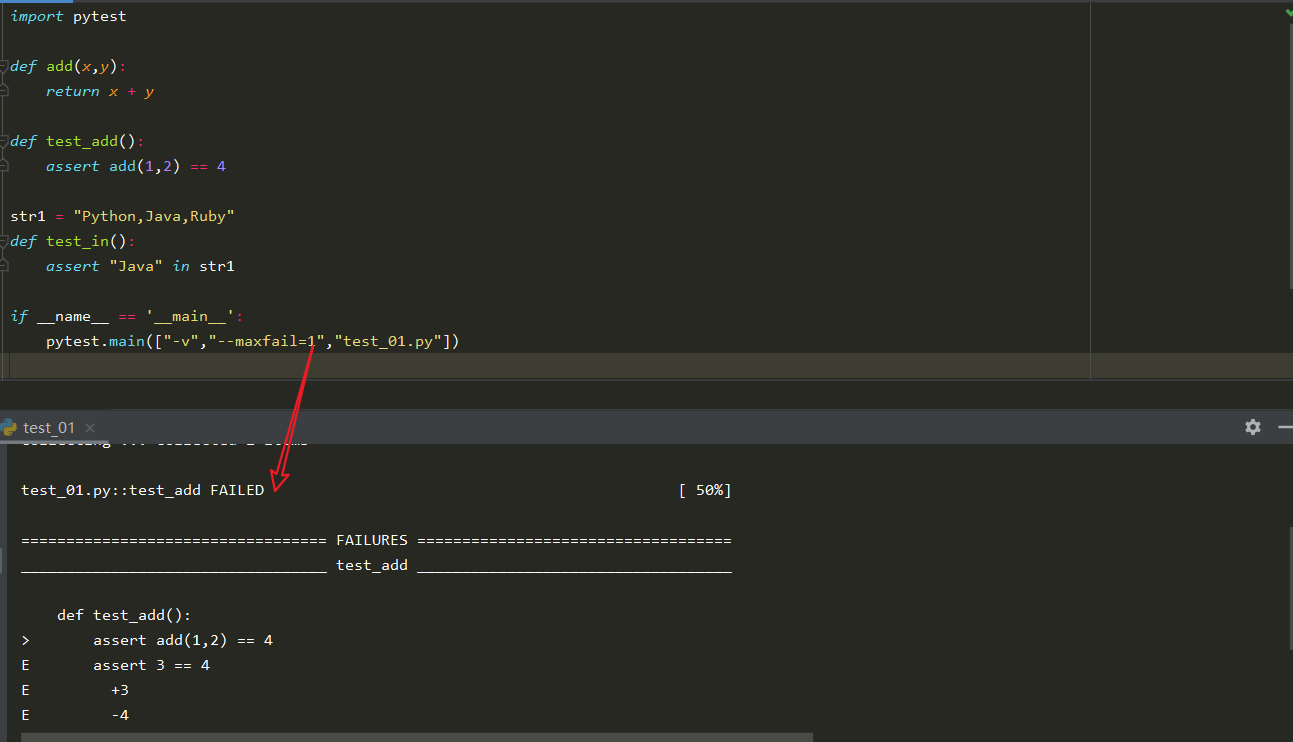
6.错误信息在一行展示
在实际项目中如果有很多用例执行失败,查看报错信息将会很麻烦。使用"--tb=line"命令,可以很好解决这个问题。

接口调用
本地写一个查询用户信息的接口,通过pytest来调用,并进行接口断言。
 1 # -*- coding: utf-8 -*-

 2 import pytest

 3 import requests

 4

 5 def test_agent():

 6     r = requests.post(

 7         url="http://127.0.0.1:9000/get_user",

 8         data={

 9             "name": "吴磊",

10             "sex": 1

11         },

12         headers={"Content-Type": "application/json"}

13     )

14     print(r.text)

15     assert r.json()['data']['retCode'] == "00" and r.json()['data']['retMsg'] == "调用成功"

16

17 if __name__ == "__main__":

18     pytest.main(["-v","test_api.py"])
Python测试框架pytest入门基础的更多相关文章
- Python测试框架pytest命令行参数用法
在Shell执行pytest -h可以看到pytest的命令行参数有这10大类,共132个 序号 类别 中文名 包含命令行参数数量 1 positional arguments 形参 1 2 gene ...
- python测试框架-pytest
一.pytest 介绍.运行.参数化和数据驱动.Fixture pytest安装与介绍 官网 : pip install -U pytest 查看版本号:pytest --version 为何选择py ...
- 小白学 Python 爬虫(35):爬虫框架 Scrapy 入门基础(三) Selector 选择器
人生苦短,我用 Python 前文传送门: 小白学 Python 爬虫(1):开篇 小白学 Python 爬虫(2):前置准备(一)基本类库的安装 小白学 Python 爬虫(3):前置准备(二)Li ...
- 全功能Python测试框架:pytest
python通用测试框架大多数人用的是unittest+HTMLTestRunner,这段时间看到了pytest文档,发现这个框架和丰富的plugins很好用,所以来学习下pytest. imag ...
- 可能是 Python 中最火的第三方开源测试框架 pytest
作者:HelloGitHub-Prodesire HelloGitHub 的<讲解开源项目>系列,项目地址:https://github.com/HelloGitHub-Team/Arti ...
- 小白学 Python 爬虫(34):爬虫框架 Scrapy 入门基础(二)
人生苦短,我用 Python 前文传送门: 小白学 Python 爬虫(1):开篇 小白学 Python 爬虫(2):前置准备(一)基本类库的安装 小白学 Python 爬虫(3):前置准备(二)Li ...
- 小白学 Python 爬虫(36):爬虫框架 Scrapy 入门基础(四) Downloader Middleware
人生苦短,我用 Python 前文传送门: 小白学 Python 爬虫(1):开篇 小白学 Python 爬虫(2):前置准备(一)基本类库的安装 小白学 Python 爬虫(3):前置准备(二)Li ...
- 小白学 Python 爬虫(37):爬虫框架 Scrapy 入门基础(五) Spider Middleware
人生苦短,我用 Python 前文传送门: 小白学 Python 爬虫(1):开篇 小白学 Python 爬虫(2):前置准备(一)基本类库的安装 小白学 Python 爬虫(3):前置准备(二)Li ...
- 小白学 Python 爬虫(38):爬虫框架 Scrapy 入门基础(六) Item Pipeline
人生苦短,我用 Python 前文传送门: 小白学 Python 爬虫(1):开篇 小白学 Python 爬虫(2):前置准备(一)基本类库的安装 小白学 Python 爬虫(3):前置准备(二)Li ...
随机推荐
- int,double与机器字长
机器字长:计算机能直接处理的二进制数据的位数,它决定了计算机的运算精度想深入了解. 学好汇编语言对你帮助非常大.汇编语言中的,最基本的数据类型有: (1) byte (2)word (3)double ...
- 国内首家!腾讯云正式成为 FinOps 基金会顶级会员
11月24日,腾讯云正式宣布加入FinOps基金会,作为国内首家FinOps基金会顶级会员,腾讯云将联合FinOps基金会,全面推进对FinOps标准和最佳实践的贡献,为企业提供云财务管理的最佳解决方 ...
- 测试平台系列(82) 解决APScheduler重复执行的问题
大家好~我是米洛! 我正在从0到1打造一个开源的接口测试平台, 也在编写一套与之对应的完整教程,希望大家多多支持. 欢迎关注我的公众号测试开发坑货,获取最新文章教程! 回顾 上一节我们编写了在线执行R ...
- 『学了就忘』Linux用户管理 — 52、用户组管理相关命令
目录 1.添加用户组 2.删除用户组 3.把用户添加进组或从组中删除 4.有效组(了解) 1.添加用户组 添加用户组的命令是groupadd. 命令格式如下: [root@localhost ~]# ...
- Python实战:截图识别文字,过万使用量版本!(附源码!!)
前人栽树后人乘凉,以不造轮子为由 使用百度的图片识字功能,实现了一个上万次使用量的脚本. 系统:win10 Python版本:python3.8.6 pycharm版本:pycharm 2021.1. ...
- Codeforces 436D - Pudding Monsters(dp)
Codeforces 题目传送门 & 洛谷题目传送门 u1s1 这题数据范围有点迷惑啊--乍一看 \(\mathcal O(nm)\) 过不去,还以为是正解是 \(\mathcal O(n+m ...
- R shinydashboard ——1. 基本用法
shiny和shinydashboard使用虽然简单,但控件众多,需及时总结归纳. install.packages("shinydashboard") shinydashboar ...
- 一个画组织解剖图R包
地址: https://github.com/jespermaag/gganatogram
- mysql 分组统计、排序、取前N条记录解决方案
需要在mysql中解决记录的分组统计.排序,并抽取前10条记录的功能.现已解决,解决方案如下: 1)表结构 CREATE TABLE `policy_keywords_rel` ( `id` int( ...
- 重新整理 .net core 实践篇——— endpoint[四十七]
前言 简单整理一些endpoint的一些东西,主要是介绍一个这个endpoint是什么. 正文 endpoint 从表面意思是端点的意思,也就是说比如客户端的某一个action 是一个点,那么服务端的 ...