
AndroidJetpack数据处理之数据库Room和懒加载Paging
数据库工具:Room
Room结构
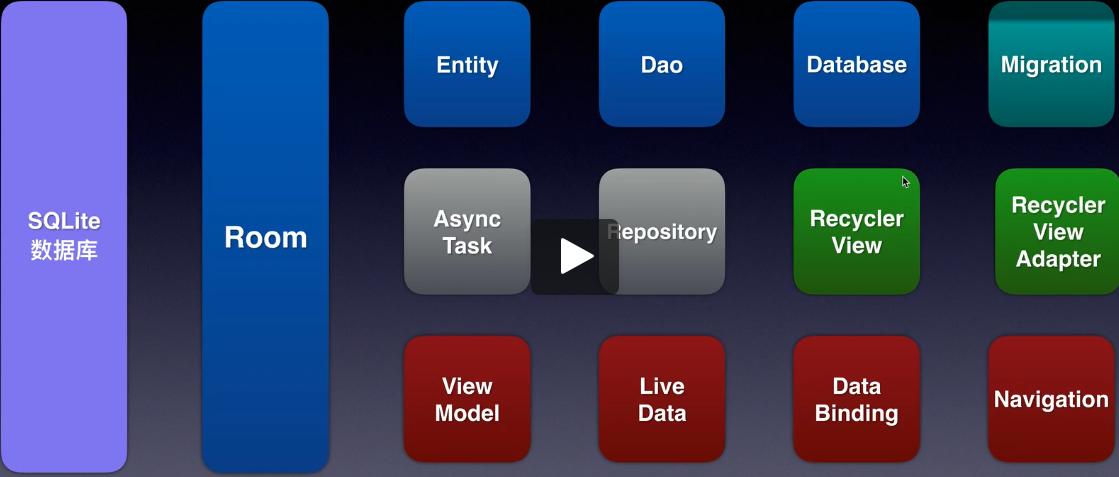
导入依赖
app的build.gradle中开启kapt:
apply plugin: 'kotlin-kapt'
并导入以下依赖:
def room_version = '2.2.4'

implementation "androidx.room:room-runtime:$room_version"

annotationProcessor "androidx.room:room-compiler:$room_version" // For Kotlin use kapt instead of annotationProcessor

// Test helpers

testImplementation "androidx.room:room-testing:$room_version"

kapt 'android.arch.persistence.room:compiler:1.1.1'

implementation 'androidx.recyclerview:recyclerview:1.1.0'

//注意:对于基于 Kotlin 的应用,请确保使用 kapt 而不是 annotationProcessor。您还应添加 kotlin-kapt 插件。
基础三大件:Entity,Dao,Database
Entity:数据库的结构
语法
使用@Entity注解Entity类

使用@PrimaryKey(autoGenerate = true),@ColumuInfo(name = "")注解键
示例
@Entity(tableName = "word_table")     //数据库结构

data class Word (

    @PrimaryKey(autoGenerate = true)

    var id: Int,

    @ColumnInfo(name = "english")

    var word: String,

    @ColumnInfo(name = "chinese")

    var chineseMeaning: String

)
Dao:数据库的操作
语法
使用 @Dao注解接口

使用 @Insert,@Update,@Delete,@Query("DELETE FROM WORD"),@Query("SELECT * FROM WORD ORDER BY ID DESC") 等注解数据库操作
示例
@Dao        //数据库操作

interface WordDao {

    @Insert

    fun insertWords(vararg words: Word)

    @Update

    fun updateWords(vararg words: Word)

    @Delete

    fun daleteWords(vararg words: Word)

    @Query("DELETE FROM WORD")

    fun deleteAllWords()

    @Query("SELECT * FROM WORD ORDER BY ID DESC")

    fun getAllWords() : LiveData<List<Word>> //使用LiveData,观测数据改变并自动

}
Database:数据库工具类
语法
使用 @Database(entities = [com.example.roomtest.Word::class], version = 1, exportSchema = false) 注解类

尽量使用抽象类并且使用单例模式
示例
@Database(entities = [com.example.roomtest.Word::class], version = 1, exportSchema = false)

//获取数据库实体

abstract class WordDatabase : RoomDatabase() {

    abstract fun getWordDao() : WordDao

    /**

     * 单例数据库

     */

    companion object {

        private var instance: WordDatabase? = null

        @Synchronized

        fun get(context: Context): WordDatabase {

            if (instance == null) {

                instance = Room.databaseBuilder(context.applicationContext,

                WordDatabase::class.java, "word_database")

                    .build()

            }

            return instance!!

        }

    }

}
进阶
一、使用ViewModel
1,导入ViewModel模板
2,示例
class WordViewModel(application: Application) : AndroidViewModel(application) {

    var wordDao: WordDao

    var allWordLive: LiveData<List<Word>>

    init {

        val wordDatabase = WordDatabase.get(application)

        wordDao = wordDatabase.getWordDao()

        allWordLive = wordDao!!.getAllWords()

    }

    fun insertWords(vararg words: Word) {

        InsertAsyncTask(wordDao!!).execute(*words)

    }

    fun clearWords() {

        ClearAsyncTask(wordDao!!).execute()

    }

    inner class InsertAsyncTask(val wordDao: WordDao) : BaseAsyncTask(wordDao) {

        override fun doInBackground(vararg params: Word): Void? {

            wordDao.insertWords(*params)

            return null

        }

    }

    inner class UpdateAsyncTask(val wordDao: WordDao) : BaseAsyncTask(wordDao) {

        override fun doInBackground(vararg params: Word): Void? {

            return null

        }

    }

    inner class DeleteAsyncTask(val wordDao: WordDao) : BaseAsyncTask(wordDao) {

        override fun doInBackground(vararg params: Word): Void? {

            return null

        }

    }

    inner class ClearAsyncTask(val wordDao: WordDao) : BaseAsyncTask(wordDao) {

        override fun doInBackground(vararg params: Word): Void? {

            wordDao.deleteAllWords()

            return null

        }

    }

}
以上ViewModel将数据的操作与使用放在一起,还可以继续分层:将数据的使用剥离出去
二、使用仓库Reposity访问数据
示例
/**

 * 数据访问

 */

class WordRepository(val context: Context) {

    private var allWordsLive : LiveData<List<Word>>

    private var wordDao : WordDao

    init {

        val wordDatabase = WordDatabase.get(context)

        wordDao = wordDatabase.getWordDao()

        allWordsLive = wordDao.getAllWords()

    }

    fun insertWords(vararg words: Word) {

        InsertAsyncTask(wordDao!!).execute(*words)

    }

    fun clearWords() {

        ClearAsyncTask(wordDao!!).execute()

    }

    inner class InsertAsyncTask(val wordDao: WordDao) : BaseAsyncTask(wordDao) {

        override fun doInBackground(vararg params: Word): Void? {

            wordDao.insertWords(*params)

            return null

        }

    }

    inner class ClearAsyncTask(val wordDao: WordDao) : BaseAsyncTask(wordDao) {

        override fun doInBackground(vararg params: Word): Void? {

            wordDao.deleteAllWords()

            return null

        }

    }

}
改造后的ViewModel:
class WordViewModel(application: Application) : AndroidViewModel(application) {

    private val wordDao: WordDao

    var allWordLive: LiveData<List<Word>>

    init {

        val wordDatabase = WordDatabase.get(application)

        wordDao = wordDatabase.getWordDao()

        allWordLive = wordDao!!.getAllWords()

    }

    fun insertWords(vararg words: Word) {

        WordRepository(getApplication()).insertWords(*words)

    }

    fun clearWords() {

        WordRepository(getApplication()).clearWords()

    }

}
三、升级数据库
Room.databaseBuilder(context.applicationContext,

		WordDatabase::class.java,

		"word_database")

	.fallbackToDestructiveMigration()       //破坏式升级:升级版本后清空原有内容

	.addMigrations(MIGRATION_1_2)       	//无痛改变

    .build()

val MIGRATION_1_2 : Migration = object : Migration(1, 2) {	//类的参数分别为新旧数据库的版本号

	override fun migrate(database: SupportSQLiteDatabase) {

		database.execSQL("")		//使用SQL语句进行数据库操作

	}

}
项目的其他代码
基累BaseAsyncTask:
open class BaseAsyncTask(private val wordDao: WordDao) : AsyncTask<Word, Void, Void>() {

    override fun doInBackground(vararg words: Word): Void? {

        return null

    }

}
Acitvity:
import androidx.appcompat.app.AppCompatActivity

import android.os.Bundle

import android.widget.Button

import android.widget.TextView

import androidx.lifecycle.LiveData

import androidx.lifecycle.Observer

import androidx.lifecycle.ViewModelProviders

import java.lang.StringBuilder

class MainActivity : AppCompatActivity() {

    private lateinit var insert: Button

    private lateinit var update: Button

    private lateinit var delete: Button

    private lateinit var clear: Button

    private lateinit var content : TextView

    private lateinit var wordViewModel: WordViewModel

    override fun onCreate(savedInstanceState: Bundle?) {

        super.onCreate(savedInstanceState)

        setContentView(R.layout.activity_main)

        insert = findViewById(R.id.insert)

        update = findViewById(R.id.update)

        delete = findViewById(R.id.delete)

        clear = findViewById(R.id.clear)

        content = findViewById(R.id.content)

        wordViewModel = ViewModelProviders.of(this)[WordViewModel::class.java]

        wordViewModel.allWordLive.observe(this, Observer {

            var text = StringBuilder()

            for (x in it) {

            text.append(x.id).append(":").append(x.word).append("=").append(x.chineseMeaning).append("\n")

            }

            content.text = text.toString()

        })

        insert.setOnClickListener {

            var word1 = Word(0, "Hello", "你好")

            var word2 = Word(0, "World", "世界")

            wordViewModel.insertWords(word1, word2)

        }

        clear.setOnClickListener {

            wordViewModel.clearWords()

        }

    }

}
xml布局:
<androidx.constraintlayout.widget.ConstraintLayout xmlns:android="http://schemas.android.com/apk/res/android"

    xmlns:app="http://schemas.android.com/apk/res-auto"

    xmlns:tools="http://schemas.android.com/tools"

    android:layout_width="match_parent"

    android:layout_height="match_parent"

    tools:context=".MainActivity">

    <androidx.constraintlayout.widget.Guideline

        android:id="@+id/guideline"

        android:layout_width="wrap_content"

        android:layout_height="wrap_content"

        android:orientation="horizontal"

        app:layout_constraintGuide_percent="0.6" />

    <ScrollView

        android:id="@+id/scrollView2"

        android:layout_width="0dp"

        android:layout_height="0dp"

        app:layout_constraintBottom_toTopOf="@+id/guideline"

        app:layout_constraintEnd_toEndOf="parent"

        app:layout_constraintHorizontal_bias="1.0"

        app:layout_constraintStart_toStartOf="parent"

        app:layout_constraintTop_toTopOf="parent"

        app:layout_constraintVertical_bias="1.0">

        <TextView

            android:id="@+id/content"

            android:layout_width="match_parent"

            android:layout_height="wrap_content"

            android:text="TextView"

            android:textSize="24sp" />

    </ScrollView>

    <androidx.constraintlayout.widget.Guideline

        android:id="@+id/guideline2"

        android:layout_width="wrap_content"

        android:layout_height="wrap_content"

        android:orientation="vertical"

        app:layout_constraintGuide_percent="0.5" />

    <androidx.constraintlayout.widget.Guideline

        android:id="@+id/guideline3"

        android:layout_width="wrap_content"

        android:layout_height="wrap_content"

        android:orientation="horizontal"

        app:layout_constraintGuide_percent="0.8" />

    <Button

        android:id="@+id/insert"

        android:layout_width="wrap_content"

        android:layout_height="wrap_content"

        android:text="insert"

        app:layout_constraintBottom_toTopOf="@+id/guideline3"

        app:layout_constraintEnd_toStartOf="@+id/guideline2"

        app:layout_constraintStart_toStartOf="parent"

        app:layout_constraintTop_toTopOf="@+id/guideline"

        app:layout_constraintVertical_bias="0.52" />

    <Button

        android:id="@+id/update"

        android:layout_width="wrap_content"

        android:layout_height="wrap_content"

        android:text="update"

        app:layout_constraintBottom_toTopOf="@+id/guideline3"

        app:layout_constraintEnd_toEndOf="parent"

        app:layout_constraintStart_toStartOf="@+id/guideline2"

        app:layout_constraintTop_toTopOf="@+id/guideline"

        app:layout_constraintVertical_bias="0.52" />

    <Button

        android:id="@+id/clear"

        android:layout_width="wrap_content"

        android:layout_height="wrap_content"

        android:text="clear"

        app:layout_constraintBottom_toBottomOf="parent"

        app:layout_constraintEnd_toStartOf="@+id/guideline2"

        app:layout_constraintStart_toStartOf="parent"

        app:layout_constraintTop_toTopOf="@+id/guideline3" />

    <Button

        android:id="@+id/delete"

        android:layout_width="wrap_content"

        android:layout_height="wrap_content"

        android:text="delete"

        app:layout_constraintBottom_toBottomOf="parent"

        app:layout_constraintEnd_toEndOf="parent"

        app:layout_constraintStart_toStartOf="@+id/guideline2"

        app:layout_constraintTop_toTopOf="@+id/guideline3" />

</androidx.constraintlayout.widget.ConstraintLayout>
懒加载控件:Paging
声明依赖
def paging_version = "2.1.1"

implementation "androidx.paging:paging-runtime:$paging_version" // For Kotlin use paging-runtime-ktx

// alternatively - without Android dependencies for testing

testImplementation "androidx.paging:paging-common:$paging_version" // For Kotlin use paging-common-ktx

// optional - RxJava support

implementation "androidx.paging:paging-rxjava2:$paging_version" // For Kotlin use paging-rxjava2-ktx
Paging + Room + RecyclerView
数据类型
Dao中,数据使用DataSource.Factory<Key, Value>格式
@Dao

interface StudentDao {

    @Query("SELECT * FROM student_table ORDER BY id")

    fun getAllStudents() : DataSource.Factory<Int, Student>

}
RecycleView的适配器
改用PagedListAdapter<数据类型, Holder>:
class MyPagedAdapter : PagedListAdapter<Student, MyViewHolder>(DIFF_CALLBACK) {

    companion object {

        private val DIFF_CALLBACK = object : DiffUtil.ItemCallback<Student>() {

            override fun areItemsTheSame(oldItem: Student, newItem: Student): Boolean {

                return oldItem.id == newItem.id

            }

            override fun areContentsTheSame(oldItem: Student, newItem: Student):Boolean {

                return oldItem.studentNumber == newItem.studentNumber

            }

        }

    }

    override fun onCreateViewHolder(parent: ViewGroup, viewType: Int): MyViewHolder {

        return MyViewHolder(view)

    }

    override fun onBindViewHolder(holder: MyViewHolder, position: Int) {

    }

    class MyViewHolder(itemView: View) : ViewHolder(itemView) {

    }

}
装配数据
private lateinit var studentDao: StudentDao						//Dao类

private lateinit var studentDatabase : StudentDatabase			//数据库类

private lateinit var pagedAdapter: MyPagedAdapter				//适配器类

private lateinit var allStudentsLivePaged : LiveData<PagedList<Student>>	//分页数据管理

override fun onCreate(savedInstanceState: Bundle?) {

    super.onCreate(savedInstanceState)

    setContentView(R.layout.activity_main)

    pagedAdapter = MyPagedAdapter()

    list.layoutManager = LinearLayoutManager(this, LinearLayoutManager.VERTICAL, false)

    list.adapter = pagedAdapter

    studentDatabase = StudentDatabase.getInstance(this)

    studentDao = studentDatabase.getStudentDao()

    //第二个参数为一次加载数据的个数

    allStudentsLivePaged = LivePagedListBuilder(studentDao.getAllStudents(), 2).build()

}
AndroidJetpack数据处理之数据库Room和懒加载Paging的更多相关文章
- hibernate懒加载(转载)
http://blog.csdn.net/sanjy523892105/article/details/7071139 懒加载详解 懒加载为Hibernate中比较常用的特性之一,下面我们详细来了解下 ...
- Hibernate中的一级缓存、二级缓存和懒加载(转)
1.为什么使用缓存 hibernate使用缓存减少对数据库的访问次数,从而提升hibernate的执行效率.hibernate中有两种类型的缓存:一级缓存和二级缓存. 2.一级缓存 Hibenate中 ...
- Hibernate中的一级缓存、二级缓存和懒加载
1.为什么使用缓存 hibernate使用缓存减少对数据库的访问次数,从而提升hibernate的执行效率.hibernate中有两种类型的缓存:一级缓存和二级缓存. 2.一级缓存 Hibenate中 ...
- Hibernate第八篇【懒加载】
前言 前面在使用Hibernate的时候就提及过了懒加载,但没有好好地说明具体的说明究竟是怎么回事-本博文主要讲解懒加载 什么是拦截器以及为什么要使用懒加载? 懒加载就是当使用数据的时候才去获取数据. ...
- Hibernate懒加载解析
Hibernate懒加载解析 在Hibernate框架中,当我们要访问的数据量过大时,明显用缓存不太合适, 因为内存容量有限 ,为了减少并发量,减少系统资源的消耗,这时Hibernate用懒加载机制来 ...
- @Basic表示一个简单的属性 懒加载,急加载
5.@Basic(fetch=FetchType,optional=true) 可选 @Basic表示一个简单的属性到数据库表的字段的映射,对于没有任何标注的getXxxx()方法,默认 即为 @Ba ...
- hibernate懒加载
Hibernate懒加载解析 hibernatejoinsession数据库sqlobject Hibernate懒加载解析 在Hibernate框架中,当我们要访问的数据量过大时,明显用缓存不太合适 ...
- 四十二:数据库之SQLAlchemy之数据查询懒加载技术
懒加载在一对多,或者多对多的时候,如果要获取多的这一部分的数据的时候,通过一个relationship定义好对应关系就可以全部获取,此时获取到的数据是list,但是有时候不想获取全部数据,如果要进行数 ...
- 在ThinkPHP框架(5.0.24)下引入Ueditor并实现向七牛云对象存储上传图片同时将图片信息保存到MySQL数据库,同时实现lazyload懒加载
这是我花了很多天的时间才得以真正实现的一组需求. 文章后面有完整Demo的GitHub链接. 一. 需求描述 1. 应用是基于ThinkPHP5开发的: 2. 服务器环境是LNMP,PHP版本是7.2 ...
随机推荐
- Hexo搭建静态博客站点
什么是Hexo? Hexo 是一个快速.简洁且高效的博客框架.Hexo 使用 Markdown(或其他渲染引擎)解析文章,在几秒内,即可利用靓丽的主题生成静态网页. 本文将介绍如何在没有域名和云主机的 ...
- lis分析之一一批处理(任务)如何连接数据库的
public class ZFBCheckAccountTask extends TaskThread { } 这个类运行时候自动加载了数据库连接,不明白是如何提前加载的,开始用static { } ...
- videojs文档翻译-Player(v6.0.0-RC.2)
Player 当使用任何Video.js设置方法初始化视频时,将创建Player类的实例. 创建实例后,可以通过两种方式在全局访问: 调用videojs('example_video_1');直接通过 ...
- HCNA Routing&Switching之二层交换技术VLAN基础
前文我们主要聊了下交换机的工作原理和以太网接口的速率和双工相关话题,回顾请参考https://www.cnblogs.com/qiuhom-1874/p/15088183.html:今天我们主要来聊一 ...
- Liferay Portal CE 反序列化命令执行漏洞(CVE-2020-7961)
影响范围 Liferay Portal 6.1.X Liferay Portal 6.2.X Liferay Portal 7.0.X Liferay Portal 7.1.X Liferay Por ...
- 重返MySQL之MySQL基础
重返MySQL之MySQL基础 本章详细介绍了,什么是数据库,常见的关系型数据库有哪些,什么是MySQL,及MySQL中DDL操作表,DML操作表记录. 1.0 数据库概述 1.1 数据存储的方式 目 ...
- IPSec组播概要
IPSec作为主流IP安全协议之一,在单播环境下,特别是在VPN场景中应用广泛.但是在组播环境貌似看到的不多,通过RFC4301了解到IPSec首先是支持组播的,即通过手动配置的方式可以实现组播包加密 ...
- NTP\rsync+inotify
NTP网络时间协议 NTP(Network Time Protocol)网络时间协议基于UDP,用于网络时间同步的协议,使网络中的计算机时钟同步到UTC(世界统一时间),再配合各个时区的偏移调整就能实 ...
- 双非本科字节跳动Android面试经验和心得体会分享(已拿offer)
新人报道,没有什么可分享的,就记录一些自己求职的体会和心得. 我是在校招补录的时候参加了今日头条的招聘,岗位是Android开发,最后成功拿到了入场券.但是这也丝毫不值得骄傲,大家都知道:技术日新月异 ...
- UVa120 煎饼(选择排序思想)
题目背景 给你一迭薄煎饼,请你写一个程式来指出要如何安排才能使这些薄煎饼由上到下依薄煎饼的半径由小到大排好.所有的薄煎饼半径均不相同. 要把薄煎饼排好序需要对这些薄煎饼做翻面(flip)的动作.方法是 ...