
AndroidJetpack数据处理之数据库Room和懒加载Paging
数据库工具:Room
Room结构
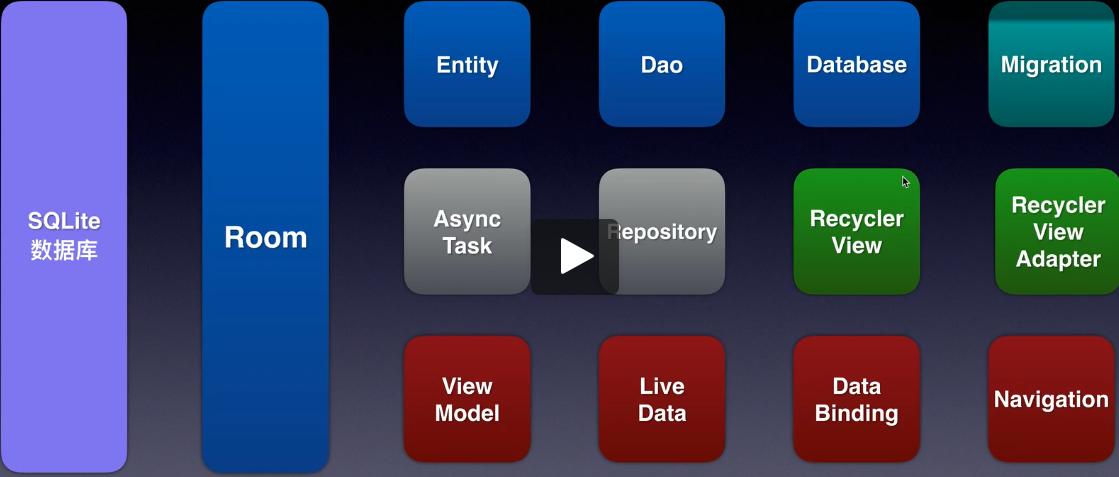
导入依赖
app的build.gradle中开启kapt:
apply plugin: 'kotlin-kapt'
并导入以下依赖:
def room_version = '2.2.4'

implementation "androidx.room:room-runtime:$room_version"

annotationProcessor "androidx.room:room-compiler:$room_version" // For Kotlin use kapt instead of annotationProcessor

// Test helpers

testImplementation "androidx.room:room-testing:$room_version"

kapt 'android.arch.persistence.room:compiler:1.1.1'

implementation 'androidx.recyclerview:recyclerview:1.1.0'

//注意:对于基于 Kotlin 的应用,请确保使用 kapt 而不是 annotationProcessor。您还应添加 kotlin-kapt 插件。
基础三大件:Entity,Dao,Database
Entity:数据库的结构
语法
使用@Entity注解Entity类

使用@PrimaryKey(autoGenerate = true),@ColumuInfo(name = "")注解键
示例
@Entity(tableName = "word_table")     //数据库结构

data class Word (

    @PrimaryKey(autoGenerate = true)

    var id: Int,

    @ColumnInfo(name = "english")

    var word: String,

    @ColumnInfo(name = "chinese")

    var chineseMeaning: String

)
Dao:数据库的操作
语法
使用 @Dao注解接口

使用 @Insert,@Update,@Delete,@Query("DELETE FROM WORD"),@Query("SELECT * FROM WORD ORDER BY ID DESC") 等注解数据库操作
示例
@Dao        //数据库操作

interface WordDao {

    @Insert

    fun insertWords(vararg words: Word)

    @Update

    fun updateWords(vararg words: Word)

    @Delete

    fun daleteWords(vararg words: Word)

    @Query("DELETE FROM WORD")

    fun deleteAllWords()

    @Query("SELECT * FROM WORD ORDER BY ID DESC")

    fun getAllWords() : LiveData<List<Word>> //使用LiveData,观测数据改变并自动

}
Database:数据库工具类
语法
使用 @Database(entities = [com.example.roomtest.Word::class], version = 1, exportSchema = false) 注解类

尽量使用抽象类并且使用单例模式
示例
@Database(entities = [com.example.roomtest.Word::class], version = 1, exportSchema = false)

//获取数据库实体

abstract class WordDatabase : RoomDatabase() {

    abstract fun getWordDao() : WordDao

    /**

     * 单例数据库

     */

    companion object {

        private var instance: WordDatabase? = null

        @Synchronized

        fun get(context: Context): WordDatabase {

            if (instance == null) {

                instance = Room.databaseBuilder(context.applicationContext,

                WordDatabase::class.java, "word_database")

                    .build()

            }

            return instance!!

        }

    }

}
进阶
一、使用ViewModel
1,导入ViewModel模板
2,示例
class WordViewModel(application: Application) : AndroidViewModel(application) {

    var wordDao: WordDao

    var allWordLive: LiveData<List<Word>>

    init {

        val wordDatabase = WordDatabase.get(application)

        wordDao = wordDatabase.getWordDao()

        allWordLive = wordDao!!.getAllWords()

    }

    fun insertWords(vararg words: Word) {

        InsertAsyncTask(wordDao!!).execute(*words)

    }

    fun clearWords() {

        ClearAsyncTask(wordDao!!).execute()

    }

    inner class InsertAsyncTask(val wordDao: WordDao) : BaseAsyncTask(wordDao) {

        override fun doInBackground(vararg params: Word): Void? {

            wordDao.insertWords(*params)

            return null

        }

    }

    inner class UpdateAsyncTask(val wordDao: WordDao) : BaseAsyncTask(wordDao) {

        override fun doInBackground(vararg params: Word): Void? {

            return null

        }

    }

    inner class DeleteAsyncTask(val wordDao: WordDao) : BaseAsyncTask(wordDao) {

        override fun doInBackground(vararg params: Word): Void? {

            return null

        }

    }

    inner class ClearAsyncTask(val wordDao: WordDao) : BaseAsyncTask(wordDao) {

        override fun doInBackground(vararg params: Word): Void? {

            wordDao.deleteAllWords()

            return null

        }

    }

}
以上ViewModel将数据的操作与使用放在一起,还可以继续分层:将数据的使用剥离出去
二、使用仓库Reposity访问数据
示例
/**

 * 数据访问

 */

class WordRepository(val context: Context) {

    private var allWordsLive : LiveData<List<Word>>

    private var wordDao : WordDao

    init {

        val wordDatabase = WordDatabase.get(context)

        wordDao = wordDatabase.getWordDao()

        allWordsLive = wordDao.getAllWords()

    }

    fun insertWords(vararg words: Word) {

        InsertAsyncTask(wordDao!!).execute(*words)

    }

    fun clearWords() {

        ClearAsyncTask(wordDao!!).execute()

    }

    inner class InsertAsyncTask(val wordDao: WordDao) : BaseAsyncTask(wordDao) {

        override fun doInBackground(vararg params: Word): Void? {

            wordDao.insertWords(*params)

            return null

        }

    }

    inner class ClearAsyncTask(val wordDao: WordDao) : BaseAsyncTask(wordDao) {

        override fun doInBackground(vararg params: Word): Void? {

            wordDao.deleteAllWords()

            return null

        }

    }

}
改造后的ViewModel:
class WordViewModel(application: Application) : AndroidViewModel(application) {

    private val wordDao: WordDao

    var allWordLive: LiveData<List<Word>>

    init {

        val wordDatabase = WordDatabase.get(application)

        wordDao = wordDatabase.getWordDao()

        allWordLive = wordDao!!.getAllWords()

    }

    fun insertWords(vararg words: Word) {

        WordRepository(getApplication()).insertWords(*words)

    }

    fun clearWords() {

        WordRepository(getApplication()).clearWords()

    }

}
三、升级数据库
Room.databaseBuilder(context.applicationContext,

		WordDatabase::class.java,

		"word_database")

	.fallbackToDestructiveMigration()       //破坏式升级:升级版本后清空原有内容

	.addMigrations(MIGRATION_1_2)       	//无痛改变

    .build()

val MIGRATION_1_2 : Migration = object : Migration(1, 2) {	//类的参数分别为新旧数据库的版本号

	override fun migrate(database: SupportSQLiteDatabase) {

		database.execSQL("")		//使用SQL语句进行数据库操作

	}

}
项目的其他代码
基累BaseAsyncTask:
open class BaseAsyncTask(private val wordDao: WordDao) : AsyncTask<Word, Void, Void>() {

    override fun doInBackground(vararg words: Word): Void? {

        return null

    }

}
Acitvity:
import androidx.appcompat.app.AppCompatActivity

import android.os.Bundle

import android.widget.Button

import android.widget.TextView

import androidx.lifecycle.LiveData

import androidx.lifecycle.Observer

import androidx.lifecycle.ViewModelProviders

import java.lang.StringBuilder

class MainActivity : AppCompatActivity() {

    private lateinit var insert: Button

    private lateinit var update: Button

    private lateinit var delete: Button

    private lateinit var clear: Button

    private lateinit var content : TextView

    private lateinit var wordViewModel: WordViewModel

    override fun onCreate(savedInstanceState: Bundle?) {

        super.onCreate(savedInstanceState)

        setContentView(R.layout.activity_main)

        insert = findViewById(R.id.insert)

        update = findViewById(R.id.update)

        delete = findViewById(R.id.delete)

        clear = findViewById(R.id.clear)

        content = findViewById(R.id.content)

        wordViewModel = ViewModelProviders.of(this)[WordViewModel::class.java]

        wordViewModel.allWordLive.observe(this, Observer {

            var text = StringBuilder()

            for (x in it) {

            text.append(x.id).append(":").append(x.word).append("=").append(x.chineseMeaning).append("\n")

            }

            content.text = text.toString()

        })

        insert.setOnClickListener {

            var word1 = Word(0, "Hello", "你好")

            var word2 = Word(0, "World", "世界")

            wordViewModel.insertWords(word1, word2)

        }

        clear.setOnClickListener {

            wordViewModel.clearWords()

        }

    }

}
xml布局:
<androidx.constraintlayout.widget.ConstraintLayout xmlns:android="http://schemas.android.com/apk/res/android"

    xmlns:app="http://schemas.android.com/apk/res-auto"

    xmlns:tools="http://schemas.android.com/tools"

    android:layout_width="match_parent"

    android:layout_height="match_parent"

    tools:context=".MainActivity">

    <androidx.constraintlayout.widget.Guideline

        android:id="@+id/guideline"

        android:layout_width="wrap_content"

        android:layout_height="wrap_content"

        android:orientation="horizontal"

        app:layout_constraintGuide_percent="0.6" />

    <ScrollView

        android:id="@+id/scrollView2"

        android:layout_width="0dp"

        android:layout_height="0dp"

        app:layout_constraintBottom_toTopOf="@+id/guideline"

        app:layout_constraintEnd_toEndOf="parent"

        app:layout_constraintHorizontal_bias="1.0"

        app:layout_constraintStart_toStartOf="parent"

        app:layout_constraintTop_toTopOf="parent"

        app:layout_constraintVertical_bias="1.0">

        <TextView

            android:id="@+id/content"

            android:layout_width="match_parent"

            android:layout_height="wrap_content"

            android:text="TextView"

            android:textSize="24sp" />

    </ScrollView>

    <androidx.constraintlayout.widget.Guideline

        android:id="@+id/guideline2"

        android:layout_width="wrap_content"

        android:layout_height="wrap_content"

        android:orientation="vertical"

        app:layout_constraintGuide_percent="0.5" />

    <androidx.constraintlayout.widget.Guideline

        android:id="@+id/guideline3"

        android:layout_width="wrap_content"

        android:layout_height="wrap_content"

        android:orientation="horizontal"

        app:layout_constraintGuide_percent="0.8" />

    <Button

        android:id="@+id/insert"

        android:layout_width="wrap_content"

        android:layout_height="wrap_content"

        android:text="insert"

        app:layout_constraintBottom_toTopOf="@+id/guideline3"

        app:layout_constraintEnd_toStartOf="@+id/guideline2"

        app:layout_constraintStart_toStartOf="parent"

        app:layout_constraintTop_toTopOf="@+id/guideline"

        app:layout_constraintVertical_bias="0.52" />

    <Button

        android:id="@+id/update"

        android:layout_width="wrap_content"

        android:layout_height="wrap_content"

        android:text="update"

        app:layout_constraintBottom_toTopOf="@+id/guideline3"

        app:layout_constraintEnd_toEndOf="parent"

        app:layout_constraintStart_toStartOf="@+id/guideline2"

        app:layout_constraintTop_toTopOf="@+id/guideline"

        app:layout_constraintVertical_bias="0.52" />

    <Button

        android:id="@+id/clear"

        android:layout_width="wrap_content"

        android:layout_height="wrap_content"

        android:text="clear"

        app:layout_constraintBottom_toBottomOf="parent"

        app:layout_constraintEnd_toStartOf="@+id/guideline2"

        app:layout_constraintStart_toStartOf="parent"

        app:layout_constraintTop_toTopOf="@+id/guideline3" />

    <Button

        android:id="@+id/delete"

        android:layout_width="wrap_content"

        android:layout_height="wrap_content"

        android:text="delete"

        app:layout_constraintBottom_toBottomOf="parent"

        app:layout_constraintEnd_toEndOf="parent"

        app:layout_constraintStart_toStartOf="@+id/guideline2"

        app:layout_constraintTop_toTopOf="@+id/guideline3" />

</androidx.constraintlayout.widget.ConstraintLayout>
懒加载控件:Paging
声明依赖
def paging_version = "2.1.1"

implementation "androidx.paging:paging-runtime:$paging_version" // For Kotlin use paging-runtime-ktx

// alternatively - without Android dependencies for testing

testImplementation "androidx.paging:paging-common:$paging_version" // For Kotlin use paging-common-ktx

// optional - RxJava support

implementation "androidx.paging:paging-rxjava2:$paging_version" // For Kotlin use paging-rxjava2-ktx
Paging + Room + RecyclerView
数据类型
Dao中,数据使用DataSource.Factory<Key, Value>格式
@Dao

interface StudentDao {

    @Query("SELECT * FROM student_table ORDER BY id")

    fun getAllStudents() : DataSource.Factory<Int, Student>

}
RecycleView的适配器
改用PagedListAdapter<数据类型, Holder>:
class MyPagedAdapter : PagedListAdapter<Student, MyViewHolder>(DIFF_CALLBACK) {

    companion object {

        private val DIFF_CALLBACK = object : DiffUtil.ItemCallback<Student>() {

            override fun areItemsTheSame(oldItem: Student, newItem: Student): Boolean {

                return oldItem.id == newItem.id

            }

            override fun areContentsTheSame(oldItem: Student, newItem: Student):Boolean {

                return oldItem.studentNumber == newItem.studentNumber

            }

        }

    }

    override fun onCreateViewHolder(parent: ViewGroup, viewType: Int): MyViewHolder {

        return MyViewHolder(view)

    }

    override fun onBindViewHolder(holder: MyViewHolder, position: Int) {

    }

    class MyViewHolder(itemView: View) : ViewHolder(itemView) {

    }

}
装配数据
private lateinit var studentDao: StudentDao						//Dao类

private lateinit var studentDatabase : StudentDatabase			//数据库类

private lateinit var pagedAdapter: MyPagedAdapter				//适配器类

private lateinit var allStudentsLivePaged : LiveData<PagedList<Student>>	//分页数据管理

override fun onCreate(savedInstanceState: Bundle?) {

    super.onCreate(savedInstanceState)

    setContentView(R.layout.activity_main)

    pagedAdapter = MyPagedAdapter()

    list.layoutManager = LinearLayoutManager(this, LinearLayoutManager.VERTICAL, false)

    list.adapter = pagedAdapter

    studentDatabase = StudentDatabase.getInstance(this)

    studentDao = studentDatabase.getStudentDao()

    //第二个参数为一次加载数据的个数

    allStudentsLivePaged = LivePagedListBuilder(studentDao.getAllStudents(), 2).build()

}
AndroidJetpack数据处理之数据库Room和懒加载Paging的更多相关文章
- hibernate懒加载(转载)
http://blog.csdn.net/sanjy523892105/article/details/7071139 懒加载详解 懒加载为Hibernate中比较常用的特性之一,下面我们详细来了解下 ...
- Hibernate中的一级缓存、二级缓存和懒加载(转)
1.为什么使用缓存 hibernate使用缓存减少对数据库的访问次数,从而提升hibernate的执行效率.hibernate中有两种类型的缓存:一级缓存和二级缓存. 2.一级缓存 Hibenate中 ...
- Hibernate中的一级缓存、二级缓存和懒加载
1.为什么使用缓存 hibernate使用缓存减少对数据库的访问次数,从而提升hibernate的执行效率.hibernate中有两种类型的缓存:一级缓存和二级缓存. 2.一级缓存 Hibenate中 ...
- Hibernate第八篇【懒加载】
前言 前面在使用Hibernate的时候就提及过了懒加载,但没有好好地说明具体的说明究竟是怎么回事-本博文主要讲解懒加载 什么是拦截器以及为什么要使用懒加载? 懒加载就是当使用数据的时候才去获取数据. ...
- Hibernate懒加载解析
Hibernate懒加载解析 在Hibernate框架中,当我们要访问的数据量过大时,明显用缓存不太合适, 因为内存容量有限 ,为了减少并发量,减少系统资源的消耗,这时Hibernate用懒加载机制来 ...
- @Basic表示一个简单的属性 懒加载,急加载
5.@Basic(fetch=FetchType,optional=true) 可选 @Basic表示一个简单的属性到数据库表的字段的映射,对于没有任何标注的getXxxx()方法,默认 即为 @Ba ...
- hibernate懒加载
Hibernate懒加载解析 hibernatejoinsession数据库sqlobject Hibernate懒加载解析 在Hibernate框架中,当我们要访问的数据量过大时,明显用缓存不太合适 ...
- 四十二:数据库之SQLAlchemy之数据查询懒加载技术
懒加载在一对多,或者多对多的时候,如果要获取多的这一部分的数据的时候,通过一个relationship定义好对应关系就可以全部获取,此时获取到的数据是list,但是有时候不想获取全部数据,如果要进行数 ...
- 在ThinkPHP框架(5.0.24)下引入Ueditor并实现向七牛云对象存储上传图片同时将图片信息保存到MySQL数据库,同时实现lazyload懒加载
这是我花了很多天的时间才得以真正实现的一组需求. 文章后面有完整Demo的GitHub链接. 一. 需求描述 1. 应用是基于ThinkPHP5开发的: 2. 服务器环境是LNMP,PHP版本是7.2 ...
随机推荐
- Python -- 长字符串
如果需要写一个非常非常长的字符串,它需要跨多行,那么,可以使用三个引号代替普通引号. print '''This is a very long string. It continues here. A ...
- koa踩坑记录
1.koa热更新用nodemon 2.koa中暂不支持import/export 3.只发送options请求,没有后续请求 当ctx.set('Access-Control-Allow-Cred ...
- Blazor 组件之间使用 EventCallback 进行通信
翻译自 Waqas Anwar 2021年3月28日的文章 <Communication between Blazor Components using EventCallback> [1 ...
- sqli-labs 靶场笔记
sqli-labs 靶场笔记 冲冲冲,好好学习 2020年1月12号 先来点铺垫 分类: 按照请求方法分类: 1.Get型注入:注入参数在get的参数里. 2.POST型注入:注入参数在POST的参数 ...
- SQL SERVER获取表在哪些存储过程中使用过
1.获取某张表在哪些存储过程中使用到 select distinct object_name(id) from syscomments where id in (select object_id fr ...
- git基本命令-直接上手使用
git基本命令-直接上手使用 此篇为直接是使用git,如果想了解其原理和其他详细信息,请关注我,看其它相关文章 git创建仓库(初始化仓库) 使用当前目录作为仓库 git init // 执行该目录后 ...
- Notepad++的NppFTP插件连接linux操作系统
Notepad++的NppFTP插件连接linux操作系统 下载地址:https://notepad-plus-plus.org/downloads/v8.1.2/ 1.安装Npp_FTP插件 两种方 ...
- WPF按钮实现水波纹效果
xaml代码如下 <Button x:Class="UI.btn.ZButton" xmlns="http://schemas.microsoft.com/winf ...
- 计算机网络:基于iptalbes的SANT和DNAT|docker的服务器发布项目--超详细一看就会
项目说明: 模拟企业让内网服务器可以上网,同时发布内网的服务器 1.实验环 我们需要准备三台linux系统,一台作为路由器机route,其它为客户机client-1.client-2 主机改名 ho ...
- epoll水平/边缘触发模式下阻塞/非阻塞EPOLLOUT事件触发条件及次数
在IO多路复用技术中,epoll默认的事件触发模式为Level_triggered(水平触发)模式,即当被监控的文件描述符上有可读/写事件发生时,epoll_wait()会通知处理程序去读写.如果这次 ...