
Springboot2.x入门——helloWorld
Springboot2.x入门——helloWorld
一、简介
1.1 Springboot简介
Spring Boot是由Pivotal团队提供的全新框架,其设计目的是用来简化新Spring应用的初始搭建以及开发过程。该框架使用了特定的方式来进行配置,从而使开发人员不再需要定义样板化的配置。通过这种方式,Spring Boot致力于在蓬勃发展的快速应用开发领域(rapid application development)成为领导者。
1.2 Springboot2.x比较1.x
新版本代码无需任何变更,只需更新部分配置文件,改动原因是:
- 配置已经不存在或者改名
- 类已经不存在改名
开发中需要变更的部分配置如下:
1. SpringBoot 2基于Spring5和JDK8,而Spring 1x则用的是低版本
2. MVC部分,WebMvcConfiguer,由抽象类改为接口,这是因为JDK8对接口有新的支持形式;视图渲染Freemaker视图解析器也有改动,默认情况下,它会自动加上ftl来来寻找模板
3. 统一错误处理,基类AbstarctErrorController也改动非常大
4. JPA中,findById 返回了一个Optional对象,改动较大,会直接影响所有业务代码
5. SpringBoot配置,web应用的ContextPath 配置属性已经改动,
6. 配置文件的中文可以直接读取,而不需要转码
7.自动装配里Boot提供的JavaVersion类报名改动了
8. Redis,见博客https://blog.csdn.net/Mirt_/article/details/80934312
9. Acutator变化很大,默认情况不再启用所有监控,需要定制化编写监控信息,完全需要重写,HealthIndicator,EndPoint同理
对比转自链接:https://blog.csdn.net/u013182960/article/details/88418998
二、使用IntelliJ IDEA创建基础项目
2.1、创建三步骤
因为我习惯了使用IntelliJ IDEA,所以这里直接使用IntelliJ IDEA来进行Springboot基础项目的创建。
2.1.1 选择Spring Initializr
File->new->project
选择Spring Initializr,出现如下页面后,点击Next
(这里的Spring Initializr其实指向的就是Spring官方提供的Spring Initializr工具地址https://start.spring.io/,所以这里创建的工程实际上也是基于Springboot官方工具来实现的。)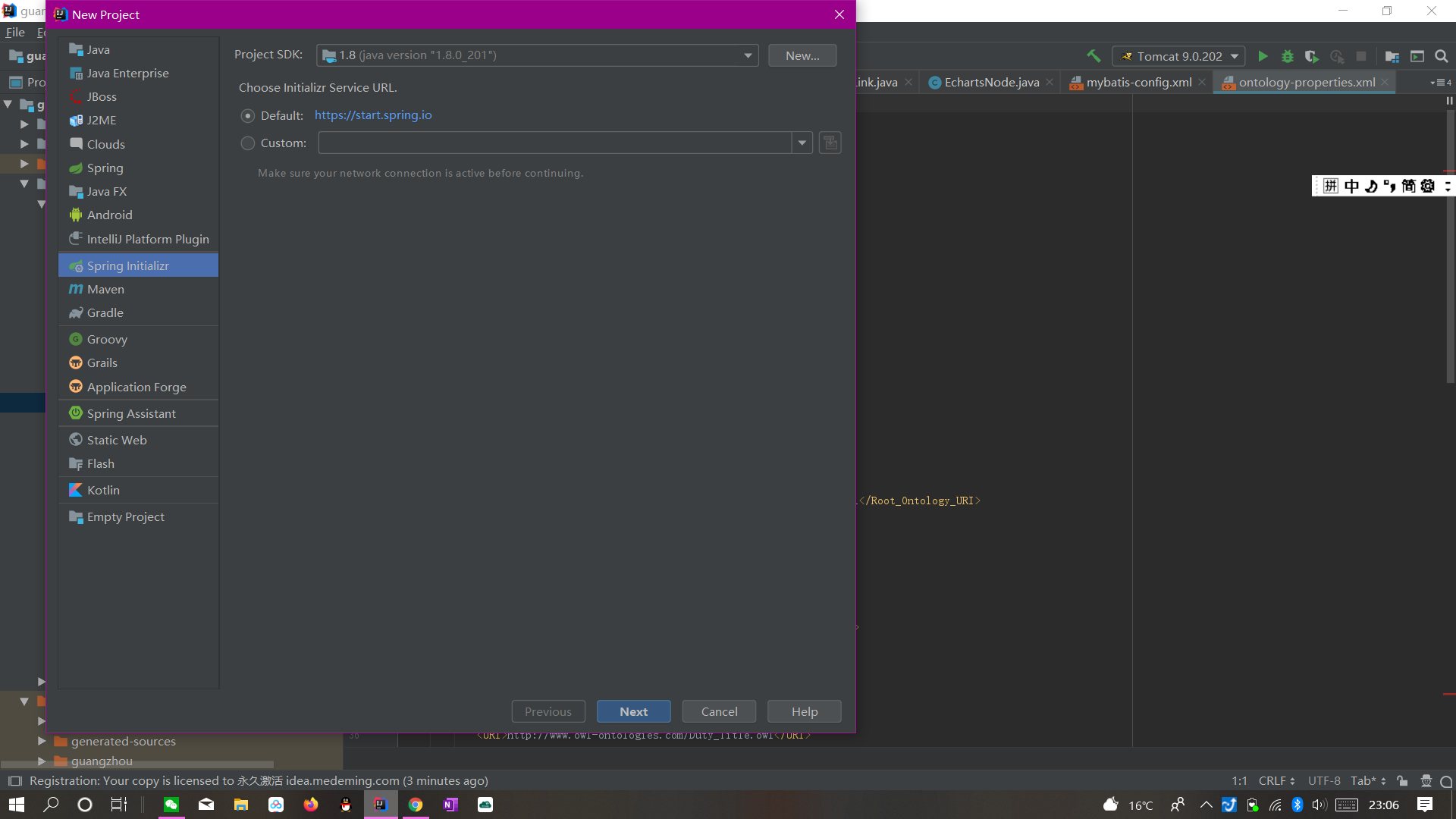
2.1.2 填写信息
点击完Next后,我们可以看到如下图所示的工程信息窗口,填好相应的Group和Artifact信息,点击Next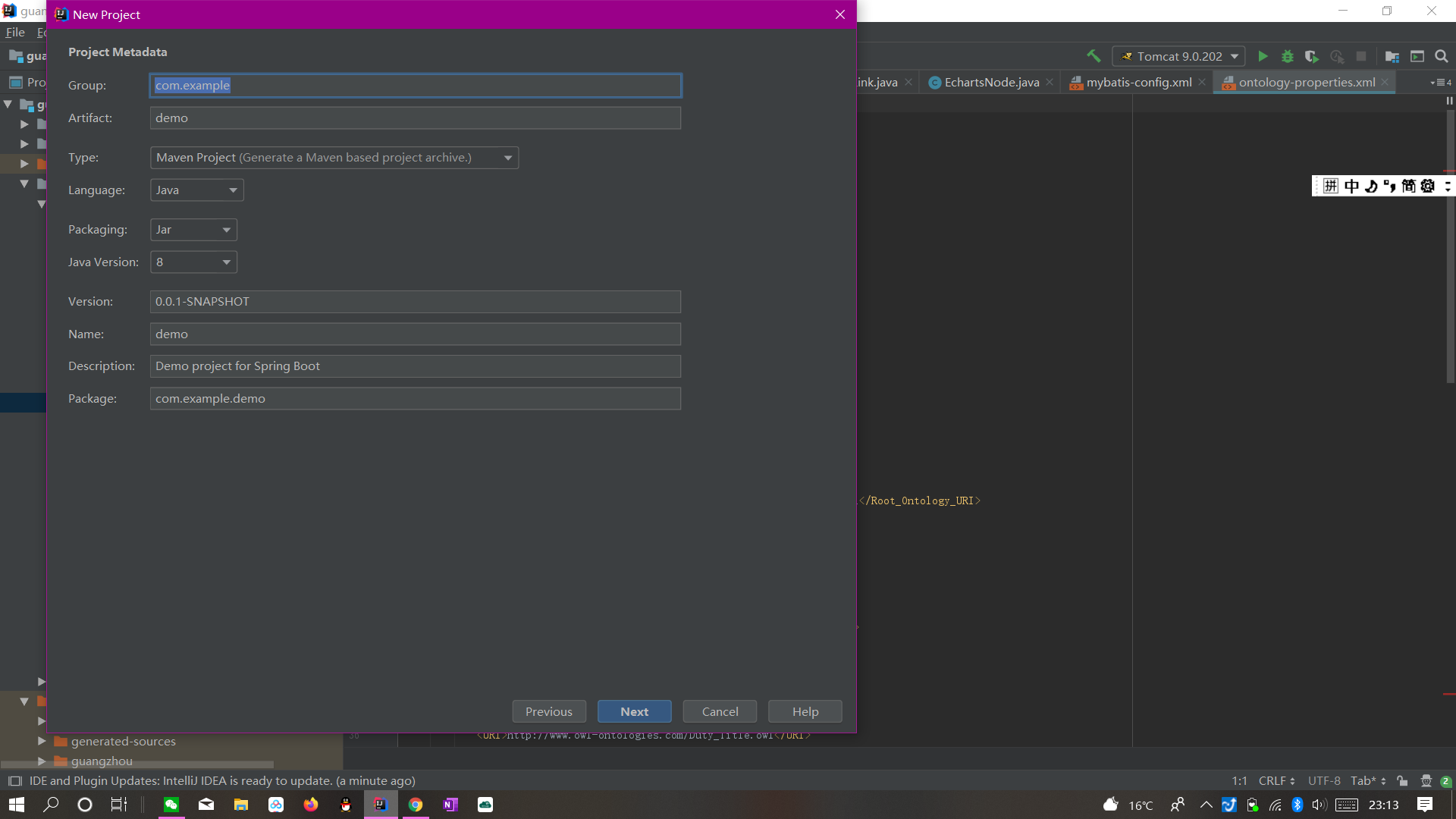
2.1.3 选择依赖,调整位置
此时我们进入的是选择Spring Boot版本和依赖管理的窗口,根据自己的需求选择相应的依赖,点击Next进入最后关于工程物理存储的一些细节,大家可以在这里选择自己项目的存放位置。最后,点击Finish就能完成工程的构建了。
(在这里值的我们关注的是,它不仅包含了Spring Boot Starter POMs中的各个依赖,还包含了Spring Cloud的各种依赖。)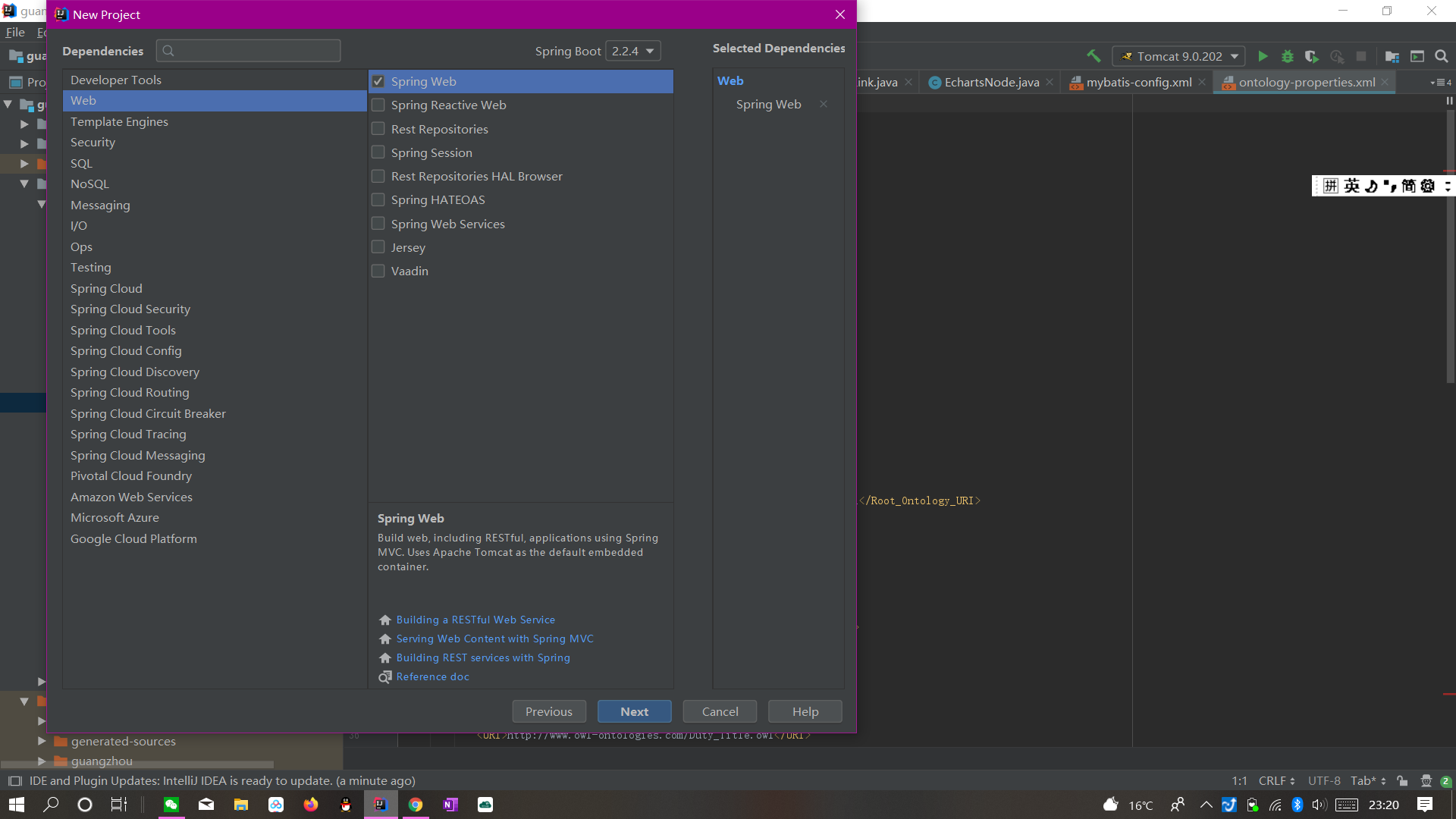
2.2、项目初始结构解析
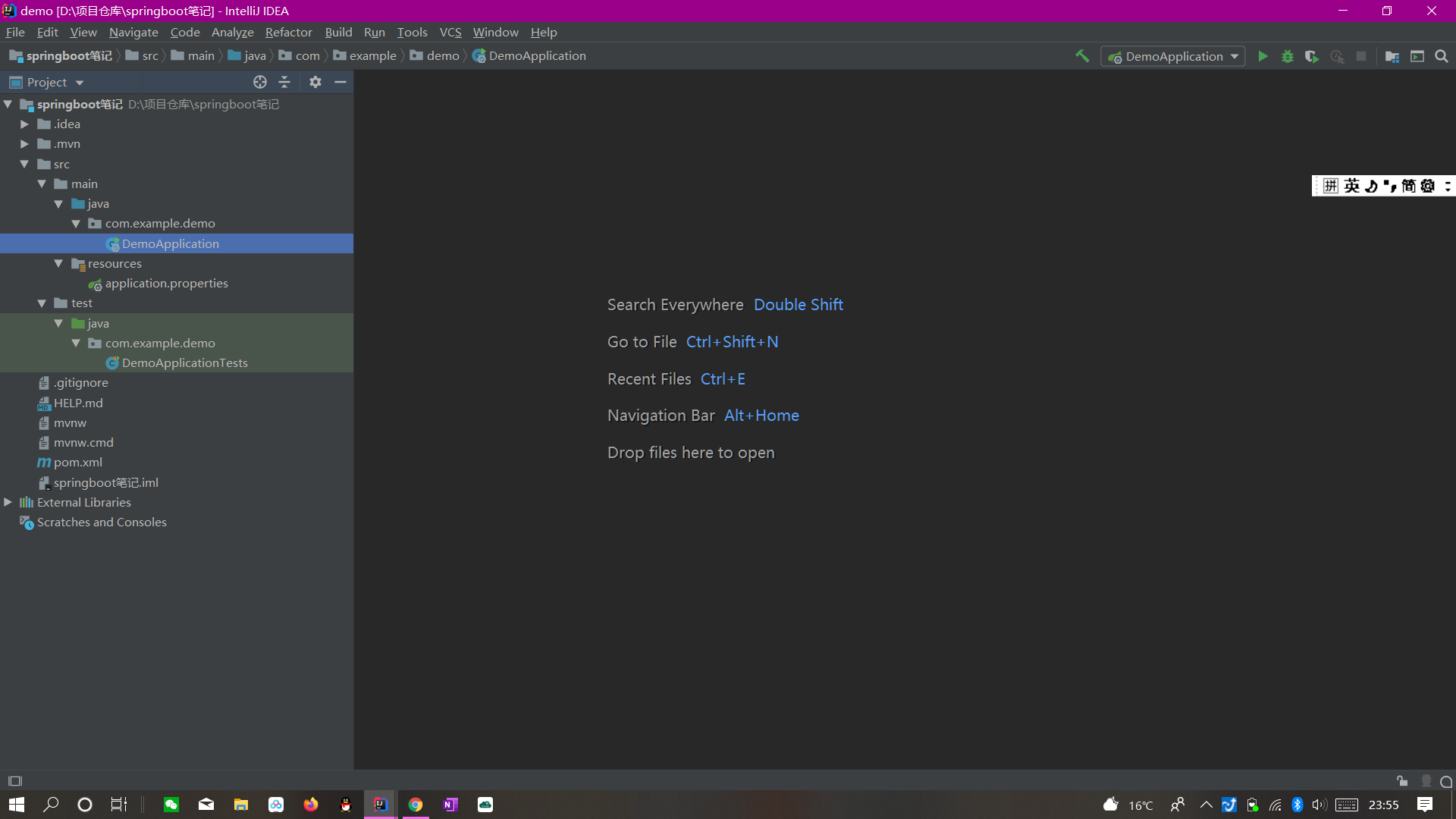
创建成功后的初始页面我们可以看到如上图所示:
2.2.1 程序入口
DemoApplication
2.2.2 配置文件
application.properties
2.2.3 测试入口
DemoApplicationTests
从名字大家也能看懂它们的作用了吧,这里就不多陈述。
2.3、项目依赖解析
打开pom.xml,我们可以看到如下内容:
<?xml version="1.0" encoding="UTF-8"?>

<project xmlns="http://maven.apache.org/POM/4.0.0" xmlns:xsi="http://www.w3.org/2001/XMLSchema-instance"

         xsi:schemaLocation="http://maven.apache.org/POM/4.0.0 https://maven.apache.org/xsd/maven-4.0.0.xsd">

    <modelVersion>4.0.0</modelVersion>

    <parent>

        <groupId>org.springframework.boot</groupId>

        <artifactId>spring-boot-starter-parent</artifactId>

        <version>2.2.4.RELEASE</version>

        <relativePath/> <!-- lookup parent from repository -->

    </parent>

    <groupId>com.example</groupId>

    <artifactId>demo</artifactId>

    <version>0.0.1-SNAPSHOT</version>

    <name>demo</name>

    <description>Demo project for Spring Boot</description>

    <properties>

        <java.version>1.8</java.version>

    </properties>

    <dependencies>

        <dependency>

            <groupId>org.springframework.boot</groupId>

            <artifactId>spring-boot-starter-web</artifactId>

        </dependency>

        <dependency>

            <groupId>org.springframework.boot</groupId>

            <artifactId>spring-boot-starter-test</artifactId>

            <scope>test</scope>

        </dependency>

    </dependencies>

    <build>

        <plugins>

            <plugin>

                <groupId>org.springframework.boot</groupId>

                <artifactId>spring-boot-maven-plugin</artifactId>

            </plugin>

        </plugins>

    </build>

</project>
如上所示,主要有四个部分:
2.3.1 项目元数据
创建时候输入的Project Metadata部分,也就是Maven项目的基本元素,包括:groupId、artifactId、version、name、description等
2.3.2 parent
 <parent>

        <groupId>org.springframework.boot</groupId>

        <artifactId>spring-boot-starter-parent</artifactId>

        <version>2.2.4.RELEASE</version>

        <relativePath/> <!-- lookup parent from repository -->

    </parent>
继承父依赖spring-boot-starter-parent的依赖管理,控制版本与打包等内容
2.3.3 dependencies
项目具体依赖,一个项目可以有很多依赖,如我们选择的spring-boot-starter-web用于实现HTTP接口
(web-starter依赖中包含了Spring MVC)
2.3.4 build
<build>

        <plugins>

            <plugin>

                <groupId>org.springframework.boot</groupId>

                <artifactId>spring-boot-maven-plugin</artifactId>

            </plugin>

        </plugins>

    </build>
构建配置部分。默认使用了spring-boot-maven-plugin,配合spring-boot-starter-parent就可以把Spring Boot应用打包成JAR来直接运行。
2.4、编写一个HTTP接口
2.4.1 创建Controller类
在文件java下新建一个Controller类helloController,如下:
package com.example.demo;

import org.springframework.web.bind.annotation.RequestMapping;

import org.springframework.web.bind.annotation.RestController;

@RestController

public class HelloController {

    @RequestMapping("/hello")

    public String hello(){

        return "hello,world!";

    }

}
2.4.2 启动主程序
启动主程序,发起请求:http://localhost:8080/hello,可以看到页面返回:Hello,world!如下: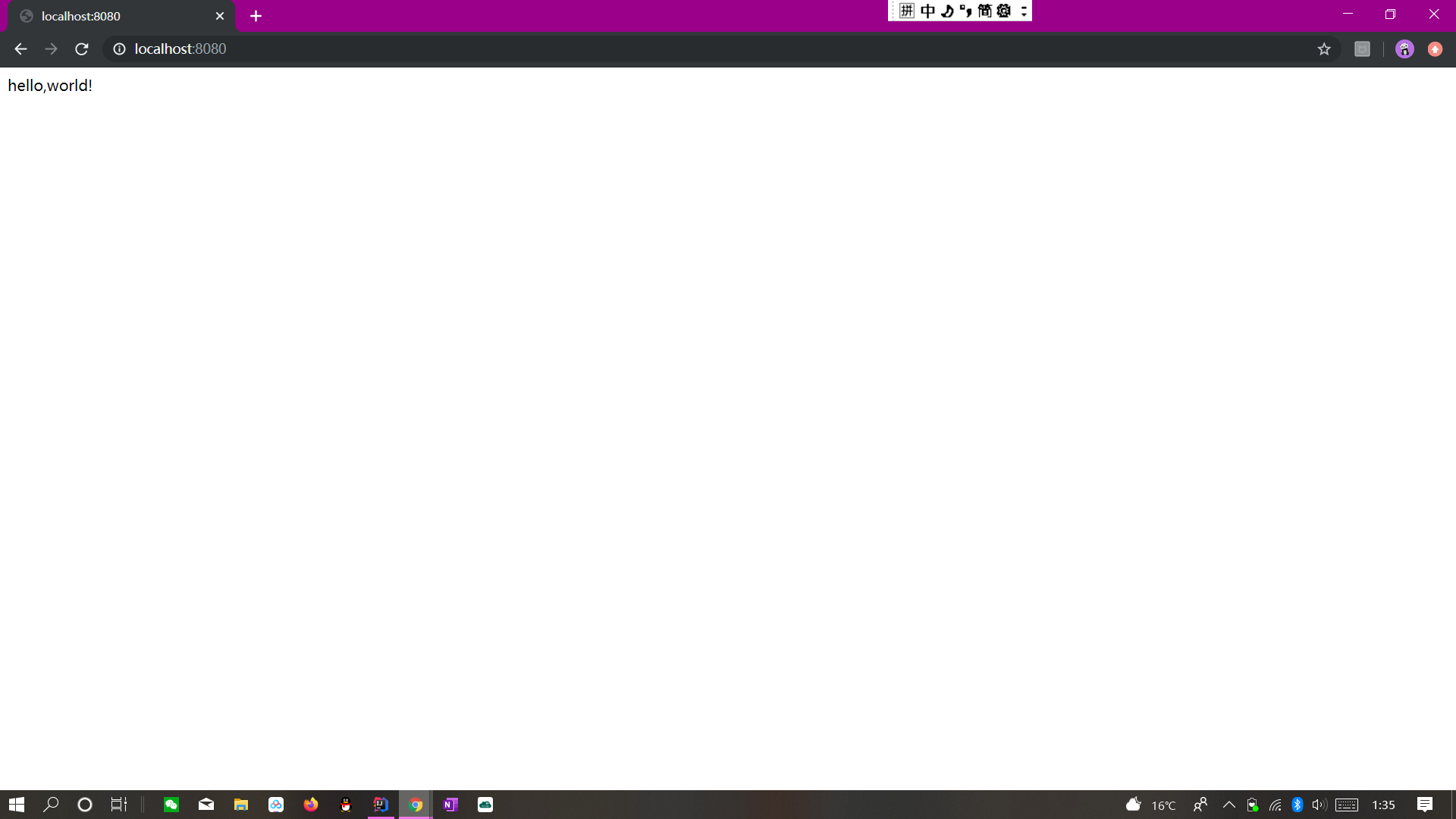
(注意:注解报红请打开maven工具栏检查一下,很可能是依赖包的问题)
Springboot2.x入门——helloWorld的更多相关文章
- RabbitMQ学习总结 第二篇:快速入门HelloWorld
目录 RabbitMQ学习总结 第一篇:理论篇 RabbitMQ学习总结 第二篇:快速入门HelloWorld RabbitMQ学习总结 第三篇:工作队列Work Queue RabbitMQ学习总结 ...
- Wix学习整理(1)——快速入门HelloWorld
原文:Wix学习整理(1)--快速入门HelloWorld 1 Wix简介 Wix是Windows Installer XML的简称,其通过类XML文件格式来指定了用于创建Windows Instal ...
- CodeIgniter入门——HelloWorld
原文:CodeIgniter入门--HelloWorld CodeIgniter(CI)是一套给PHP网站开发者使用的应用程序开发框架和工具包. 初次接触,来一个HelloWorld~~~ ^_^ 准 ...
- Flask入门HelloWorld
Flask入门HelloWorld Flask官网:http://flask.pocoo.org/ Flask中文翻译:http://dormousehole.readthedocs.io/en/la ...
- Windows Eclipse Scala的入门HelloWorld
[学习笔记] Windows Eclipse Scala的入门HelloWorld 有关带scala版本的eclipse4.7的下载, 你可以直接去: http://scala-ide.org/dow ...
- Spring Boot2(002):手动创建第1个SpringBoot2简单应用——“HelloWorld” web 工程
备注:以下内容参考 springboot 官方文档 https://docs.spring.io/spring-boot/docs/2.1.5.RELEASE/reference/pdf/spring ...
- SpringBoot2.x入门:快速创建一个SpringBoot应用
前提 这篇文章是<SpringBoot2.x入门>专辑的第2篇文章,使用的SpringBoot版本为2.3.1.RELEASE,JDK版本为1.8. 常规的套路会建议使用Spring官方提 ...
- SpringBoot2.x入门:引入web模块
前提 这篇文章是<SpringBoot2.x入门>专辑的第3篇文章,使用的SpringBoot版本为2.3.1.RELEASE,JDK版本为1.8. 主要介绍SpringBoot的web模 ...
- SpringBoot2.x入门教程:理解配置文件
前提 这篇文章是<SpringBoot2.x入门>专辑的第4篇文章,使用的SpringBoot版本为2.3.1.RELEASE,JDK版本为1.8. 主要介绍SpringBoot配置文件一 ...
随机推荐
- 神奇的魔方阵--(MagicSquare)(2)
在上一篇博客中,我们讨论了阶数为奇数,以及阶数为(4K)的魔方阵的排列规则,以及代码实现(详见:https://www.cnblogs.com/1651472192-wz/p/14640903.htm ...
- redhat7.6 更换 centos7 YUM
使用yum 遇到如下错误. This system is not registered to Red Hat Subscription Management. You can use subscrip ...
- Trees on the level UVA - 122
Trees are fundamental in many branches of computer science (Pun definitely intended). Current stateo ...
- Borrowers UVA - 230
I mean your borrowers of books - those mutilators of collections, spoilers of the symmetry of shel ...
- Message Decoding UVA - 213
Some message encoding schemes require that an encoded message be sent in two parts. The fifirst par ...
- 机器学习03-sklearn.LinearRegression 源码学习
在上次的代码重写中使用了sklearn.LinearRegression 类进行了线性回归之后猜测其使用的是常用的梯度下降+反向传播算法实现,所以今天来学习它的源码实现.但是在看到源码的一瞬间突然有种 ...
- PAT归纳总结——关于二叉树的一些总结
今天是6月26日到下个月的这个时候已经考过试了,为了让自己考一个更高的分数,所以我打算把PAT的相关题型做一个总结.目前想到的方法就是将相关的题型整理到一起然后,针对这种题型整理出一些方法. 二叉树的 ...
- D - The Frog's Games (二分)
The annual Games in frogs' kingdom started again. The most famous game is the Ironfrog Triathlon. On ...
- 【Jwt】JSON Web Token
一.什么是JSON Web Token: 首先要明确的是JSON Web Token:是一个开放标准,这个标准定义了一种用于简洁,自包含的用于通信双方之间以JSON对象的形式安全传递信息的方法 而我们 ...
- Windows新建选项排序
运行输入:regedit 然后找到:HKEY_CURRENT_USER\Software\Microsoft\Windows\CurrentVersion\Explorer\Discardable\P ...