
MQTT 3 ——MQTT与Spring Mvc整合
本篇记录一下MQTT客户端与Spring Mvc整合
网络上已经有很多的MQTT客户端与SpringBoot整合的技术文档,但是与Spring Mvc框架的整合文档似乎并不太多,可能是因为SpringMvc框架已经逐渐被淘汰了。但很幸运,我这次JAVA后端项目就是用的SpringMvc,所以在整理了网上很多资料后,也为了方便其他后来人,把我这次的整合开发过程用文字记录一下。
POM引入依赖
千万注意引入依赖的版本,一定要保持3个依赖的版本一致,不同的版本可能造成各种问题。
我在开发过程中碰到因为3个版本不一致,导致Class找不到的情况,所以对版本间区别不清楚的朋友们,就不要改版本。
<dependency>

<groupId>org.springframework.integration</groupId>

<artifactId>spring-integration-stream</artifactId>

<version>4.1.0.RELEASE</version>

</dependency>

<dependency>

<groupId>org.springframework.integration</groupId>

<artifactId>spring-integration-core</artifactId>

<version>4.1.0.RELEASE</version>

</dependency>

<dependency>

<groupId>org.springframework.integration</groupId>

<artifactId>spring-integration-mqtt</artifactId>

<version>4.1.0.RELEASE</version>

</dependency>
resource目录下添加mqtt.properties配置文件
#用户名

mqtt.username=mqttPubClient

#密码

mqtt.password=123456

#是否清除会话

mqtt.cleanSession=false

#服务端url

mqtt.serverURI1=tcp://127.0.0.1:1883

mqtt.async=true

#超时时间

mqtt.completionTimeout=20000

#心跳

mqtt.keepAliveInterval=30

#客户端id

mqtt.clientId=mqttPubClient

#默认的消息服务质量

mqtt.defaultQos=1

#MQTT-监听的主题

mqtt.topic=hello
写Spring Mqtt 的配置XML
在resource目录下添加spring-mqtt.xml,要确保这个XML能被Spring启动时加载进去。
 1 <?xml version="1.0" encoding="UTF-8"?>

 2 <beans xmlns="http://www.springframework.org/schema/beans"

 3 xmlns:xsi="http://www.w3.org/2001/XMLSchema-instance"

 4 xmlns:int="http://www.springframework.org/schema/integration"

 5 xmlns:context="http://www.springframework.org/schema/context"

 6 xmlns:int-mqtt="http://www.springframework.org/schema/integration/mqtt"

 7 xsi:schemaLocation="

 8 http://www.springframework.org/schema/integration

 9 http://www.springframework.org/schema/integration/spring-integration-4.1.xsd

10 http://www.springframework.org/schema/beans

11 http://www.springframework.org/schema/beans/spring-beans-3.1.xsd

12 http://www.springframework.org/schema/integration/mqtt

13 http://www.springframework.org/schema/integration/mqtt/spring-integration-mqtt-4.1.xsd

14 http://www.springframework.org/schema/context

15 http://www.springframework.org/schema/context/spring-context-3.1.xsd ">

16

17 <context:property-placeholder location="classpath:mqtt.properties" ignore-unresolvable="true"/>

18

19 <!--MQTT配置-->

20 <bean id="clientFactory"

21 class="org.springframework.integration.mqtt.core.DefaultMqttPahoClientFactory">

22 <property name="userName" value="${mqtt.username}"/>

23 <property name="password" value="${mqtt.password}"/>

24 <property name="cleanSession" value="${mqtt.cleanSession}"/>

25 <property name="keepAliveInterval" value="${mqtt.keepAliveInterval}"/>

26 <property name="serverURIs">

27 <array>

28 <value>${mqtt.serverURI1}</value>

29 </array>

30 </property>

31 </bean>

32

33 <bean id="mqttHandler" class="org.springframework.integration.mqtt.outbound.MqttPahoMessageHandler">

34 <constructor-arg name="clientId" value="${mqtt.clientId}"/>

35 <constructor-arg name="clientFactory" ref="clientFactory"/>

36 <property name="async" value="${mqtt.async}"/>

37 <property name="defaultQos" value="${mqtt.defaultQos}"/>

38 <property name="completionTimeout" value="${mqtt.completionTimeout}"/>

39 </bean>

40

41 <!-- 消息适配器 -->

42 <int-mqtt:message-driven-channel-adapter

43 id="mqttInbound" client-id="${mqtt.clientId}" url="${mqtt.serverURI1}"

44 topics="${mqtt.topic}" qos="${mqtt.defaultQos}" client-factory="clientFactory" auto-startup="true"

45 send-timeout="${mqtt.completionTimeout}" channel="startCase" />

46 <int:channel id="startCase" />

47 <!-- 消息处理类 -->

48 <int:service-activator id="handlerService"

49 input-channel="startCase" ref="mqttCaseService" method="handler" />

50

51 <!-- 消息处理 -->

52 <bean id="mqttCaseService" class="com.loong.mqtt.service.impl.MqttServiceImpl" />

53

54 </beans>
MQTT Service 接口
1 public interface MqttService {

2

3 public void send(String topic,String content) throws Exception;

4

5 public void handler(String message) throws Exception;

6 }
MQTT Service 实现
 1 import com.mqtt.service.MqttService;

 2 import lombok.extern.slf4j.Slf4j;

 3 import org.springframework.integration.mqtt.outbound.MqttPahoMessageHandler;

 4 import org.springframework.integration.mqtt.support.MqttHeaders;

 5 import org.springframework.integration.support.MessageBuilder;

 6 import org.springframework.messaging.Message;

 7 import org.springframework.stereotype.Service;

 8

 9 import javax.annotation.Resource;

10

11 @Service("MqttService")

12 @Slf4j

13 public class MqttServiceImpl implements MqttService {

14

15 @Resource

16 private MqttPahoMessageHandler mqttHandler;

17

18 @Override

19 public void send(String topic, String content) throws Exception {

20 // 构建消息

21 Message<String> messages =

22 MessageBuilder.withPayload(content).setHeader(MqttHeaders.TOPIC, topic).build();

23 // 发送消息

24 mqttHandler.handleMessage(messages);

25 }

26

27

28 @Override

29 public void handler(String message) throws Exception {

30 log.info("收到消息:"+message);

31 }

32 }

33
MQTT Controller
 1 package com.loong.mqtt.controller;

 2

 3 import com.loong.api.model.ApiQueryOrderModel;

 4 import com.loong.kuaizhi.service.KuaizhiService;

 5 import com.loong.mqtt.service.MqttService;

 6 import com.loong.ysf.dto.Protocol;

 7 import com.loong.ysf.model.OrderInfo;

 8 import lombok.extern.slf4j.Slf4j;

 9 import org.jeecgframework.core.common.service.impl.RedisService;

10 import org.jeecgframework.core.util.ResourceUtil;

11 import org.springframework.beans.factory.annotation.Autowired;

12 import org.springframework.web.bind.annotation.*;

13

14 import javax.annotation.Resource;

15 import javax.servlet.http.HttpServletRequest;

16 import javax.servlet.http.HttpServletResponse;

17

18 /**

19  */

20 @RestController

21 @RequestMapping("/mqttController")

22 @Slf4j

23 public class MqttController {

24

25     @Resource(name = "MqttService")

26     private MqttService mqttService;

27

28     @RequestMapping(params = "testSend", method = RequestMethod.POST)

29     @ResponseBody

30     public String testSend(HttpServletRequest request, HttpServletResponse response) {

31         try {

32             String topic = ResourceUtil.getParameter("topic");

33             String content = ResourceUtil.getParameter("content");

34             this.mqttService.send(topic,content);

35         } catch (Exception ex) {

36             ex.printStackTrace();

37             log.error("发送失败", ex);

38         }

39

40         return "发送成功";

41     }

42 }
发送消息测试
- MQTTBOX先连上MQTT服务器,并订阅topic为hello的消息
- POSTMAN向mqttController.testSend接口发送请求,topic为hello,内容为{"hello":"200315"}
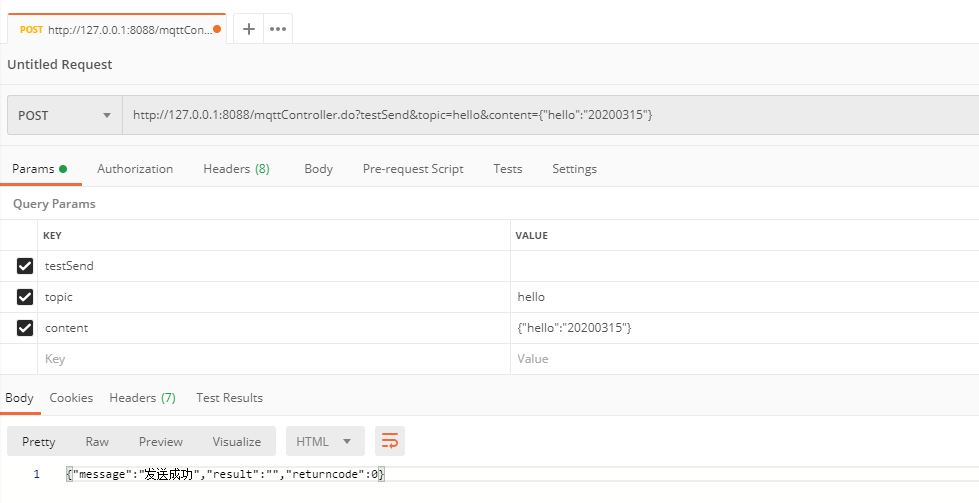
- MQTTBOX里面的订阅者收到消息

接收消息测试
- MQTTBOX创建一个消息发布者,发MQTT服务器发送topic为hello,内容为{"hello":"513002"}

- 项目后台日志输出订阅到的内容

作者:admin
原文地址:www.jiansword.com
MQTT 3 ——MQTT与Spring Mvc整合的更多相关文章
- Spring与Struts2整合VS Spring与Spring MVC整合
Spring与Struts2整合,struts.xml在src目录下 1.在web.xml配置监听器 web.xml <!-- 配置Spring的用于初始化ApplicationContext的 ...
- spring MVC 整合mongodb
Spring Mongodb 目录 1 SPRING整合MONGODB 1 1.1 环境准备 1 1.2 包依赖 1 1.3 配置 2 2 案列 5 2.1 SPRING MVC整合MONGODB代码 ...
- MyBatis+Spring+Spring MVC整合开发
MyBatis+Spring+Spring MVC整合开发课程观看地址:http://www.xuetuwuyou.com/course/65课程出自学途无忧网:http://www.xuetuwuy ...
- 【RabbitMQ系列】 Spring mvc整合RabbitMQ
一.linux下安装rabbitmq 1.安装erlang环境 wget http://erlang.org/download/otp_src_18.2.1.tar.gz tar xvfz otp_s ...
- Java基础-SSM之Spring和Mybatis以及Spring MVC整合案例
Java基础-SSM之Spring和Mybatis以及Spring MVC整合案例 作者:尹正杰 版权声明:原创作品,谢绝转载!否则将追究法律责任. 能看到这篇文章的小伙伴,详细你已经有一定的Java ...
- spring mvc整合mybaitis和log4j
在上一篇博客中,我介绍了在mac os上用idea搭建spring mvc的maven工程,但是一个完整的项目肯定需要数据库和日志管理,下面我就介绍下spring mvc整合mybatis和log4j ...
- Spring MVC 整合Swagger的一些问题总结
在做Spring MVC 整合swagger的时候,遇到的两个问题: 第一个问题 在网上找了一些Spring MVC 和Swagger的例子,照着一步步的配置,结果,到最后,项目都起来了,没有任何问题 ...
- 【Java Web开发学习】Spring MVC整合WebSocket通信
Spring MVC整合WebSocket通信 目录 ========================================================================= ...
- 【转载】Spring MVC 整合 Freemarker
前言 1.为什么要使用Spring MVC呢? 2.为什么要使用Freemarker呢? 3.为什么不使用Struts2呢? 此示例出现的原因就是发现了struts2的性能太差,所以学习Spring ...
随机推荐
- 针对Spring MVC的Interceptor内存马
针对Spring MVC的Interceptor内存马 目录 针对Spring MVC的Interceptor内存马 1 基础拦截器和调用流程的探索 1.1 基础拦截器 1.2 探索拦截器的调用链 1 ...
- 转载 | python inferface使用
Python中最特别的关键字之一便是pass,它放在类或函数里,表示类和函数暂不定义. class PassClass: pass def PassFun(): pass 如上实现最精简的类和函数定义 ...
- C#解决WebClient不能下载https网页内容
在下载之前,执行以下代码即可: if (stUrl.Substring(0, 5) == "https") { // 解决WebClient不能通过https下载内容问题 Serv ...
- 201871030138-杨蕊媛 实验三 结对项目—《D{0-1}KP 实例数据集算法实验平台》项目报告
项目 内容 班级博客链接 https://edu.cnblogs.com/campus/xbsf/2018CST 这个作业要求链接 https://www.cnblogs.com/nwnu-daizh ...
- Vue&Element 前端应用开发之菜单和路由的关系
我们一般的应用系统,菜单是很多功能界面的入口,菜单为了更好体现功能点的设置,一般都是动态从数据库生成的,而且还需要根据用户角色的不同,过滤掉部分没有权限的菜单:在Vue&Element的纯前端 ...
- 基于自动驾驶车辆的NVIDIA-TensorRT推理实时优化
基于自动驾驶车辆的NVIDIA-TensorRT推理实时优化 Optimizing NVIDIA TensorRT Conversion for Real-time Inference on Auto ...
- 如何打造高性能的 Go 缓存库
转载请声明出处哦~,本篇文章发布于luozhiyun的博客:https://www.luozhiyun.com/archives/531 文中代码位置: https://github.com/devY ...
- Linkerd 2.10(Step by Step)—1. 将您的服务添加到 Linkerd
为了让您的服务利用 Linkerd,它们还需要通过将 Linkerd 的数据平面代理(data plane proxy)注入到它们服务的 pod 中,从而进行网格化. Linkerd 2.10 中文手 ...
- 『动善时』JMeter基础 — 47、JMeter的HTTP代理服务器详细介绍
目录 1.HTTP代理服务器的添加 2.HTTP代理服务器界面详解 (1)State:状态 (2)Global Settings:全局设置 (3)Test Plan Creation:测试计划创建 ( ...
- OOP第三次总结Blog
1. 前言 相比于前一次Blog题目集,此次七八九题目集偏重于类的继承.多态性使用方法以及接口的应用;在设计层面,强调模式复用,不断的迭代,若前期设计不合理,则后续的题目增加新的功能(即可扩展性)将会 ...