
asp.net微信开发第四篇----已关注用户管理
如果本章不明白打标签是什么意思,可以先看用户分组管理,再看本章, 本项目所用框架基于:layUI,官网:https://www.layui.com/
公众号可通过本接口来获取帐号的关注者列表,关注者列表由一串OpenID(加密后的微信号,每个用户对每个公众号的OpenID是唯一的)组成。一次拉取调用最多拉取10000个关注者的OpenID,可以通过多次拉取的方式来满足需求。
接口调用请求说明
http请求方式: GET(请使用https协议)

https://api.weixin.qq.com/cgi-bin/user/get?access_token=ACCESS_TOKEN&next_openid=NEXT_OPENID
| 参数 | 是否必须 | 说明 |
|---|---|---|
| access_token | 是 | 调用接口凭证 |
| next_openid | 是 | 第一个拉取的OPENID,不填默认从头开始拉取 |
返回说明
正确时返回JSON数据包:
{"total":2,"count":2,"data":{"openid":["","OPENID1","OPENID2"]},"next_openid":"NEXT_OPENID"}
| 参数 | 说明 |
|---|---|
| total | 关注该公众账号的总用户数 |
| count | 拉取的OPENID个数,最大值为10000 |
| data | 列表数据,OPENID的列表 |
| next_openid | 拉取列表的最后一个用户的OPENID |
错误时返回JSON数据包(示例为无效AppID错误):
{"errcode":40013,"errmsg":"invalid appid"}
附:关注者数量超过10000时
当公众号关注者数量超过10000时,可通过填写next_openid的值,从而多次拉取列表的方式来满足需求。
具体而言,就是在调用接口时,将上一次调用得到的返回中的next_openid值,作为下一次调用中的next_openid值。
示例如下:
公众账号A拥有23000个关注的人,想通过拉取关注接口获取所有关注的人,那么分别请求url如下:

https://api.weixin.qq.com/cgi-bin/user/get?access_token=ACCESS_TOKEN

返回结果:

{

  "total":23000,

  "count":10000,

  "data":{"

     openid":[

        "OPENID1",

        "OPENID2",

        ...,

        "OPENID10000"

     ]

   },

   "next_openid":"OPENID10000"

}

https://api.weixin.qq.com/cgi-bin/user/get?access_token=ACCESS_TOKEN&next_openid=NEXT_OPENID1

返回结果:

{

   "total":23000,

   "count":10000,

   "data":{

     "openid":[

       "OPENID10001",

       "OPENID10002",

       ...,

       "OPENID20000"

     ]

   },

   "next_openid":"OPENID20000"

}

https://api.weixin.qq.com/cgi-bin/user/get?access_token=ACCESS_TOKEN&next_openid=NEXT_OPENID2

返回结果(关注者列表已返回完时,返回next_openid为空):

{

   "total":23000,

   "count":3000,

   "data":{"

       "openid":[

         "OPENID20001",

         "OPENID20002",

         ...,

         "OPENID23000"

       ]

   },

   "next_openid":"OPENID23000"

}

本篇更新于2017年5月11日,微信官方网站后台的接口权限表里(以服务号为例)每天调用的获取用户列表能获取500次,获取用户基本信息可以获取500000次,所以说接下来,我在获取用户列表的时候,会用到缓存,别看500次不少了,
可是真正的用起来快得不得了,先上效果图如下:
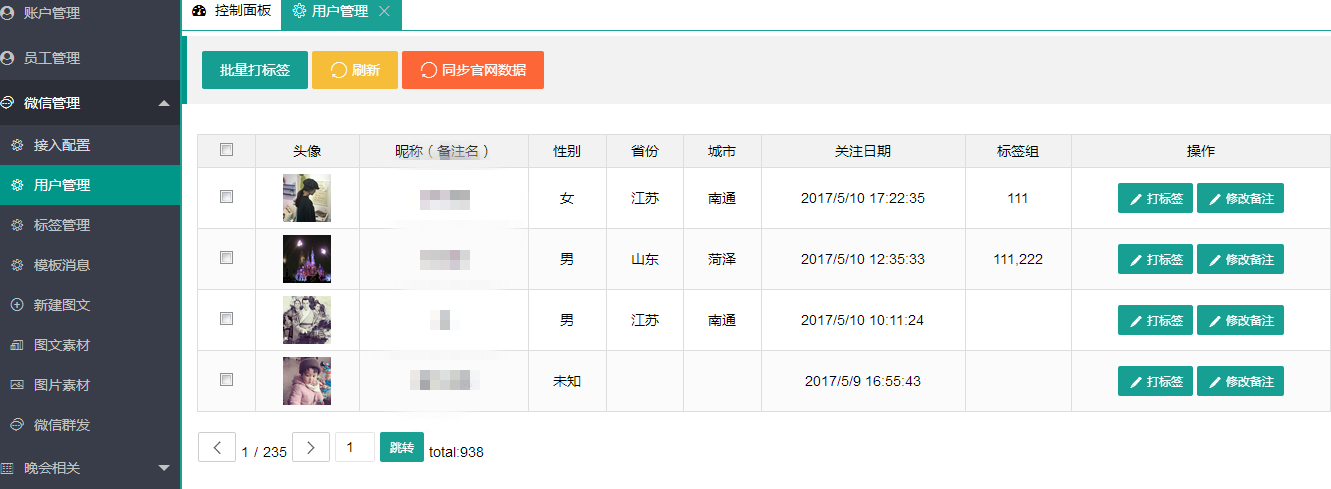
打标签:

批量打标签:

修改用户备注名:

同步官方数据:具体实现思路如下:
1.新建微信用户实体类,openID实体类,用于封装微信用户的每个属性信息,
2.从微信服务器获取到数据后(如果获取数据较多,容易出现卡死现象,我做的是ajax异步获取,加了一个加载数据的动画显示),序列化后转存到本地数据库(转存前删除本地数据库的原有用户数据),页面加载数据的时候是从本地数据库加载的,不和微信打交道,

先来看看用户列表,官网说获取用户的列表返回的是一组组openID,针对这个特性,我是这么做的,
创建一个用于存储openId的类,用于存储openID列表
 /// <summary>

    /// 微信用户的OpenID实体类,此类不用来参与数据库数据存储,只是临时储存用户的openID列表

    /// </summary>

    public class WeChat_UserOpenIdInfo

    {

        /// <summary>

        /// 微信用户的openID

        /// </summary>

        public String WeChatUserOpenId { get; set; }

    }
/// <summary>

    /// 微信已关注用户实体类

    /// </summary>

    public class WeChat_UserInfo

    {

        public int ID { get; set; }//编号,自增列

        public string subscribe { get; set; }//关注状态

        public string openid { get; set; }//OpenID

        public string nickname { get; set; }//昵称

        public string sex { get; set; }//性别

        public string city { get; set; }//城市

        public string country { get; set; }//国家

        public string province { get; set; }//省份

        public string language { get; set; }//语言

        public string headimgurl { get; set; }//头像图片地址

        public string subscribe_time { get; set; }//用户关注时间

        public string remark { get; set; }//备注

        public string groupid { get; set; }//分组ID

        /// <summary>

        /// 用户被打上的标签ID列表

        /// </summary>

        public string tagid_list { get; set; }

    }
用户列表前台代码
<%@ Page Language="C#" AutoEventWireup="true" CodeBehind="WeiXinUserList.aspx.cs" Inherits="DQWebSite.Administrator.WeiXinUserList" %> <!DOCTYPE html> <html xmlns="http://www.w3.org/1999/xhtml">
<head runat="server">
<meta http-equiv="Content-Type" content="text/html; charset=utf-8"/>
<title></title>
<link href="css/style.css" rel="Stylesheet" type="text/css" />
<style type="text/css">
#title {width:%; height:40px;margin-top:10px; text-indent:5px; line-height:40px;}
.checkstyle { float:left;}
#DDlAddgroups { text-align:center; width:161px; border:1px solid #d9d9d9; border-radius:5px; height:35px; line-height:35px; font-weight:bold; text-align:center; float:left; margin:auto 5px auto 5px;}
.DDlAddgroups{ text-align:center; width:161px; border:1px solid #d9d9d9; border-radius:5px; height:35px; line-height:35px; font-weight:bold; text-align:center; float:left; margin:auto 5px auto 5px;}
#DDLgroups { text-align:center; width:111px; border:1px solid #d9d9d9; border-radius:5px; height:35px; line-height:35px; font-weight:bold; text-align:center; float:left; margin:auto 5px auto 5px;}
.newGroups { margin:auto 5px auto 5px;}
.inputstyle { height:35px; line-height:35px; text-indent:5px; width:280px;background-image:url('images/inputbg.gif'); background-repeat:repeat-x;border-top:solid 1px #a7b5bc; border-left:solid 1px #a7b5bc; border-right:solid 1px #ced9df; border-bottom:solid 1px #ced9df; float:left; margin:auto 5px auto 5px;
}
.wxusertab { border:1px solid #d9d9d9; width:%; text-align:left; text-indent:5px;
} th { height:35px;background-image:url('images/th.gif'); background-repeat:repeat-x;
}
td {
border-bottom:1px solid #d9d9d9;
}
.trcolor { background-color:#ecd9df;
}
tr:hover { cursor:pointer;
}
#FenPage { width:1124px; height:25px; line-height:25px; text-align:center; margin:20px auto 20px auto;
}
.linka { color:#0094ff; cursor:pointer;
}
.fenyebtn {width:60px; height:25px; border:1px solid #ced9df; border-radius:5px; text-align:center; line-height:25px; float:right;
}
.fenyebtn2 { width:60px; height:25px; border:1px solid #ced9df; border-radius:5px; text-align:center; line-height:25px;margin-left:10px;float:right;
}
.toPageIndex { width:60px;height:25px; background-image:url('images/inputbg.gif'); margin-left:10px; background-repeat:repeat-x;border-top:solid 1px #a7b5bc; border-left:solid 1px #a7b5bc; border-right:solid 1px #ced9df; border-bottom:solid 1px #ced9df; text-align:center; float:right;
}
.gotoPagebtn { width:60px; height:25px; border:1px solid #ced9df; border-radius:5px; text-align:center; line-height:25px;margin-left:10px;float:right; background-color:#ced9df;
}
.deletebtn {float:left;width:100px; color:#; height:25px; background-color:#ced9df; border:1px solid #ced9df; border-radius:5px; text-align:center;
}
a { color:#08a5e0;
}
.droplist { background-image:url('images/inputbg.gif'); background-repeat:repeat-x; width:120px; height:25px; border:1px solid #ced9df;
}
.checkstyle { float:left;
}
.imgheadstyle { width:50px; height:50px; margin-top:10px;
}
.lbsubscribeCount { font-size:26px;
} #shownewgroup { width:300px; height:200px; background-color:white;z-index:; border:2px solid #DDD; top:%; left:%; background-color:#fff; position:fixed;margin:-100px auto auto -100px; display:none;
}
#shownewgroupzhezhaoceng { height:%; width:%; left:0px; top:0px;position:fixed; z-index:; background:rgb(,,);background:rgba(,,,0.5); display:none;
}
.closeLogin { height:30px; border-bottom:2px solid #31bb34; text-align:right; line-height:30px; font-size:14px; font-weight:bold;
}
a:hover { cursor:pointer;
} #updateremark { width:300px; height:200px; background-color:white;z-index:; border:2px solid #DDD; top:%; left:%; background-color:#fff; position:fixed;margin:-100px auto auto -100px; display:none;
}
#updateremark_zhezhaoceng { height:%; width:%; left:0px; top:0px;position:fixed; z-index:; background:rgb(,,);background:rgba(,,,0.5); display:none;
} </style> <script src="../js/jquery-1.7.1.min.js" type="text/javascript"></script>
<script type="text/javascript">
$(document).ready(function () { $(".newGroups").click(function () {
$("#shownewgroupzhezhaoceng").show();
$("#shownewgroup").show();
}),
$('.closeloginpage').click(function () {
$("#shownewgroupzhezhaoceng").hide();
$("#shownewgroup").hide();
})
})
</script>
</head>
<body>
<form id="form1" runat="server">
<div class="place">
<span>位置:</span>
<ul class="placeul">
<li><a href="WelCome.aspx" target="rightFrame">首页</a></li>
<li>微信管理</li>
<li>德桥员工服务中心--关注者列表管理</li>
</ul>
</div>
<asp:ScriptManager ID="ScriptManager1" runat="server"></asp:ScriptManager>
<asp:UpdatePanel ID="UpdatePanel1" runat="server">
<ContentTemplate>
<div id="shownewgroup">
<div class="closeLogin"><a class="closeloginpage"><span style="float:left; color:#08a5e0; font-size:18px; text-indent:5px;">新建分组</span>关闭</a> </div>
<div style="font-size:12px; height:40px; color:red; line-height:40px;"> 30字符以内</div>
<input type="text" id="txtgroupsName" name="txtgroupsName" class="inputstyle" maxlength="" runat="server" value="分组名称" onfocus="if(value==defaultValue){value='';this.style.color='#000'}" onblur="if(!value){value=defaultValue;this.style.color='#999'}" style="color:#999"/>
<asp:LinkButton ID="LinkBtnCreateGroup" runat="server" OnClick="LinkBtnCreateGroup_Click"><div style="background-image:url('images/buttonbg.png'); width:111px; height:35px; line-height:35px; font-weight:bold;float:left; margin-top:20px; margin-left:5px; text-align:center;color:#fff;"> 确定创建</div></asp:LinkButton>
</div>
<div id="shownewgroupzhezhaoceng"></div>
<div style=" border-bottom:2px solid #31bb34; height:30px; margin-top:10px; text-indent:10px; font-size:22px; line-height:30px; width:100%;"><span style="float:left; font-size:16px;">已关注人数</span><span style="color:red;"><asp:Label ID="lbsubscribeCount" CssClass="lbsubscribeCount" runat="server" Text="Label"></asp:Label> </span></div>
<div id="title">
<asp:CheckBox ID="CheckAll" runat="server" CssClass="checkstyle" OnCheckedChanged="CheckAll_CheckedChanged" /><span style="float:left;">全选 </span> <asp:DropDownList ID="DDlAddgroups" CssClass="DDlAddgroups" runat="server" OnSelectedIndexChanged="DDlAddgroups_SelectedIndexChanged">
</asp:DropDownList>
<asp:DropDownList ID="DDLgroups" runat="server">
</asp:DropDownList>
<a class="newGroups"><div style="background-image:url('images/buttonbg.png'); width:111px; height:35px; line-height:35px; margin:auto 20px auto 10px; font-weight:bold;float:left; text-align:center;color:#fff;"> + 新建分组</div></a>
<a href="WxGroupManageList.aspx"><div style="background-image:url('images/buttonbg.png'); width:111px; height:35px; line-height:35px; margin:auto 20px auto 10px; font-weight:bold;float:left; text-align:center;color:#fff;">分组管理</div></a>
<a href="WeiXinUserList.aspx"><div style="background-image:url('images/buttonbg.png'); width:111px; height:35px; line-height:35px; margin:auto 20px auto 10px; font-weight:bold;float:left; text-align:center;color:#fff;">刷 新</div></a> <%-- <input type="text" id="txtName" name="txtName" class="inputstyle" runat="server" value="用户昵称" onfocus="if(value==defaultValue){value='';this.style.color='#000'}" onblur="if(!value){value=defaultValue;this.style.color='#999'}" style="color:#999"/> <asp:LinkButton ID="LinkButton1" runat="server"><div style="background-image:url('images/buttonbg.png'); width:111px; height:35px; line-height:35px; font-weight:bold;float:left; text-align:center;color:#fff;"> 查询</div></asp:LinkButton>--%>
</div>
<table class="wxusertab">
<asp:Repeater ID="RepeaterWxUserList" runat="server" OnItemDataBound="RepeaterWxUserList_ItemDataBound">
<HeaderTemplate>
<tr>
<th></th>
<th>OpenID</th>
<th>头像</th>
<th>昵称(备注名)</th>
<th>关注时间</th>
<th>所属分组</th>
<th>操作</th>
</tr>
</HeaderTemplate>
<ItemTemplate>
<tr style="width:100%; line-height:50px;">
<td style="width:30px;"> <asp:CheckBox ID="CheckIn" runat="server" CssClass="checkstyle" /> <%--OnCheckedChanged="CheckIn_CheckedChanged"--%></td>
<td style="width:150px;"><asp:Label ID="lbwxopenID" runat="server" Text=""></asp:Label>
</td>
<td style="width:80px;"><asp:Image ID="ImgHeadUrl" runat="server" CssClass="imgheadstyle" /> </td>
<td style="width:150px;"><asp:Label ID="lbNickName" runat="server" CssClass="checkstyle" Text=""></asp:Label>
<asp:Label ID="lbRemark" runat="server" Text=""></asp:Label>
</td>
<td style="width:130px;">
<asp:Label ID="lbSubscrine_time" runat="server" Text=""></asp:Label>
</td>
<td style="width:100px;">
<asp:Label ID="lbgroupId" runat="server" CssClass="checkstyle" Visible="false" Text=""></asp:Label>
<asp:DropDownList ID="DDlAddgroupss" Enabled="false" CssClass="DDlAddgroups" runat="server">
<asp:ListItem Value="">分组名称</asp:ListItem>
</asp:DropDownList>
</td>
<td style="width:110px;">
<a href='UpdateRemarkName.aspx?id=<%# Eval("WxopenId") %>'><div style=" border:1px solid #d9d9d9; border-radius:5px; width:111px; height:35px; line-height:35px; font-weight:bold;float:left; text-align:center;"> 修改备注名称</div></a>
</td>
</tr>
</ItemTemplate>
</asp:Repeater>
</table>
<div id="FenPage">
<asp:LinkButton ID="LinkBtnToPage" CssClass="gotoPagebtn" runat="server" OnClick="LinkBtnToPage_Click">确定</asp:LinkButton>
<asp:TextBox ID="txtPageIndex" CssClass="toPageIndex" runat="server"></asp:TextBox>
<asp:HyperLink ID="lnkLast" runat="server"><span class="fenyebtn2">>>|</span></asp:HyperLink>
<asp:HyperLink ID="lnkNext" runat="server"><span class="fenyebtn2">></span></asp:HyperLink>
<asp:HyperLink ID="lnkTop" runat="server"><span class="fenyebtn2"><</span></asp:HyperLink>
<asp:HyperLink ID="lnkFist" runat="server"><span class="fenyebtn">|<<</span></asp:HyperLink>
<span style="float:left;">当前第</span>
<span style="float:left; color:red;"><asp:Label ID="lbPageIndex" runat="server" Text=""></asp:Label></span>
<span style="float:left;margin-left:5px;">页/</span>
<span style="float:left;margin-left:5px;">共</span>
<span style="float:left;color:red;"><asp:Label ID="lbCountPage" runat="server" Text=""></asp:Label></span>
<span style="float:left;margin-left:5px;">页</span>
<span style="float:left;margin-left:10px;"><asp:Label ID="lbPageSize" runat="server" Text=""></asp:Label></span>
<span style="float:left;margin-left:10px;">共搜索到 </span>
<span style="float:left;margin-left:5px; color:red;"><asp:Label ID="lbCountData" runat="server" Text=""></asp:Label></span>
<span style="float:left;margin-left:5px;">条记录.</span>
</div>
</ContentTemplate>
</asp:UpdatePanel>
</form>
</body>
</html>
获取用户列表绑定用户信息的后台代码,已包括,修改备注名,打标签(将用户移动到标签组),新建分组代码
分组统计,用于显示每个分组的已存在人数,无其他作用
上代码:
PagedDataSource pds = new PagedDataSource();
protected void Page_Load(object sender, EventArgs e)
{
if(!Page.IsPostBack)
{
BindGroupList();
BindGetAllUserOpenIdList();
this.DataBind();
this.CheckAll.AutoPostBack = true;
this.DDlAddgroups.AutoPostBack = true;
}
//this.DDlAddgroups.Enabled = false; }
/// <summary>
/// 获取所有用户的openId列表
/// </summary>
private void BindGetAllUserOpenIdList()
{
WeiXinServer wxs = new WeiXinServer(); ///从缓存读取accesstoken
string Access_token = Cache["Access_token"] as string; if (Access_token == null)
{
//如果为空,重新获取
Access_token = wxs.GetAccessToken(); //设置缓存的数据7000秒后过期
Cache.Insert("Access_token", Access_token, null, DateTime.Now.AddSeconds(), System.Web.Caching.Cache.NoSlidingExpiration);
} string Access_tokento = Access_token.Substring(, Access_token.Length - ); string jsonres = ""; string content = Cache["AllUserOpenList_content"] as string; if (content == null)
{
jsonres = "https://api.weixin.qq.com/cgi-bin/user/get?access_token=" + Access_tokento; HttpWebRequest myRequest = (HttpWebRequest)WebRequest.Create(jsonres);
myRequest.Method = "GET";
HttpWebResponse myResponse = (HttpWebResponse)myRequest.GetResponse();
StreamReader reader = new StreamReader(myResponse.GetResponseStream(), Encoding.UTF8);
content = reader.ReadToEnd();
reader.Close(); //设置缓存的数据7000秒后过期
Cache.Insert("AllUserOpenList_content", content, null, DateTime.Now.AddSeconds(), System.Web.Caching.Cache.NoSlidingExpiration);
} //使用前需要引用Newtonsoft.json.dll文件
JObject jsonObj = JObject.Parse(content); int totalnum = int.Parse(jsonObj["count"].ToString()); List<WxOpenIdInfo> openidlist = new List<WxOpenIdInfo>(); for (int i = ; i < totalnum;i++ )
{
WxOpenIdInfo wxopeninfo = new WxOpenIdInfo();
wxopeninfo.WxopenId = jsonObj["data"]["openid"][i].ToString();
openidlist.Add(wxopeninfo);
} pds.DataSource = openidlist;
pds.AllowPaging = true;
pds.PageSize = ;//每页显示为20条
int CurrentPage; if (!String.IsNullOrWhiteSpace(this.txtPageIndex.Text.ToString().Trim()))
{ CurrentPage = Convert.ToInt32(this.txtPageIndex.Text.ToString().Trim());
}
else if (Request.QueryString["Page"] != null)
{
CurrentPage = Convert.ToInt32(Request.QueryString["Page"]);
}
else
{
CurrentPage = ;
}
pds.CurrentPageIndex = CurrentPage - ;//当前页的索引就等于当前页码-1;
if (!pds.IsFirstPage)
{
//Request.CurrentExecutionFilePath 为当前请求的虚拟路径
this.lnkTop.NavigateUrl = Request.CurrentExecutionFilePath + "?Page=" + Convert.ToString(CurrentPage - );
this.lnkFist.Enabled = this.lnkTop.Enabled = true;
this.lnkNext.Enabled = this.lnkLast.Enabled = true;
}
else
{
this.lnkFist.Enabled = this.lnkTop.Enabled = false;
this.lnkNext.Enabled = this.lnkLast.Enabled = true;
this.lnkFist.Attributes.Add("style", "color:#ced9df;");
this.lnkTop.Attributes.Add("style", "color:#ced9df;");
this.lnkNext.Attributes.Remove("style");
this.lnkLast.Attributes.Remove("style");
}
if (!pds.IsLastPage)
{
//Request.CurrentExecutionFilePath 为当前请求的虚拟路径
this.lnkNext.NavigateUrl = Request.CurrentExecutionFilePath + "?Page=" + Convert.ToString(CurrentPage + );
this.lnkFist.Enabled = this.lnkTop.Enabled = true;
this.lnkNext.Enabled = this.lnkLast.Enabled = true;
}
else
{
this.lnkNext.Enabled = this.lnkLast.Enabled = false;
this.lnkFist.Enabled = this.lnkTop.Enabled = true;
this.lnkNext.Attributes.Add("style", "color:#ced9df;");
this.lnkLast.Attributes.Add("style", "color:#ced9df;");
this.lnkFist.Attributes.Remove("style");
this.lnkTop.Attributes.Remove("style");
}
this.lnkFist.NavigateUrl = Request.CurrentExecutionFilePath + "?Page=" + Convert.ToString();//跳转至首页
this.lnkLast.NavigateUrl = Request.CurrentExecutionFilePath + "?Page=" + Convert.ToString(pds.PageCount);//跳转至末页 this.RepeaterWxUserList.DataSource = pds;
this.RepeaterWxUserList.DataBind(); this.lbCountData.Text = openidlist.Count.ToString();
this.lbPageIndex.Text = (pds.CurrentPageIndex + ).ToString();
this.lbPageSize.Text = "每页" + pds.PageSize.ToString() + "条记录";
this.lbCountPage.Text = pds.PageCount.ToString();
this.txtPageIndex.Text = (pds.CurrentPageIndex + ).ToString(); if (int.Parse(openidlist.Count.ToString()) <= int.Parse(pds.PageSize.ToString()))
{
this.lnkFist.Visible = this.lnkTop.Visible = this.lnkNext.Visible = this.lnkLast.Visible = this.txtPageIndex.Visible = this.LinkBtnToPage.Visible = false;
}
else
{
this.lnkFist.Visible = this.lnkTop.Visible = this.lnkNext.Visible = this.lnkLast.Visible = this.txtPageIndex.Visible = this.LinkBtnToPage.Visible = true;
} this.lbsubscribeCount.Text = openidlist.Count.ToString();
}
/// <summary>
/// 绑定分组列表
/// </summary>
private void BindGroupList()
{
WeiXinServer wxs = new WeiXinServer(); ///从缓存读取accesstoken
string Access_token = Cache["Access_token"] as string; if (Access_token == null)
{
//如果为空,重新获取
Access_token = wxs.GetAccessToken(); //设置缓存的数据7000秒后过期
Cache.Insert("Access_token", Access_token, null, DateTime.Now.AddSeconds(), System.Web.Caching.Cache.NoSlidingExpiration);
} string Access_tokento = Access_token.Substring(, Access_token.Length - ); string jsonres = ""; string content = Cache["AllGroups_content"] as string; if (content == null)
{
jsonres = "https://api.weixin.qq.com/cgi-bin/groups/get?access_token=" + Access_tokento; HttpWebRequest myRequest = (HttpWebRequest)WebRequest.Create(jsonres);
myRequest.Method = "GET";
HttpWebResponse myResponse = (HttpWebResponse)myRequest.GetResponse();
StreamReader reader = new StreamReader(myResponse.GetResponseStream(), Encoding.UTF8);
content = reader.ReadToEnd();
reader.Close(); //设置缓存的数据7000秒后过期
Cache.Insert("AllGroups_content", content, null, DateTime.Now.AddSeconds(), System.Web.Caching.Cache.NoSlidingExpiration);
} //使用前需要引用Newtonsoft.json.dll文件
JObject jsonObj = JObject.Parse(content); int groupsnum = jsonObj["groups"].Count(); this.DDLgroups.Items.Clear();//清除
this.DDlAddgroups.Items.Clear();
this.DDLgroups.Items.Insert(, new ListItem("分组统计", ""));//添加默认第一个提示
this.DDlAddgroups.Items.Insert(, new ListItem("移动用户到分组", ""));
for (int i = ; i < groupsnum; i++)
{
this.DDLgroups.Items.Add(new ListItem(jsonObj["groups"][i]["name"].ToString() + "(" + jsonObj["groups"][i]["count"].ToString() + ")", jsonObj["groups"][i]["id"].ToString())); this.DDlAddgroups.Items.Add(new ListItem(jsonObj["groups"][i]["name"].ToString(), jsonObj["groups"][i]["id"].ToString()));
}
}
/// <summary>
/// 输入页码提交跳转
/// </summary>
/// <param name="sender"></param>
/// <param name="e"></param>
protected void LinkBtnToPage_Click(object sender, EventArgs e)
{ if (String.IsNullOrWhiteSpace(this.txtPageIndex.Text.ToString().Trim()))
{
ScriptManager.RegisterClientScriptBlock(this.Page, this.GetType(), "", "alert('页码不能为空!')", true);
this.txtPageIndex.Focus();
return;
}
if (IsNum(this.txtPageIndex.Text.ToString().Trim()))
{
ScriptManager.RegisterClientScriptBlock(this.Page, this.GetType(), "", "alert('页码数只能输入数字!')", true);
this.txtPageIndex.Focus();
this.txtPageIndex.Text = this.lbPageIndex.Text.ToString();
return;
}
if (int.Parse(this.txtPageIndex.Text.ToString().Trim()) > int.Parse(this.lbCountPage.Text.ToString().Trim()))
{
ScriptManager.RegisterClientScriptBlock(this.Page, this.GetType(), "", "alert('所输页数不能大于总页数!')", true);
this.txtPageIndex.Focus();
this.txtPageIndex.Text = this.lbPageIndex.Text.ToString();
return;
} BindGetAllUserOpenIdList();
}
/// <summary>
/// 判断是否是数字
/// </summary>
/// <param name="text"></param>
/// <returns></returns>
public static bool IsNum(string text) //
{
for (int i = ; i < text.Length; i++)
{
if (!Char.IsNumber(text, i))
{
return true; //输入的不是数字
}
}
return false; //否则是数字
}
/// <summary>
/// 绑定用户基本信息事件
/// </summary>
/// <param name="sender"></param>
/// <param name="e"></param>
protected void RepeaterWxUserList_ItemDataBound(object sender, RepeaterItemEventArgs e)
{
//CheckBox checkIn = e.Item.FindControl("CheckIn") as CheckBox; //checkIn.AutoPostBack = true; if(e.Item.ItemType==ListItemType.Item||e.Item.ItemType==ListItemType.AlternatingItem)
{
WxOpenIdInfo wxopen = e.Item.DataItem as WxOpenIdInfo; Label lbwxopenID = e.Item.FindControl("lbwxopenID") as Label; lbwxopenID.Text = wxopen.WxopenId.ToString(); //根据OpenID获取用户基本信息。缓存处理
WeiXinServer wxs = new WeiXinServer(); ///从缓存读取accesstoken
string Access_token = Cache["Access_token"] as string; if (Access_token == null)
{
//如果为空,重新获取
Access_token = wxs.GetAccessToken(); //设置缓存的数据7000秒后过期
Cache.Insert("Access_token", Access_token, null, DateTime.Now.AddSeconds(), System.Web.Caching.Cache.NoSlidingExpiration);
} string Access_tokento = Access_token.Substring(, Access_token.Length - ); string jsonres ="https://api.weixin.qq.com/cgi-bin/user/info?access_token=" + Access_tokento + "&openid=" + lbwxopenID.Text.ToString(); HttpWebRequest myRequest = (HttpWebRequest)WebRequest.Create(jsonres);
myRequest.Method = "GET";
HttpWebResponse myResponse = (HttpWebResponse)myRequest.GetResponse();
StreamReader reader = new StreamReader(myResponse.GetResponseStream(), Encoding.UTF8);
string content = reader.ReadToEnd();
reader.Close(); //使用前需要引用Newtonsoft.json.dll文件
JObject jsonObj = JObject.Parse(content); Image ImgHeadUrl = e.Item.FindControl("ImgHeadUrl") as Image;
Label lbNickName = e.Item.FindControl("lbNickName") as Label;
Label lbRemark = e.Item.FindControl("lbRemark") as Label;
Label lbSubscrine_time = e.Item.FindControl("lbSubscrine_time") as Label; Label lbgroupId = e.Item.FindControl("lbgroupId") as Label; DropDownList DDlAddgroupss = e.Item.FindControl("DDlAddgroupss") as DropDownList; lbNickName.Text = jsonObj["nickname"].ToString(); if (!String.IsNullOrWhiteSpace(jsonObj["remark"].ToString()))
{
lbRemark.Text = "(" + jsonObj["remark"].ToString() + ")";
} ImgHeadUrl.ImageUrl = jsonObj["headimgurl"].ToString();
lbgroupId.Text = jsonObj["groupid"].ToString(); //获取关注时间
int totaltiem = int.Parse(jsonObj["subscribe_time"].ToString());
//将整型格式时间转换为时间格式
DateTime t = new DateTime(, , ).AddSeconds(totaltiem);
//转换后的时间会比原有时间小8个小时,因此需要加上8个小时
lbSubscrine_time.Text = t.AddHours().ToString(); string jjjjjjjjjddd = Cache["AllGroups_content"] as string; if (jjjjjjjjjddd == null)
{
jsonres = "https://api.weixin.qq.com/cgi-bin/groups/get?access_token=" + Access_tokento; HttpWebRequest myRequestss = (HttpWebRequest)WebRequest.Create(jsonres);
myRequest.Method = "GET";
HttpWebResponse myResponsess = (HttpWebResponse)myRequest.GetResponse();
StreamReader readerss = new StreamReader(myResponse.GetResponseStream(), Encoding.UTF8);
jjjjjjjjjddd = reader.ReadToEnd();
reader.Close(); //设置缓存的数据7000秒后过期
Cache.Insert("AllGroups_content", jjjjjjjjjddd, null, DateTime.Now.AddSeconds(), System.Web.Caching.Cache.NoSlidingExpiration);
} //使用前需要引用Newtonsoft.json.dll文件
JObject jsonObjss = JObject.Parse(jjjjjjjjjddd); int groupsnumss = jsonObjss["groups"].Count(); for (int i = ; i < groupsnumss;i++ )
{
if (jsonObjss["groups"][i]["id"].ToString().Equals(lbgroupId.Text.ToString()))
{
DDlAddgroupss.SelectedItem.Text = jsonObjss["groups"][i]["name"].ToString();
}
} }
}
/// <summary>
/// 创建分组
/// </summary>
/// <param name="sender"></param>
/// <param name="e"></param>
protected void LinkBtnCreateGroup_Click(object sender, EventArgs e)
{
if (this.txtgroupsName.Value.ToString().Equals("分组名称"))
{
////
ScriptManager.RegisterClientScriptBlock(this.Page,this.GetType(),"","alert('不能为空!')",true);
this.txtgroupsName.Focus();
return;
} WeiXinServer wxs = new WeiXinServer();
string res = ""; ///从缓存读取accesstoken
string Access_token = Cache["Access_token"] as string; if (Access_token == null)
{
//如果为空,重新获取
Access_token = wxs.GetAccessToken(); //设置缓存的数据7000秒后过期
Cache.Insert("Access_token", Access_token, null, DateTime.Now.AddSeconds(), System.Web.Caching.Cache.NoSlidingExpiration);
} string Access_tokento = Access_token.Substring(, Access_token.Length - ); string posturl = "https://api.weixin.qq.com/cgi-bin/groups/create?access_token=" + Access_tokento; //string postData = "{\"group\":{\"name\":\""+this.txtgroupsName.Value.ToString().Trim()+"\"}}"; string postData = "{\"group\":{\"name\":\""+this.txtgroupsName.Value.ToString().Trim()+"\"}}"; res = wxs.GetPage(posturl, postData); ScriptManager.RegisterClientScriptBlock(this.Page, this.GetType(), "", "alert('创建成功!如未显示,请退出重新登录即可!');location='WeiXinUserList.aspx';", true);
}
/// <summary>
/// 全选、全不选
/// </summary>
/// <param name="sender"></param>
/// <param name="e"></param>
protected void CheckAll_CheckedChanged(object sender, EventArgs e)
{
CheckBox checkAll = (CheckBox)sender;
foreach (RepeaterItem item in this.RepeaterWxUserList.Items)
{
CheckBox checkIn = (CheckBox)item.FindControl("CheckIn");
checkIn.Checked = checkAll.Checked;
}
} /// <summary>
/// 移动用户到分组
/// </summary>
/// <param name="sender"></param>
/// <param name="e"></param>
protected void DDlAddgroups_SelectedIndexChanged(object sender, EventArgs e)
{
///取得分组ID
string groupId = this.DDlAddgroups.SelectedValue.ToString(); //this.Label1.Text = groupId.ToString(); Boolean bools = false; foreach (RepeaterItem item in this.RepeaterWxUserList.Items)
{
CheckBox checkIn = (CheckBox)item.FindControl("CheckIn"); if (checkIn.Checked)
{
bools = true; Label lbwxopenID = item.FindControl("lbwxopenID") as Label; WeiXinServer wxs = new WeiXinServer();
string res = ""; ///从缓存读取accesstoken
string Access_token = Cache["Access_token"] as string; if (Access_token == null)
{
//如果为空,重新获取
Access_token = wxs.GetAccessToken(); //设置缓存的数据7000秒后过期
Cache.Insert("Access_token", Access_token, null, DateTime.Now.AddSeconds(), System.Web.Caching.Cache.NoSlidingExpiration);
} string Access_tokento = Access_token.Substring(, Access_token.Length - ); string posturl = "https://api.weixin.qq.com/cgi-bin/groups/members/update?access_token=" + Access_tokento; //POST数据例子:{"openid":"oDF3iYx0ro3_7jD4HFRDfrjdCM58","to_groupid":108}
//string postData = "{\"openid\":\"" + openid.ToString().Trim() + "\",\"remark\":\"" + this.txtRemarkName.Value.ToString() + "\"}"; string postData = "{\"openid\":\"" + lbwxopenID.Text.ToString() + "\",\"to_groupid\":\"" + groupId.ToString() + "\"}"; res = wxs.GetPage(posturl, postData); //使用前需要引用Newtonsoft.json.dll文件
JObject jsonObj = JObject.Parse(res); ///获取返回结果的正确|true|false,
string isright = jsonObj["errcode"].ToString();//
string istrueorfalse = jsonObj["errmsg"].ToString();//ok
if (isright.Equals("") && istrueorfalse.Equals("ok"))
{
ScriptManager.RegisterClientScriptBlock(this.Page, this.GetType(), "", "alert('移动用户成功!');location='WeiXinUserList.aspx';", true);
}
else
{
ScriptManager.RegisterClientScriptBlock(this.Page, this.GetType(), "", "alert('移动用户失败!');", true);
return;
}
} }
if (!bools)
{
ScriptManager.RegisterClientScriptBlock(this.Page, this.GetType(), "", "alert('未选中项!');location='WeiXinUserList.aspx';", true);
return;
}
}
WeiXinServer wxs = new WeiXinServer();是单独创建的一个类,主要用来获取通行证和加载流的方法,代码如下:
 /// <summary>

    /// 微信服务类

    /// </summary>

   public class WeiXinServer

    {

        /// <summary>

        /// 获取通行证

        /// </summary>

        /// <returns></returns>

        public string GetAccessToken()

        {

            string url_token = "https://api.weixin.qq.com/cgi-bin/token?grant_type=client_credential&appid=此处应该填写公众的appid&secret=此处应该填写公众号的secret";

            HttpWebRequest myRequest = (HttpWebRequest)WebRequest.Create(url_token);

            myRequest.Method = "GET";

            HttpWebResponse myResponse = (HttpWebResponse)myRequest.GetResponse();

            StreamReader reader = new StreamReader(myResponse.GetResponseStream(), Encoding.UTF8);

            string content = reader.ReadToEnd();

            reader.Close();

            return content;

        }

        public string GetPage(string p, string postData)

        {

            Stream outstream = null;

            Stream instream = null;

            StreamReader sr = null;

            HttpWebResponse response = null;

            HttpWebRequest request = null;

            Encoding encoding = Encoding.UTF8;

            byte[] data = encoding.GetBytes(postData);

            // 准备请求...

            try

            {

                // 设置参数

                request = WebRequest.Create(p) as HttpWebRequest;

                CookieContainer cookieContainer = new CookieContainer();

                request.CookieContainer = cookieContainer;

                request.AllowAutoRedirect = true;

                request.Method = "POST";

                request.ContentType = "application/x-www-form-urlencoded";

                request.ContentLength = data.Length;

                outstream = request.GetRequestStream();

                outstream.Write(data, , data.Length);

                outstream.Close();

                //发送请求并获取相应回应数据

                response = request.GetResponse() as HttpWebResponse;

                //直到request.GetResponse()程序才开始向目标网页发送Post请求

                instream = response.GetResponseStream();

                sr = new StreamReader(instream, encoding);

                //返回结果网页(html)代码

                string content = sr.ReadToEnd();

                string err = string.Empty;

                return content;

            }

            catch (Exception ex)

            {

                string err = ex.Message;

                return string.Empty;

            }

        }

    }
修改备注页面的代码:
 protected void Page_Load(object sender, EventArgs e)

        {

            if(Request.QueryString["id"]!=null)

            {

                String openid = Request.QueryString["id"].ToString();

                this.txtOpenId.Value = openid.ToString();

                //根据OpenID获取用户基本信息。缓存处理

                WeiXinServer wxs = new WeiXinServer();

                ///从缓存读取accesstoken

                string Access_token = Cache["Access_token"] as string;

                if (Access_token == null)

                {

                    //如果为空,重新获取

                    Access_token = wxs.GetAccessToken();

                    //设置缓存的数据7000秒后过期

                    Cache.Insert("Access_token", Access_token, null, DateTime.Now.AddSeconds(), System.Web.Caching.Cache.NoSlidingExpiration);

                }

                string Access_tokento = Access_token.Substring(, Access_token.Length - );

                string jsonres = "https://api.weixin.qq.com/cgi-bin/user/info?access_token=" + Access_tokento + "&openid=" + openid;

                HttpWebRequest myRequest = (HttpWebRequest)WebRequest.Create(jsonres);

                myRequest.Method = "GET";

                HttpWebResponse myResponse = (HttpWebResponse)myRequest.GetResponse();

                StreamReader reader = new StreamReader(myResponse.GetResponseStream(), Encoding.UTF8);

                string content = reader.ReadToEnd();

                reader.Close();

                //使用前需要引用Newtonsoft.json.dll文件

                JObject jsonObj = JObject.Parse(content);

            //假如备注名不为空,给备注名文本框赋值,显示原有的备注名

                if (!String.IsNullOrWhiteSpace(jsonObj["remark"].ToString()))

                {

                    this.txtRemarkName.Value = jsonObj["remark"].ToString();

                }

            }

        }

        /// <summary>

        /// 设置备注名

        /// </summary>

        /// <param name="sender"></param>

        /// <param name="e"></param>

        protected void LinkBtnSet_Click(object sender, EventArgs e)

        {

            String openid = Request.QueryString["id"].ToString();

            WeiXinServer wxs = new WeiXinServer();

            string res = "";

            ///从缓存读取accesstoken

            string Access_token = Cache["Access_token"] as string;

            if (Access_token == null)

            {

                //如果为空,重新获取

                Access_token = wxs.GetAccessToken();

                //设置缓存的数据7000秒后过期

                Cache.Insert("Access_token", Access_token, null, DateTime.Now.AddSeconds(), System.Web.Caching.Cache.NoSlidingExpiration);

            }

            string Access_tokento = Access_token.Substring(, Access_token.Length - );

            string posturl = "https://api.weixin.qq.com/cgi-bin/user/info/updateremark?access_token=" + Access_tokento;

            string postData = "{\"openid\":\"" + openid.ToString().Trim() + "\",\"remark\":\"" + this.txtRemarkName.Value.ToString() + "\"}";

            res = wxs.GetPage(posturl, postData);

            //使用前需药引用Newtonsoft.json.dll文件

            JObject jsonObj = JObject.Parse(res);

            ///获取返回结果的正确|true|false,

            string isright = jsonObj["errcode"].ToString();//

            string istrueorfalse = jsonObj["errmsg"].ToString();//ok

            if (isright.Equals("") && istrueorfalse.Equals("ok"))

            {

                ScriptManager.RegisterClientScriptBlock(this.Page, this.GetType(), "", "alert('修改备注成功!');location='WeiXinUserList.aspx';", true);

            }

            else

            {

                ScriptManager.RegisterClientScriptBlock(this.Page, this.GetType(), "", "alert('修改备注失败!');", true);

            }

        }
至于Newtonsoft.json.dll文件,可在百度中搜索下载,如有需要,也可留下你的邮箱,我发邮件给你,至此用户管理模块告一段落!如有不对之处,欢迎指导!
asp.net微信开发第四篇----已关注用户管理的更多相关文章
- asp.net微信开发第五篇----用户分组管理
上一篇已讲解到新建用户分组,移动用户到分组的功能,这一章主要讲解修改分组名称和删除分组 开发者可以使用接口,对公众平台的分组进行查询.创建.修改.删除等操作,也可以使用接口在需要时移动用户到某个分组. ...
- asp.net微信开发第七篇----高级群发(图文)
上一篇介绍了如何群发文本消息,本篇将介绍如何群发图文信息,上传图文信息所需的素材,界面如下: 我们先看从素材库中获取图文素材的代码,界面: 素材列表,我是使用的repeater控件, 前台代码如下: ...
- asp.net微信开发第三篇----自定义会话管理
和微信用户的沟通少不了,总觉得看起来微信官网后台管理中的会话回复消息有点呆板,所以我这里就自定义了一个会话管理功能,最终效果图如下: 因为我试使用富文本文件CKEDITOR来进行编写,你看到稳中可能会 ...
- asp.net微信开发第八篇----永久素材管理
除了3天就会失效的临时素材外,开发者有时需要永久保存一些素材,届时就可以通过本接口新增永久素材. 最近更新,永久图片素材新增后,将带有URL返回给开发者,开发者可以在腾讯系域名内使用(腾讯系域名外使用 ...
- asp.net微信开发第六篇----高级群发(文本)
说到高级群发,微信的参考资料http://mp.weixin.qq.com/wiki/14/0c53fac3bdec3906aaa36987b91d64ea.html 首先我们先来讲解一下群发文本信息 ...
- asp.net微信开发第十篇----使用百度编辑器编辑图文消息,上传图片、微信视频
经过几天的资料收集,终于完成了该编辑器的图片上传,视频插入功能,视频插入功能主要借用了该编辑器的插入iframe功能,如原始插件图: 修改后的插件图如下(其中我隐藏掉了一些不需要使用的插件功能): 配 ...
- asp.net微信开发第二篇----消息应答
当普通微信用户向公众账号发消息时,微信服务器将POST消息的XML数据包到开发者填写的URL上. 请注意: 1.关于重试的消息排重,推荐使用msgid排重. 2.微信服务器在五秒内收不到响应会断掉连接 ...
- 基于GBT28181:SIP协议组件开发-----------第四篇SIP注册流程eXosip2实现(一)
原创文章,引用请保证原文完整性,尊重作者劳动,原文地址http://www.cnblogs.com/qq1269122125/p/3945294.html. 上章节讲解了利用自主开发的组件SIP组件l ...
- ASP.NET微信公众号用于给指定OpenId用户发送红包
ASP.NET微信公众号用于给指定OpenId用户发送红包 微信公众号要实现对指定用户发送红包,必须指定一个存放兵发放金额的商户号,在微信商户平台里面申请商户号并获取相关参数例如发送红包所要用到的安全 ...
随机推荐
- bt种子文件文件结构
估计80%以上接触互联网的人都知道bt是什么东西,任何一个用bt下载的人都知道这样一个概念,种子.bt种子就是记录了p2p对等网络中tracker, nodes, files等信息,也就是说,这个 ...
- 清除html的标签和行内样式
function shieldStyle(){ this._styleStartArr=["<span","<p","<strong ...
- c# 集合ArrayList;特殊集合Stack、Queue
一) ArrayList 1.foreach遍历数组中各个元素,执行内部语句 2. 3. 4. myarry.Clear();//将集合清空 bool b = myarry.Contains(3 ...
- Yii widget使用
关于widgets,他们在yii中的关系如下 system.web.widgets 系统自带最基本的widget zii.widgets 是基本扩展 zii.widgets.grid 是基本扩展的重要 ...
- bzoj3505
ans=C((n+1)*(m+1),3)-三点一线的情况横线竖线我们可以先去掉然后考虑斜线,由于对称性我们只要考虑斜率大于0的即可有一个很显然的结论,但两点坐标差为x,y时,这条线段上的点数为gcd( ...
- -_-#【jQuery插件】Spinner 数字选择器
Spinner (jQuery UI)
- 动态规划(斜率优化):BZOJ 1010 【HNOI2008】 玩具装箱
玩具装箱toy Time Limit: 1 Sec Memory Limit: 162 MBSubmit: 8218 Solved: 3233[Submit] Description P 教授要去 ...
- select的使用(二)
多表查询 /*基本连接*/ select a.Name,b.Name from T_Employee a,T_Department b where a.DepartmentId=b.Id /*内连接, ...
- bzoj 3876 [Ahoi2014]支线剧情(有上下界的最小费用流)
3876: [Ahoi2014]支线剧情 Time Limit: 10 Sec Memory Limit: 256 MBSubmit: 484 Solved: 296[Submit][Status ...
- 滑雪 (搜索)(dp)(贪心)
以每一点为起点找出所有路径,并求出以此点做为起点的最大路径 求出每个点的最大路径后再找出其中最大的值,输出最大值 #include <stdio.h>#include <string ...