
Html5 Canvas Text
html5 canvas中支持对text文本进行渲染;
直接的理解就是把text绘制在画布上,并像图形一样处理它(可以加shadow、gradient、pattern、color fill等等);
既然它的本质是文字,就会具有文字所特有的一些属性;本篇的侧重点也在于此;
不过,在最后会增加一些图形填充效果在text上应用的实例;
context.font:
[font style] [font weight] [font size] [font face]
字体属性的设置与css中的类似;
例:context.font = "italic bold 24px serif"; context.font = "normal lighter 50px cursive";
context.measureText(message):
当我们提供一个文本message,调用此方法,
它会依据当前context设置的字体、大小等,返回一个文本的度量信息对象TextMetrics;
当前html5 canvas中TextMetrics对象,仅包含一个属性,就是width;
可以用来确定当前给定字符串文本的在当前环境下的宽度;
例如:
var metrics = context.measureText(message);
var textWidth = metrics.width;
fillText([text],[x],[y],[maxWidth]):
参数的意义:
text:要在canvas上要渲染的文本内容;
x,y:代表开始渲染的点的位置坐标;
maxWidth:代表最大宽度;
与之搭配的设置文本的颜色属性:fillStyle
strokeText([text],[x],[y],[maxWidth]):
参数的意义与fillText相同;与fillText相比,它指渲染文字的轮廓;
与之搭配的设置文本的颜色属性:strokeStyle
Canvas中有对文本对齐方式的支持,包括两个选项:水平Horizontal alignment与竖直Vertical alignment;
context.textAlign:文字水平对齐方式。可取属性值: start, end, left,right, center。默认值:start.
context.textBaseline:文字竖直对齐方式。可取属性值:top, hanging, middle,alphabetic, ideographic, bottom。默认值:alphabetic.
Horizontal alignment选项:center|start|end|left|right
例:context.textAlign = "center";
Vertical alignment选项:top|hanging|middle|alphabetic|ideographic|bottom
例:context.textBaseline = "top";
当我们把一段文本渲染在canvas上时,文本本身显示在画布上,会占据一个矩形块(看不见的矩形,我们暂且称其为IBox(invisible bounding box));
这里提到的对齐方式,都是针些这个文本所占据的这个IBox来操作的(IBox有,上,下,左,右四条边线);
把字符串“HA”在画布的中心点位置(两条黑色直线相交点为中心);textAlign为默认值,应用不同的textBaseline所产生的效果如下图:
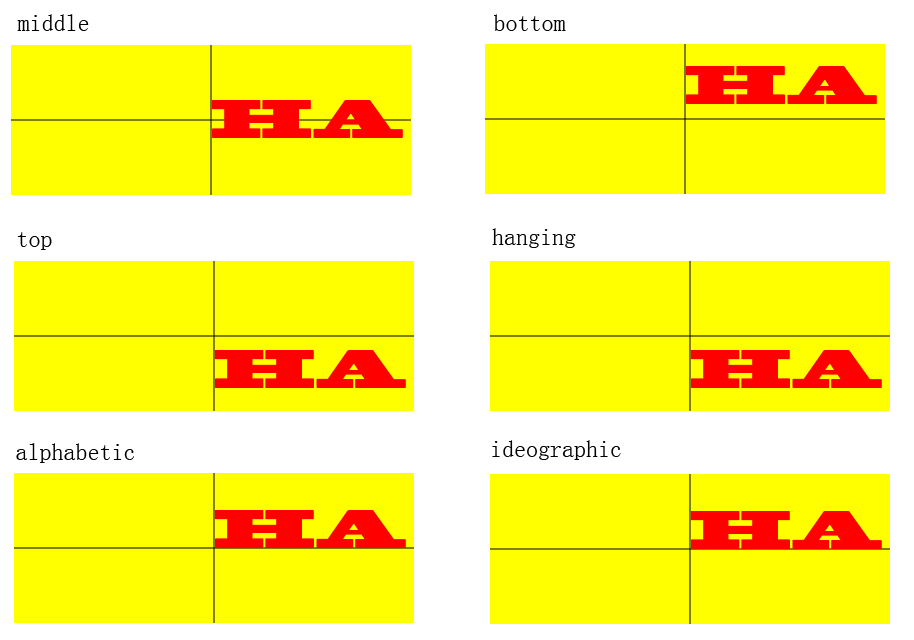
把字符串“HA”在画布的中心点位置(两条黑色直线相交点为中心);textBaseline为默认值,应用不同的textAlign所产生的效果如下图:

使用实例:
<!DOCTYPE html>

<html lang="en">

<head>

    <meta charset="utf-8" />

    <title>test</title>

    <!--<script type="text/javascript" src="modernizr-latest.js"></script>-->

    <script src="Js/modernizr-2.6.2.js"></script>

    <script type="text/javascript">

        window.addEventListener("load", eventWindowLoaded, false);

        function eventWindowLoaded() {

            canvasApp();

        }

        function canvasSupport() {

            return Modernizr.canvas;

        }

        function eventWindowLoaded() {

            canvasApp();

        }

        function canvasApp() {

            var message = "your text";

            var fillOrStroke = "fill";

            var fontSize = "50";

            var fontFace = "serif";

            var textFillColor = "#ff0000";

            var textBaseline = "middle";

            var textAlign = "center";

            var fontWeight = "normal";

            var fontStyle = "normal";

            if (!canvasSupport()) {

                return;

            }

            var theCanvas = document.getElementById("canvasOne");

            var context = theCanvas.getContext("2d");

            var formElement = document.getElementById("textBox");

            formElement.addEventListener('keyup', textBoxChanged, false);

            formElement = document.getElementById("fillOrStroke");

            formElement.addEventListener('change', fillOrStrokeChanged, false);

            formElement = document.getElementById("textSize");

            formElement.addEventListener('change', textSizeChanged, false);

            formElement = document.getElementById("textFillColor");

            formElement.addEventListener('change', textFillColorChanged, false);

            formElement = document.getElementById("textFont");

            formElement.addEventListener('change', textFontChanged, false);

            formElement = document.getElementById("textBaseline");

            formElement.addEventListener('change', textBaselineChanged, false);

            formElement = document.getElementById("textAlign");

            formElement.addEventListener('change', textAlignChanged, false);

            formElement = document.getElementById("fontWeight");

            formElement.addEventListener('change', fontWeightChanged, false);

            formElement = document.getElementById("fontStyle");

            formElement.addEventListener('change', fontStyleChanged, false);

            drawScreen();

            function drawScreen() {

                context.fillStyle = "yellow";

                context.fillRect(0, 0, theCanvas.width, theCanvas.height);

                context.lineWidth = 1;

                context.beginPath();

                context.moveTo(theCanvas.width / 2, 0);

                context.lineTo(theCanvas.width / 2, theCanvas.height);

                context.stroke();

                context.closePath();

                context.beginPath();

                context.moveTo(0, theCanvas.height / 2);

                context.lineTo(theCanvas.width, theCanvas.height / 2);

                context.stroke();

                context.closePath();

                //Text

                context.textBaseline = textBaseline;

                context.textAlign = textAlign;

                context.font = fontWeight + " " + fontStyle + " " + fontSize + "px " + fontFace;

                var xPosition = (theCanvas.width / 2);

                var yPosition = (theCanvas.height / 2);

                switch (fillOrStroke) {

                    case "fill":

                        context.fillStyle = textFillColor;

                        context.fillText(message, xPosition, yPosition);

                        break;

                    case "stroke":

                        context.strokeStyle = textFillColor;

                        context.strokeText(message, xPosition, yPosition);

                        break;

                    case "both":

                        context.fillStyle = textFillColor;

                        context.fillText(message, xPosition, yPosition);

                        context.strokeStyle = "#000000";

                        context.strokeText(message, xPosition, yPosition);

                        break;

                }

            }

            //添加阴影效果

            //function drawScreen() {

            //    context.fillStyle = "yellow";

            //    context.fillRect(0, 0, theCanvas.width, theCanvas.height);

            //    //Text

            //    context.textBaseline = textBaseline;

            //    context.textAlign = textAlign;

            //    context.shadowColor = "#707070";

            //    context.shadowOffsetX = 5;

            //    context.shadowOffsetY = 5;

            //    context.shadowBlur = 5;

            //    context.font = fontWeight + " " + fontStyle + " " + fontSize + "px " + fontFace;

            //    var xPosition = (theCanvas.width / 2);

            //    var yPosition = (theCanvas.height / 2);

            //    context.fillStyle = textFillColor;

            //    context.fillText(message, xPosition, yPosition);

            //}

            //添加渐变效果

            //function drawScreen() {

            //    context.fillStyle = "yellow";

            //    context.fillRect(0, 0, theCanvas.width, theCanvas.height);

            //    var gradient = context.createLinearGradient(0, 0, theCanvas.width, 0);

            //    context.font = "italic bold 40px serif";

            //    gradient.addColorStop(0, "#000000");

            //    gradient.addColorStop(.5, "#FF0000");

            //    gradient.addColorStop(1, "#00ff00");

            //    var xPosition = (theCanvas.width / 2);

            //    var yPosition = (theCanvas.height / 2);

            //    context.fillStyle = gradient;

            //    context.fillText("message", xPosition, yPosition);

            //}

            function textBoxChanged(e) {

                var target = e.target;

                message = target.value;

                drawScreen();

            }

            function fillOrStrokeChanged(e) {

                var target = e.target;

                fillOrStroke = target.value;

                drawScreen();

            }

            function textSizeChanged(e) {

                var target = e.target;

                fontSize = target.value;

                drawScreen();

            }

            function textFillColorChanged(e) {

                var target = e.target;

                textFillColor = "#" + target.value;

                drawScreen();

            }

            function textFontChanged(e) {

                var target = e.target;

                fontFace = target.value;

                drawScreen();

            }

            function textBaselineChanged(e) {

                var target = e.target;

                textBaseline = target.value;

                drawScreen();

            }

            function textAlignChanged(e) {

                var target = e.target;

                textAlign = target.value;

                drawScreen();

            }

            function fontWeightChanged(e) {

                var target = e.target;

                fontWeight = target.value;

                drawScreen();

            }

            function fontStyleChanged(e) {

                var target = e.target;

                fontStyle = target.value;

                drawScreen();

            }

        }

    </script>

</head>

<body>

    <div style="position: absolute; top: 50px; left: 50px;">

        <canvas id="canvasOne" width="400" height="150">

            Your browser does not support HTML5 Canvas.

        </canvas>

        <form>

            <span>Text</span>

            <input id="textBox" />

            <br />

            <span>Fill or Stroke</span>

            <select id="fillOrStroke">

                <option value="fill">fill</option>

                <option value="stroke">stroke</option>

                <option value="both">both</option>

            </select>

            <br />

            <span>Font</span>

            <select id="textFont">

                <option value="serif">serif</option>

                <option value="sans-serif">sans-serif</option>

                <option value="cursive">cursive</option>

                <option value="fantasy">fantasy</option>

                <option value="monospace">monospace</option>

            </select>

            <br />

            <span>font size</span>

            <input type="range" id="textSize" min="0" max="200" value="30" />

            <br />

            <span>font color</span>

            <input class="color" id="textFillColor" value="FF0000" />

            <br />

            <span>font weight</span>

            <select id="fontWeight">

                <option value="normal">normal</option>

                <option value="bold">bold</option>

                <option value="bolder">bolder</option>

                <option value="lighter">lighter</option>

            </select>

            <br />

            <span>font style</span>

            <select id="fontStyle">

                <option value="normal">normal</option>

                <option value="italic">italic</option>

                <option value="oblique">oblique</option>

            </select>

            <br />

            <span>textBaseLine</span>

            <select id="textBaseline">

                <option value="middle">middle</option>

                <option value="top">top</option>

                <option value="hanging">hanging</option>

                <option value="alphabetic">alphabetic</option>

                <option value="ideographic">ideographic</option>

                <option value="bottom">bottom</option>

            </select>

            <br />

            <span>TextAlign</span>

            <select id="textAlign">

                <option value="center">center</option>

                <option value="start">start</option>

                <option value="end">end</option>

                <option value="left">left</option>

                <option value="right">right</option>

            </select>

        </form>

    </div>

</body>

</html>

来源地址;
http://www.cnblogs.com/amtf/archive/2012/01/18/2324343.html
Html5 Canvas Text的更多相关文章
- HTML5 Canvas Text文本居中实例
1.代码: <canvas width="700" height="300" id="canvasOne" class="c ...
- HTML5 Canvas Text实例1
1.简单实例1 <canvas width="300" height="300" id="canvasOne" class=" ...
- HTML5 Canvas 填充与描边(Fill And Stroke)
HTML5 Canvas 填充与描边(Fill And Stroke) 演示HTML5 Canvas Fill 与Stroke文字效果,基于Canvas如何实 现纹理填充与描边. 一:颜色填充与描边 ...
- HTML5 程序设计 - 使用HTML5 Canvas API
请你跟着本篇示例代码实现每个示例,30分钟后,你会高喊:“HTML5 Canvas?!在哥面前,那都不是事儿!” 呵呵.不要被滚动条吓到,很多都是代码和图片.我没有分开写,不过上面给大家提供了目录,方 ...
- HTML5 Canvas彩色小球碰撞运动特效
脚本简介 HTML5 Canvas彩色小球碰撞运动特效是一款基于canvas加面向对象制作的运动小球动画特效. 效果展示 http://hovertree.com/texiao/html5/39/ ...
- 学习笔记:HTML5 Canvas绘制简单图形
HTML5 Canvas绘制简单图形 1.添加Canvas标签,添加id供js操作. <canvas id="mycanvas" height="700" ...
- 基于HTML5 Canvas实现的图片马赛克模糊特效
效果请点击下面网址: http://hovertree.com/texiao/html5/1.htm 一.开门见山受美国肖像画家Chuck Close的启发,此脚本通过使用HTML5 canvas元素 ...
- 简介 jCanvas:当 jQuery遇上HTML5 Canvas
https://github.com/caleb531/jcanvas HTML5 可以直接在你的网页中使用 <canvas> 元素及其相关的 JavaScript API绘制的图形. 在 ...
- HTML5 canvas绘图
HTML5 canvas画图 示例 ------- <!DOCTYPE html> <head> <meta charset="UTF-8"> ...
随机推荐
- windows 下安装nodejs及其配置环境
第一步:下载安装文件下载nodejs,官网:http://nodejs.org/download/,我这里下载的是node-v0.10.28-x86.msi,如下图: 第二步:安装nodejs下载完成 ...
- [BZOJ 1257] [CQOI2007] 余数之和sum 【数学】
题目链接:BZOJ - 1257 题目分析 首先, a % b = a - (a/b) * b,那么答案就是 sigma(k % i) = n * k - sigma(k / i) * i ( ...
- SHell命令总结
cat files-to-copy.txt | xargs -i cp {} /tmp
- 【HDOJ】2266 How Many Equations Can You Find
简单DFS. #include <cstdio> #include <cstring> #define MAXN 15 char str[MAXN]; __int64 x; i ...
- sublime每次打开时都提示升级,怎么取消这个弹出框?
答案其实很简单,设置如下: 进入Preferences -> Settings-User ,添加 "update_check": false 重启Sublime. 发现了什么 ...
- QTP自传之对象
对象在手,测试我有 大家别误会,这里说的对象可不是值指男女朋友,而是对被测控件的识别.经过昨天的录制,大家一定很奇怪为什么我可以做到精确的回放操作,这都要归功于对象,下面就隆重的介绍我在对象识别方面的 ...
- NeoOcean - Unity3D Ocean Waves Simulation
GMail: bearworks8@gmail.com QQMail:196221347@qq.com QQ Group:391782326 Dropbox Demo: https://www.dr ...
- [Locked] Palindrome Permutation I & II
Palindrome Permutation I Given a string, determine if a permutation of the string could form a palin ...
- Linux 数学运算
let 命令 a= b= let c=a+B echo $c let a++ let b++ echo $a $b []方法 a= b= echo $[a+b] echo $[$a+$b] (()) ...
- sqlserver使用OpenQuery或OPENROWSET遇到的问题
OpenQuery,OPENROWSET允许用户在链接服务器上查询.通过这种方法来得到查询的结果集. 1.在创建存储过程中,必须设置 SET ANSI_NULLS ...