
winPcap_3_获取设备列表
获取设备列表
int pcap_findalldevs_ex  (

    char *  source,

    //The 'source' is a parameter that tells the function where the lookup has to be done and it uses the same syntax of the pcap_open().

    //This source will be examined looking for adapters (local or remote) (e.g. source can be 'rpcap://' for local adapters or 'rpcap://host:port' for adapters on a remote host) or pcap files (e.g. source can be 'file://c:/myfolder/').

    struct pcap_rmtauth *  auth,

    //auth,:  a pointer to a pcap_rmtauth structure. This pointer keeps the information required to authenticate the RPCAP connection to the remote host. This parameter is not meaningful in case of a query to the local host: in that case it can be NULL.

    pcap_if_t **  alldevs,

    //alldevs,:  a 'struct pcap_if_t' pointer, which will be properly allocated inside this function. When the function returns, it is set to point to the first element of the interface list; each element of the list is of type 'struct pcap_if_t'.

    char *  errbuf

    //errbuf,:  a pointer to a user-allocated buffer (of size PCAP_ERRBUF_SIZE) that will contain the error message (in case there is one).

)
·功能:获得已连接的网络适配器列表;(Create a list of network devices that can be opened with pcap_open(). )
·该函数返回一个 pcap_if 结构的链表, 每个这样的结构都包含了一个适配器的详细信息;
·pcap_if结构链表中:数据域 name 和 description 表示一个适配器名称和一个可以让人们理解的描述;
·errbuf:一旦发生错误,这个参数将会被libpcap写入字符串类型的错误信息;
- Returns:
- '0' if everything is fine, '-1' if some errors occurred. The list of the devices is returned in the 'alldevs' variable. When the function returns correctly, 'alldevs' cannot be NULL. In other words, this function returns '-1' also in case the system does not have any interface to list.
The error message is returned in the 'errbuf' variable. An error could be due to several reasons:
- libpcap/WinPcap was not installed on the local/remote host
- the user does not have enough privileges to list the devices / files
- a network problem
- the RPCAP version negotiation failed
- other errors (not enough memory and others).
- Warning:
- There may be network devices that cannot be opened with pcap_open() by the process calling pcap_findalldevs(), because, for example, that process might not have sufficient privileges to open them for capturing; if so, those devices will not appear on the list.
The interface list must be deallocated manually by using the pcap_freealldevs().
struct pcap_rmtauth{

  int    type

     //Type of the authentication required.

  char *    username

     //Zero-terminated string containing the username that has to be used on the remote machine for authentication.

  char *    password

     //Zero-terminated string containing the password that has to be used on the remote machine for authentication.

};
pcap_rmtauth struct
typedef struct pcap_if pcap_if_t;
struct  pcap_if

{

    pcap_if *    next

    //if not NULL, a pointer to the next element in the list; NULL for the last element of the list

    char *    name

    //a pointer to a string giving a name for the device to pass to pcap_open_live()

    char *    description

    //if not NULL, a pointer to a string giving a human-readable description of the device

    pcap_addr *    addresses

    //a pointer to the first element of a list of addresses for the interface

    u_int    flags

    //PCAP_IF_ interface flags. Currently the only possible flag is PCAP_IF_LOOPBACK, that is set if the interface is a loopback interface.

};
pcap_if struct
typedef struct pcap_addr pcap_addr_t;
struct pcap_addr
{
pcap_addr * next
//if not NULL, a pointer to the next element in the list; NULL for the last element of the list
sockaddr * addr
//a pointer to a struct sockaddr containing an address
sockaddr * netmask
//if not NULL, a pointer to a struct sockaddr that contains the netmask corresponding to the address pointed to by addr.
sockaddr * broadaddr
//if not NULL, a pointer to a struct sockaddr that contains the broadcast address corre sponding to the address pointed to by addr; may be null if the interface doesn't support broadcasts
sockaddr * dstaddr
//if not NULL, a pointer to a struct sockaddr that contains the destination address corre sponding to the address pointed to by addr; may be null if the interface isn't a point- to-point interface
};
pcap_addr struct
void pcap_freealldevs ( pcap_if_t * alldevsp )
·功能:Free an interface list returned by pcap_findalldevs().(pcap_freealldevs() is used to free a list allocated by pcap_findalldevs().)
 #include "pcap.h"

 main()

 {

     pcap_if_t *alldevs;

     pcap_if_t *d;

     int i=;

     char errbuf[PCAP_ERRBUF_SIZE];

     /* 获取本地机器设备列表 */

     if (pcap_findalldevs_ex(PCAP_SRC_IF_STRING, NULL /* auth is not needed */, &alldevs, errbuf) == -)

     {

         fprintf(stderr,"Error in pcap_findalldevs_ex: %s\n", errbuf);

         exit();

     }

     /* 打印列表 */

     for(d= alldevs; d != NULL; d= d->next)

     {

         printf("%d. %s", ++i, d->name);

         if (d->description)

             printf(" (%s)\n", d->description);

         else

             printf(" (No description available)\n");

     }

     if (i == )

     {

         printf("\nNo interfaces found! Make sure WinPcap is installed.\n");

         return;

     }

     /* 不再需要设备列表了,释放它 */

     pcap_freealldevs(alldevs);

 }
获取设备列表.c
编译:在Windows平台上,您需要创建一个工程,并按照 使用WinPcap编程 里的步骤做。 然而,我们建议您使用WinPcap developer's pack ( 详情请访问WinPcap网站, http://www.winpcap.org ), 因为它提供了很多已经配置好的范例,包括本教程中的所有示例代码,以及在编译运行时需要的 包含文件(include) 和 库(libraries)
结果:
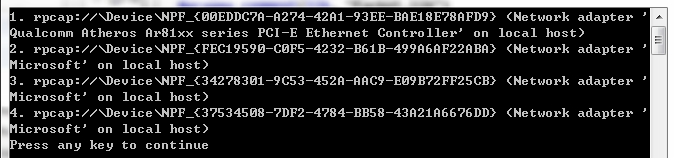
前部分为name,后面部分为description;
winPcap_3_获取设备列表的更多相关文章
- wxPython制作跑monkey工具(python3)-带显示设备列表界面
一. wxPython制作跑monkey工具(python3)-带显示设备列表界面 源代码 Run Monkey.py #!/usr/bin/env python import wx import ...
- appium自动化测试框架——封装获取设备信息类
在上一节中,我们已经解决了如何在python中执行cmd,并获取执行结果.下面就小小实战一下,获取设备信息. 一.思路 1.windows上获取设备信息的方法 输入dos命令“adb devices” ...
- 微信蓝牙设备开发教程之获取设备deviceid和二维码(3)
文章转载地址 http://www.vxzsk.com/87.html 设备授权 调用 设备授权新接口 ,获取deviceid和二维码,然后利用获取到的deviceid更新设备属性(如mac地址, ...
- Android获取定位权限,获取设备所在的经纬度
转载请标明出处:http://www.cnblogs.com/tangZH/p/8969898.html 前言: 有时候我们仅仅是想要获取设备所在的经纬度,那么直接调用Android相关的api就可 ...
- PhoneGap获取设备信息
一. 获取设备信息的方法列表(如果没有或者检测不出来就显示undefined) 1.device.name 设备名称(一些国产机检测不出来) 2.device.model ...
- iOS 获取设备唯一标示符的方法
在开发中会遇到应用需要记录设备标示,即使应用卸载后再安装也可重新识别的情况,在这写一种实现方式--读取设备的UUID(Universally Unique Identifier)并通过KeyChain ...
- ios获取设备信息总结
1.获取设备的信息 UIDevice *device = [[UIDevice alloc] int]; NSString *name = device.name; //获取设备所有者的名 ...
- 获取设备UDID、IMEI、ICCID、序列号、Mac地址等信息
在iOS7之前, 可以方便的使用 [[UIDevice currentDevice] uniqueIdentifier] 来获取设备的UDID,但是在iOS7之后这个方法不再适用. 你可以用[[UID ...
- iOS获取设备唯一标识的8种方法
8种iOS获取设备唯一标识的方法,希望对大家有用. UDID UDID(Unique Device Identifier),iOS 设备的唯一识别码,是一个40位十六进制序列(越狱的设备通过某些工具可 ...
随机推荐
- zabbix图中出现中文乱码问题
我这周部署了zabbix监控服务器,但是配置过程中发现当有中文时,图中的中文会变成方块 如下图所示: 这个问题是由于zabbix的web端没有中文字库,我们最需要把中文字库加上即可 解决办法如下 1. ...
- Servlet学习--练习示例总结
醉了醉了..本来想测试下Servlet生命周期的,然后调了好久的错误,还是没成功,不知道为什么不能这样做 贴上代码: import java.io.IOException; import java.i ...
- 移动页面缩放方法之(一)控制meta法
<!DOCTYPE HTML> <html lang="zh-cn"> <head> <meta http-equiv="Con ...
- c# 网站发布
.net 网站发布简单步骤: 1.选择需要发布的网站,右击->发布 1)配置文件:可以任意新建文件配置名 2)连接: 发布方法选择系统文件:选择目标位置,任意新建一个位置即可. 3)设置:选择D ...
- 【转载】逃离adapter的地狱-针对多个View type的组合实现方案
英文原文:JOE'S GREAT ADAPTER HELL ESCAPE 转载地址:http://www.jcodecraeer.com/a/anzhuokaifa/androidkaifa/2015 ...
- [转帖]AVS音视频编解码技术了解
AVS高清立体视频编码器 电视技术在经历了从黑白到彩色.从模拟到数字的技术变革之后正在酝酿另一场技术革命,从单纯观看二维场景的平面电视跨越到展现三维场景的立体电视3DTV.3DTV系统的核心问题之一是 ...
- drop table xx purge
drop table xx purge; 说明: 所有删除的表都会在回收站里面,只有后面加上purge才是彻底的清空表. (一般用于测试.练习数据表,所以最好不要带purge,要不误删就找不到了.)
- JFrome 登陆/注册/回显/输出流小程序之二
- 优秀的弹窗插件 jquery.lightbox_me.js
项目地址: https://github.com/buckwilson/Lightbox_me用法:http://buckwilson.me/lightboxme/ var opt = { 'cent ...
- 解析一下rtmp协议比较难懂的地方
官方文档写的过于复杂,这里弄个简单的好入门的.chunk 分基础头,消息头,时间戳,数据部分基础头中第一个字节最高位的两个位是用来设置消息头的四种格式的,和基础头没关系,整个基础头有3个字段的长度存储 ...