
Webform——注册验证
服务器控件和客户端控件的交替使用,主要还是获取到各个控件的值,直接用C#或Js判断是否符合条件就可以。
这里是以服务器控件为例子,至于客户端控件则需要写JS代码
、UserBF
public class UserBF
{
private MyDBDataContext _context;
public UserBF()
{
_context = new MyDBDataContext();
}
public bool Select(string UserName,string UserPwd) //验证用户名
{
var query = _context.LoginUser.Where(P=>P.UserName==UserName&&P.UserPwd==UserPwd);
return query.Count() > ;
}
public bool Login(string UserID)//验证ID是否唯一
{
var query = _context.LoginUser.Where(P => P.UserID==UserID);
return query.Count() > ;
}
public void Insert(string userid,string username,string userpwd)
{
LoginUser data = new LoginUser();
data.UserID = userid;
data.UserName = username;
data.UserPwd = userpwd;
_context.LoginUser.InsertOnSubmit(data);
_context.SubmitChanges();
}
}
、前台设计
<form id="form1" runat="server" >
<div>
<center><h1>注册页面</h1></center> <div>
<center>
<h1>服务器控件</h1>
<asp:Label ID="Label5" runat="server" Text="用户ID:"></asp:Label> <asp:TextBox ID="TextBox2" runat="server" OnTextChanged="TextBox2_TextChanged"></asp:TextBox><input id="Button3" type="button" value="唯一验证" runat="server" onserverclick="Button3_ServerClick" ><br>
<asp:Label ID="Label6" runat="server" Text="用户名:"></asp:Label> <asp:TextBox ID="TextBox3" runat="server"></asp:TextBox><br>
<asp:Label ID="Label7" runat="server" Text="密码:"></asp:Label> <asp:TextBox ID="TextBox4" runat="server"></asp:TextBox><br>
<asp:Label ID="Label8" runat="server" Text="确认密码:"></asp:Label><asp:TextBox ID="TextBox5" runat="server"></asp:TextBox><br>
<asp:Button ID="Button4" runat="server" Text="注册" Enabled="False" OnClick="Button1_Click" />
</center>
</div>
</from>
、在C#后台写验证的代码
protected void Button1_Click(object sender, EventArgs e)//服务器的注册
{
string userid = TextBox2.Text;
string username = TextBox3.Text;
string userpwd = TextBox4.Text;
string userpwdagain = TextBox5.Text;
if(userid=="")
{
Response.Write("<script>alert('用户ID不能为空!!')</script>");
}
else if(username=="")
{
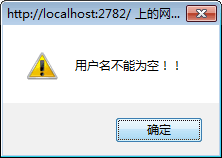
Response.Write("<script>alert('用户名不能为空!!')</script>");
}
else if (userpwd == "")
{
Response.Write("<script>alert('用户密码不能为空!!')</script>");
}
else if (userpwd != userpwdagain)
{
Response.Write("<script>alert('两次密码不一样,请重新输入!!')</script>");
}
else
{
new UserBF().Insert(userid,username,userpwd);
Response.Write("<script>alert('注册成功!!')</script>"); }
}
protected void Button3_ServerClick(object sender, EventArgs e)//服务器唯一验证
{
if (string.IsNullOrWhiteSpace(TextBox2.Text))
{
Response.Write("<script>alert('用户ID不能为空!!')</script>"); }
else
{
bool isok = new UserBF().Login(TextBox2.Text);
if (isok)
{
Response.Write("<script>alert('此ID已存在,请更改!!')</script>");
}
else
{
Response.Write("<script>alert('恭喜你可以使用!!!')</script>");
Button4.Enabled = true;
}
}
}
protected void TextBox2_TextChanged(object sender, EventArgs e)
{
Button4.Enabled = false;
}
效果图:
 →
→ →
→
→
 →
→ →
→
→ →→
→→ →
→
Webform——注册验证的更多相关文章
- MVC中使用WebMail 发送注册验证信息
在MVC中发送Email 可以使用WebMail :使用起来十分简单.如下: WebMail.SmtpServer = ConfigurationHelper.GetValue("SmtpS ...
- Ajax注册验证用户名是否存在 ——引自百度经验
Ajax注册验证用户名是否存在 http://jingyan.baidu.com/article/a948d6515fdf870a2dcd2e85.html
- PHP+Ajax 异步通讯注册验证
HTML代码 <!DOCTYPE html PUBLIC "-//W3C//DTD XHTML 1.0 Transitional//EN" "http://www. ...
- jQuery失去焦点的时候注册验证
//注册验证$('form :input').blur(function () { if ($("#txtName").val() == "") { $(&qu ...
- SpringBoot注册登录(三):注册--验证账号密码是否符合格式及后台完成注册功能
SpringBoot注册登录(一):User表的设计点击打开链接SpringBoot注册登录(二):注册---验证码kaptcha的实现点击打开链接 SpringBoot注册登录(三):注册 ...
- thinkphp+jquery+ajax前后端交互注册验证
thinkphp+jquery+ajax前后端交互注册验证,界面如下 register.html <!DOCTYPE html PUBLIC "-//W3C//DTD XHTML 1. ...
- Python学习:8.小项目之登录注册验证
简介 本次项目登录注册验证是对之前学习知识点的加深学习,这次项目的练习的知识点有函数.判断语句.循环语句.文件操作等. 项目流程 运行代码之后,输出登录或者注册选项. 当选择登录之后,输入用户名密码, ...
- Java实现发送邮箱验证码/注册验证链接
本文以163邮箱为例 1.准备(邮箱账号,邮箱必须设置POP3/SMTP/IMAP,设置步骤如下:) >>步骤:1 开启授权码服务 >>步骤:2 手机获取验证码 >> ...
- jquery注册验证的写法
在做注册页面时会用到jquery验证注册信息,用户名,密码,邮箱,手机号的验证,比较简单的,新手莫怪... <script> function Name(){ var name = $(& ...
随机推荐
- Update files embedded inside CAB file.
References: https://community.flexerasoftware.com/showthread.php?182791-Replace-a-single-file-embedd ...
- crontab环境变量问题
今天设置linux定时任务时,python内调用的shell指令总执行失败,单独调用python脚本则无问题,考虑到是环境变量未生效引起. 故在执行crontab -e编辑配置文件时,将shell内执 ...
- 计算序列中第k小的数
作者:jostree 转载请注明出处 http://www.cnblogs.com/jostree/p/4046399.html 使用分治算法,首先选择随机选择轴值pivot,并使的序列中比pivot ...
- android hander 线程用法
@Override public View onCreateView(LayoutInflater inflater, ViewGroup container, Bundle savedInstanc ...
- Asp.net自带导出方法
///datatable数据源 filename绝对路径 如:E:\\***.xls DataTable.WriteXml(fileName)
- win7 64 安装Oracle 11G 、使用PLSQL进行连接 标准实践
第一步: 安装oracle 服务,两个解压包,分别解压后 合并到一个文件夹,点击exe安装 (安装过程中如遇到PATH问题,直接忽略即可) 第二步:使用SQLPlus 测试是否成功 安装成功:CMD ...
- Missra开源前端框架
Missra开源前端框架,官方网址:http://framework.missra.com
- php中的require() 语句的使用方法
php中的require() 语句的使用方法 require()语句包括并运行指定文件. require()语句包括并运行指定文件.有关包括如何工作的详细信息见 include() 的文档. requ ...
- php实现单链表
<?php /** * 单链表 */ class Demo { private $id; public $name; public $next; public function __constr ...
- 007.Compiled
Delphi property Compiled: Boolean read FCompiled; 类型:property 可见性:public 所在单元:System.RegularExpressi ...