
[转贴]JAVA:RESTLET开发实例(二)使用Component、Application的REST服务
上一篇文章,我们介绍了基于JAX-RS的REST服务,本篇文章我们介绍不基于JAX-RS的模式。JAX-RS其实就是一个简单的 Application服务。和我们接下来介绍的Application基本一致,唯一不同的地方就是,不使用JAX-RS自动映射为xml。 restlet的一些基本概念可以参考上篇文章 RESTLET开发实例(一)基于JAX-RS的REST服务 的介绍,这里不再阐述。
一、基于ServerResource的REST,来实现JAX-RS中get方法。
1、新建RestApplication Web工程。
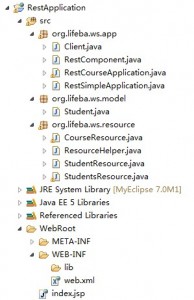
然后把相应的restlet的lib下的全部jar加入工程引用中,然后在web.xml,加入如下配置:
<context-param>
<param-name>org.restlet.application</param-name>
<param-value>org.lifeba.ws.app.RestSimpleApplication</param-value>
</context-param>
<servlet>
<servlet-name>RestletServlet</servlet-name>
<servlet-class>org.restlet.ext.servlet.ServerServlet</servlet-class>
</servlet>
<servlet-mapping>
<servlet-name>RestletServlet</servlet-name>
<url-pattern>/*</url-pattern>
</servlet-mapping>
上面的配置和基于JAX-RS的配置一样的。
2、新建RestSimpleApplication对象。将应用程序和资源类绑定在一起,代码如下:
public class RestSimpleApplication extends org.restlet.Application{
@Override
public Restlet createInboundRoot() {
Router router = new Router(getContext());
router.attach("/student/{studentId}", StudentResource.class);
return router;
}
}
和JAX-RS不同主要有2个地方:
1)RestSimpleApplication直接扩展了Application对象,而不是JAX-RS中的JaxRsApplication对象。
2)重载了createInboundRoot通过attach方法绑定资源类,并且制定了访问路径。而JAX-RS中调用了this.add(new StudentApplication())来绑定资源类,并且不用指定访问路径,因为是在资源类中指定。
3、新建Student对象,代码如下:和JAX-RS的区别就是少了@XmlRootElement(name="Student")标注。
public class Student {
private int id;
private String name;
private int sex;
private int clsId;
private int age;
public int getId() {
return id;
}
public void setId(int id) {
this.id = id;
}
public String getName() {
return name;
}
public void setName(String name) {
this.name = name;
}
public int getSex() {
return sex;
}
public void setSex(int sex) {
this.sex = sex;
}
public int getClsId() {
return clsId;
}
public void setClsId(int clsId) {
this.clsId = clsId;
}
public int getAge() {
return age;
}
public void setAge(int age) {
this.age = age;
}
public String toString(){
return "Id:"+this.id+"\r\nName:"+this.name+"\r\nClass:"+
this.clsId+"\r\nSex:"+this.sex+"\r\nAge:"+this.age;
}
}
4、新建StudentResource类,该类扩展ServerResource类。代码如下:
public class StudentResource extends ServerResource{
private int id;
@Override
protected void doInit() throws ResourceException {
id = Integer.valueOf((String) getRequestAttributes().get("studentId"));
}
public Representation get(Representation entity) {
Student student = ResourceHelper.findStudent(id);
return new StringRepresentation(student.toString());
}
}
上面的代码实现的功能和JAX-RS中的下面的代码的功能一样,都是根据ID来获取对应的student信息。
@Path("{id}/xml")
@Produces("application/xml")
public Student getStudentXml(@PathParam("id") int id) {
return ResourceHelper.findStudent(id);
}
非JAX-RS模式的,扩展了ServerResource类,并且重载了doInit()方法用来获取传递过来的studentId占位符的值。因为没 有传递method方法,默认是调用@Get标注的无参方法,最后返回StringRepresentation对象(你也可以返回xml或json的 Representation对象)。
JAX-RS的也是类似,不过他的方法是带参数,并且返回一个Student对象(会根据@Produces("application/xml")自动封装xml数据)。
5、完成了上面的主要类得创建和编写,你就可以在tomcat中运行了,启动tomcat后,访问http://localhost:8085/RestApplication/student/1,你将看到下面界面:

二、实现更新、删除、添加(delete,put,post)及列表展示
1、上面的介绍,我们实现将JAX-RS中的get方法,用ServerResource方式的来实现。根据rest规范,对StudentResource,除了有get方法外,还有delete及put方法。
public Representation delete() {
int status = ResourceHelper.deleteStudent(id);
return new StringRepresentation(String.valueOf(status));
}
@Put
public Representation put(Representation entity)
throws ResourceException {
Form form = new Form(entity);
Student student = ResourceHelper.findStudent(id);
String name = form.getFirstValue("name");
int clsId = Integer.parseInt(form.getFirstValue("clsId"));
int sex = Integer.parseInt(form.getFirstValue("sex"));
student.setClsId(clsId);
student.setName(name);
student.setSex(sex);
return new StringRepresentation(String.valueOf(ResourceHelper.updateStudent(student)));
}
2、测试更新和删除:
1)通过页面修改用户资料
update.jsp页面中加入:
<form action="/RestApplication/student/1?method=put" method="post">
用户名:<input type="text" name="name"><br>
班级:<input type="text" name="clsId"><br>
性别:<input type="text" name="sex"><br>
<input type="submit" value="提交">
</form>
提交后访问,返回1表示修改成功。

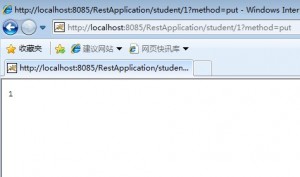
访问http://localhost:8085/RestApplication/student/1就会看到名字已经修改了。

2)通过客户端删除用户资料。新建Client类,加入如下代码,执行成功返回1.
public void student_delete(){
try {
ClientResource client = new ClientResource("http://localhost:8085/RestApplication/student/1");
Representation representation =client.delete();
System.out.println(representation.getText());
} catch (Exception e) {
e.printStackTrace();
}
}
这个时候访问 http://localhost:8085/RestApplication/student/1 ,会提示错误。因为找不到这个1的用户。
3、添加一个student,及显示全部student信息
1)StudentResource资源,按照restlet的规范,包含了get put delete方法。所以添加一个student及显示全部student信息我们需要再加入一个资源类StudentsResource,代码如下:
public Representation get(Representation entity) {
StringBuilder sb = new StringBuilder();
Iterator it = ResourceHelper.students.keySet().iterator();
while(it.hasNext()){
sb.append(ResourceHelper.students.get(it.next()).toString()+"\r\n\r\n");
}
return new StringRepresentation(sb.toString());
}
public Representation post(Representation entity)
throws ResourceException {
Form form = new Form(entity);
String name = form.getFirstValue("name");
int clsId = Integer.parseInt(form.getFirstValue("clsId"));
int sex = Integer.parseInt(form.getFirstValue("sex"));
Student student = new Student();
student.setClsId(clsId);
student.setName(name);
student.setSex(sex);
ResourceHelper.maxId++;
int id = ResourceHelper.maxId;
student.setId(id);
return new StringRepresentation(String.valueOf(ResourceHelper.addStudent(student)));
}
添加了上面代码后,我们还要在RestSimpleApplication添加下面代码,指定下资源类StudentsResource的访问路径才可以。
router.attach("/student", StudentsResource.class);
2)首先我们添加一个id为2的student对象,client类中加入下面代码,执行成功后返回新添加的studentid:2。
public void student_post(){
try {
Form queryForm = new Form();
queryForm.add("name","steven3");
queryForm.add("clsId","201002");
queryForm.add("sex","2");
queryForm.add("age","12");
ClientResource client = new ClientResource("http://localhost:8085/RestApplication/student");
Representation representation =client.post(queryForm.getWebRepresentation());
System.out.println(representation.getText());
} catch (Exception e) {
e.printStackTrace();
}
}
访问http://localhost:8085/RestApplication/student 如下,返回了全部的student资料:
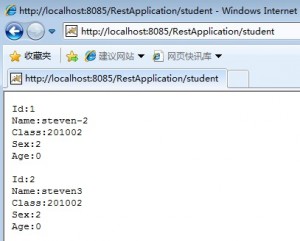
可以看到我们已经成功添加了一个2的student。
三、使用Component绑定多个Application
我们已经实现了一个student的application。里面包含了2个资源类(StudentResource和 StudentsResource)。如果我们加入一个course的资源类,我们可以按照上面的方式直接建立CourseResource,然后在 RestSimpleApplication中绑定下 router.attach("/course/{courseId}", CourseResource.class)。不过这样处理会把业务逻辑混在一起,并不是很好的方法。因此我们建立一个 RestCourseApplication,然后在这里绑定CourseResource类,来实现业务逻辑的分离。
RestCourseApplication代码如下:
public class RestCourseApplication extends org.restlet.Application{
@Override
public Restlet createInboundRoot() {
Router router = new Router(getContext());
router.attach("/course/{courseId}", CourseResource.class);
return router;
}
}
CourseResource代码如下:
public class CourseResource extends ServerResource{
private int id;
@Override
protected void doInit() throws ResourceException {
id = Integer.valueOf((String) getRequestAttributes().get("courseId"));
}
public Representation get(Representation entity) {
return new StringRepresentation("course id:"+id);
}
}
现在我们有2个Application了,web.xml中就不能使用org.restlet.application了,必须使用org.restlet.component。
<context-param>
<param-name>org.restlet.application</param-name>
<param-value>org.lifeba.ws.app.RestSimpleApplication</param-value>
</context-param>
把上面的代码改为:
<init-param>
<param-name>org.restlet.component</param-name>
<param-value>component</param-value>
</init-param>
新建RestComponent类,代码如下,因为必须执行路径,所以在访问的时候记得要带上对应的前缀。
public class RestComponent extends org.restlet.Component{
public RestComponent(){
getDefaultHost().attach("/a", new RestSimpleApplication());
getDefaultHost().attach("/b", new RestCourseApplication());
}
}
访问:http://localhost:8085/RestApplication/a/student

访问:http://localhost:8085/RestApplication/b/course/1

四、资源下载
[转贴]JAVA:RESTLET开发实例(二)使用Component、Application的REST服务的更多相关文章
- [转贴]JAVA :RESTLET开发实例(一)基于JAX-RS的REST服务
RESTLET介绍 Restlet项目为“建立REST概念与Java类之间的映射”提供了一个轻量级而全面的框架.它可用于实现任何种类的REST式系统,而不仅仅是REST式Web服务. Restlet项 ...
- [转贴]JAVA:RESTLET开发实例(三)基于spring的REST服务
前面两篇文章,我们介绍了基于JAX-RS的REST服务以及Application的Rest服务.这里将介绍restlet如何整合spring框架进行开发.Spring 是一个开源框架,是为了解决企业应 ...
- RESTLET开发实例(一)基于JAX-RS的REST服务
RESTLET介绍 Restlet项目为“建立REST概念与Java类之间的映射”提供了一个轻量级而全面的框架.它可用于实现任何种类的REST式系统,而不仅仅是REST式Web服务. Restlet项 ...
- RESTLET开发实例(三)基于spring的REST服务
http://www.lifeba.org/arch/restlet_spring_3.html 前面两篇文章,我们介绍了基于JAX-RS的REST服务以及Application的Rest服务.这里将 ...
- NDK 开发实例二(添加 Eigen库)
上一篇,我已经阐述了如何创建一个简单的NDK实例: NDK 开发实例一(Android.mk环境配置下) 在上一篇的基础上,我们来添加Eigen库,然后做一个简单实例. Eigen是一个高层次的C + ...
- RESTLET开发实例
1 前提 由于近期工作的需要,要把RESTLET应用到项目中,于是在网上参考了一些资料的基础上,实践了一个关于RESTLET接口的小例子. Restlet的思想是:HTTP客户端与HTTP服务器之间的 ...
- 【温故知新】Java web 开发(二)Servlet 和 简单JSP
系列一介绍了新建一个 web 项目的基本步骤,系列二就准备介绍下基本的 jsp 和 servlet 使用. (关于jsp的编译指令.动作指令.内置对象不在本文讨论范围之内) 1. 首先,在 pom. ...
- java web开发入门二(struts)基于eclispe
JavaBean JavaBean, 咖啡豆. JavaBean是一种开发规范,可以说是一种技术. JavaBean就是一个普通的java类.只有符合以下规定才能称之为javabean: 1)必须提 ...
- Spring Boot 使用IntelliJ IDEA创建一个web开发实例(二)
1. 创建一个Controller类 package com.example.demo; import org.springframework.web.bind.annotation.RequestM ...
随机推荐
- Java NIO Socket 非阻塞通信
相对于非阻塞通信的复杂性,通常客户端并不需要使用非阻塞通信以提高性能,故这里只有服务端使用非阻塞通信方式实现 客户端: package com.test.client; import java.io. ...
- JUnit4 笔记
1. JUnit4基础 JUnit4 与 JUnit3不同的是,不需要继承测试类,而是通过JDK5提供的注解去标识测试方法. 常用的注解如下: @Before:初始化方法 对于每一个测试方法都要执行一 ...
- 处理 eclipse 导入报错 Invalid project description,问题
有时候在添加工程时,会出现如图所示的错误信息, ,提示显示将要添加的工程已经存在,但是在工作空间里却找不到,这个时候,要做就是, 在导入的时候选择General->Existing Projec ...
- lsjORM ----让开发变得更加快捷(二)
lsjORM结构 跟传统三层没有多大区别,这里添加DTO(参数列表)跟PetaPoce(数据库操作),普通的三层我们都喜欢用DBHelper或者SqlHelper来封装sql的辅助方法,PetaPoc ...
- 跳转界面方法 (runtime实用篇一)
在开发项目中,会有这样变态的需求: 推送:根据服务端推送过来的数据规则,跳转到对应的控制器 feeds列表:不同类似的cell,可能跳转不同的控制器(嘘!产品经理是这样要求:我也不确定会跳转哪个界面哦 ...
- iOS支付宝集成步骤;王刚韧的技术博客
- CSS和JS样式属性对照表
注意:1.CSS中的float属性是个例外,因为float是javascript的保留关键字,在IE中使用的是styleFloat,而其他浏览器则使用cssFloat. 盒子标签和属性对照 CSS语法 ...
- 基于SSM框架的简易的分页功能——包含maven项目的搭建
新人第一次发帖,有什么不对的地方请多多指教~~ 分页这个功能经常会被使用到,我之前学习的时候找了很多资源,可都看不懂(笨死算了),最后还是在朋友帮助下做出了这个分页.我现在把我所能想到的知识 做了一个 ...
- 管理员把我的admin权限去掉了,那么如何获得jdk zip安装呢?这篇可以帮你。
JDK is not available as a portable zip unfortunately. However, you can: Create working JDK directory ...
- 《JavaScript高级程序设计》笔记(1):<script>元素
使用<script>元素内部的JavaScript代码将从上至下依此解释.在使用<script>嵌入的JavasCript代码时,代码任何地方不能出现"</sc ...