
WPF中的3D Wireframe
WPF不支持画三维线,但开发人员提供了ScreenSpaceLines3D 类用于实现这个功能。我已经在程序中实现并成功显示3D Wireframe,并能够进行3D Solid和3D Wireframe的切换。
我在熟悉这个类的基础上,自己定义了3D Wireframe xml文件的格式,用于保存3D Wireframe数据。
格式如下:
<Wireframe>
<ScreenSpaceLines3D
Form="Generic"
Color="#00FF00"
Thickness="1.0"
Points="1540.681396, 706.149353, 449.837555, 1540.681396, 706.149353, 466.246826" />
<ScreenSpaceLines3D
Form="Generic"
Color="#00FF00"
Thickness="1.0"
Points="1460.956909, 792.438416, 51.958309, 1460.877686, 784.031250, 54.853123" />
..................................................
</Wireframe>
然后,解析这个xml文件,遍历points属性,并将每个点按照一定规则加到ScreenSpaceLines3D .Points里面,这样有了点wireframe就有了内容,然后将ScreenSpaceLines3D ._model应用到视图就可以正常显示了。具体方法以后有空再总结。
下面是我看到有关wireframe的一些文章,摘录一下。
How to Draw WPF 3D Wireframe Graphics
A question I periodically see on forums and discussions with WPF 3D graphics users is, "how do I draw wireframe" content for 3D. This isn't supported out of the box, but couple strategies I would suggest are:
- The out of band 3DTools library from members of the WPF 3D team includes "ScreenSpaceLines" which allows for wireframe rendering of lines.
http://www.codeplex.com/3DTools
- Charles Petzold has also posted about wireframe rendering with his own implementation.
(as below)
As Eric Sink pointed out recently, "WPF 3D doesn't know how to draw lines.". Fortunately, the WPF 3D team at Microsoft has made available the 3DTools library that includes the ScreenSpaceLines3D class that derives from ModelVisual3D and draws lines in a 3D scene. The "screen space" in the name of this class indicates that you specify the thickness of the lines in terms of device-independent units, which are 1/96th inch and hence often pixels.
What's really nice is that the source code to ScreenSpaceLines3D is also available so you can see the clever techniques at work to make this happen: Basically, each line is a pair of triangles arranged in a long thin rectangle. While you specify the begin point and end point of this "line" in 3D coordinates, the ScreenSpaceLines3D class must determine the thickness of this "line" at each end so that after the various transforms have been applied to it (including the camera transforms — see Chapter 7 of my book 3D Programming for Windows) it ends up on the screen with a uniform thickness with a surface that is always oriented perpendicularly to the viewer.
This job requires that ScreenSpaceLines3D know about all the transforms that are applied to the visual because it must invert the transform chain to determine the dimensions and orientation of the line that it renders. What makes this job particularly tricky is that these transforms can be animated. For that reason, ScreenSpaceLines3D installs a handler for the CompositionTarget.Rendering event, and walks the parent/child chain up to Viewport3D on each vertical retrace of the video display. As Eric notes, this is a problem.
I spent a lot of time studying ScreenSpaceLines3D because I knew I wanted to implement something similar in my own Petzold.Media3D library (available here). At one point I derived from Viewport3D specifically to provide support for my "wire" classes (as I began thinking of them), but I eventually abandoned that approach.
Instead, my abstract WireBase class installs a handler for CompositionTarget.Rendering but it does so from a static constructor, so regardless how many WireBase objects you have, there's only one call to this handler per vertical retrace. Each instance of WireBase puts itself into a static collection that the CompositionTarget.Rendering handler enumerates for each call, at that point essentially performing the same logic as ScreenSpaceLines3D. However, if a particular WireBase instance discovers that its chain of visual parents no longer ends in a Window object, then it removes itself from this collection and is abandoned. This is how I hope my implementation is a little less insane than ScreenSpaceLines3D.
I had decided that I would be using XAML files to create all the illustrations in my book. Many of the illustrations were created from 400 DPI bitmaps that I generated from XamlCruncher 2.0. At that resolution, ScreenSpaceLines3D had some limitiations I simply couldn't tolerate. Not only did I need to shamelessly copy the technique of ScreenSpaceLines3D but I had to enhance it.
The "wire" classes I eventually created for the Petzold.Media3D begin with WireBase and are shown here roughly in increasing levels of complexity:
- Object
DispatcherObject
DependencyObject
Visual3D
ModelVisual3D
WireBase
WireLine
WireLines
WirePolyline
WirePath
WireText
Axes
For me, the most serious problem with ScreenSpaceLines3D was the line joins. Here's a ScreenSpaceLines3D element with a width of 40 device-independent units:
- <tools:ScreenSpaceLines3D
Points="-1 0 0, 0 0.5 0, 0 0.5 0, 0.5 0 0"
Thickness="40" Color="Blue" />
In ScreenSpaceLines3D you set the Points property to an even number of Point3D objects; each pair of points define one line. And here's what it looks like:

It's obviously two lines rather than a connected line. The class in the Petzold.Media3D library that's closest in syntax to ScreenSpaceLines3D is WireLines except the property is named Lines rather than Points:
- <cp:WireLines Lines="-1 0 0, 0 0.5 0, 0 0.5 0, 0.5 0 0"
Thickness="40" Color="Blue" />
The image produced by that markup is the same as the ScreenSpaceLines3D example. However, I've also provided a property in WireBase named Rounding of type int that lets you specify the number of little pie slices used to approximate the rounding of the ends of each line:
- <cp:WireLines Lines="-1 0 0, 0 0.5 0, 0 0.5 0, 0.5 0 0"
Thickness="40" Color="Blue" Rounding="10" />
And now the lines are rendered like this:

You can alternatively use the WirePolyline class and just specify the three points that make up this particular figure:
- <cp:WirePolyline Points="-1 0 0, 0 0.5 0, 0.5 0 0"
Thickness="40" Color="Blue"
Rounding="10" />
Or, to draw a single straight line, you can use WireLine and set the Point1 and Point2 properties. The WireBase class also defines ArrowEnds, ArrowLength, and ArrowAngle properties to draw arrows at the end of the line (handy for symbolizing vectors in 3D space.)
Similar to the WPF 2D Path class, my WirePath class has a Data property of type PathGeometry3D, and if you check the Paths directory of the Petzold.Media3D source code, you'll find that my PathGeometry3D class defines a Figures property of type PathFigure3DCollection, and PathFigure3D defines a StartPoint property and a Segments property of type PathSegment3DCollection, and PathSegment3D is parent to the four classes LineSegment3D, PolyLineSegment3D, BezierSegment3D, and PolyBezierSegment3D. In other words, I've tried to duplicate the 2D path geometry classes in 3D. (What I didn't get around to doing was a PathGeometry3DConverter that would let you specify a whole path as an encoded text string, but it's high on my to-do list.)
For example, these classes allowed me to create the following XAML file for a figure in Chapter 6 of 3D Programming for Windows:
You can run that XAML file in XamlCruncher 2.0 if you have the Petzold.Media3D library loaded, or you can just run an XBAP created from the XAML file:
It looks like this:
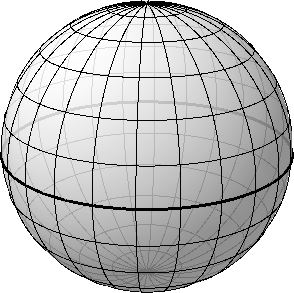
It looks better in the book (page 240) because that image was created at 400 DPI rather than 96 DPI as it is here. (It also looks better on the screen with a Tier 2 graphics board because you get anti-aliasing. You don't get anti-aliasing when you're rendering 3D scenes on bitmaps.) All the lines of longitude and latitude are WirePath objects, but inside is a sphere colored with a translucent brush to make the lines around the back a little less dark.
The WireText text class is based around the polylines from the ancient Windows plotter fonts. You set the Font property to a member of the Font enumeration (Modern, Roman, or Script) and FontSize to an approximate character height in 3D units. Set the Origin property to a Point3D where the text is to begin, and HorizontalAlignment (default is Left) and VerticalAlignment (default is Top) to indicate the meaning of that origin. You'll also need to set two vectors: BaselineDirection (default is (1, 0, 0)) and UpDirection (default is (0, 1, 0)). The cross product of BaselineDirection and UpDirection indicates the direction from which the text appears normal. Set the Text property to the text you wish to display.
The size of the text characters will get smaller as the text recedes to the background, but the actual strokes that make up the characters will not. Those are governed by the Thickness property defined by WireBase.
Finally, the Axes class combines lines and text to display the 3D coordinate axes:
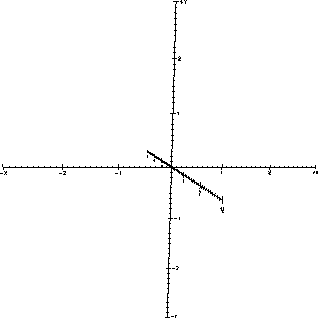
Of course, several properties let you set the Extent of the axes (the default is 3), whether it will ShowNumbers, the length of LargeTick and SmallTick, and you can even replace the Labels from X, Y, and Z to something else, such as shown on page 317 of my book.
The Petzold.Media3D Library: The "Wire" Classes
WPF中的3D Wireframe的更多相关文章
- WPF中反转3D列表项
原文:WPF中反转3D列表项 WPF中反转3D列表项 周银辉记得在苹果电脑中有一个很酷的 ...
- WPF中的3D特性和常见的几个类
原文:WPF中的3D特性和常见的几个类 WPF 3D 常用的几个类及其关系 1. Visual 类 所有二维可视化元素的基类,为 WPF 中的呈现提供支持,其中包括命中测试.坐标转换和边界 ...
- 在WPF中添加3D特性
原文:在WPF中添加3D特性 35.4 在WPF中添加3D特性 本节介绍WPF中的3D特性,其中包含了开始使用该特性的信息. 提示: WPF中的3D特性在System.Windows.Media.M ...
- WPF中的3D变换PlaneProjection
在UWP中有一个比较好用的伪3D变换PlaneProjection,可以以一种轻量级和非常简单的方式实现3D的效果.这种效果在Silverlight中也有这种变换,但在WPF中确一直没有提供. 虽然W ...
- WPF中的三维空间(1)
原文:WPF中的三维空间(1) WPF中可以创建三维几何图形,支持3D对象的应用,支持从3D Max等软件将3D文件obj导入设计中,但是目前还不支持将材质同时导入,这样需要在WPF中对3D对象重新设 ...
- WPF中的简单水动画
原文 https://stuff.seans.com/2008/08/21/simple-water-animation-in-wpf/ 很多年前(80年代中期),我在一家拥有Silicon Grap ...
- 在WPF中使用PlaneProjection模拟动态3D效果
原文:在WPF中使用PlaneProjection模拟动态3D效果 虽然在WPF中也集成了3D呈现的功能,在简单的3D应用中,有时候并不需要真实光影的3D场景.毕竟使用3D引擎会消耗很多资源,有时候使 ...
- WPF中3D旋转的实现
原文:WPF中3D旋转的实现 关于3D旋转的原理,请看Daniel Lehenbauer的文章 <Rotating the Camera with the Mouse> http://vi ...
- WPF中使用TranslateTransform3D修改CAD的3D旋转中心
原文:WPF中使用TranslateTransform3D修改CAD的3D旋转中心 前面一篇文章讲述了2D旋转功能的实现,文章提到了修改3D旋转中心,这一节主要总结一下具体的修改3D旋转 ...
随机推荐
- MySQL数据导出导入任务脚本
#!/usr/bin/env python#-*- encoding: utf8 -*- import timeimport osimport mysql.connector #定义一些全局变量 w ...
- 【Android开源框架】使用andbase开发框架实现绘制折线图
在Android中,当有绘制折线图的需求时.大多数人使用的AChartEngine,来进行折线图的绘制.AChartEngine图表引擎确实能够实现折线图的功能.除此之外,我们还能够使用andbase ...
- 经验总结56--mybatis返回主键
使用mybatis框架时,有时候须要新插入的数据的主键是多少. 1.oracle 因为oracle是建的序列文件,获取ID值. <insert id="insert" par ...
- Java链接Redis时出现 “ERR Client sent AUTH, but no password is set” 异常的原因及解决办法
Java链接Redis时出现 "ERR Client sent AUTH, but no password is set" 异常的原因及解决办法 [错误提示] redis.clie ...
- HTTP协议和HTTPS协议初探
概况 HTTP是hypertext transfer protocol(超文本传输协议)的简写.它是TCP/IP协议的一个应用层协议,用于定义WEB浏览器与WEBserver之间交换数据的过程. HT ...
- spring(3)------控制反转(IOC)/依赖注入(DI)
一.spring核心概念理解 控制反转: 控制反转即IoC (Inversion of Control).它把传统上由程序代码直接操控的对象的调用权交给容器.通过容器来实现对象组件的装配和管理. 所谓 ...
- 11G、12C安装结束需要做的一些操作
修改spfile参数:修改前,先备份 create pfile from spfile; alter system set memory_target=0 scope=spfile;alter sys ...
- 【24.91】【Tsinsen 1302】&【BZOJ 2626】JZPFAR
时间限制:5.0s 内存限制:256.0MB 总提交次数:547 AC次数:137 平均分:40.31 将本题分享到: 查看未格式化的试题 提交 试题讨论 试题来 ...
- Oracle null 处理
null first null last 解决啦-
- [Vue] Import component into page
Components are one of the most powerful features of Vue. Let's take a look at how to write our first ...