
Java IO流文件复制/解压的几种方法总结
引言
在JavaWeb项目开发过程,涉及到IO文件的读写操作以及文件的复制copy操作是作为一个程序员不可获取的知识,那接下来就总结一些copy文件的一些方法,与大家通过学习,如果还有其他更好的方法,欢迎大家留言探讨.代码如下:
package com.svse.util;

import java.io.File;

import java.io.FileInputStream;

import java.io.FileOutputStream;

import java.io.IOException;

import java.io.InputStream;

import java.io.OutputStream;

import java.nio.channels.FileChannel;

import java.nio.file.Files;

/***

 *

 *功能说明:复制文件  将FileA 复制为FileB文件

 *@author:zsq

 *create date:2019年5月30日 下午2:38:20

 *修改人   修改时间  修改描述

 *

 *Copyright (c)2019北京智华天成科技有限公司-版权所有

 */

public class FileUtils {

	  //(方法一)copy复制文件 将FileA 复制为FileB文件

	  @SuppressWarnings("unused")

	  private static void copyFileUsingFileStreams1(File source, File dest)

	            throws IOException {

	        InputStream input = null;

	        OutputStream output = null;

	        try {

	                 input = new FileInputStream(source);

	                 output = new FileOutputStream(dest);

	                 byte[] buf = new byte[1024];

	                 int bytesRead;

	                   while ((bytesRead = input.read(buf)) > 0) {

	                            output.write(buf, 0, bytesRead);

	                   }

	        } finally {

	              input.close();

	              output.close();

	        }

	  }

	  //(方法二)copy复制文件 将FileA 复制为FileB文件

	  @SuppressWarnings("unused")

	  private static void copyFileUsingFileChannels(File source, File dest) throws IOException {

            FileChannel inputChannel = null;

            FileChannel outputChannel = null;

	        try {

	              inputChannel = new FileInputStream(source).getChannel();

	              outputChannel = new FileOutputStream(dest).getChannel();

	              outputChannel.transferFrom(inputChannel, 0, inputChannel.size());

	        } finally {

	              inputChannel.close();

	              outputChannel.close();

	        }

	  }

	  //(方法三)copy复制文件 将FileA 复制为FileB文件

	  @SuppressWarnings("unused")

	  private static void copyFileUsingApacheCommonsIO(File source, File dest)

	             throws IOException {

	          org.apache.commons.io.FileUtils.copyFile(source, dest);

	   }

	  //(方法四)copy复制文件 将FileA 复制为FileB文件

	  @SuppressWarnings("unused")

	  private static void copyFileUsingJava7Files(File source, File dest)

            throws IOException {

              Files.copy(source.toPath(), dest.toPath());

	  }


  /**

	   *

	   *功能说明:将zip文件解压到指定的目录

	   *输入参数:zipFile待解压的文件     descDir解压到的目录

	   *输出参数:

	   *创建人:zsq

	   *创建时间:2019年5月30日 下午3:04:16

	   *

	   */

	  public static void unZipFiles(File zipFile, String descDir) throws IOException{

		    ZipFile zip = new ZipFile(zipFile,Charset.forName("GBK"));//解决中文文件夹乱码

		    String name = zip.getName().substring(zip.getName().lastIndexOf('\\')+1, zip.getName().lastIndexOf('.'));

		    File pathFile = new File(descDir+name);

	            if (!pathFile.exists()) {

	                  pathFile.mkdirs();  //以给定的路径加上待加压文件的文件名创建文件夹

	        }

	         for (Enumeration<? extends ZipEntry> entries = zip.entries(); entries.hasMoreElements();) {

	    	       ZipEntry entry = (ZipEntry) entries.nextElement();

	    	        String zipEntryName = entry.getName();

	    	        InputStream in = zip.getInputStream(entry);

	    	        //String outPath = (descDir + name +"/"+ zipEntryName).replaceAll("\\*", "/");

	    	        String outPath = (descDir  +"/"+ zipEntryName).replaceAll("\\*", "/");

	    	        // 判断路径是否存在,不存在则创建文件路径

	    	        File file = new File(outPath.substring(0, outPath.lastIndexOf('/')));

	    	         if (!file.exists()) {

	    		           file.mkdirs();

	    	         }

	    	        // 判断文件全路径是否为文件夹,如果是上面已经上传,不需要解压

	    	         if (new File(outPath).isDirectory()) {

	    		           continue;

	    	         }

	    	       // 输出文件路径信息

	    	         System.out.println(outPath);

	    	        FileOutputStream out = new FileOutputStream(outPath);

	    	        byte[] buf1 = new byte[1024];

	    	        int len;

	    	        while ((len = in.read(buf1)) > 0) {

	    		           out.write(buf1, 0, len);

	    	        }

	    	        IOUtils.closeQuietly(in);

	    	        IOUtils.closeQuietly(out);

	          }

	          System.out.println("******************解压完毕********************");

	          return;

	  }

  public static void main(String[] args) throws IOException {

		    //copyFileUsingFileStreams1(new File("E:/Ng/test/abc.txt"),new File("E:/Ng/test/abc.txt"));

		    //copyFileUsingFileChannels(new File("E:/Ng/test/abc.txt"),new File("E:/Ng/test/abc.txt"));

		    //copyFileUsingApacheCommonsIO(new File("E:/Ng/test/abc.txt"),new File("E:/Ng/test/abc.txt"));

    copyFileUsingJava7Files(new File("E:/Ng/test/abc.txt"),new File("E:/Ng/test/abc.txt"));

		    //unZipFiles(new File("E:/Ng/test/nginx-1.12.2.zip"),"E:/Ng/test");

	  }

}
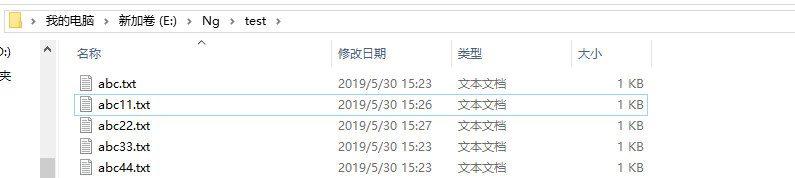
结果如下:
Java IO流文件复制/解压的几种方法总结的更多相关文章
- 【Android】数据存储-java IO流文件存储
1.数据持久化:将在内存中的瞬时数据保存在存储设备中.瞬时数据:设备关机数据丢失.持久化技术提供一种机制可以让数据在瞬时状态和持久状态之间转换. 2.Android中简单的三种存储方式:文件存储.Sh ...
- java IO流文件的读写具体实例(转载)
引言: 关于java IO流的操作是非常常见的,基本上每个项目都会用到,每次遇到都是去网上找一找就行了,屡试不爽.上次突然一个同事问了我java文件的读取,我一下子就懵了第一反应就是去网上找,虽然也能 ...
- Java IO 流-- 文件拷贝
IO流操作套路: 1.创建源: 2.选择流: 3.操作: 4.释放资源 上代码: package com.xzlf.io; import java.io.File; import java.io.Fi ...
- linux下分卷压缩,合并解压的3种方法
我们上传东西的时候,由于文件过大而不能上传,或者不给上传,最明显的就是发邮件了,附件最大5M,有的10M.如果超过了就郁闷了.这个时候,如果能把压缩的东西,分割开来就比较爽了,windows下面我想大 ...
- Java io流完成复制粘贴功能
JAVA 中io字节输入输出流 完成复制粘贴功能: public static void main(String[] args) throws Exception{ // 创建输入流要读 ...
- java实现zip文件的解压
使用到的包 org.apache.commons 下载文件 url:文件所在地址需要是http:// filePath:将下载的文件保存的路径 public static void getDownlo ...
- java IO流文件的读写具体实例
IO流的分类:1.根据流的数据对象来分:高端流:所有的内存中的流都是高端流,比如:InputStreamReader 低端流:所有的外界设备中的流都是低端流,比如InputStream,Output ...
- Java—IO流 文件的编码
文件的编码 package cn.test; import java.io.UnsupportedEncodingException; public class Demo15 { public sta ...
- java IO流文件拷贝文件(字符流标准写法)
public static void copyFile2(String path1, String path2) { Reader reader = null; Writer writer = nul ...
随机推荐
- PAC代理语法含义与书写规范
一直以来使用ShadowSocksFQ,基本上默认的PAC代理模式己能满足所需,实在个别pac不方便的就转成用全局代理模式也能愉快FQ. 只是最近学习前端的知识,需要FQ访问 MDN web docs ...
- Perl Connect to Database without password as sysdba
#!/oracle/product/11g/db/perl/bin/perl use lib '/oracle/product/11g/db/perl/lib/site_perl/5.10.0'; u ...
- docker安装kong和kong-dashboard
1:docker安装遵循官方手册 2:安装kong 参考文档:https://getkong.org/install/docker/ 安装过程基本和文档一致,文档十分简单清晰. 但应注意,为了最新版k ...
- Linux 系统基础优化和常用命令
目录 Linux 系统基础优化和常用命令 软连接 tar解压命令 gzip命令 netstart命令 ps命令 kill命令 killall命令 SELinux功能 iptables防火墙 Linux ...
- 第六节:web爬虫之urllib(二)
二.urllib.request.Request(url, data=None, headers={}, origin_req_host=None, unverifiable=False, metho ...
- net core 配置Redis Cache
参考文章地址:https://dotnetcoretutorials.com/2017/01/06/using-redis-cache-net-core/ 具体步骤: 1 Install-Pack ...
- tensorflow的数据输入
tensorflow有两种数据输入方法,比较简单的一种是使用feed_dict,这种方法在画graph的时候使用placeholder来站位,在真正run的时候通过feed字典把真实的输入传进去.比较 ...
- 【BestCoder Round #93 1001】MG loves gold
[题目链接]:http://acm.hdu.edu.cn/showproblem.php?pid=6019 [题意] 每次选择一段连续的段,使得这一段里面没有重复的元素; 问你最少选多少次; [题解] ...
- Codeforces Round #417 (Div. 2)——ABCE
题目链接 题面有点长需耐心读题. A.一个人行道上的人被撞有4种情况 1.所在车道有车驶出 2.右边车道有左转车 3.左边车道有右转车 4.对面车道有直行车 #include <bits/std ...
- ant生成war包的简单实现
按网上的操作,实现一下. build.xml: <?xml version="1.0" ?> <project name ="antwebproject ...