
day63-webservice 08.在web项目中配置带有接口的webservice服务
这个是配置带有接口的WebService的服务。
http://localhost:8080/cxf-web-server/service

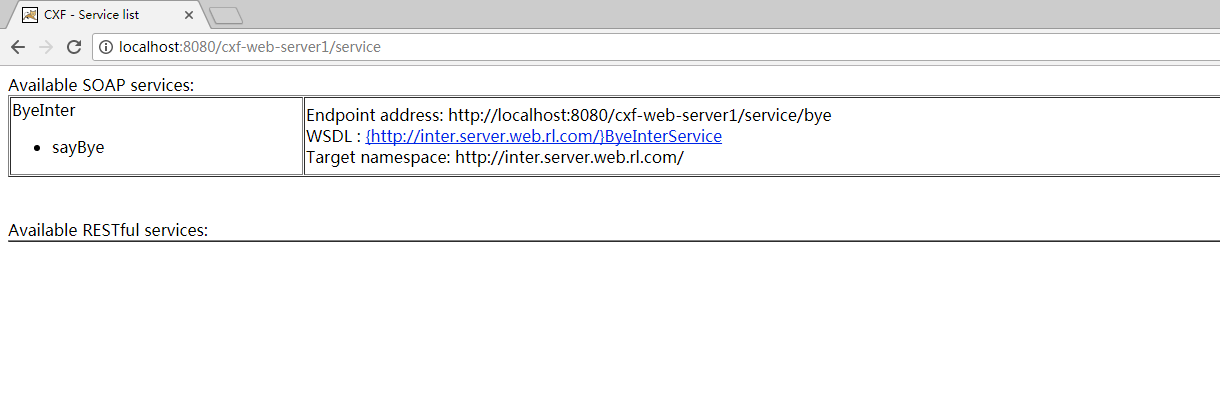
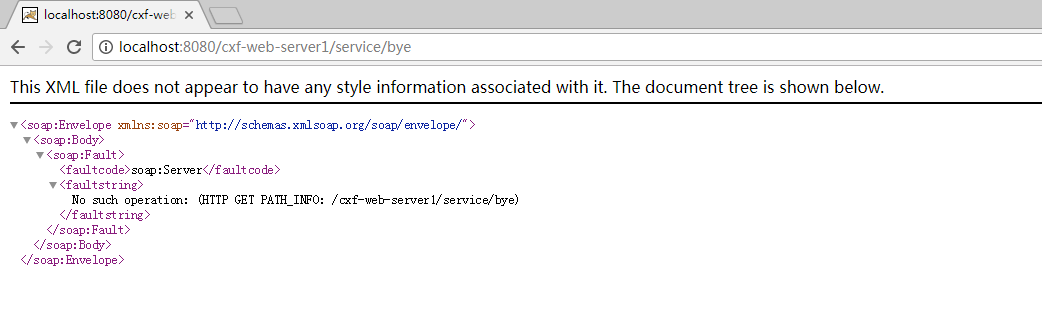

带有接口的实现类也给它做好了.jaxws:endpoint是用在类上,jaxws:server是用在接口上.这就是带有接口的WebService.
<?xml version="1.0" encoding="UTF-8"?>

<beans xmlns="http://www.springframework.org/schema/beans"

    xmlns:xsi="http://www.w3.org/2001/XMLSchema-instance" xmlns:jaxws="http://cxf.apache.org/jaxws"

    xmlns:jaxrs="http://cxf.apache.org/jaxrs" xmlns:cxf="http://cxf.apache.org/core"

    xsi:schemaLocation="http://www.springframework.org/schema/beans

          http://www.springframework.org/schema/beans/spring-beans.xsd

            http://cxf.apache.org/jaxrs http://cxf.apache.org/schemas/jaxrs.xsd

            http://cxf.apache.org/jaxws http://cxf.apache.org/schemas/jaxws.xsd

            http://cxf.apache.org/core http://cxf.apache.org/schemas/core.xsd">

    <!-- 引入CXF Bean定义如下,早期的版本中使用 -->

    <import resource="classpath:META-INF/cxf/cxf.xml" />

    <import resource="classpath:META-INF/cxf/cxf-extension-soap.xml" />

    <import resource="classpath:META-INF/cxf/cxf-servlet.xml" />

    <!--

     =========================配置类的形式webservice服务==================================

       address:tomcat的host http://ip:port/projectName/service/后面的一端路径

       implementor:指定具体的服务的类

     -->

     <!--

     <jaxws:endpoint id="hello" address="/hello" implementor="com.rl.web.server.HelloService">

        -->

        <!-- 输入拦截器,打印输入的消息 -->

        <!--

        <jaxws:inInterceptors>

          <bean class="org.apache.cxf.interceptor.LoggingInInterceptor"></bean>

        </jaxws:inInterceptors>

        <jaxws:outInterceptors>

           <bean class="org.apache.cxf.interceptor.LoggingOutInterceptor"></bean>

        </jaxws:outInterceptors>

     </jaxws:endpoint>

     -->

          <!--

          =======================配置带有接口的webservice服务=========================================

           address:tomcat的host http://ip:port/projectName/service/后面的一端路径

           http://ip:port/projectName/service/bye

          implementor:指定具体的服务的类

          serviceClass:服务接口的类

          -->

          <jaxws:server address="/bye" serviceClass="com.rl.web.server.inter.ByeInter">

          <!--

                      这里不是指定实例,而是指定实现类的类

                      服务接口的实现类

          -->

          <jaxws:serviceBean>

              <bean class="com.rl.web.server.inter.ByeInterImpl"></bean>

          </jaxws:serviceBean>

          <!-- 输入拦截器,打印输入的消息 -->

        <jaxws:inInterceptors>

          <bean class="org.apache.cxf.interceptor.LoggingInInterceptor"></bean>

        </jaxws:inInterceptors>

        <jaxws:outInterceptors>

           <bean class="org.apache.cxf.interceptor.LoggingOutInterceptor"></bean>

        </jaxws:outInterceptors>

     </jaxws:server>

</beans>
<?xml version="1.0" encoding="UTF-8"?>

   <web-app  xmlns:xsi="http://www.w3.org/2001/XMLSchema-instance"

       xmlns="http://java.sun.com/xml/ns/javaee" xmlns:web="http://java.sun.com/xml/ns/javaee/web-app_2_5.xsd"

       xsi:schemaLocation="http://java.sun.com/xml/ns/javaee http://java.sun.com/xml/ns/javaee/web-app_2_5.xsd"

       id="WebApp_ID" version="2.5">

   <!-- 使用Spring的监听器 -->

   <listener>

      <listener-class>org.springframework.web.context.ContextLoaderListener</listener-class><!-- 初始化Spring的容器,cxf.xml本身就是一个Spring的容器.可以把cxf.xml作为Spring的容器进行加载. -->

      <!-- 能加载Spring文件的类,这个类叫什么? -->

   </listener>

   <context-param>

      <param-name>contextConfigLocation</param-name><!-- param-name不能再指定config-location,而是要指定ContextLoaderListener里面读取Spring文件的那个Key -->

      <param-value>classpath:cxf.xml</param-value>

   </context-param>

   <servlet>

       <servlet-name>cxf</servlet-name>

       <servlet-class>org.apache.cxf.transport.servlet.CXFServlet</servlet-class>

       <!--

       <init-param>

          <param-name>config-location</param-name>

          <param-value>classpath:cxf.xml</param-value>

       </init-param>

       <load-on-startup>1</load-on-startup>

       -->

   </servlet>

   <servlet-mapping>

       <servlet-name>cxf</servlet-name>

       <url-pattern>/service/*</url-pattern>  <!-- 拦截这种请求 -->

   </servlet-mapping>

</web-app>
<?xml version="1.0" encoding="UTF-8"?>

<beans xmlns="http://www.springframework.org/schema/beans"

    xmlns:xsi="http://www.w3.org/2001/XMLSchema-instance" xmlns:jaxws="http://cxf.apache.org/jaxws"

    xmlns:jaxrs="http://cxf.apache.org/jaxrs" xmlns:cxf="http://cxf.apache.org/core"

    xsi:schemaLocation="http://www.springframework.org/schema/beans

          http://www.springframework.org/schema/beans/spring-beans.xsd

            http://cxf.apache.org/jaxrs http://cxf.apache.org/schemas/jaxrs.xsd

            http://cxf.apache.org/jaxws http://cxf.apache.org/schemas/jaxws.xsd

            http://cxf.apache.org/core http://cxf.apache.org/schemas/core.xsd">

    <!-- 引入CXF Bean定义如下,早期的版本中使用 -->

    <import resource="classpath:META-INF/cxf/cxf.xml" />

    <import resource="classpath:META-INF/cxf/cxf-extension-soap.xml" />

    <import resource="classpath:META-INF/cxf/cxf-servlet.xml" />

    <!--

       =========================配置类的形式webservice服务==================================

       address:tomcat的host http://ip:port/projectName/service/后面的一端路径

       implementor:指定具体的服务的类

     -->

     <!--

     <jaxws:endpoint id="hello" address="/hello" implementor="com.rl.web.server.HelloService">

        -->

        <!-- 输入拦截器,打印输入的消息 -->

        <!--

        <jaxws:inInterceptors>

          <bean class="org.apache.cxf.interceptor.LoggingInInterceptor"></bean>

        </jaxws:inInterceptors>

        <jaxws:outInterceptors>

           <bean class="org.apache.cxf.interceptor.LoggingOutInterceptor"></bean>

        </jaxws:outInterceptors>

     </jaxws:endpoint>

     -->

     <!--

          =======================配置带有接口的webservice服务=========================================

           address:tomcat的host http://ip:port/projectName/service/后面的一端路径

           http://ip:port/projectName/service/bye

          implementor:指定具体的服务的类

          serviceClass:服务接口的类

      -->

     <jaxws:server address="/bye" serviceClass="com.rl.web.server.inter.ByeInter">

          <!--

                      这里不是指定实例,而是指定实现类的类

                      服务接口的实现类

          -->

          <jaxws:serviceBean>

              <bean class="com.rl.web.server.inter.ByeInterImpl"></bean>

          </jaxws:serviceBean>

          <!-- 输入拦截器,打印输入的消息 -->

        <jaxws:inInterceptors>

          <bean class="org.apache.cxf.interceptor.LoggingInInterceptor"></bean>

        </jaxws:inInterceptors>

        <jaxws:outInterceptors>

           <bean class="org.apache.cxf.interceptor.LoggingOutInterceptor"></bean>

        </jaxws:outInterceptors>

     </jaxws:server>

</beans>
package com.rl.web.server.inter;

import javax.jws.WebService;

@WebService

public interface ByeInter {

   public String sayBye(String name);

}
package com.rl.web.server.inter;

public class ByeInterImpl implements ByeInter {

    @Override

    public String sayBye(String name) {

        // TODO Auto-generated method stub

        return name + " bye";

    }

}
package com.rl.cxf.web.client;

import com.rl.web.inter.ByeInter;

import com.rl.web.inter.ByeInterService;

public class WebInterClient {

    public static void main(String[] args) {

   ByeInterService  bs = new ByeInterService();

   ByeInter bi = bs.getByeInterPort();

   String result = bi.sayBye("八戒");

   System.out.println(result);

    }

}
day63-webservice 08.在web项目中配置带有接口的webservice服务的更多相关文章
- web项目中配置多个数据源
web项目中配置多个数据源 spring + mybatis 多数据源配置有两种解决方案 1.配置多个不同的数据源,使用一个sessionFactory,在业务逻辑使用的时候自动切换到不同的数据源, ...
- 如何在web项目中配置Spring的Ioc容器
在web项目中配置Spring的Ioc容器其实就是创建web应用的上下文(WebApplicationContext) 自定义要使用的IoC容器而不使用默认的XmlApplicationContext ...
- Log4j2在WEB项目中配置
最近决定在新WEB项目中使用新的日志系统Log4j2. 官方介绍和学习文档网址为http://logging.apache.org/log4j/2.x/ 首先在WEB项目中引入以下几个jar包: ① ...
- 转载 Log4j2在WEB项目中配置
最近决定在新WEB项目中使用新的日志系统Log4j2. 官方介绍和学习文档网址为http://logging.apache.org/log4j/2.x/ 首先在WEB项目中引入以下几个jar包: ① ...
- 如何在Web项目中配置Spring MVC
要使用Spring MVC需要在Web项目配置文件中web.xml中配置Spring MVC的前端控制器DispatchServlet <servlet> <servlet-name ...
- 在web项目中配置log4j
在web.xml中添加如下代码 <context-param> <param-name>contextConfigLocation</param-name> < ...
- 在web项目中发布jaxws
概述 在web项目中发布基于jaxws的webservice. 参考文章:用JAX-WS在Tomcat中发布WebService 参考文章说,如果不是servlet3.0及以上,需要配置servlet ...
- 在web项目中使用cxf开发webservice,包含spring支持
本文主要介绍了,如何使用cxf内置的例子,学会开发webserivce,在web项目中使用,且包含spring支持. webserivce的开发可以使用cxf或者axis,好像还有httpclient ...
- SpringMVC,MyBatis项目中兼容Oracle和MySql的解决方案及其项目环境搭建配置、web项目中的单元测试写法、HttpClient调用post请求等案例
要搭建的项目的项目结构如下(使用的框架为:Spring.SpingMVC.MyBatis): 2.pom.xml中的配置如下(注意,本工程分为几个小的子工程,另外两个工程最终是jar包): 其中 ...
随机推荐
- 【系列】Java多线程初学者指南(1):线程简介
原文地址:http://www.blogjava.net/nokiaguy/archive/2009/nokiaguy/archive/2009/03/archive/2009/03/19/26075 ...
- 编码的来历和使用 utf-8 和GB2312比较
经常我们打开外国网站的时候出现乱码,又或者打开很多非英语的外国网站的时候,显示的都是口口口口口的字符, wordpress程序是用的UTF-8,很多cms用的是GB2312. ● 为什么有这么多编码? ...
- CentOS 7 中配置通过 daemon 模式启动的 Tomcat 8 服务
距离上次折腾已经有很长一段时间了... 不说这个,刚好有空闲,把这两天折腾的 Tomcat 8 的服务配置整理出来收录一下. 1.JDK安装 1)检查服务器是否预装了 openJdk,如果有就删除,在 ...
- [转]VIM字符替换
语法为 :[addr]s/源字符串/目的字符串/[option] 全局替换命令为::%s/源字符串/目的字符串/g [addr] 表示检索范围,省略时表示当前行. 如:"1,20" ...
- VTK初始化New返回Null问题
原文链接:http://www.cppblog.com/mythma/archive/2013/08/02/vtk-6-new-null.html 在使用VTK6.0时候,会遇到X::New()返回为 ...
- 【JSP】上传图片到数据库中
第一步:建立数据库 create table test_img(id number(4),name varchar(20),img long raw); 第二步:(NewImg.html) <h ...
- 【sqli-labs】 less26 GET- Error based -All you SPACES and COMMENTS belong to us(GET型基于错误的去除了空格和注释的注入)
看了下源码 所有的注释形式和反斜线,and,or都被了过滤掉了 单引号没有过滤 空格也被过滤了 http://localhost/sqli-labs-master/Less-26/?id=1' htt ...
- Jenkins 定时 构建项目
选择要定时构建的 项目-->配置-->构建触发器 触发项目: Poll SCM:定时检查源码变更(根据SCM软件的版本号),如果有更新就checkout最新code下来,然后执行构建动作. ...
- PAT_A1118#Birds in Forest
Source: PAT A1118 Birds in Forest (25 分) Description: Some scientists took pictures of thousands of ...
- 对 Lua闭包 知识点的学习的总结 ,在这里和大家分享一下,希望对大家有所帮助
Lua闭包 --当一个函数内部嵌套另外一个函数定义时,内部的函数体可以访问外部的函数的局部变量,这种特征为词法定界.--闭包是由函数与其相关的引用环境组合而成的实体 闭包=函数+引用环境--不是在局部 ...