
Cisco交换机IOS配置介绍
一、模式
• 用户模式(>):
• 特权模式(#):
• 全局配置模式(config#):
• 接口配置模式(config-if#):
• 线路模式(#config-line):
二、基本IOS命令结构
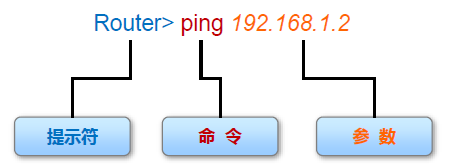
•每个IOS 命令都具有特定的格式或语法,并在相应的提示符下执行。
•常规命令语法为命令后接相应的关键字和参数。
•某些命令包含一个关键字和参数子集,此子集可提供额外功能。
三、相关配置
1、 进入用户模式,命令提示符是>号(正常登陆设备CLI(command-line interface,命令行界面)后的第一个配置模式,主要用于查看统计信息,可用的命令比较少,查看部分简单配置,不可修改,配置)
Switch>
Switch>?
Exec commands:
connect Open a terminal connection
disable Turn off privileged commands
disconnect Disconnect an existing network connection
enable Turn on privileged commands
exit Exit from the EXEC
logout Exit from the EXEC
ping Send echo messages
resume Resume an active network connection
show Show running system information
telnet Open a telnet connection
terminal Set terminal line parameters
traceroute Trace route to destination
2、 输入enable进入特权模式,命令提示符是#号(从用户模式进入,可用命令比较多,查看所有配置,部分修改(保存,恢复出厂等))
Switch>enable
Switch#
Switch#?
Exec commands:
clear Reset functions
clock Manage the system clock
configure Enter configuration mode
connect Open a terminal connection
copy Copy from one file to another
debug Debugging functions (see also 'undebug')
delete Delete a file
dir List files on a filesystem
disable Turn off privileged commands
disconnect Disconnect an existing network connection
enable Turn on privileged commands
erase Erase a filesystem
exit Exit from the EXEC
logout Exit from the EXEC
more Display the contents of a file
no Disable debugging informations
ping Send echo messages
reload Halt and perform a cold restart
resume Resume an active network connection
setup Run the SETUP command facility
show Show running system information
--More--
3、 输入disable从特权模式退到用户模式
Switch#disable
Switch>
4、 输入configure terminal进入全局配置模式(需要从特权模式进入,在全局模式下执行命令将影响整个设备,大配置操作都在这个模式下或从这个模式进入其他模式)
Switch#configure terminal
Switch(config)#
5、输入exit从全局配置模式退到特权模式
Switch(config)#exit
Switch#
6、在全局配置模式下可以设置特权密码(进入特权模式的密码,用于限制人员访问特权执行模式),输入enable password
Switch(config)#enable password 1234 #密码为1234
Switch>enable
Password: #再从用户模式进入特权模式提示输入密码
7、进入某个接口配置模式
Switch(config)#interface vlan 100
Switch(config-if)#
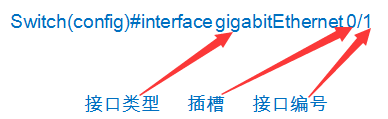
Switch(config)#interface gigabitEthernet 0/1
Switch(config-if)#
8、现在开始配置vlan 100 的管理ip 和子网掩码
Switch(config-if)#ip address 192.168.100.100 255.255.255.0
9、配置一条线路(实际线路或虚拟线路,每个连接这个设备的用户都要占用一个线路例Console、AUX 或VTY等连接方式,这里VTY(Virtual Type Terminal) 是虚拟终端的意思)
Switch(config)#line vty 0 4
line vty 0 4表示设置0到4号5个线路为远程登录,设置为0 3,0 2,0 1完全是可以的,0 4表示最多可以同时5个线路连接,默认0线路被Console占用)
Switch(config-line)#
10、在全局配置模式下可以设置Console密码(用于限制人员通过控制台(Console)连接访问设备)
Switch(config)#line console 0 #配置console线路
Switch(config-line)#password 1234 #密码为1234
Switch(config-line)#login #登录启用密码检查
11、在全局配置模式下可以设置VTY线路登录密码(用于限制人员通过VTY接访问设备)
Switch(config)#line vty 0 10 #通过VTY线路同时连接的最大用户是10
Switch(config-line)#password 12345 #VTY线路登录密码12345
Switch(config-line)#login #登录启用密码检查
Cisco交换机IOS配置介绍的更多相关文章
- Cisco交换机常见配置
-------查看当前系统基础信息-------- sh version //查看当前IOS版本. sh running-config //查看当前系统中运行的配置信息 -------清除当前系统配置 ...
- CISCO交换机-SNMP配置
1.1 SNMP基础配置 router> enable 进入路由器是用户模式 router# conf terminal 进入路由器的全局配置模式 #snmp-server commun ...
- Huawei交换机VRP配置介绍
一.命令视图• 用户视图<Huawei>• 系统视图 [Huawei]• 接口视图 [Huawei-GigabitEthernet0/0/1]• 协议视图 [Huawei-rip-1]• ...
- 通过python的paramiko模块获取cisco交换机的配置
import paramiko import time import os import threading,Queue class MyExpection(Exception): pass clas ...
- cisco 交换机 IOS命令
1 显示交换机的MAC地址表 user mode : show mac-address-table
- Cisco交换机管理员配置
conf tservice timestamps debug datetime msec localtime yearservice timestamps log datetime msec loca ...
- [CISCO] 思科交换机基本配置
思科交换机基本配置 交换机是局域网中最重要的设备,交换机是基于 MAC 来进行工作的.和路由器类似,交换 机也有 IOS,IOS 的基本使用方法是一样的.本章将简单介绍交换机的一些基本配置,以及交换 ...
- CiSCO 交换机配置 SSH 登陆
CiSCO 交换机配置 SSH 登陆 题目:在三层交换机上仅运行 SSH 服务,且用户名和密码的方式登录交换机. (一)了解主机名与域名 1."主机名" 为该设备的名称 2 ...
- Cisco 交换机配置的基本命令
1.不同的vlan 不同vlan需要路由 在路由的端口设置多个IP段 交换机模拟器实验六 2.查看端口名字 SWA#sh vlan default Active F0/1, F0/2, F0 ...
随机推荐
- mysql给某字段随机赋特定范围的整数值
[引] mysql中随机生成一些范围内的整数有时候是很有用的,用到了2个函数 1.floor(f) 返回一个不大于f的最大整数 2.rand(),rand(n) 返回一个随机浮点值 v ,范围在 0 ...
- ORA-06553:PLS-306:wrong number or types of arguments in call to ''
1.错误描写叙述 watermark/2/text/aHR0cDovL2Jsb2cuY3Nkbi5uZXQv/font/5a6L5L2T/fontsize/400/fill/I0JBQkFCMA==/ ...
- iOS 中client和server的 Web Service 网络通信 (1)
当你打开你手机上新浪微博应用或者知乎应用是.你是否会去想这些显示在手机上的图片和数据时从哪里来的?又是通过如何的方法实现的?好.那么接下来就介绍是如何实现的.过程又是怎么样的. 当我们浏览着 ...
- 制作 Gif 工具
ScreenToGif:非常小,非常强大: 从此可以十分方便地从视频中抠 gif 出来了: 以及制作一些教学类小 gif,插入到网页中: 丰富的编辑功能: 插入文本,插入标题,插入图像等: 下载地址: ...
- MinGW - 安装和配置 / MinGW - Howto Install And Configure
MinGW在线安装程序下载地址:http://sourceforge.net/projects/mingw/files/Automated%20MinGW%20Installer/mingw-get- ...
- 相机拍照友盟检测crash是为什么?
友盟报错如下* setObjectForKey: object cannot be nil (key: UIImagePickerControllerOriginalImage)(null)(( 0 ...
- PostgreSQL Replication之第二章 理解PostgreSQL的事务日志(1)
在前面的章节中,我们已经理解了各种复制概念.这不仅仅是一个为了接下来将要介绍的东西而增强您的意识的理论概述,还将为您介绍大体的主题. 在本章,我们将更加接近实际的解决方案,并了解PostgreSQL内 ...
- codeforces 445 B DZY Loves Chemistry【并查集】
题意:给出n种化学物质,其中m对会发生化学反应,每次加入化学物质进去的时候, 如果有能够和它发生反应的,危险值就乘以2,问怎样的放入顺序使得危险值最大 将这m对会反应的用并查集处理,统计每个连通块里面 ...
- C#自定义事件监视变量变化
首先监视定义类 class Event { public delegate void tempChange(object sender, EventArgs e); public event temp ...
- 学习Go语言之单例模式
单例模式涉及到一个单一的类,该类负责创建自己的对象,同时确保只有单个对象被创建.这个类提供了一种访问其唯一的对象的方式,可以直接访问,不需要实例化该类的对象 // 单例模式 package main ...