
layui的多文件列表上传功能前端代码
html页面的代码(注意:引入layui相关的css):
<div class="layui-upload" style="margin-left: 130px">

            <button type="button" class=" layui-btn" id="choiceList"><i class="iconfont icon-e645"></i>选择多文件</button>

            <div class="layui-upload-list layui-upList-minHeight">

                <table class="layui-table">

                    <thead>

                        <tr>

                            <th>文件名</th>

                            <th>大小</th>

                            <th>状态</th>

                            <th>操作</th>

                        </tr>

                    </thead>

                    <tbody id="demoList">

                        <tr id="upload">

                            <td>xxx.txt</td>

                            <td>xxxkb</td>

                            <td>等待上传</td>

                            <td><button class="layui-btn layui-btn-xs demo-reload layui-hide">重传</button><button class="layui-btn layui-btn-xs layui-btn-danger demo-delete" disabled>删除</button></td>

                        </tr>

                    </tbody>

                </table>

            </div>

            <!--            <div class="layui-form-item layui-btn-Center">

                    <div class="layui-input-block text-right">

                        <button type="button" class="layui-btn layui-btn-xs" id="choiceListAction">开始上传</button>

                        <button class="btn layui-btn layui-btn-xs layui-btn-primary js_close" id="quXiao" type="button">取消</button>

                    </div>

                </div> -->

        </div>
js的编写(引入layui相关的js):
layui.use(['upload','form','layer','laydate'], function(){

		  var $ = layui.jquery

		  ,upload = layui.upload

		  ,form = layui.form;

		  //多文件列表示例

		$(function() {

			var uploadFile = {

				init: function() {

					this.upload();

				},

				//上传文件

				upload: function() {

					layui.use('upload', function() {

						var $ = layui.jquery,

							upload = layui.upload;

						//多文件列表示例

						var demoListView = $('#demoList'),

							uploadListIns = upload.render({

								elem: '#choiceList',

								url: '__PUBLIC__/static/file/uploadFile',

								accept: 'file',

								multiple: true,

								auto: true,

								bindAction: '#choiceListAction',

								choose: function(obj) {

									var files = this.files = obj.pushFile(); //将每次选择的文件追加到文件队列

									//读取本地文件

									obj.preview(function(index, file, result) {

										if($('#demoList tr td').eq(0).text() == 'xxx.txt') {

											$('#demoList').empty();

										}

										var tr = $(['<tr id="upload-' + index + '">',

											'<td>' + file.name + '</td>',

											'<td>' + (file.size / 1014).toFixed(1) + 'kb</td>',

											'<td>等待上传</td>',

											'<td>',

											'<button class="layui-btn layui-btn-xs demo-reload layui-hide">重传</button>',

											'<button class="layui-btn layui-btn-xs layui-btn-danger demo-delete">删除</button>',

											'</td>',

											'</tr>'

										].join(''));

										//单个重传

										tr.find('.demo-reload').on('click', function() {

											obj.upload(index, file);

										});

										//删除

										tr.find('.demo-delete').on('click', function() {

											delete files[index]; //删除对应的文件

											tr.remove();

											uploadListIns.config.elem.next()[0].value = ''; //清空 input file 值,以免删除后出现同名文件不可选

										});

										demoListView.append(tr);

									});

								},

								done: function(res, index, upload) {

									if(res.code == 0) { //上传成功

										var tr = demoListView.find('tr#upload-' + index),

											tds = tr.children();

										tds.eq(2).html('<span style="color: #5FB878;">上传成功</span>');

										tds.eq(3).html(''); //清空操作

										return delete this.files[index]; //删除文件队列已经上传成功的文件

									}

									this.error(index, upload, res.msg);

								},

								error: function(index, upload, msg) {

									var tr = demoListView.find('tr#upload-' + index),

										tds = tr.children();

									tds.eq(2).html('<span style="color: #FF5722;">' + msg + '</span>');

									tds.eq(3).find('.demo-reload').removeClass('layui-hide'); //显示重传

								}

							});

					});

				}

			}

			uploadFile.init();

		});

	});
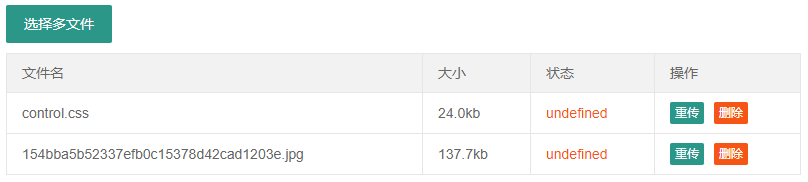
效果图
layui的多文件列表上传功能前端代码的更多相关文章
- Vue实现多文件上传功能(前端 + 后端代码)
本人业余前端开发,因为公司(很坑)觉得我很牛逼,所以让我前后端一起玩,无奈的我只能磕磕碰碰的研究起了vue. 开发项目的时候,用到文件上传的功能很常见,包括单文件上传和多文件上传,上传各种类型的文件. ...
- 020 文件(图片)上传功能---涉及switchhost和Nginx的使用
文件的上传并不只是在品牌管理中有需求,以后的其它服务也可能需要,因此我们创建一个独立的微服务,专门处理各种上传. 1.搭建模块 (1)创建模块 (2)依赖 我们需要EurekaClient和web依赖 ...
- layui+springmvc实现文件异步上传
一.单文件上传 前端代码 <div class="layui-upload"> <div class="layui-upload-list"& ...
- java+web文件的上传和下载代码
一般10M以下的文件上传通过设置Web.Config,再用VS自带的FileUpload控件就可以了,但是如果要上传100M甚至1G的文件就不能这样上传了.我这里分享一下我自己开发的一套大文件上传控件 ...
- jfinal layui easyexcel 实现文件的上传下载
jfinal layui easyexcel 这三样开源技术这里就不多介绍了,自行百度了解吧,他们的组合算是一个很高效又不失美观的操作体验. 操作主要分以下几步: 1.建立jfinal的操作环境, ...
- java文件分片上传,断点续传
百度的webUploader的前端开源插件实现的大文件分片上传功能 前端部分 前端页面代码如下,只需要修改自己的文件上传地址接口地址: <!DOCTYPE html> <html l ...
- layui文件单文件和多文件的上传、预览以及删除和修改
活不多说,直接上代码 单文件上传 1.HTML <blockquote class="layui-elem-quote layui-quote-nm" style=" ...
- 文件/大文件上传功能实现(JS+PHP)全过程
文件/大文件上传功能实现(JS+PHP) 参考博文:掘金-橙红年代 前端大文件上传 路漫漫 其修远 PHP + JS 实现大文件分割上传 本文是学习文件上传后的学习总结文章,从无到有实现文件上传功能, ...
- 使用element的upload组件实现一个完整的文件上传功能(上)
说到标题就有点心塞了,前段时间项目上需要实现一个文件上传的功能,然后就咔咔的去用了element的upload组件,不用不知道一用吓一跳哇. 在使用的过程中遇到了很多让意想不到的问题,后来也因为时间问 ...
随机推荐
- winform右键菜单
public partial class Form1 : Form { ContextMenuStrip cms; Bitmap bm ; public Form1() { InitializeCom ...
- (转) RabbitMQ学习之helloword(java)
http://blog.csdn.net/zhu_tianwei/article/details/40835555 amqp-client:http://www.rabbitmq.com/java-c ...
- Linux常用命令速查
索引表格 命令 功能简述 目录与文件基本操作 pwd 显示当前目录 ls 列出目录和文件名称 cp 复制文件或目录 mv 移动或更名现有的文件或目录 rm 删除文件或目录 mkdir 新建目录 rmd ...
- SPOJ DISQUERY LCA + 倍增
裸题,如此之水- Code: #include<cstdio> #include<algorithm> using namespace std; const int maxn ...
- 死磕itchat源码--__init__.py
itchat包中的__init__.py是该库的入口:在该文件中的源码如下: # -*- coding: utf-8 -*- from . import content from .core impo ...
- js提示是否删除
第一种: <a href="javascript:if(confirm('确认删除吗?'))window.location='del.asp'">删除</a> ...
- Python笔记6----数组
1.Python 中的数组 形式: 用list和tuple等数据结构表示数组 一维数组:list=[1,2,3,4] 二维数组:list=[[1,2,3],[4,5,6],[7,8,9]] 用arra ...
- CodeForcesGym 100641B A Cure for the Common Code
A Cure for the Common Code Time Limit: 3000ms Memory Limit: 262144KB This problem will be judged on ...
- 洛谷—— P1220 关路灯
https://www.luogu.org/problem/show?pid=1220 题目描述 某一村庄在一条路线上安装了n盏路灯,每盏灯的功率有大有小(即同一段时间内消耗的电量有多有少).老张就住 ...
- Guava工具类
原文链接:http://blog.csdn.net/mnmlist/article/details/53425865 Objects类 Objects类有几个比较不错的方法,toString.hash ...