
SAFS Distilled --- 9 April 2015 to 16 April 2015
In the org.safs.model, the class Component stores:
- information of this component's name
- reference of its parent, also a component
private String _name;

private Component _parent;
It provides interface to return its name, its parent's name and its parent's comopnent reference:
public String getName();

public Component getParent();

public String getParentName();
In package org.safs.model, the Utils class provides various functions used by other classes. For example:
/**

 * Wrap the provided val String in double-quotes.

 * @param val String to wrap in double-quotes

 * @return val wrapped in quotes or a double-quoted empty string if

 * val was null.

 */

static public String quote(String val) {

    if (val == null) return "\"\"";

        return "\"" + val + "\"";

}

public static String concat(String string1, String string2) {

    return string1 + "&" + string2;

}
Retrieve SAFSVARS
Let's first talk about the process of retrieving SAFS variables stored in SAFSVARS. This process will show many mechanisms routining in SAFS. We need to open up the packages of SAFS to know some basic classes structure.
In package org.safs.model.tools, class EmbeddedHookDriverRunner is an access point to a minimalist EmbeddedHookDriver Driver API. EmbeddedHookDriver allows custom JSAFS test development and execution inside a Java-based SAFS Engine.
As the constructor is:
/**

 * Create the Runner that instantiates the particular EmbeddedHookDriver subclass

 * pass in to the Constructor.

 */

public EmbeddedHookDriverRunner(Class clazz){

	super();

	if(driver == null){

		try{

			driver = new EmbeddedHookDriverDriver(clazz);

		}catch(Exception x){

			x.printStackTrace();

			throw new Error("Cannot instantiate required Drivers!");

		}

	}

}
It'll create specific subclass of EmbeddedHookDriver for doing the work. Also from the code, we can know that EmbeddedHookDriverDriver is just a wrapper of EmbeddedHookDriver for providing minimalist interface.

Java-based SAFS Engines would need to implement an engine-specific subclass of this EmbededHookDriver using a EmbeddedHookSTAFHelper to take advantage of this feature. For example:
EmbeddedHookDriverSubclass hook = new EmbeddedHookDriverSubclass("UniqueName");
Generic JavaHook for tool-independent SAFS Engines. This abstract class provides the implementation for the initialization and event handling of all Java-based SAFS Engines that will be controlled via our SAFS protocols.
// Set the process name for this hook for an instance of created from an empty constructor.

protected void setProcessName(String process_name);

// Insert this SAFS Engine hook into the STAF system.

void start();
JSAFSDriver Structure and Utility:

- AbstractDriver: the root, abstract implementation of tool-independent driver.
- DefaultDriver: root, yet abstract, implementation of tool-independent driver, final concrete implementation must implement AbstractDriver#processTest().
- JSAFSDriver: provides easy access to SAFS functionality for non-SAFS programs and frameworks.
Combine the two parts, we get:

In order to retrieve the value of a SAFS variable stored in SAFSVARS, SAFS uses a embeddedHookDriverRunner to finish the work.
return Runner.jsafs().getVariable(variableName);
The steps are:
- return a EmbeddedHookDriver by using EmbeddedHookDriverDriver called by EmbeddedHookDriverRunner.
- use this embeddedHookDriver to return a JSAFSDriver.
- use the JSAFSDriver to retrieve the value of a SAFS variable stored in SAFSVARS.
Then, let's focus on the retrieving method of JSAFSDriver.
The method getVariable()
public String getVariable(String varname){

	return getVarsInterface().getValue(varname);

}
is from the superclass AbstractDriver. It'll return the VarsInterface:
In the interface SimpleVarsInterface, it will return the current value of variable var.
That's the whole process of retrieving the variables stored in SAFSVARS.
The obvious next question is: when are the values of variables stored in SAFSVARS loaded into program?
Well, in fact this will be another long story we will expand below.
In order to know when SAFS load the configuration information, we'll focus on the following class structure:

In the AbstractDriver class, it offers lots of variables to store the driver interface information:
// Driver Interface Information

protected InputInterface           input       = null;

protected MapsInterface            maps        = null;

protected VarsInterface            vars        = null;

protected LogsInterface            logs        = null;

protected CoreInterface            core        = null;

protected CountersInterface        counts      = null;

protected DebugInterface           debug       = new DebugInfo();
Here, we may focus just one variable maps (which) as our example for explanation.
The JSAFSDriver offers a method run() for initializing the embedded dirvers and engines to start running if it is not already running. It ensures the drivers are initialized before trying to use them. Following this run() method, a series of calling will happen:
- driver.run()
- preloadAppMapExpressions()
- preloadAppMap()
The first part, driver.run(), will initialize configuration with default paramters. The process is below:

Thus, the validateRootConfigureParameters() method will configurate paramters with defalut paramters.
In DefaultDriver class, method validateRootConfigureParameters() gets the configuration information.
In org.safs.tools.drivers.ConfigureFile.java, class ConfigureFile implements ConfigureInterface, and its method getNamedValue() will retrieve the values in the configuration sources.
In org.safs.tools.drivers.ConfigureInterface.java, the method getNamedValue() of interface ConfigureInterface is used to retrieve an item that may be in the configuration sources. An item is identified by a parent key or section name, like in an INI file "section", and the name of the item in that section.
After loading of configuration information, in the DefaultDriver class, the function initializeRuntimeInterface() will initialize these interface variables:
protected void initializeRuntimeInterface(){

	// ...

	try {

		// first one in, if initializing STAF, must be last one to shutdown.

		maps = (MapsInterface) getGenericInterface(DriverConstant.SECTION_SAFS_MAPS,

													 DriverConstant.DEFAULT_MAPS_INTERFACE);

		// ...

	}

	// ...

}
Inside the getGenericInterface() method, it'll use the configuration information, stored in variable configInfo, to initialize the corresponding interface information, i.e. maps here:
protected GenericToolsInterface getGenericInterface (String configSection, String defaultInterface)

	throws ClassNotFoundException, IllegalAccessException, InstantiationException {

	String iName = configInfo.getNamedValue(configSection, "Item");

	if (iName == null)

		iName = defaultInterface;

	iName = StringUtilities.TWhitespace(iName);

	iName = StringUtilities.removeDoubleQuotes(iName);

	return ((GenericToolsInterface) (Class.forName(iName).newInstance()));

}
The third part, preloadAppMap(), will locate the directory of MAP file, and using file read function to assign corresponding interface variables:
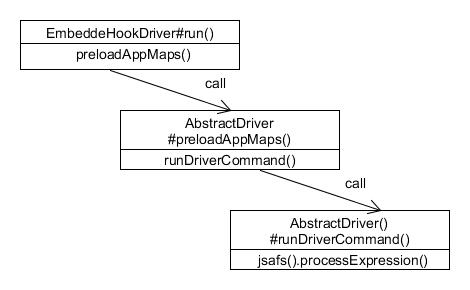
That's the brief explanation of loading MAP files.
Open a Browser
In the SeleniumPlus class, the command() method executes a driver command by a EmbeddedDriverRunner, Runner:
public static EmbeddedHookDriverRunner Runner = new EmbeddedHookDriverRunner(EmbeddedSeleniumHookDriver.class);

// ...

prevResults = Runner.command(command, params);
Process of calling functions:

In order to startup a service, it needs to use the interface of a driver's wrapper, i.e. the Runner. Then, by using the method of wrapper, it uses JSAFSDriver to call corresponding method. It's obvious that all the other service calling will get through this process. Summary above, we get:
- Use an access point of a driver's wrapper, Runner.
- Use the wrapper, driver of EmbeddedHookDriver which is the field of Runner, driver.
- Use this driver to get a Java SAFS Driver, jsafs.
- Use jsafs to call process command methods.
Following above steps, by using jsafs to startup command methods, it needs to call abstract driver method. After the initial parameters processing, it will use a Process variable, proc, to call the concrete driver methods.
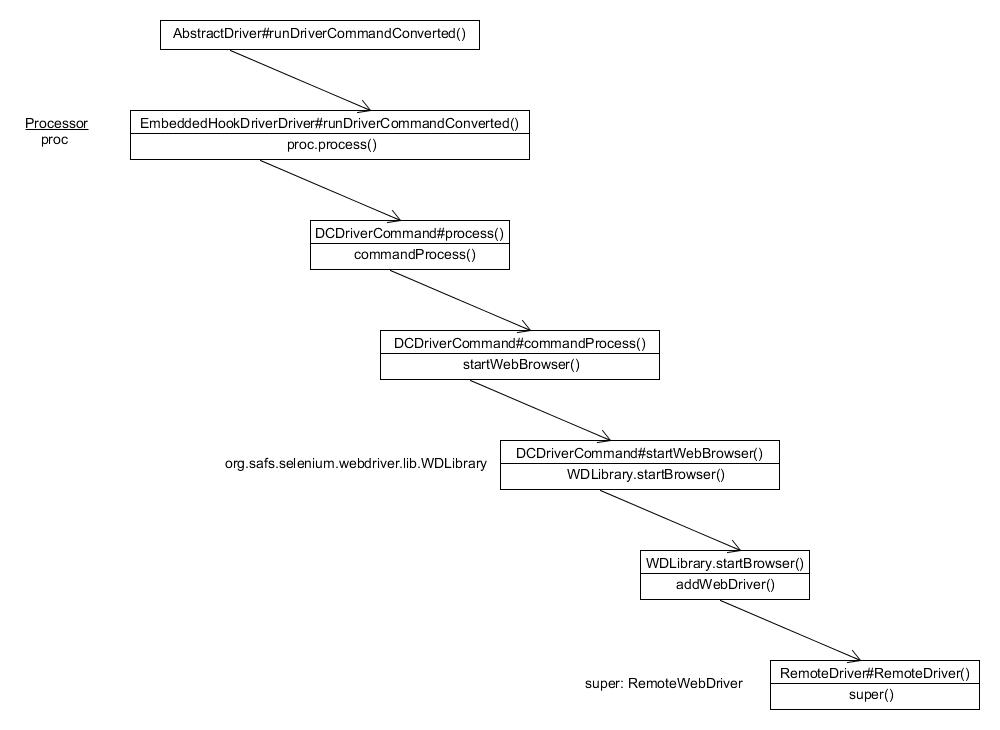
The RemoteDriver class handle a SeleniumRMIAgent, if enabled, to communicate with a remote SAFS Selenium RMI Server.
Log In
The log in process involves the click action, which is a little different than the process of command.
Process of calling structure:

In ComponentFunction class, the componentProcess() method includes the process generic actions on a component.
Set Text Value
The process of "set text value":

How to generate Map.class file:
SAFS Distilled --- 9 April 2015 to 16 April 2015的更多相关文章
- [转]Adobe Creative Cloud 2015 下载 Adobe CC 2015 Download
Adobe Creative Cloud 2015 下载 Adobe 宣布 Creative Cloud 设计套件全线更新! Adobe CC 2015新功能包括: – Premiere Pro ...
- myeclipse 2015 CI 16发布【附下载】
2015升级版再次来袭! 更新日志: Slack Integration 新版本集成了Slack,你只需要注册一个Slack帐号然后就可以发送和接收代码片段.你甚至不需要登录Slack就可以直接在Ec ...
- H264解码学习-2015.04.16
今天看了不少,却感觉收获寥寥. 1.H264相关知识 因为RTP协议发过来的数据已经经过了H264编码,所以这边需要解码.补充一下H264的相关知识. 与以往的视频压缩标准相比,H.264 视频压缩标 ...
- Zookepper(2015.08.16笔记)
2015.08.16zookepper Zookeeper 是 Google 的 Chubby一个开源的实现,是 Hadoop 的分布式协调服务(如同小区里面的供水.电的系统) 它包含一个简单的原 ...
- 2015.2.16 关于delphi web控件打开新网页时弹出关闭页面(js代码)出错的解决办法研究
参考网址1:http://www.csharpwin.com/csharpspace/2360.shtml...参考网址2:http://www.oschina.net/question/234345 ...
- SQL SERVER 并发【2015.12.16】
并发控制模型 1.悲观并发控制: A.默认冲突存在,当前进程通过获取当前数据的锁阻止其他进程的访问. B.读与写之间是相互阻塞. 2.乐观并发控制: A.使用行版本控制保持数据被操作前的状态. B ...
- http://oncenote.com/2015/09/16/Security-2-HTTPS2/ (轉載)
上一篇<iOS安全系列之一:HTTPS>被CocoaChina转载,还顺便上了下头条: 打造安全的App!iOS安全系列之 HTTPS,但那篇文章只是介绍了比较偏应用的初级知识,对于想要深 ...
- 2015第16周六学习java建议
学习Java 建议: 尽量用 google 查找技术资料. 有问题在 stackoverflow 找找,大部分都已经有人回答. 多看官方的技术文档. ibm developerworkers 的文章质 ...
- android 边学边记 2015.10.16
1.Menu.FIRST在reference中描述为:First value for group and item identifier integers.我们可以理解为ID设置的最小数值. 2.se ...
随机推荐
- Python全栈之路8--迭代器(iter)和生成器(yield)
一.生成器( iter ) 从Python2.2起,生成器提供了一种简洁的方式帮助返回列表元素的函数来完成简单和有效的代码. 它基于yield指令,允许停止函数并立即返回结果.此函数保存其执行上下文, ...
- php 生日提醒程序
<?php $startdate=time(); //当前时间 $birth="2013-05-13"; // 出生日期 $arr=explode(" ...
- Eclipse的安装和java环境变量的设置
首先准备工作是要下载好Eclipse和java JDK. 必须要注意的是,Eclipse和java JDK必须下载同一位数的版本,即64位同为64位,32位同为32位.否则在安装完成运行Eclipse ...
- sqlite数据库中 保存和读取UIData对象
+ (void)getPersonByID:(int)ID { sqlite3 *db = [DB open]; sqlite3_stmt *stmt = nil; int result = sqli ...
- 如何制作u盘启动盘
1,下载windows系统 许多人下载windows时会出现各种版本,我推荐在这里下载 你用上面的地址进行下载,一般用迅雷吧.下载结束你就有了镜像文件了. 2,下载安装碟软通 那 ...
- SpringMVC上传文件
SpringMVC中上传文件还是比较方便的,Spring内置了一些上传文件的支持类,不需要复杂的操作即可上传文件. 文件上传需要两个jar支持,一个是commons-fileupload.jar和co ...
- [ACM] poj 2456 Aggressive cows (二分查找)
Aggressive cows Time Limit: 1000MS Memory Limit: 65536K Total Submissions: 5436 Accepted: 2720 D ...
- 今天在Mac机器上使用了Flex Builder编辑了一个源代码文件,保存后使用vim命令去打开时发现系统自动在每一行的结尾添加了^M符号,其实^M在Linux/Unix中是非常常见的,也就是我们在Win中见过的/r回车符号。由于编辑软件的编码问题,某些IDE的编辑器在编辑完文件之后会自动加上这个^M符号。看起来对我们的源代码没有任何影响,其实并不然,当我们把源代码文件Check In到svn之类
今天在Mac机器上使用了Flex Builder编辑了一个源代码文件,保存后使用vim命令去打开时发现系统自动在每一行的结尾添加了^M符号,其实^M在Linux/Unix中是非常常见的,也就是我们在W ...
- 解决 yum安装时报错 Error: Protected multilib versions: 报错
系统中缺少一个lib库 libz.so.1文件,使用yum安装会自动找到相关的rpm包,如下命令 # yum -y install libz.so.1 Resolving Dependencies-- ...
- C++混合编程之idlcpp教程(一)
我是C++语言的忠实拥趸,由于在上学时经历了资源匮乏的DOS时代,对C/C++这种更加接近硬件的语言由衷的喜爱.一直以来也是已C++作为工作的语言,对别的语言那是不屑一顾.在java火爆流行的时候,没 ...