
LGLDatePickerView
这个是封装 系统的PickerView 使用也比较简单, gihub地址:https://github.com/liguoliangiOS/LGLDatePickerView.git
效果图
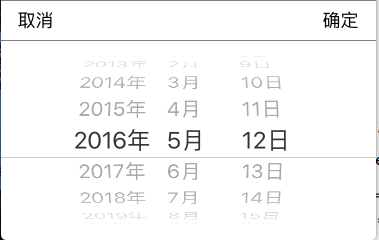
使用方法:
[[LGLDatePickerView shareDatePiker] datePikerShowWithMode:LGLDatePickerModeDate];
[[LGLDatePickerView shareDatePiker] dateCallBackSelectBlock:^(NSString *date) {
NSLog(@"%@", date);
}];
上代码:
LGLDatePickerView.h
//

//  LGLDatePickerView.h

//  LGLProgress

//

//  Created by 李国良 on 2016/10/9.

//  Copyright © 2016年 李国良. All rights reserved.

//

#import <Foundation/Foundation.h>

typedef NS_ENUM(NSInteger, LGLDatePickerrMode) {

    LGLDatePickerModeTime,           // 选择时间

    LGLDatePickerModeDate,           // 日期

    LGLDatePickerModeDateAndTime,    // 日期和时间

    LGLDatePickerModeCountDownTimer, // 可以用于倒计时

};

/** 回调Block*/

typedef void(^DateSelectBlock)(NSString * date);

@interface LGLDatePickerView : NSObject

@property (nonatomic, copy) DateSelectBlock block;

+ (instancetype)shareDatePiker;

- (void)datePikerShowWithMode:(LGLDatePickerrMode)mode;

- (void)dateCallBackSelectBlock:(DateSelectBlock)block;

@end
LGLDatePickerView.m
//

//  LGLDatePickerView.m

//  LGLProgress

//

//  Created by 李国良 on 2016/10/9.

//  Copyright © 2016年 李国良. All rights reserved.

//

#import "LGLDatePickerView.h"

#import "UIView+Frame.h"

#define WIDTH [UIScreen mainScreen].bounds.size.width

#define HEIGHT [UIScreen mainScreen].bounds.size.height

@interface LGLDatePickerView ()

@property (nonatomic, strong) UIView       * bgView;

@property (nonatomic, strong) UIView       * dateView;

@property (nonatomic, strong) UIDatePicker * datePicker;

@property (nonatomic, copy)   NSString     * selectDate;

@end

@implementation LGLDatePickerView

    static id _instace;

+ (instancetype)shareDatePiker

{

    static dispatch_once_t onceToken;

    dispatch_once(&onceToken, ^{// 只创建一次

        _instace = [[self alloc] init];

    });

    return _instace;

}

+ (id)allocWithZone:(struct _NSZone *)zone

{

    static dispatch_once_t onceToken;

    dispatch_once(&onceToken, ^{// 只初始化一次

        _instace = [super allocWithZone:zone];

    });

    return _instace;

}

- (id)copyWithZone:(NSZone *)zone

{

    return _instace;

}

- (void)datePikerShowWithMode:(LGLDatePickerrMode)mode {

    if (!self.dateView) {

        self.dateView = [[UIView alloc] initWithFrame:CGRectMake(, HEIGHT, WIDTH, )];

        self.dateView.userInteractionEnabled = YES;

//  ============================= 添加分界线 =======================================================================

        UIView * lineView1 = [[UIView alloc] initWithFrame:CGRectMake(, , WIDTH, )];

        lineView1.backgroundColor = [UIColor colorWithRed: green: blue: alpha:0.5];

        [self.dateView addSubview:lineView1];

        UIView * lineView = [[UIView alloc] initWithFrame:CGRectMake(, , WIDTH, )];

        lineView.backgroundColor = [UIColor colorWithRed: green: blue: alpha:0.5];

        [self.dateView addSubview:lineView];

//  =====================  添加确定取消按钮  =========================================================================

        UIButton * cancelBtn = [UIButton buttonWithType:UIButtonTypeCustom];

        cancelBtn.frame = CGRectMake(, , , );

        [cancelBtn setTitle:@"取消" forState:UIControlStateNormal];

        [cancelBtn setTitleColor:[UIColor blackColor] forState:UIControlStateNormal];

        cancelBtn.userInteractionEnabled = YES;

        [cancelBtn addTarget:self action:@selector(cancelBtnclink) forControlEvents:UIControlEventTouchUpInside];

        [self.dateView addSubview:cancelBtn];

        UIButton * okBtn = [UIButton buttonWithType:UIButtonTypeCustom];

        okBtn.frame = CGRectMake(WIDTH - , , , );

        [okBtn setTitle:@"确定" forState:UIControlStateNormal];

        [okBtn setTitleColor:[UIColor blackColor] forState:UIControlStateNormal];

        [okBtn addTarget:self action:@selector(okBtnClink) forControlEvents:UIControlEventTouchUpInside];

        [self.dateView addSubview:okBtn];

// ====================  初始化UIDatePicker,旋转滚动选择日期类  =======================================================

        self.datePicker = [[UIDatePicker alloc] initWithFrame:CGRectMake(, , WIDTH, )];

        [self.datePicker setLocale:[[NSLocale alloc]initWithLocaleIdentifier:@"zh_CN"]];

        [self.datePicker setTimeZone:[NSTimeZone localTimeZone]];           // 设置时区

        [self.datePicker setDate:[NSDate date] animated:YES];               // 设置当前显示时间

        //[datePicker setMaximumDate:[NSDate date]];                        // 设置显示最大时间(此处为当前时间)最大和最小同时设置就不能选择未来的时间

        UIDatePickerMode  pikcerMode = (mode == LGLDatePickerModeDate) ? (UIDatePickerModeDate) : ((mode == LGLDatePickerModeDateAndTime) ? UIDatePickerModeDateAndTime : ((mode == LGLDatePickerModeTime) ? UIDatePickerModeTime : UIDatePickerModeCountDownTimer));

        [self.datePicker setDatePickerMode:pikcerMode];    // 设置UIDatePicker的显示模式

        [self.datePicker addTarget:self action:@selector(datePickerValueChanged:) forControlEvents:UIControlEventValueChanged];

        [self.dateView addSubview:self.datePicker];

        UIWindow * window = [UIApplication sharedApplication].keyWindow;

        [UIView animateWithDuration:0.5 animations:^{

            self.dateView.y = HEIGHT - ;

        }];

        [window addSubview:self.dateView];

        self.selectDate = [self dateToStringWithDate:[NSDate date]];        // 防止用户不选择日期直接选择确定

    }

}

- (void)cancelBtnclink {

    [UIView animateWithDuration:0.5 animations:^{

        self.dateView.y = HEIGHT;

    }completion:^(BOOL finished) {

        [self.dateView removeFromSuperview];

         self.dateView = nil;

    }];

}

- (void)dateCallBackSelectBlock:(DateSelectBlock)block {

    self.block = block;

}

- (void)okBtnClink {

    self.block(self.selectDate);

    [self cancelBtnclink];

}

- (void)datePickerValueChanged:(UIDatePicker *)datepiker {

    self.selectDate = [self dateToStringWithDate:[datepiker date]];

}

- (NSString *)dateToStringWithDate:(NSDate *)selectDate {

    NSDateFormatter *selectDateFormatter = [[NSDateFormatter alloc] init];

    selectDateFormatter.dateFormat = @"yyyy-MM-dd HH:mm:ss"; // 设置时间和日期的格式

    NSString * dateAndTime = [selectDateFormatter stringFromDate:selectDate]; // 把date类型转为设置好格式的string类型

    return dateAndTime;

}

@end
LGLDatePickerView的更多相关文章
随机推荐
- C#调用JAVA接口WSSE方式用WebClient方式
C#读取JAVA的WSSE接口的调用代码: 用webclient 方式: /// <summary> /// 调用java cxf ws_security加密的服务wcf客户端对应的加密类 ...
- Windows Store 开发总结——文件操作
1.读取Isolated Storage 每个Metro程序都有三个文件夹:Local,Roaming,Temp.每个文件夹的访问方法都是相同的. Local用于将数据存储在本地,这是程序特定的文件夹 ...
- <转载> 优秀程序员必备的23条好习惯
转自 优秀程序员必备的23条好习惯 编程是一项聪明人玩的游戏,它既是对智力的考验,也是对习惯的考验,智力的好坏取决于父母的基因,人们无从左右,但习惯的好坏却是可以不断培养.一项由美国芝加哥大学国家研究 ...
- POJ 2785 4 Values whose Sum is 0
4 Values whose Sum is 0 Time Limit: 15000MS Memory Limit: 228000K Total Submissions: 13069 Accep ...
- 打开jnlp Faild to validate certificate, the application will not be executed.
今天连jenkins, 本来好好的,只是我在一台机器上一直不断的启动不同的jnlp,绑定不同命名的slave, 然后突然就报错了, 如下截图所示:
- Java Garbage Collection Basics--转载
原文地址:http://www.oracle.com/webfolder/technetwork/tutorials/obe/java/gc01/index.html Overview Purpose ...
- 2014.7.12 敏捷个人奥森健步走&敏友分享会.活动报道
今天是个阳光明媚的日子,正式开起了敏捷个人2014年每月一次的健步走&读书分享活动. 周老师一大早8点就到了森林公园南门,一边看书一边等候敏友们的到来.时间走到了9点半,大家基本到齐了,我们准 ...
- JAVA魔法堂:读取.properties配置文件
一.前言 Java工程中想log4j.数据库连接等配置信息一般都写在.properties文件中,那么如何读取这些配置信息呢?下面把相关方法记录下来供以后查阅. 二..properties文件 配置文 ...
- UINavigationItem和UItabBarItem的区别详解
一.UINavigationItem 1> 获得方式 self.navigationItem // self是指控制器 2> 作用 可以用来设置当前控制器顶部导航栏的内容 // 设置导航栏 ...
- Spring基础——在Spring Config 文件中配置 Bean
一.基于 XML 的 Bean 的配置——通过全类名(反射) <bean <!-- id: bean 的名称在IOC容器内必须是唯一的若没有指定,则自动的将全限定类名作为 改 bean 的 ...