
LGLDatePickerView
这个是封装 系统的PickerView 使用也比较简单, gihub地址:https://github.com/liguoliangiOS/LGLDatePickerView.git
效果图
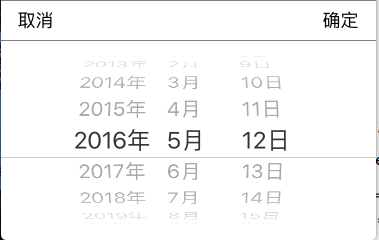
使用方法:
[[LGLDatePickerView shareDatePiker] datePikerShowWithMode:LGLDatePickerModeDate];
[[LGLDatePickerView shareDatePiker] dateCallBackSelectBlock:^(NSString *date) {
NSLog(@"%@", date);
}];
上代码:
LGLDatePickerView.h
//

//  LGLDatePickerView.h

//  LGLProgress

//

//  Created by 李国良 on 2016/10/9.

//  Copyright © 2016年 李国良. All rights reserved.

//

#import <Foundation/Foundation.h>

typedef NS_ENUM(NSInteger, LGLDatePickerrMode) {

    LGLDatePickerModeTime,           // 选择时间

    LGLDatePickerModeDate,           // 日期

    LGLDatePickerModeDateAndTime,    // 日期和时间

    LGLDatePickerModeCountDownTimer, // 可以用于倒计时

};

/** 回调Block*/

typedef void(^DateSelectBlock)(NSString * date);

@interface LGLDatePickerView : NSObject

@property (nonatomic, copy) DateSelectBlock block;

+ (instancetype)shareDatePiker;

- (void)datePikerShowWithMode:(LGLDatePickerrMode)mode;

- (void)dateCallBackSelectBlock:(DateSelectBlock)block;

@end
LGLDatePickerView.m
//

//  LGLDatePickerView.m

//  LGLProgress

//

//  Created by 李国良 on 2016/10/9.

//  Copyright © 2016年 李国良. All rights reserved.

//

#import "LGLDatePickerView.h"

#import "UIView+Frame.h"

#define WIDTH [UIScreen mainScreen].bounds.size.width

#define HEIGHT [UIScreen mainScreen].bounds.size.height

@interface LGLDatePickerView ()

@property (nonatomic, strong) UIView       * bgView;

@property (nonatomic, strong) UIView       * dateView;

@property (nonatomic, strong) UIDatePicker * datePicker;

@property (nonatomic, copy)   NSString     * selectDate;

@end

@implementation LGLDatePickerView

    static id _instace;

+ (instancetype)shareDatePiker

{

    static dispatch_once_t onceToken;

    dispatch_once(&onceToken, ^{// 只创建一次

        _instace = [[self alloc] init];

    });

    return _instace;

}

+ (id)allocWithZone:(struct _NSZone *)zone

{

    static dispatch_once_t onceToken;

    dispatch_once(&onceToken, ^{// 只初始化一次

        _instace = [super allocWithZone:zone];

    });

    return _instace;

}

- (id)copyWithZone:(NSZone *)zone

{

    return _instace;

}

- (void)datePikerShowWithMode:(LGLDatePickerrMode)mode {

    if (!self.dateView) {

        self.dateView = [[UIView alloc] initWithFrame:CGRectMake(, HEIGHT, WIDTH, )];

        self.dateView.userInteractionEnabled = YES;

//  ============================= 添加分界线 =======================================================================

        UIView * lineView1 = [[UIView alloc] initWithFrame:CGRectMake(, , WIDTH, )];

        lineView1.backgroundColor = [UIColor colorWithRed: green: blue: alpha:0.5];

        [self.dateView addSubview:lineView1];

        UIView * lineView = [[UIView alloc] initWithFrame:CGRectMake(, , WIDTH, )];

        lineView.backgroundColor = [UIColor colorWithRed: green: blue: alpha:0.5];

        [self.dateView addSubview:lineView];

//  =====================  添加确定取消按钮  =========================================================================

        UIButton * cancelBtn = [UIButton buttonWithType:UIButtonTypeCustom];

        cancelBtn.frame = CGRectMake(, , , );

        [cancelBtn setTitle:@"取消" forState:UIControlStateNormal];

        [cancelBtn setTitleColor:[UIColor blackColor] forState:UIControlStateNormal];

        cancelBtn.userInteractionEnabled = YES;

        [cancelBtn addTarget:self action:@selector(cancelBtnclink) forControlEvents:UIControlEventTouchUpInside];

        [self.dateView addSubview:cancelBtn];

        UIButton * okBtn = [UIButton buttonWithType:UIButtonTypeCustom];

        okBtn.frame = CGRectMake(WIDTH - , , , );

        [okBtn setTitle:@"确定" forState:UIControlStateNormal];

        [okBtn setTitleColor:[UIColor blackColor] forState:UIControlStateNormal];

        [okBtn addTarget:self action:@selector(okBtnClink) forControlEvents:UIControlEventTouchUpInside];

        [self.dateView addSubview:okBtn];

// ====================  初始化UIDatePicker,旋转滚动选择日期类  =======================================================

        self.datePicker = [[UIDatePicker alloc] initWithFrame:CGRectMake(, , WIDTH, )];

        [self.datePicker setLocale:[[NSLocale alloc]initWithLocaleIdentifier:@"zh_CN"]];

        [self.datePicker setTimeZone:[NSTimeZone localTimeZone]];           // 设置时区

        [self.datePicker setDate:[NSDate date] animated:YES];               // 设置当前显示时间

        //[datePicker setMaximumDate:[NSDate date]];                        // 设置显示最大时间(此处为当前时间)最大和最小同时设置就不能选择未来的时间

        UIDatePickerMode  pikcerMode = (mode == LGLDatePickerModeDate) ? (UIDatePickerModeDate) : ((mode == LGLDatePickerModeDateAndTime) ? UIDatePickerModeDateAndTime : ((mode == LGLDatePickerModeTime) ? UIDatePickerModeTime : UIDatePickerModeCountDownTimer));

        [self.datePicker setDatePickerMode:pikcerMode];    // 设置UIDatePicker的显示模式

        [self.datePicker addTarget:self action:@selector(datePickerValueChanged:) forControlEvents:UIControlEventValueChanged];

        [self.dateView addSubview:self.datePicker];

        UIWindow * window = [UIApplication sharedApplication].keyWindow;

        [UIView animateWithDuration:0.5 animations:^{

            self.dateView.y = HEIGHT - ;

        }];

        [window addSubview:self.dateView];

        self.selectDate = [self dateToStringWithDate:[NSDate date]];        // 防止用户不选择日期直接选择确定

    }

}

- (void)cancelBtnclink {

    [UIView animateWithDuration:0.5 animations:^{

        self.dateView.y = HEIGHT;

    }completion:^(BOOL finished) {

        [self.dateView removeFromSuperview];

         self.dateView = nil;

    }];

}

- (void)dateCallBackSelectBlock:(DateSelectBlock)block {

    self.block = block;

}

- (void)okBtnClink {

    self.block(self.selectDate);

    [self cancelBtnclink];

}

- (void)datePickerValueChanged:(UIDatePicker *)datepiker {

    self.selectDate = [self dateToStringWithDate:[datepiker date]];

}

- (NSString *)dateToStringWithDate:(NSDate *)selectDate {

    NSDateFormatter *selectDateFormatter = [[NSDateFormatter alloc] init];

    selectDateFormatter.dateFormat = @"yyyy-MM-dd HH:mm:ss"; // 设置时间和日期的格式

    NSString * dateAndTime = [selectDateFormatter stringFromDate:selectDate]; // 把date类型转为设置好格式的string类型

    return dateAndTime;

}

@end
LGLDatePickerView的更多相关文章
随机推荐
- 详细介绍windows下使用python pylot进行网站压力测试
windows下使用python进行网站压力测试,有两个必不可少的程序需要安装,一个是python,另一个是pylot.python是一个安装软件,用来运行python程序,而pylot则是pytho ...
- HTML5+javascript实现图片加载进度动画效果
在网上找资料的时候,看到网上有图片加载进度的效果,手痒就自己也写了一个. 图片加载完后,隐藏loading效果. 想看加载效果,请ctrel+F5强制刷新或者清理缓存. 效果预览: 0% // ...
- java中的==和equals
1,==用于比较基本数据类型,和引用类型.而equals是Object上的方法,可以被子类重写,用于判断内容一致. 比较奇葩的是,java基本数据类型(byte,short,int,long,floa ...
- 在自己的对象里实现IEnumerator和IEnumerable
平时工作中我们经常用foreach来迭代一个集合.比如 foreach (Student student in myClass) { Console.WriteLine(student); } 基本所 ...
- 解析Javascript中大括号“{}”的多义性
JS中大括号有四种语义作用 语义1,组织复合语句,这是最常见的 复制代码 代码如下: if( condition ) { //... }else { //... } for() { //. ...
- There is an internal error in the React performance measurement code.Did not expect componentDidMount timer to start while render timer is still in progress for another instance
一.There is an internal error in the React performance measurement code.Did not expect componentDidMo ...
- 【转载】[JS]让表单提交返回后保持在原来提交的位置上
有时候,在网页中点击了页面中的按钮或是刷新了页面后,页面滚动条又 会回到顶部,想看后面的记录就又要拖动滚动条,或者要按翻页键,非常不方便,想在提交页面或者在页面刷新的时候仍然保持滚动条的位置不变,最好 ...
- js中的执行上下文,菜鸟入门基础。
console.log(a); //Uncaught ReferenceError: a is not defined 因为没有定义a所以报错了. var a = 52; console.log(a) ...
- ServiceStack Redis客户端的bug
client.Set("key", 0); 当使用上面的语句设置 真正存入redis的却是一个空白字符,而不是0 跟了一下源码,发现 private static byte[] T ...
- Reinforcement Learning
Q-learning 高潮博文 http://mnemstudio.org/path-finding-q-learning-tutorial.htm 模式识别与机器学习的区别. http://www. ...