
如何修改linux时间? 校正linux系统的时间
第一步:通过xshell远程连接到linux系统
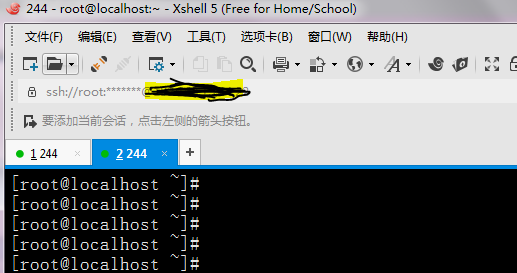
第二步:输入 tzselect
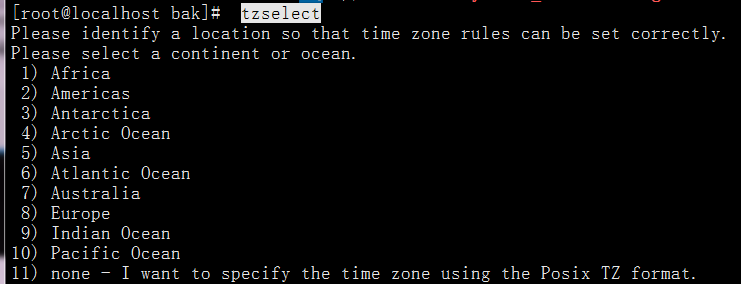
第三步:选择所在的州,中国人请选择 5 ,亚洲

第四步:选择你所在的国家,中国人请选择9,中国
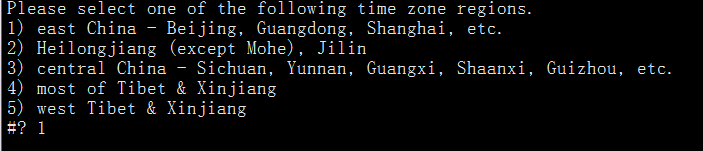
第五步:选择一个时区,大部分人选择北京时间
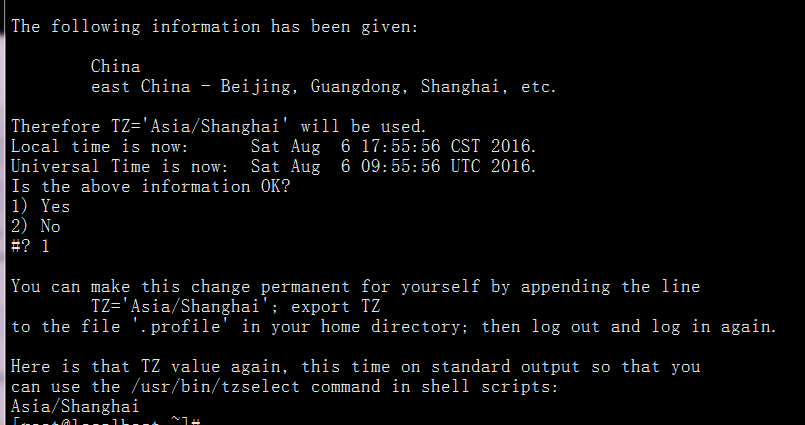
插入完整修改过程:
 [root@localhost ~]#  tzselect

 Please identify a location so that time zone rules can be set correctly.

 Please select a continent or ocean.

  1) Africa

  2) Americas

  3) Antarctica

  4) Arctic Ocean

  5) Asia

  6) Atlantic Ocean

  7) Australia

  8) Europe

  9) Indian Ocean

 10) Pacific Ocean

 11) none - I want to specify the time zone using the Posix TZ format.

 #? 5

 Please select a country.

  1) Afghanistan          18) Israel            35) Palestine

  2) Armenia          19) Japan            36) Philippines

  3) Azerbaijan          20) Jordan            37) Qatar

  4) Bahrain          21) Kazakhstan        38) Russia

  5) Bangladesh          22) Korea (North)        39) Saudi Arabia

  6) Bhutan          23) Korea (South)        40) Singapore

  7) Brunei          24) Kuwait            41) Sri Lanka

  8) Cambodia          25) Kyrgyzstan        42) Syria

  9) China          26) Laos            43) Taiwan

 10) Cyprus          27) Lebanon            44) Tajikistan

 11) East Timor          28) Macau            45) Thailand

 12) Georgia          29) Malaysia            46) Turkmenistan

 13) Hong Kong          30) Mongolia            47) United Arab Emirates

 14) India          31) Myanmar (Burma)        48) Uzbekistan

 15) Indonesia          32) Nepal            49) Vietnam

 16) Iran          33) Oman            50) Yemen

 17) Iraq          34) Pakistan

 #? 9

 Please select one of the following time zone regions.

 1) east China - Beijing, Guangdong, Shanghai, etc.

 2) Heilongjiang (except Mohe), Jilin

 3) central China - Sichuan, Yunnan, Guangxi, Shaanxi, Guizhou, etc.

 4) most of Tibet & Xinjiang

 5) west Tibet & Xinjiang

 #? 1


 The following information has been given:

     China

     east China - Beijing, Guangdong, Shanghai, etc.

 Therefore TZ='Asia/Shanghai' will be used.

 Local time is now:    Sat Aug  6 17:55:56 CST 2016.

 Universal Time is now:    Sat Aug  6 09:55:56 UTC 2016.

 Is the above information OK?

 1) Yes

 2) No

 #? 1


 You can make this change permanent for yourself by appending the line

     TZ='Asia/Shanghai'; export TZ

 to the file '.profile' in your home directory; then log out and log in again.

 Here is that TZ value again, this time on standard output so that you

 can use the /usr/bin/tzselect command in shell scripts:

 Asia/Shanghai

 [root@localhost ~]#

 [root@localhost ~]#
如何修改linux时间? 校正linux系统的时间的更多相关文章
- linux和windows双系统时间错误解决方法
转自http://www.2cto.com/os/201204/126212.html windows时间会慢8小时,原因: 两个概念: UTC即Universal Time Coordinated, ...
- UTC、GTC时间和本地时间(Linux默认使用UTC时间,要修改一下)
1.问题 对于装有Windows和Linux系统的机器,进入Windows显示的时间和Linux不一致,Linux中的时间比Windows提前8个小时. 2.解决方法 修改/etc/default/r ...
- Linux下用C获取当前时间
Linux下用C获取当前时间,具体如下: 代码(可以把clock_gettime换成time(NULL)) ? 1 2 3 4 5 6 7 8 9 10 void getNowTime() { ti ...
- linux 下的clock_gettime() 获取精确时间函数
#include <time.h> int clock_gettime(clockid_t clk_id, struct timespec* tp); clock_gettime() 函数 ...
- Linux的硬件时间、校正Linux系统时间及系统时间调用流程
第一部分: 一)概述: 事实上在Linux中有两个时钟系统,分别是系统时间和硬件时间 UTC是协调世界时(Universal Time Coordinated)英文缩写,它比北京时间早8个小时. ...
- 我使用过的Linux命令之date - 显示、修改系统日期时间
原文地址:http://www.cnblogs.com/diyunpeng/archive/2011/11/20/2256538.html 用途说明 ate命令可以用来显示和修改系统日期时间,注意不是 ...
- 我使用过的Linux命令之date - 显示、修改系统日期时间(转)
用途说明 ate命令可以用来显示和修改系统日期时间,注意不是time命令. 常用参数 格式:date 显示当前日期时间. 格式:date mmddHHMM 格式:date mmddHHMMYYYY 格 ...
- linux 查看系统当前时间,修改时间
linux 查看系统当前时间,修改时间1. 查看时间和日期命令 : "date"2.设置时间和日期例如:将系统日期设定成2018年6月8日的命令命令 : "date -s ...
- linux系统的时间调整
以centos为例,其它系统应该是一样或者类似的. 需要用到两个命令: date 和 hwclock 其中 date 命令由 coreutils 这个包提供, hwclock 命令由 util-lin ...
- django 获取系统当前时间 和linux 系统当前时间不一致 问题处理。
问题场景: 在django admin models 实体对象添加一个属性最后修改时间,用户在添加.修改是系统自动修改操作时间. UpdateTime自动获取系统时间.并且自动修改. 代码设置如下. ...
随机推荐
- 使用CSS时间打点的Loading效果的教程
基于box-shadow实现的打点效果 理论上,box-shadow可以实现任意的图形效果,自然我们可以利用box-shadow生成我们的点效果,然后通过animation控制不同时间点点的数目就可以 ...
- 【POJ】【2104】区间第K大
可持久化线段树 可持久化线段树是一种神奇的数据结构,它跟我们原来常用的线段树不同,它每次更新是不更改原来数据的,而是新开节点,维护它的历史版本,实现“可持久化”.(当然视情况也会有需要修改的时候) 可 ...
- NYOJ-32 组合数 AC 分类: NYOJ 2013-12-30 07:42 189人阅读 评论(0) 收藏
#include<stdio.h> int num[100]; int pnum(int n,int v); int mv=0; int main(){ int n,v; scanf(&q ...
- 【bzoj1007】[HNOI2008]水平可见直线
1007: [HNOI2008]水平可见直线 Time Limit: 1 Sec Memory Limit: 162 MBSubmit: 5932 Solved: 2254[Submit][Sta ...
- ajax 乱码
1. 在页面的中文变量前添加encodeURIComponent() $.ajax({ type: "POST", url: "", data:{ id:e ...
- webservice之XFire的使用(java调用java)
注意:xfire不支持java.util.List等集合,所以调用webservice传递的参数要为基本类型. 转自:http://zp9245.blog.163.com/blog/static/10 ...
- 2014年03月09日攻击百度贴吧的XSS蠕虫源码
var n=PageData.user.user_forum_list.info.length; var num=0; var config = { titles: ["\u4f60\u76 ...
- JavaScript中this的工作原理以及注意事项
在JavaScript中,this 的概念比较复杂.除了在面向对象编程中,this 还是随处可用的.这篇文章介绍了this 的工作原理,它会造成什么样的问题以及this 的相关例子. 要根据this ...
- ios设备突破微信小视频6S限制的方法
刷微信朋友圈只发文字和图片怎能意犹未竟,微信小视频是一个很好的补充,音视频到位,流行流行最流行.但小视频时长不能超过6S,没有滤镜等是很大的遗憾.but有人突破限制玩出了花样,用ios设备在朋友圈晒出 ...
- HDU4836 The Query on the Tree(树状数组&&LCA)
由于智力的问题,百度之星完全lu不动..开场看第一题根据题目给的条件我觉得一定是可以构造出来的,题目给的意思颇有鸽巢原理的感觉,于是觉得开场第一题应该就是智力构造题了,想了半个小时,发现完全想不动,于 ...