
【MySQL】Sysbench性能测试
两台MySQL配置不一样,要测试下性能差别
[m1]

long_query_time         = 0.1

log_slave_updates

innodb_flush_log_at_trx_commit  = 1

[m2]

long_query_time         = 1

#log_slave_updates

innodb_flush_log_at_trx_commit  = 2

innodb_file_per_table

innodb_write_io_threads = 8

innodb_read_io_threads = 8
设备配置
CPU:Intel(R) Xeon(R) CPU E5-2650 v2 @ 2.60GHz *2  8核

内存:64G

磁盘:raid5
编译安装sysbench
[root@m1 sysbench-0.4.12]# ./configure --with-mysql-includes=/servers/mysql/include --with-mysql-libs=/servers/mysql/lib

[root@m1 sysbench-0.4.12]# make && make install

...

make[]: Entering directory `/sysbench-0.4.12/sysbench'

/bin/sh ../libtool --tag=CC   --mode=link gcc -pthread -g -O2      -o sysbench sysbench.o sb_timer.o sb_options.o sb_logger.o db_driver.o tests/fileio/libsbfileio.a tests/threads/libsbthreads.a tests/memory/libsbmemory.a tests/cpu/libsbcpu.a tests/oltp/libsboltp.a tests/mutex/libsbmutex.a drivers/mysql/libsbmysql.a -L/servers/mysql/lib -lmysqlclient_r   -lrt -lm

../libtool: line 838: X--tag=CC: command not found

../libtool: line 871: libtool: ignoring unknown tag : command not found

../libtool: line 838: X--mode=link: command not found

../libtool: line 1004: *** Warning: inferring the mode of operation is deprecated.: command not found

../libtool: line 1005: *** Future versions of Libtool will require --mode=MODE be specified.: command not found

../libtool: line 2231: X-g: command not found

../libtool: line 2231: X-O2: command not found

../libtool: line 1951: X-L/servers/mysql/lib: No such file or directory

../libtool: line 2400: Xsysbench: command not found

Fatal server error:

Server is already active for display 0

        If this server is no longer running, remove /tmp/.X0-lock

        and start again.

Please consult the CentOS support

         at https://www.redhat.com/apps/support/

 for help.

...
上面报错是因为sysbench的libtool版本低于OS的,删除替换成OS的libtool
[root@m1 sysbench-0.4.12]# which libtool

/usr/bin/libtool

[root@m1 sysbench-0.4.12]# mv libtool libtool_bak

[root@m1 sysbench-0.4.12]# cp -r /usr/bin/libtool ./

[root@m1 sysbench-0.4.12]# make && make install
测试sysbench
[root@m1 sysbench-0.4.12]# sysbench --test=cpu --cpu-max-prime=200 run

sysbench: error while loading shared libraries: libmysqlclient.so.18: cannot open shared object file: No such file or directory
报错替换lib64的libmysqlclient文件
[root@m1 sysbench-0.4.12]# ln -s  /servers/mysql/lib/libmysqlclient.so.18 /usr/lib64/

[root@m1 sysbench-0.4.12]# ll /usr/lib64/libmysqlclient.so.18

lrwxrwxrwx. 1 root root 46 Sep 15 11:56 /usr/lib64/libmysqlclient.so.18 -> /servers/mysql/lib/libmysqlclient.so.18
OLTP性能测试:
参数说明
参数说明:

[root@m1 ~]# sysbench --help

Usage:

  sysbench [general-options]... --test=<test-name> [test-options]... command

General options:

  --num-threads=N            number of threads to use [1]   线程数

  --max-requests=N           limit for total number of requests [10000]   事务请求数

  --max-time=N               limit for total execution time in seconds [0]

  --forced-shutdown=STRING   amount of time to wait after --max-time before forcing shutdown [off]

  --thread-stack-size=SIZE   size of stack per thread [32K]

  --init-rng=[on|off]        initialize random number generator [off]

  --test=STRING              test to run

  --debug=[on|off]           print more debugging info [off]

  --validate=[on|off]        perform validation checks where possible [off]

  --help=[on|off]            print help and exit

  --version=[on|off]         print version and exit

Compiled-in tests:

  fileio - File I/O test

  cpu - CPU performance test

  memory - Memory functions speed test

  threads - Threads subsystem performance test

  mutex - Mutex performance test

  oltp - OLTP test

Commands: prepare run cleanup help version

See 'sysbench --test=<name> help' for a list of options for each test.

[root@m1 ~]# sysbench --test=oltp help

sysbench 0.4.12:  multi-threaded system evaluation benchmark

oltp options:

  --oltp-test-mode=STRING         test type to use {simple,complex,nontrx,sp} [complex]

  --oltp-reconnect-mode=STRING    reconnect mode {session,transaction,query,random} [session]

  --oltp-sp-name=STRING           name of store procedure to call in SP test mode []

  --oltp-read-only=[on|off]       generate only 'read' queries (do not modify database) [off]

  --oltp-skip-trx=[on|off]        skip BEGIN/COMMIT statements [off]

  --oltp-range-size=N             range size for range queries [100]

  --oltp-point-selects=N          number of point selects [10]

  --oltp-simple-ranges=N          number of simple ranges [1]

  --oltp-sum-ranges=N             number of sum ranges [1]

  --oltp-order-ranges=N           number of ordered ranges [1]

  --oltp-distinct-ranges=N        number of distinct ranges [1]

  --oltp-index-updates=N          number of index update [1]

  --oltp-non-index-updates=N      number of non-index updates [1]

  --oltp-nontrx-mode=STRING       mode for non-transactional test {select, update_key, update_nokey, insert, delete} [select]

  --oltp-auto-inc=[on|off]        whether AUTO_INCREMENT (or equivalent) should be used on id column [on]

  --oltp-connect-delay=N          time in microseconds to sleep after connection to database [10000]

  --oltp-user-delay-min=N         minimum time in microseconds to sleep after each request [0]

  --oltp-user-delay-max=N         maximum time in microseconds to sleep after each request [0]

  --oltp-table-name=STRING        name of test table [sbtest]   表名

  --oltp-table-size=N             number of records in test table [10000]  表的行数

  --oltp-dist-type=STRING         random numbers distribution {uniform,gaussian,special} [special]

  --oltp-dist-iter=N              number of iterations used for numbers generation [12]

  --oltp-dist-pct=N               percentage of values to be treated as 'special' (for special distribution) [1]

  --oltp-dist-res=N               percentage of 'special' values to use (for special distribution) [75]

General database options:

  --db-driver=STRING  specifies database driver to use ('help' to get list of available drivers)

  --db-ps-mode=STRING prepared statements usage mode {auto, disable} [auto]

Compiled-in database drivers:

  mysql - MySQL driver

mysql options:

  --mysql-host=[LIST,...]       MySQL server host [localhost]

  --mysql-port=N                MySQL server port [3306]

  --mysql-socket=STRING         MySQL socket

  --mysql-user=STRING           MySQL user [sbtest]

  --mysql-password=STRING       MySQL password []

  --mysql-db=STRING             MySQL database name [sbtest]

  --mysql-table-engine=STRING   storage engine to use for the test table {myisam,innodb,bdb,heap,ndbcluster,federated} [innodb]

  --mysql-engine-trx=STRING     whether storage engine used is transactional or not {yes,no,auto} [auto]

  --mysql-ssl=[on|off]          use SSL connections, if available in the client library [off]

  --myisam-max-rows=N           max-rows parameter for MyISAM tables [1000000]

  --mysql-create-options=STRING additional options passed to CREATE TABLE []
测试_200W数据_PREPARE
[root@m2 ~]# sysbench --test=oltp --mysql-user=user --mysql-password=passwd --mysql-socket=/data/mysql/tmp/mysql.sock --oltp-table-size=2000000 --mysql-db=test --oltp-table-name=test200w --max-requests=200000 --num-threads=200 --mysql-table-engine=innodb prepare

sysbench 0.4.12:  multi-threaded system evaluation benchmark

No DB drivers specified, using mysql

Creating table 'test200w'...

Creating 2000000 records in table 'test200w'...
测试_200W数据_RUN
[root@m1 ~]# sysbench --test=oltp --mysql-user=user --mysql-password=passwd --mysql-socket=/data/mysql/tmp/mysql.sock --oltp-table-size=2000000 --mysql-db=test --oltp-table-name=test200w --max-requests=200000 --num-threads=200 --mysql-table-engine=innodb --oltp-skip-trx=off run

sysbench 0.4.12:  multi-threaded system evaluation benchmark

No DB drivers specified, using mysql

Running the test with following options:

Number of threads: 200

Doing OLTP test.

Running mixed OLTP test

Using Special distribution (12 iterations,  1 pct of values are returned in 75 pct cases)

Using "BEGIN" for starting transactions

Using auto_inc on the id column

Maximum number of requests for OLTP test is limited to 200000

Threads started!

Done.

OLTP test statistics:

    queries performed:

        read:                            2800070

        write:                           1000025

        other:                           400010

        total:                           4200105

    transactions:                        200005 (3205.05 per sec.)

    deadlocks:                           0      (0.00 per sec.)

    read/write requests:                 3800095 (60895.90 per sec.)

    other operations:                    400010 (6410.09 per sec.)

Test execution summary:

    total time:                          62.4031s

    total number of events:              200005

    total time taken by event execution: 12473.5711

    per-request statistics:

         min:                                 13.09ms

         avg:                                 62.37ms

         max:                                261.41ms

         approx.  95 percentile:              88.53ms

Threads fairness:

    events (avg/stddev):           1000.0250/7.76

    execution time (avg/stddev):   62.3679/0.01
[root@m2 ~]# sysbench --test=oltp --mysql-user=user --mysql-password=passwd --mysql-socket=/data/mysql/tmp/mysql.sock --oltp-table-size=2000000 --mysql-db=test --oltp-table-name=test200w --max-requests=200000 --num-threads=200 --mysql-table-engine=innodb --oltp-skip-trx=off run

sysbench 0.4.12:  multi-threaded system evaluation benchmark

No DB drivers specified, using mysql

Running the test with following options:

Number of threads: 200

Doing OLTP test.

Running mixed OLTP test

Using Special distribution (12 iterations,  1 pct of values are returned in 75 pct cases)

Using "BEGIN" for starting transactions

Using auto_inc on the id column

Maximum number of requests for OLTP test is limited to 200000

Threads started!

Done.

OLTP test statistics:

    queries performed:

        read:                            2800154

        write:                           1000055

        other:                           400022

        total:                           4200231

    transactions:                        200011 (3165.83 per sec.)

    deadlocks:                           0      (0.00 per sec.)

    read/write requests:                 3800209 (60150.74 per sec.)

    other operations:                    400022 (6331.66 per sec.)

Test execution summary:

    total time:                          63.1781s

    total number of events:              200011

    total time taken by event execution: 12629.9640

    per-request statistics:

         min:                                 12.43ms

         avg:                                 63.15ms

         max:                                278.01ms

         approx.  95 percentile:              89.76ms

Threads fairness:

    events (avg/stddev):           1000.0550/7.63

    execution time (avg/stddev):   63.1498/0.01
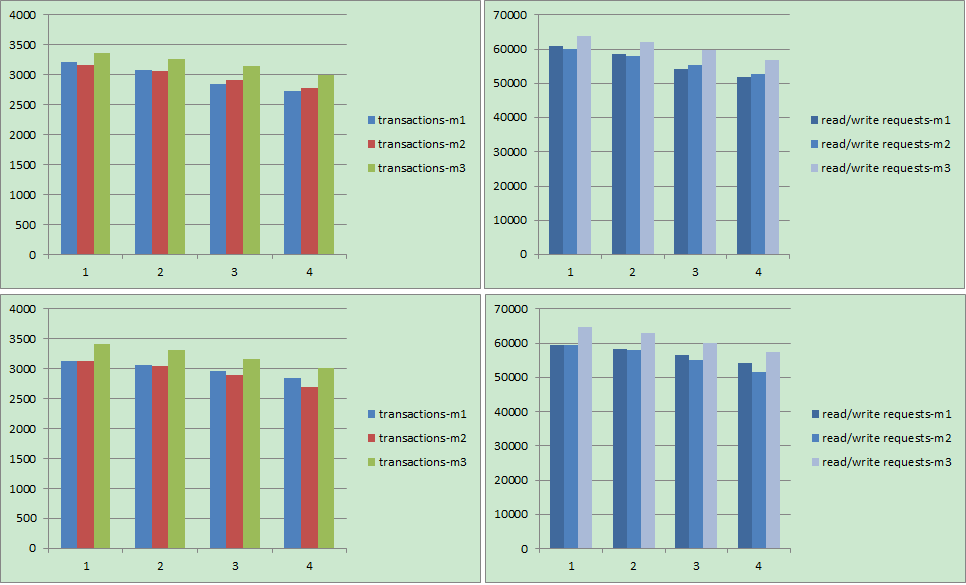
测试分为两个对照组
| 表数据 | 事务数 | 线程数 |
| 200W | 20W | 200 |
| 200W | 20W | 400 |
| 200W | 20W | 600 |
| 200W | 20W | 800 |
| 2000W | 20W | 200 |
| 2000W | 20W | 400 |
| 2000W | 20W | 600 |
| 2000W | 20W | 800 |
四幅图中上面两个是表数据200W,下面是表数据2000W
由于观察m1和m2两个配置在对照组中性能差别不大,怀疑由于InnoDB I/O配置的innodb_write_io_threads = 8和innodb_read_io_threads = 8过大,导致引擎层面并发I/O因瓶颈无发发挥出并发效果,m3的配置既恢复默认的4。
【MySQL】Sysbench性能测试的更多相关文章
- 使用sysbench 对mysql进行性能测试
使用sysbench 对mysql进行性能测试 sysbench是一个开源的.模块化的.跨平台的多线程性能测试工具,可以用来进行CPU.内存.磁盘I/O.线程.数据库的性能测试.目前支持的数据库有My ...
- Mysql多线程性能测试工具sysbench 安装、使用和测试
From:http://www.cnblogs.com/zhoujinyi/archive/2013/04/19/3029134.html 摘要: sysbench是一个开源的.模块化的.跨 ...
- Mybatis与JDBC批量插入MySQL数据库性能测试及解决方案
转自http://www.cnblogs.com/fnz0/p/5713102.html 不知道自己什么时候才有这种钻研精神- -. 1 背景 系统中需要批量生成单据数据到数据库表,所以采用 ...
- mysql sysbench基准测试
git项目地址: https://github.com/akopytov/sysbench 利用sysbench很容易对mysql做性能基准测试(当然这个工具很强大,除了测试主流数据库性能,还能测试其 ...
- Jmeter MySQL数据库性能测试
1.首先准备M一SQL数据,新建一个数据库及测试用的表,插入1条数据 2.打开Jmeter,新建线程组,设置多少用户,循环几次随意 3.在线程组下新增JDBC配置元件,通过配置使得Jmeter能够连上 ...
- 【转】Jmeter MySQL数据库性能测试
1.首先准备M一SQL数据,新建一个数据库及测试用的表,插入1条数据 2.打开Jmeter,新建线程组,设置多少用户,循环几次随意 3.在线程组下新增JDBC配置元件,通过配置使得Jmeter能够连上 ...
- mysql 重点性能测试指标
#qps 每秒钟查询数量 计算方式queries/seconds 查询总数/秒数show GLOBAL STATUS LIKE 'question%' #tps 每秒事务数 计算方式 (com_com ...
- MYSQL LIMIT 性能测试
查询语句 # 普通表 SELECT * FROM test_page LIMIT m,n # 内存表 SELECT * FROM test_page_memory LIMIT m,n 总结 查询位置( ...
- MySQL 常用工具sysbench/fio/tpcc等测试
为什么要压力测试采购新设备,评估新设备性能开发新项目,评估数据库容量新系统上线前,预估/模拟数据库负载更换数据库版本,评估性能变化 关注指标 CPU %wait,%user,%sys 内存 只内存读 ...
随机推荐
- CharsetUtils.java
/* * Copyright (c) 2013. * * Licensed under the Apache License, Version 2.0 (the "License" ...
- firebug下载时出现there was an error loading firebug
打开Firefox -> Preferences -> Advance ->Certificates 将Query OSCP....前面的checkbox取消
- jsp页面的使用
public void doGet(HttpServletRequest request, HttpServletResponse response) throws ServletException, ...
- 创建指定日期java Date对象
import java.text.DateFormat;import java.text.ParseException;import java.text.SimpleDateFormat;import ...
- es增量自定义更新的脚本
安装需要可软件 sudo apt-get install python-pip sudo pip install elasticsearch; sudo apt-get install python- ...
- cocos2d-lua 3.5 ios搭建步骤
xcode搭建cocos2d-lua是最简单的,不用 配置一系列环境变量,只把xcode安装好就可以 步骤一:去官网下载quick-3.5,然后打开命令行工具 步骤二:cd进入/Users/song/ ...
- MFC创建非模态对话框并修改CStatic文字
//由IDD_STATUS_DIALOG创建一个对话框CDialog* pCheckNetStatusDlg = new CDialog(); pCheckNetStatusDlg->Creat ...
- linux包转发开发
28号晚上接到这个任务的, 看了点epoll, 29号上午安装Ubuntu 12.10的G++, 开始把内网的vm虚拟机文件, 复制到外网, 重新建立一个虚拟机再更新, 最后外网也没能安装得了g++. ...
- 剑指Offer:面试题11——数值的整数次方(java实现)
题目描述: 实现函数double Power(double base, int exponent),求base的exponent次方,不得使用库函数,同时不需要考虑大数问题 思路:本题的重点考察内容是 ...
- Appium + Python -------------元素定位
说在前面 1.https://github.com/appium/python-client/tree/master/test 里面有一些test ,可以看看,研究研究 2.学会使用 uiautom ...