
Basic Tutorials of Redis(2) - String
This post is mainly about how to use the commands to handle the Strings of Redis.And I will show you both the native
commands and the usage of the StackExchange.Redis.The version of Redis is 3.2.3 and the vesion of StackExchange.Redis
is 1.1.604-alpha.Yeah,You are right,I will show you by using a dotnet core console app.Maybe you will ask me that why don't
you use the ServiceStack.Redis? The reasons why I choose StackExchange.Redis are as follow:
1.I am a poor man so that I can not pay for the License of ServiceStack.Redis
2.The opreations of this two drive are vary easy,but I like to use the StackExchange.Redis.
3.Open source code
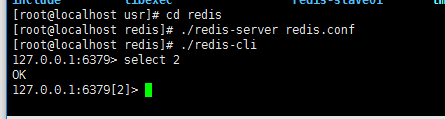
First of all,we should start the service of redis.We can not do anything without the running service.And use the ./redis-cli to
enter the client.Then choose the second database for this tutorial.
How many commands belong to Strings?You can find the answer in http://www.redis.io/commands#string
and I use Xmind to make a picture as follow:
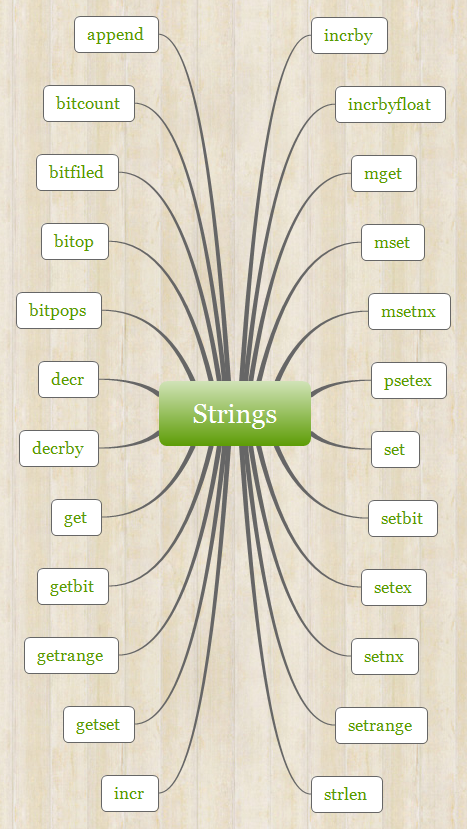
Up to today,there are 24 commands that we can use to handle Strings.But I will choose some of them to show you in this
tutorials .Many commands are very useful of Strings,and I will Introduce them at the future tutorials.
The first thing we should take care is that how to store the data? If you learned Memcached before,you can compare with them.
They have some common features.But there are no relationship between Redis and Memcached.In Redis,you can use the command
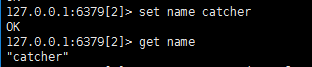
set to store the data you want to save,and the command get can help you to find out the data you stored.For example, I set a key
named name with a value catcher,after successffully stored,the client will return you a OK message.And using the get command with
the key's name you can get the value of this key.
set name catcher

get name
However those two commands can only handle a single k/v.How about handle two k/v or more k/v?Don't worry,there are also some
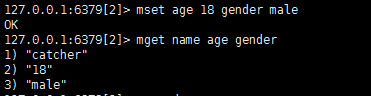
commands(mset,mget) can handle multi k/v which can help you to finish some difficult jobs.The usage of them look like this:
mset age  gender male

mget name age gender
It's very good for the flexible commands.The next command is append,which you may often use in the program languages to
handle the strings,such as C#'s StringBuilder.After creating an instance of StringBuilder(sb),we can use sb.Append to append many
strings to sb.Naturally,command append can do this too.As you can see , I appended wong to catcher so I got the result catcherwong.
append name wong

For Relational Database,when designing a table,we often set the primary key increasing automatically.How can we do in Redis?The
creator of Redis already considerred this situation.All of us can use command incr to increase the value by 1 automatically,and use
command incrby to increase the value by a integet.I made the key named age increase automatically and the client returned the result
after increasing.The command incrby can assign the value to increase.
incr age

incr age
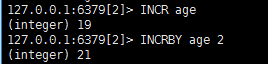
set the value and expiration of a key.For an instance,I set a key named tmp for saving 5s.
setex tmp tmp

Stop introducing more,the usage of other commands you can find out in the site of Redis.
Now, I will show you the same commands above by using C#.
        //connect the redis server by ip address

             ConnectionMultiplexer redis = ConnectionMultiplexer.Connect("192.168.198.128");

             //choose the second database of redis

             IDatabase db = redis.GetDatabase();

             //set get

             db.StringSet("name","catcher");

             Console.WriteLine(string.Format("the value of name is {0}",db.StringGet("name")));

             //mset mget

             var dic = new Dictionary<RedisKey, RedisValue>();

             dic.Add("age",);

             dic.Add("gender","male");

             db.StringSet(dic.ToArray());

             var keys = new RedisKey[] { "age","gender"};

             Parallel.ForEach(db.StringGet(keys), (item) =>

             {

                 Console.WriteLine(string.Format("mget value ----{0}",item));

             });

             //append

             db.StringAppend("name", " wong");

             Console.WriteLine(string.Format("after append the value of name is {0}",db.StringGet("name")));

             //incr incrby

             db.StringIncrement("age");

             Console.WriteLine(string.Format("after incr the value of age is {0}", db.StringGet("age")));

             db.StringIncrement("age",);

             Console.WriteLine(string.Format("after incrby the value of age is {0}", db.StringGet("age")));

             //setex

             db.StringSet("tmp", "tmp", TimeSpan.FromSeconds());

             var task = Task.Factory.StartNew(()=>

             {

                 Task.Delay(TimeSpan.FromSeconds()).Wait();

                 Console.WriteLine(string.IsNullOrWhiteSpace(db.StringGet("tmp"))?"empty value":db.StringGet("tmp").ToString());

             });
the redis server.You should sure that your debug environment can visit the CentOS in your Vmware.When you debug the above code ,
you will get the below result.

Basic Tutorials of Redis(2) - String的更多相关文章
- Basic Tutorials of Redis(9) -First Edition RedisHelper
After learning the basic opreation of Redis,we should take some time to summarize the usage. And I w ...
- Basic Tutorials of Redis(8) -Transaction
Data play an important part in our project,how can we ensure correctness of the data and prevent the ...
- Basic Tutorials of Redis(7) -Publish and Subscribe
This post is mainly about the publishment and subscription in Redis.I think you may subscribe some o ...
- Basic Tutorials of Redis(6) - List
Redis's List is different from C#'s List,but similar with C#'s LinkedList.Sometimes I confuse with t ...
- Basic Tutorials of Redis(5) - Sorted Set
The last post is mainly about the unsorted set,in this post I will show you the sorted set playing a ...
- Basic Tutorials of Redis(4) -Set
This post will introduce you to some usages of Set in Redis.The Set is a unordered set,it means that ...
- Basic Tutorials of Redis(3) -Hash
When you first saw the name of Hash,what do you think?HashSet,HashTable or other data structs of C#? ...
- Basic Tutorials of Redis(1) - Install And Configure Redis
Nowaday, Redis became more and more popular , many projects use it in the cache module and the store ...
- 二、Redis基本操作——String(实战篇)
小喵万万没想到,上一篇博客,居然已经被阅读600次了!!!让小喵感觉压力颇大.万一有写错的地方,岂不是会误导很多筒子们.所以,恳请大家,如果看到小喵的博客有什么不对的地方,请尽快指正!谢谢! 小喵的唠 ...
随机推荐
- ASP.NET Core应用针对静态文件请求的处理[4]: DirectoryBrowserMiddleware中间件如何呈现目录结构
和StaticFileMiddleware中间件一样,DirectoryBrowserMiddleware中间本质上还是定义了一个请求地址与某个物理目录之间的映射关系,而目标目录体现为一个FilePr ...
- 谈谈一些有趣的CSS题目(六)-- 全兼容的多列均匀布局问题
开本系列,谈谈一些有趣的 CSS 题目,题目类型天马行空,想到什么说什么,不仅为了拓宽一下解决问题的思路,更涉及一些容易忽视的 CSS 细节. 解题不考虑兼容性,题目天马行空,想到什么说什么,如果解题 ...
- Hawk 7. 常见问题
本页面您可以通过关键字搜索来获取信息. 理性使用爬虫 爬虫是一种灰色的应用,虽然作为Hawk的设计者,但我依然不得不这么说. 各大网站都在收集和整理数据上花费了大量的精力,因此抓取的数据应当仅仅作为科 ...
- 基于ASP.NET/C#开发国外支付平台(Paypal)学习心得。
最近一直在研究Paypal的支付平台,因为本人之前没有接触过接口这一块,新来一家公司比较不清楚流程就要求开发两个支付平台一个是支付宝(这边就不再这篇文章里面赘述了),但还是花了2-3天的时间通 ...
- Opserver开源的服务器监控系统(ASP.NET)
Opserver是Stack Exchange下的一个开源监控系统,系统本身由C#语言开发的ASP.NET(MVC)应用程序,无需任何复杂的应用配置,入门很快.下载地址:https://github. ...
- Phantomjs+Nodejs+Mysql数据抓取(2.抓取图片)
概要 这篇博客是在上一篇博客Phantomjs+Nodejs+Mysql数据抓取(1.抓取数据) http://blog.csdn.net/jokerkon/article/details/50868 ...
- css知多少之绝对定位小记
一.position定位常见属性 对于属性position来说,属性值有static/relative/absolute/fixed/inherit以下只对绝对定位position:absolute详 ...
- 5.2 Array类型的方法汇总
所有对象都具有toString(),toLocaleString(),valueOf()方法. 1.数组转化为字符串 toString(),toLocaleString() ,数组调用这些方法,则返回 ...
- 在开源中国(oschina)git中新建标签(tags)
我今天提交代码到主干上面,本来想打个标签(tags)的. 因为我以前新建过标签(tags),但是我现在新建的时候不知道入库在哪了.怎么找也找不到了. 从网上找资料也没有,找客服没有人理我,看到一个交流 ...
- SQL 约束
先用设计器创建约束.再用代码创建约束.数据库约束是为了保证数据的完整性(正确性)而实现的一套机制见文件Employee.sql非空约束(选择复选框)主键约束(PK) primary key const ...