
【MVVM DEV】DataColumn中的TextBox与ComboBox的并存
一、前言
在WPF编程中,有时候我们使用DataGrid会需要在一个DataColumn中既有TextBox,也要有ComboBox或者TextBlock等其他数据显示样式。
这个时候我们就需要DataGridTemplateColumn去自定义我们的Column样式,通过数据类型去判断该信息是以TextBox显示还是以ComboBox来显示。
二、从数据库出发
所谓兵马未到,粮草先行。数据库的字段应该明确告诉我们该条数据是哪个数据类型?是字符串型还是多选型?是否可编辑?
这些清晰的信息都能为我们之后的MVVM绑定带来极大的便利。
数据库的字段可以大致这样:
1. ID
2. Keyword
3. Name
4. Value
5. ItemsValue (用来告知有哪些选择项)
6. DataType (是字符串型,还是多选型,还是其他?)
7. IsAcceptInput (显示在界面上后是否可编辑)
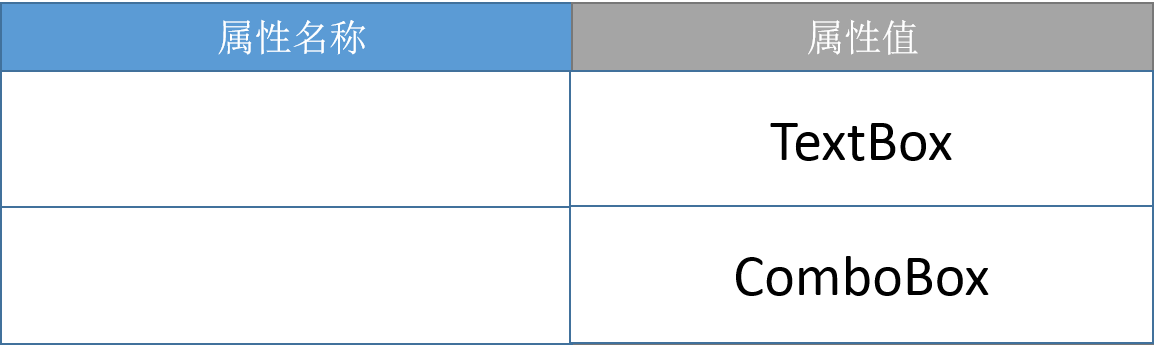
范例:

我们可以从上表看出,第1与第2条数据应该是TextBox显示,而第3与第4条则是ComboBox显示。
三、在代码中准备好相应的枚举
当我们准备完数据库的数据时,在代码中我们会用Dapper, EF, Nhibernate等等将数据库字段映射为相应的数据类型:
public Class ExampleInfoData

{

   public long Id {get;set;}

   public string Keyword {get;set;}

   public string PropertyName {get;set;}

   public DataItem PropertyValue {get;set;}

   public List<DataItem> ItemValues {get;set;}

   public int DataType {get;set;}

   public bool IsAcceptInput {get;set;}

}
这里我们看到有个类叫 DataItem, 这是为了什么呢?我们看下范例:
public class DataItem

{

        public string DisplayName { get; set; }  //显示值   用来在界面上显示用的

        public string ItemValue { get; set; }    //原始值

        //这个方法是为了能让界面正常显示从数据库读取的值,不用这个方法的话就算数据库中存有默认值,绑定之后它也不会正常显示在界面上

        public override bool Equals(object obj)

        {

            if (!(obj is DataItem))

            {

                return false;

            }

            DataItem di = obj as DataItem;

            return di != null && di.ItemValue == ItemValue;

        }

        public override int GetHashCode()      //配合Equals方法,两者一起使用

        {

            return ItemValue.GetHashCode();

        }

}
对于多选型的数据,我们也应该准备好相应的枚举值,有了Description能方便的给之前的DisplayName提供值。
public enum ProjectType

{

    [Description("类型一")]

    T_1 = ,

    [Description("类型二")]

    T_2 = ,

     [Description("类型三")]

    T_3 = ,

}

public enum MemberType

{

    [Description("成员类型一")]

    M_1 = ,

    [Description("成员类型二")]

    M_2 = ,

     [Description("成员类型三")]

    M_3 = ,

}
四、ViewModel的准备
准备好上述工作,我们就要开始使用MVVM了,首先要把ViewModel的数据填充上,这里我不详写代码,看清套路就能自己开车了。
  using System.Collections.Generic;

  using System.Collections.ObjectModel;

  using System.Linq;

  using DevExpress.Mvvm;

  namespace Example

  {

      public class ProjectSettingViewModel : ViewModelBase

     {

         public ObservableCollection<ExampleInfoData> ProjectInfo { get; set; }

         public New_ProjectSettingViewModel()

         {

              ProjectInfo = new ObservableCollection<ExampleInfoData>(FillProjectInfo());

         }

        public List<ExampleInfoData> FillProjectInfo()

        {

             List<ExampleInfoData> projectSettingInfoList = new List<ExampleInfoData>();

             var dB_projectSettingInfo = projectSettingDB.GetAll(); //get Data From DB

             foreach (var item in dB_projectSettingInfo)

             {

                 ExampleInfoData projectSettingInfo = new ExampleInfoData ();

                 projectSettingInfo.Id = item.Id;

                 projectSettingInfo.KeyWord = item.Keyword;

                 projectSettingInfo.PropertyName = item.Name;

                 projectSettingInfo.TabId = item.TabId;

                 projectSettingInfo.DataType = item.DataType;

                 projectSettingInfo.AcceptInput = item.AcceptInput;

                 if (item.ItemValues == null)

                 {

                     DataItem smText = new DataItem();

                     smText.DisplayName = smText.ItemValue = item.Value;

                     projectSettingInfo.ProjectSettingValue = smText;

                     projectSettingInfo.ItemValues = null;

                 }

                 else

                 {

                     DataItem smCombox = new DataItem();

                     smCombox.ItemValue = item.Value;

                     smCombox.DisplayName = JudgeType(item.Value);  // 这个函数判断是哪种枚举类型的!!!并返回相应的Description

                     projectSettingInfo.ProjectSettingValue = smCombox;

                     projectSettingInfo.ItemValues = new List<DataItem>();

                     foreach (var iv in item.ItemValues.Split(','))

                     {

                         DataItem sm = new DataItem();

                         sm.ItemValue = iv;

                         sm.DisplayName = JudgeType(iv);

                         projectSettingInfo.ItemValues.Add(sm);

                     }

                 }

                 projectSettingInfoList.Add(projectSettingInfo);

             }
             return projectSettingInfoList;

        }

        public string JudgeType(string strValue)
        {
            if (!string.IsNullOrEmpty(strValue))
            {
                string strType = strValue.Split('_')[0];
                if (string.Equals(strType, "T", StringComparison.CurrentCultureIgnoreCase))
                {
                    return GetDescriptionFromEnumValue((ProjectType)Enum.Parse(typeof(ProjectType), strValue)); //获取Description的方法各位自己写
                }
                else if (string.Equals(strType, "M", StringComparison.CurrentCultureIgnoreCase))
                {
                    return GetDescriptionFromEnumValue((MemberType)Enum.Parse(typeof(MemberType), strValue));
                }
                else
                {
                    return null;
                }
            }
            return null;
        }

    }

 }
五、View的准备
<UserControl x:Class="Example"

             xmlns="http://schemas.microsoft.com/winfx/2006/xaml/presentation"

             xmlns:x="http://schemas.microsoft.com/winfx/2006/xaml"

             xmlns:mc="http://schemas.openxmlformats.org/markup-compatibility/2006"

             xmlns:d="http://schemas.microsoft.com/expression/blend/2008"

             mc:Ignorable="d"

             d:DesignHeight="" d:DesignWidth="">

    <UserControl.Resources>

        <ResourceDictionary>

            <ResourceDictionary.MergedDictionaries>

                <ResourceDictionary Source="../../Controls/ProjectSettingDataGrid.xaml"/>  !!!Here

            </ResourceDictionary.MergedDictionaries>

        </ResourceDictionary>

    </UserControl.Resources>

    <Grid Margin="0,15,0,0">

              <DataGrid x:Name="dgPJInfo"

                 CanUserSortColumns="False"

                 AutoGenerateColumns="False"

                 CanUserAddRows="False"

                 CanUserReorderColumns="False"

                 AlternatingRowBackground="#EBEBEB"

                 Background="White"

                 ItemsSource ="{Binding ProjectInfo}">

                <DataGrid.Columns>

                    <DataGridTextColumn Width=".4*" IsReadOnly="True" Header="属性名称" FontSize=""  Binding="{Binding PropertyName}"></DataGridTextColumn>

                    <DataGridTemplateColumn Width=".4*" Header="属性值" CellTemplateSelector="{StaticResource DataGridTemplateSelector}"></DataGridTemplateColumn>  !!!Here

                </DataGrid.Columns>

            </DataGrid>

     </Grid>

</UserControl>
上面这个View告诉我们这个DataGridTemplateColumn的CellTemplateSelector是
绑定到<ResourceDictionary Source="../../Controls/ProjectSettingDataGrid.xaml"/>里的DataGridTemplateSelector
那么ProjectSettingDataGrid.xaml 该怎么写呢?
<ResourceDictionary xmlns="http://schemas.microsoft.com/winfx/2006/xaml/presentation"

             xmlns:x="http://schemas.microsoft.com/winfx/2006/xaml"

             xmlns:controls="clr-namespace:Example.Controls"

             xmlns:view="clr-namespace:Example.UI.View">

    <DataTemplate x:Key="TextBoxTemplate">  //TextBox的Template

        <TextBox Text="{Binding PropertyValue,Mode=TwoWay,UpdateSourceTrigger=PropertyChanged,ValidatesOnDataErrors=True}" FontSize=""/>

    </DataTemplate>

    <DataTemplate x:Key="TextBlockTemplate">  //TextBlock的Template

        <TextBlock Text="{Binding PropertyValue}" FontSize=""/>

    </DataTemplate>

    <DataTemplate x:Key="ComboBoxTemplate">  //Combobox的Template

        <ComboBox ItemsSource="{Binding ItemValues}" FontSize="" IsEditable="{Binding IsAcceptInput}"
        SelectedItem="{Binding PropertyValue,Mode=TwoWay,UpdateSourceTrigger=PropertyChanged}" DisplayMemberPath="DisplayName"/> !!!注意这里的DisplayMemberPath !!!

    </DataTemplate>

    <controls:DataGridTemplateSelector x:Key="DataGridTemplateSelector"

                                      TextBoxDataTemplate="{StaticResource TextBoxTemplate}"

                                      TextBlockDataTemplate="{StaticResource TextBlockTemplate}"

                                      ComboBoxDataTemplate="{StaticResource ComboBoxTemplate}"/>

</ResourceDictionary>
这下好了,定义好了各种Template,我剩下的事就是根据数据,判断采用哪种Template,
ProjectSettingDataGrid.xaml.cs可以这样写:
using System;

using System.Windows;

using System.Windows.Controls;

using Example.ProjectSetting;

namespace Example.Controls

{

    public partial class PropertyDataGrid : DataGrid

    {

        public PropertyDataGrid()

        {

        }

    }

    public class DataGridTemplateSelector : DataTemplateSelector

    {

        public DataTemplate TextBoxDataTemplate { get; set; }

        public DataTemplate TextBlockDataTemplate { get; set; }

        public DataTemplate ComboBoxDataTemplate { get; set; }

        public override DataTemplate SelectTemplate(object item, DependencyObject container) //这里的object item传进来的就是ViewModel中ProjectInfo的一条条数据!!!

        {

            if (null == item)

            {

                return null;

            }

            if (item is ExampleInfoData)

            {

                ExampleInfoData projectInfo = item as ExampleInfo;

                if (projectInfo.DataType == (int) ((DataEnum) Enum.Parse(typeof (DataEnum), "DATA_ENUM")))  !!!注意这里,在数据库定义的DataType此时就起到了判断Template的作用!!!

                {

                    return ComboBoxDataTemplate;

                }

                else

                {

                    return TextBoxDataTemplate;

                }

            }

            // else if (item is OtherInfoData)

            // {

            //        //do something

            // }

            else

            {

                return null;

            }

        }

    }

}
六、总结
以上内容就是所有的套路,
简单的说就是:
1. 数据库字段
2. 映射字段
3. 枚举类对应
4. ViewModel 数据填充
5. DataGridTemplateColumn的绑定
6. 定义各种Template并作出判断选择哪种Template
【MVVM DEV】DataColumn中的TextBox与ComboBox的并存的更多相关文章
- 用MVVM模式开发中遇到的零散问题总结(2)
原文:用MVVM模式开发中遇到的零散问题总结(2) 本节目录: 1.解决动画属性被劫持问题 2.设置页面焦点默认所在对象 3.XAML模拟键盘按键 4.DataGrid数据源绑定到复杂格式(dynam ...
- .NET程序员项目开发必知必会—Dev环境中的集成测试用例执行时上下文环境检查(实战)
Microsoft.NET 解决方案,项目开发必知必会. 从这篇文章开始我将分享一系列我认为在实际工作中很有必要的一些.NET项目开发的核心技术点,所以我称为必知必会.尽管这一系列是使用.NET/C# ...
- Dev gridView中设置自适应列宽和日期显示格式、金额的显示格式
在Dev GridView控件中,数据库中表数据日期都是长日期格式(yyyy-MM-dd HH:mm:ss),但显示在控件变成短日期格式(yyyy-MM-dd),金额显示要显示精确的数值, 比如80. ...
- 【原创】有关Silverlight中“DataGrid中单元格动态绑定ComboBox单击时数据项莫名被清除 ”的解决方案及思路。
今天上班遇到一个很古怪的问题,搞了半天愣是没找到原因.是这样的,在Datagrid中有绑定一个ComboBox列,其不包含在 model数据中,而是单独在LoadingRow事件中去 从数据库拿数据绑 ...
- Dev环境中的集成测试用例执行时上下文环境检查(实战)
Dev环境中的集成测试用例执行时上下文环境检查(实战) Microsoft.NET 解决方案,项目开发必知必会. 从这篇文章开始我将分享一系列我认为在实际工作中很有必要的一些.NET项目开发的核心技术 ...
- C#的winform中控制TextBox中只能输入数字
C#的winform中控制TextBox中只能输入数字 private void textBox3_KeyPress(object sender, System.Windows.Forms.KeyPr ...
- 用MVVM模式开发中遇到的零散问题总结(4)——自制摄像头拍摄大头贴控件
原文:用MVVM模式开发中遇到的零散问题总结(4)--自制摄像头拍摄大头贴控件 一直有个疑问,为什么silverlight对摄像头支持这么好,WPF却一个库都没有....于是我各种苦恼啊,各种Code ...
- 用MVVM模式开发中遇到的零散问题总结(5)——将动态加载的可视元素保存为图片的控件,Binding刷新的时机
原文:用MVVM模式开发中遇到的零散问题总结(5)--将动态加载的可视元素保存为图片的控件,Binding刷新的时机 在项目开发中经常会遇到这样一种情况,就是需要将用户填写的信息排版到一张表单中,供打 ...
- 用MVVM模式开发中遇到的零散问题总结(3)——自制正则表达式万能绑定转换器
原文:用MVVM模式开发中遇到的零散问题总结(3)--自制正则表达式万能绑定转换器 前言 最近接受了3个项目的洗礼,出差近3个月,各种北京.广州.昆明来回奔波,好久没写博客了,之前我觉得我遇到的问题都 ...
随机推荐
- Android线程管理之ThreadLocal理解及应用场景
前言: 最近在学习总结Android的动画效果,当学到Android属性动画的时候大致看了下源代码,里面的AnimationHandler存取使用了ThreadLocal,激起了我很大的好奇心以及兴趣 ...
- 从啥也不会到可以胜任最基本的JavaWeb工作,推荐给新人的学习路线(二)
在上一节中,主要阐述了JavaScript方面的学习路线.先列举一下我朋友的经历,他去过培训机构,说是4个月后月薪过万,虽然他现在还未达到这个指标. 培训机构一般的套路是这样:先教JavaSE,什么都 ...
- trigger事件模拟
事件模拟trigger 在操作DOM元素中,大多数事件都是用户必须操作才会触发事件,但有时,需要模拟用户的操作,来达到效果. 需求:页面初始化时触发搜索事件并获取input控件值,并打印输出(效果图如 ...
- Android Weekly Notes Issue #237
Android Weekly Issue #237 December 25th, 2016 Android Weekly Issue #237 这是本年的最后一篇issue, 感谢大家. 本期内容包括 ...
- iOS 自定义方法 - 不完整边框
示例代码 ///////////////////////////OC.h////////////////////////// //// UIView+FreeBorder.h// BHBFreeB ...
- linux启动SSH及开机自动启动
本文地址 分享提纲: 1.查看是否启动 2. 设置自动启动 1.[查看是否启动] 启动SSH服务 “/etc/init.d/sshd start”.然后用netstat -antulp | grep ...
- [bzoj2152][聪聪和可可] (点分治+概率)
Description 聪聪和可可是兄弟俩,他们俩经常为了一些琐事打起来,例如家中只剩下最后一根冰棍而两人都想吃.两个人都想玩儿电脑(可是他们家只有一台电脑)……遇到这种问题,一般情况下石头剪刀布就好 ...
- java根据html生成摘要
转自:http://java.freesion.com/article/48772295755/ 开发一个系统,需要用到这个,根据html生成你指定多少位的摘要 package com.chendao ...
- 如何利用 Visual Studio 自带工具提高开发效率
Visual Stuido 是一款强大的Windows 平台集成开发工具,你是否好好地利用了它呢? 显示行号 有些时候(比如错误定位)的时候,显示行号将有利于我们进行快速定位. 如何显示 1. 工具 ...
- 如何用Dockerfile创建镜像
本文原创,原文地址为:http://www.cnblogs.com/fengzheng/p/5181222.html 创建镜像的目的 首先说DockerHub或其它一些镜像仓库已经提供了够多的镜像,有 ...