
phpmailer 发送邮件(一)
Github 地址:(已更新,适用于旧版)
PHPMailer : https://github.com/PHPMailer/PHPMailer
一、基本要求
- Web访问正常(apache可以正常访问)
- php 设置正确(Sockets Support、OpenSSL support 两项设置为enable)
- gmail设置, 允许不够安全的应用:设置为已启用
可以写一个简单的语句测试一下:info.php
<?php

phpinfo();

?>


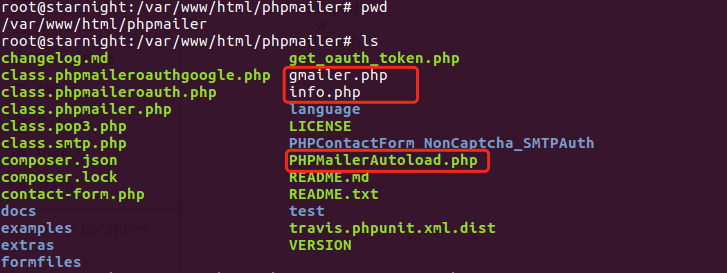
将下载好的phpmailer解压到web目录,我的目录结构如下:(主要的文件是红框中圈出的,目录中比你解压后多出的文件,请不要在意)
二、发送邮件测试(一)
标记为***xxx***的需要改成自己的信息。
<?php

require 'PHPMailerAutoload.php';                    // 跟gmailer同在phpmailer文件夹下

$mail = new PHPMailer;

$mail->SMTPDebug = 1;              // Enable verbose debug output

$mail->isSMTP();                // Set mailer to use SMTP

$mail->Host = 'smtp.gmail.com';          // Specify main and backup SMTP servers

$mail->SMTPAuth = true;                  // Enable SMTP authentication

$mail->Username = '***your_gmail_user_name@gmail.com***';  // SMTP username

$mail->Password = '***your_gmail_password***';          // SMTP password

$mail->SMTPSecure = 'ssl';          // Enable TLS encryption, `ssl` also accepted

$mail->Port = 465;               // TCP port to connect to

$mail->setFrom('***your_gmail_user_name@gmail.com***', 'Mailer');     // Add set from id

$mail->addAddress('***starnight_cyber at foxmail.com***', 'Receiver');   // Add a recipient

$mail->addAddress('***neverthinkaboutit at 163.com***', 'Receiver');     // Add a recipient

$mail->Subject = 'Helo, it is a test!';

$mail->Body    = 'This is the HTML message body <b>in bold!</b>';

$mail->AltBody = 'This is the body in plain text for non-HTML mail clients';

if(!$mail->send()) {

    echo 'Message could not be sent.';

    echo 'Mailer Error: ' . $mail->ErrorInfo;

} else {

    echo 'Message has been sent';

}

?>
访问页面:http://localhost/phpmailer/gmailer.php, 您将得到如下输出,显示的是发送正确。(发送邮件的速度,即等待时间,跟连接到邮件服务器的速度有关)

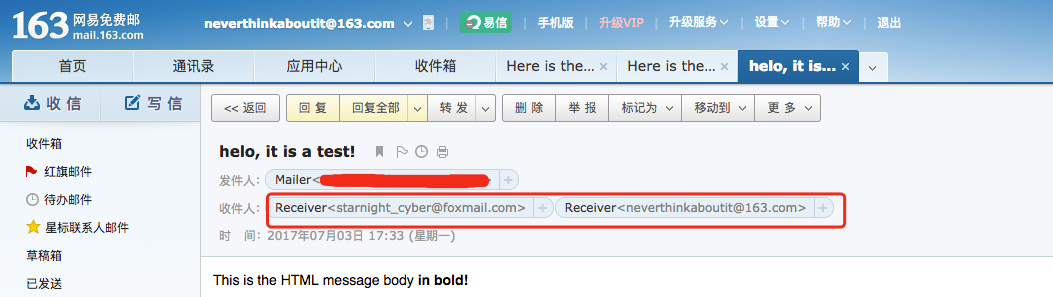
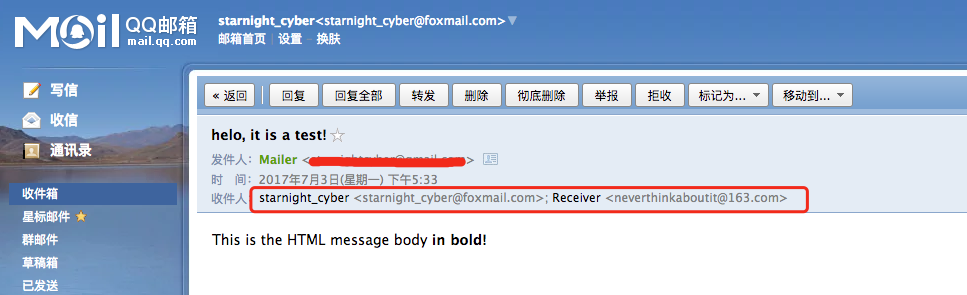
下面是收件人的情况:(邮件发送后,需要稍等一分钟左右可以看到邮件,用gmail会更快些)
三、发送邮件测试(二)
上面那个记不清是啥版本的,讲道理可能是phpmailer-5.2.18的例子,跟下面的phpmailer-5.2.16比较相像,但有少许不同,现补充如下:
phpmailer-5.2.16下载地址:https://github.com/PHPMailer/PHPMailer/releases/tag/v5.2.16
<?php

/**

 * This example shows settings to use when sending via Google's Gmail servers.

 */

//SMTP needs accurate times, and the PHP time zone MUST be set

//This should be done in your php.ini, but this is how to do it if you don't have access to that

date_default_timezone_set('Etc/UTC');

require 'PHPMailerAutoload.php';

//Create a new PHPMailer instance

$mail = new PHPMailer;

//Tell PHPMailer to use SMTP

$mail->isSMTP();

//Enable SMTP debugging

// 0 = off (for production use)

// 1 = client messages

// 2 = client and server messages

$mail->SMTPDebug = 2;

//Ask for HTML-friendly debug output

$mail->Debugoutput = 'html';

//Set the hostname of the mail server

$mail->Host = 'smtp.gmail.com';

// use

// $mail->Host = gethostbyname('smtp.gmail.com');

// if your network does not support SMTP over IPv6

//Set the SMTP port number - 587 for authenticated TLS, a.k.a. RFC4409 SMTP submission

$mail->Port = 587;

//Set the encryption system to use - ssl (deprecated) or tls

$mail->SMTPSecure = 'tls';

//Whether to use SMTP authentication

$mail->SMTPAuth = true;

//Username to use for SMTP authentication - use full email address for gmail

$mail->Username = "starnightcyber@gmail.com";

//Password to use for SMTP authentication

$mail->Password = "your-password";        # look here, you need to change to your own mailer address and password

//Set who the message is to be sent from

$mail->setFrom('starnightcyber@gmail.com', 'starnightcyber');

//Set an alternative reply-to address

//$mail->addReplyTo('replyto@example.com', 'First Last');

//Set who the message is to be sent to

$mail->addAddress('zl15@foxmail.com', 'liuzhen');

//Set the subject line

$mail->Subject = 'PHPMailer GMail SMTP test';

//Read an HTML message body from an external file, convert referenced images to embedded,

//convert HTML into a basic plain-text alternative body

$mail->msgHTML(file_get_contents('contents.html'), dirname(__FILE__));

//Replace the plain text body with one created manually

$mail->Body    = 'Hello, this is a test mail using phpmailer';

$mail->AltBody = 'Hello, this is a test mail using phpmailer';

//Attach an image file

//$mail->addAttachment('images/phpmailer_mini.png');

//send the message, check for errors

if (!$mail->send()) {

    echo "Mailer Error: " . $mail->ErrorInfo;

} else {

    echo "Message sent!";

}
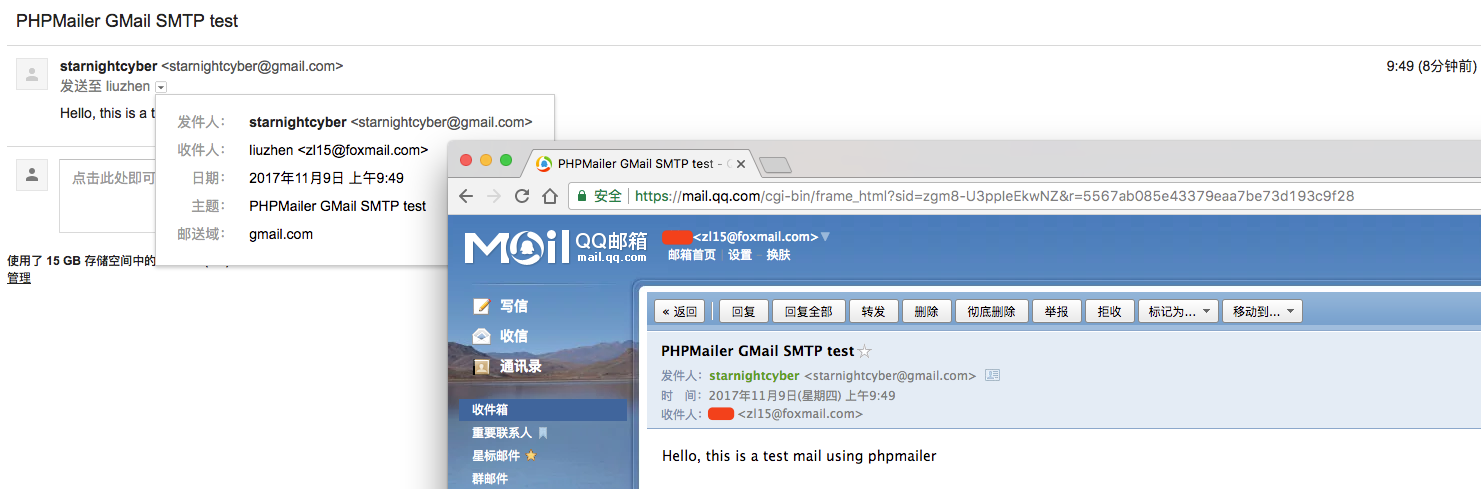
发送邮件输出日志如下:
SERVER -> CLIENT: 220 smtp.gmail.com ESMTP v22sm8729998pgb.65 - gsmtp

CLIENT -> SERVER: EHLO 192.168.0.8

SERVER -> CLIENT: 250-smtp.gmail.com at your service, [210.45.123.80]250-SIZE 35882577250-8BITMIME250-STARTTLS250-ENHANCEDSTATUSCODES250-PIPELINING250-CHUNKING250 SMTPUTF8

CLIENT -> SERVER: STARTTLS

SERVER -> CLIENT: 220 2.0.0 Ready to start TLS

CLIENT -> SERVER: EHLO 192.168.0.8

SERVER -> CLIENT: 250-smtp.gmail.com at your service, [210.45.123.80]250-SIZE 35882577250-8BITMIME250-AUTH LOGIN PLAIN XOAUTH2 PLAIN-CLIENTTOKEN OAUTHBEARER XOAUTH250-ENHANCEDSTATUSCODES250-PIPELINING250-CHUNKING250 SMTPUTF8

CLIENT -> SERVER: AUTH LOGIN

SERVER -> CLIENT: 334 VXNlcm5hbWU6

CLIENT -> SERVER: c3Rhcm5pZ2h0Y3liZXJAZ21haWwuY29t

SERVER -> CLIENT: 334 UGFzc3dvcmQ6

CLIENT -> SERVER: MTIzQHdheW5lJmx6OTMj

SERVER -> CLIENT: 235 2.7.0 Accepted

CLIENT -> SERVER: MAIL FROM:<starnightcyber@gmail.com>

SERVER -> CLIENT: 250 2.1.0 OK v22sm8729998pgb.65 - gsmtp

CLIENT -> SERVER: RCPT TO:<zl15@foxmail.com>

SERVER -> CLIENT: 250 2.1.5 OK v22sm8729998pgb.65 - gsmtp

CLIENT -> SERVER: DATA

SERVER -> CLIENT: 354 Go ahead v22sm8729998pgb.65 - gsmtp

CLIENT -> SERVER: Date: Thu, 9 Nov 2017 01:49:55 +0000

CLIENT -> SERVER: To: liuzhen <zl15@foxmail.com>

CLIENT -> SERVER: From: starnightcyber <starnightcyber@gmail.com>

CLIENT -> SERVER: Subject: PHPMailer GMail SMTP test

CLIENT -> SERVER: Message-ID: <81fd574eec8f52c3080c06e671ff7e77@192.168.0.8>

CLIENT -> SERVER: X-Mailer: PHPMailer 5.2.16 (https://github.com/PHPMailer/PHPMailer)

CLIENT -> SERVER: MIME-Version: 1.0

CLIENT -> SERVER: Content-Type: multipart/alternative;

CLIENT -> SERVER: boundary="b1_81fd574eec8f52c3080c06e671ff7e77"

CLIENT -> SERVER: Content-Transfer-Encoding: 8bit

CLIENT -> SERVER:

CLIENT -> SERVER: This is a multi-part message in MIME format.

CLIENT -> SERVER:

CLIENT -> SERVER: --b1_81fd574eec8f52c3080c06e671ff7e77

CLIENT -> SERVER: Content-Type: text/plain; charset=us-ascii

CLIENT -> SERVER:

CLIENT -> SERVER: Hello, this is a test mail using phpmailer

CLIENT -> SERVER:

CLIENT -> SERVER:

CLIENT -> SERVER: --b1_81fd574eec8f52c3080c06e671ff7e77

CLIENT -> SERVER: Content-Type: text/html; charset=us-ascii

CLIENT -> SERVER:

CLIENT -> SERVER: Hello, this is a test mail using phpmailer

CLIENT -> SERVER:

CLIENT -> SERVER:

CLIENT -> SERVER:

CLIENT -> SERVER: --b1_81fd574eec8f52c3080c06e671ff7e77--

CLIENT -> SERVER:

CLIENT -> SERVER: .

SERVER -> CLIENT: 250 2.0.0 OK 1510192199 v22sm8729998pgb.65 - gsmtp

CLIENT -> SERVER: QUIT

SERVER -> CLIENT: 221 2.0.0 closing connection v22sm8729998pgb.65 - gsmtp

Message sent!
phpmailer-5.2.16 gmail发送邮件输出日志
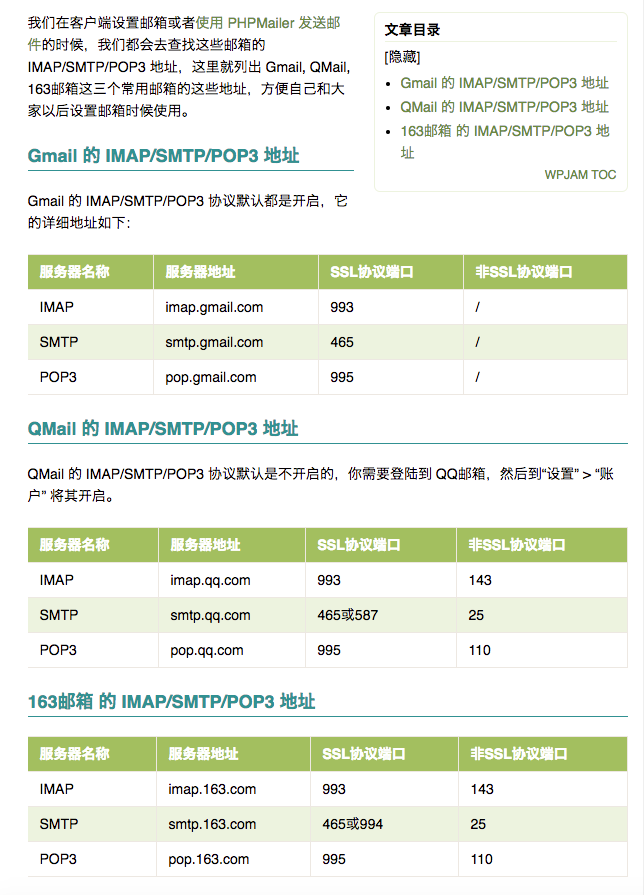
最后,附上:Gmail,QMail,163邮箱的 IMAP/SMTP/POP3 地址
欢迎给我留言联系...
phpmailer 发送邮件(一)的更多相关文章
- 利用PHPMailer发送邮件时报错
利用thinkphp集成PHPMailer发送邮件时报错:Failed to connect to server: Unable to find the socket transport “ssl” ...
- 使用PHPmailer发送邮件的详细代码
一.使用PHPMailer发送邮件的原因 PHP有内置的mail()方法,但是由于一些主机空间不支持该方法,所以经常会遇到无法发送邮件的情况. 所以,可以下载PHPMailer类,实现邮件发送. 二. ...
- ThinkPHP 中使用 PHPMailer 发送邮件 支持163和QQ邮箱等
[摘要]ThinkPHP是一个开源的PHP框架, 是为了简化企业级应用开发和敏捷WEB应用开发而诞生的.本文介绍ThinkPHP 中使用 PHPMailer 发送邮件. PHP是自带可以发送邮件的Ma ...
- 在Thinkphp3.2 中使用PHPMailer 发送邮件
phpmailer发送邮件是php开发者首选的一个邮件发送插件了,下面我来介绍怎么集成phpmailer到thinkphp框架了,有需要了解的朋友可参考. phpmailer发送邮件功能很强大,今天真 ...
- PHPMailer 发送邮件(二)
发现PHPMailer又做了较大的更新,以前发送邮件的方法已不太适用,刚好要做一个实验,需要搭建个环境,这里使用Gmail进行测试,现记录下来. 传送地址Github: PHPMailer 基本要求的 ...
- 用phpmailer发送邮件提示SMTP Error: Could not connect to SMTP host解决办法
之前做项目的时候做了一个用phpmailer发送邮件的功能<CI框架结合PHPmailer发送邮件>,昨天步署上线(刚开始用新浪云,嫌贵,换成阿里了),测试的时候,发送邮件却意外报错了.. ...
- thinkphp使用PHPMailer发送邮件
第一步:准备PHPMailer 使用PHPMailer发送邮件,首先下载个PHPMailer 将下载的PHPMailer放到ThinkPHP文件夹里面的ThinkPHPExtendVendor 第二步 ...
- PHPMailer发送邮件中文附件名是乱码
可能使用了PHPMailer发送邮件的朋友带中文附件名时会出现乱码,下面我来介绍一个解决办法. 比如我们要发送的附件是"测试.txt",如果在添加附件的时候强制使用指定文件名的方式 ...
- phpmailer发送邮件
phpmailer发送邮件 PHP内置的mail函数使用起来不够方便,另外受其他语言的影响,博主更偏好面向对象的包管理模式,因此phpmailer成为了我用PHP发送邮件的首选,这里分享给大家. 库导 ...
- PHPmailer发送邮件时的常见问题及解决办法
来源:http://www.chinastor.com/a/jishu/mailserver/0G392262014.html 使用PHPmailer发送邮件时的常见问题总结: 一,没有定义发送邮箱$ ...
随机推荐
- jdk版本查看,以及java -version 和JAVA_HOME不一致问题
一.jdk版本查看及位数查看 在cmd进入命令行窗口,输入java -version 可以查看安装的jdk版本,如图: 当有64-bit时代表是64位jdk,如果没有则默认是32位的. 二.java ...
- 【转】深入理解CSS定位中的偏移
前面的话 CSS有三种基本的定位机制:普通流.浮动和绝对定位.利用定位,可以准确地定义元素框相对于其正常位置应该出现的位置,或者相对于父元素.另一个元素甚至浏览器窗口本身的位置.但元素究竟如何定位,定 ...
- asp.net web api 2.2 基础框架(带例子)
链接:https://github.com/solenovex/asp.net-web-api-2.2-starter-template 简介 这个是我自己编写的asp.net web api 2.2 ...
- 利用python多线程实现多个客户端与单个服务端的远程ssh
本次实验设计两个方面的代码,第一个是客户端,代码如下: import os from socket import * c = socket(AF_INET,SOCK_STREAM) c.connect ...
- .NET十年回顾
一. 引子 从我还是编程菜鸟时起,.NET就从来没让我失望过.总是惊喜不断. 当年我第一个项目是做个进销存.用的Winform.当时我是机电工程师.编程只是业余心血来潮而已. .NET的低门槛.V ...
- Print Article hdu 3507 一道斜率优化DP 表示是基础题,但对我来说很难
Print Article Time Limit: 9000/3000 MS (Java/Others) Memory Limit: 131072/65536 K (Java/Others)To ...
- OWLQN算法
一.BFGS算法 算法思想如下: Step1 取初始点,初始正定矩阵,允许误差,令: Step2 计算: Step3 计算,使得 : Step4 令: Step5 如果,则取为 ...
- linux备份文件脚本
#!/bin/sh #Author: Opal TODAY=`date +%Y%m%d` YESTERDAY=`date -d"-1 day" +%Y%m%d` mkdir -p ...
- 简单Elixir游戏服设计-创建玩家模型
删除model.ex 创建玩家模型 player.ex, 简单化,只有唯一标识,昵称,金币,够用了. 选择 map 代表数据,是为了扩展数据结构,方便增加功能.struct也是可以的. add_num ...
- Color Blender---在线渐变色带生成器
Color Blender是一个很有用的在线渐变色带生成器,它可以在两种颜色之间,自动生成过渡色,对网页设计师来说是一个不错的颜色调配工具. Color Blender的使用方法很简单,你只 ...