
Powershell 远程连接ARM Windows Server VM 并关闭 Firewall
准备环境:Azure ARM Windows Server 2008 R2 机器
1.登陆机器查看防火墙,是开着的

2.查看机器的监听端口,发现没有Powershell远程管理对应的端口5985或5986 【5985(http) / 5986(https) 】
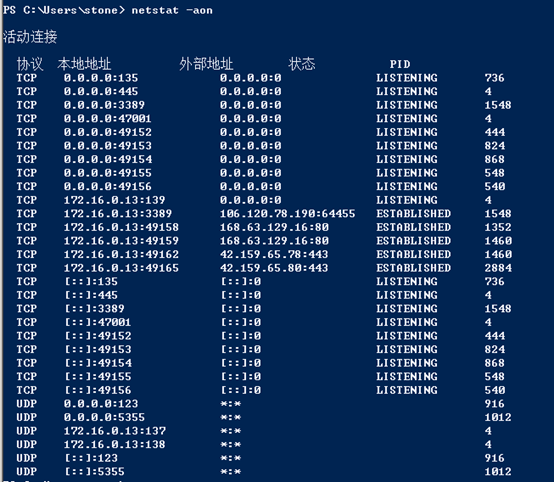
3.需要在Server机器上 Enable-PSRemoting
PS C:\Users\stone> Enable-PSRemoting

WinRM 快速配置

正在运行命令“Set-WSManQuickConfig”,以使该计算机能够通过 WinRM 服务进行远程管理。

 其中包括:

    1. 启动或重新启动(如果已启动) WinRM 服务

    2. 将 WinRM 服务类型设置为自动启动

    3. 创建一个侦听器以接受任意 IP 地址上的请求

    4. 对 WS-Management 流量启用防火墙例外(仅适用于 http)。

是否继续?

[Y] 是(Y)  [A] 全是(A)  [N] 否(N)  [L] 全否(L)  [S] 挂起(S)  [?] 帮助 (默认值为“Y”):

在此计算机上,WinRM 已设置为接收请求。

WinRM 已经进行了更新,以用于远程管理。

在 HTTP://* 上创建 WinRM 侦听程序接受 WS-Man 对此机器上任意 IP 的请求。

WinRM 防火墙异常已启用。

已配置 LocalAccountTokenFilterPolicy 以远程向本地用户授予管理权限。

确认

是否确实要执行此操作?

对目标“未找到会话配置“Microsoft.PowerShell32”。正在运行命令“Register-PSSessionConfiguration Microsoft.PowerShell32

-processorarchitecture x86 -force”以创建“Microsoft.PowerShell32”会话配置。这将会重新启动 WinRM

服务。”执行操作“正在注册会话配置”。

[Y] 是(Y)  [A] 全是(A)  [N] 否(N)  [L] 全否(L)  [S] 挂起(S)  [?] 帮助 (默认值为“Y”):
4.再次查看机器的监听端口,发现Powershell远程管理对应的端口5985已经被监听了
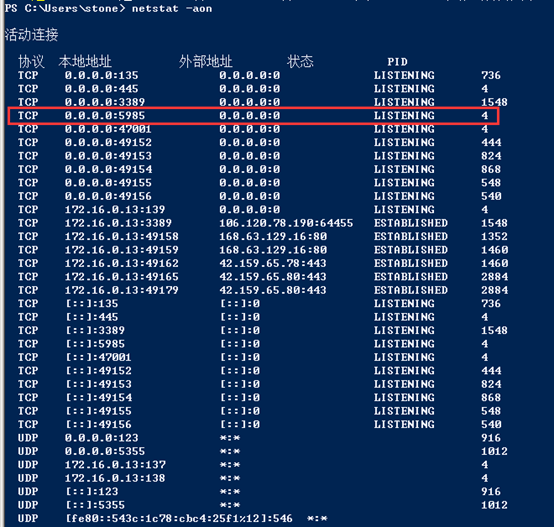
5.在Portal界面添加允许5985端口的NSG规则,并测试该端口的连通性


6.尝试Powershell远程登陆虚拟机,发现会出现如下报错:
PS C:\Users\he.liming> Enter-Pssession -ComputerName "40.*.*.*" -port 5985 -Credential VMAccountName

Enter-Pssession : Connecting to remote server 40.*.*.* failed with the following error message : The WinRM client cannot process the request. Default authentication may be used with an IP address under the following conditions: the transport is HTTPS or the destination is in the TrustedHosts list, and explicit credentials are provided. Use winrm.cmd to configure TrustedHosts. Note that computers in the TrustedHosts list might not be authenticated. For more information on how to set Trusted

Hosts run the following command: winrm help config. For more information, see the about_Remote_Troubleshooting Help topic.

At line:1 char:1

+ Enter-Pssession -ComputerName "40.*.*.*" -port 5985 -Credential stone

+ ~~~~~~~~~~~~~~~~~~~~~~~~~~~~~~~~~~~~~~~~~~~~~~~~~~~~~~~~~~~~~~~~~~~~~~~~~~

+ CategoryInfo          : InvalidArgument: (40.125.160.63:String) [Enter-PSSession], PSRemotingTransportException

+ FullyQualifiedErrorId : CreateRemoteRunspaceFailed
7.需要将Server端IP地址添加到Client机器的TrustedHosts列表下
PS C:\Windows\system32> Set-Item wsman:\localhost\Client\TrustedHosts -value 40.125.160.63

WinRM Security Configuration.

This command modifies the TrustedHosts list for the WinRM client. The computers in the TrustedHosts list might not be

 authenticated. The client might send credential information to these computers. Are you sure that you want to modify

 this list?

[Y] Yes  [N] No  [S] Suspend  [?] Help (default is "Y"):
8.重新使用Powershell连接虚拟机,登陆成功
PS C:\Users\he.liming> Enter-Pssession -ComputerName "40.125.160.63" -port 5985 -Credential VMAccountName
[40.125.160.63]: PS C:\Users\stone\Documents>
9.使用如下命令关闭防火墙
PS C:\Users\stone\Documents> netsh advfirewall set allprofiles state off
10.再次查看防火墙,已经关闭
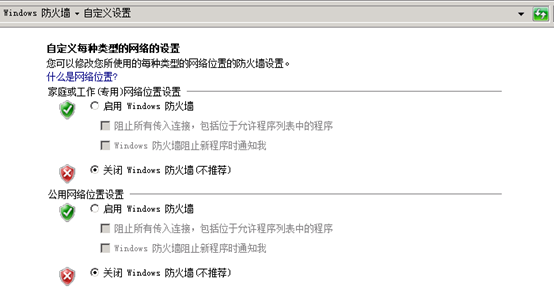
备注:Windows Server 2012 R2的机器开启Powershell远程连接的方法,与上面的操作大同小异,需要注意的是Windows Server 2012 R2机器默认情况下5985的端口是监听着的

Powershell 远程连接ARM Windows Server VM 并关闭 Firewall的更多相关文章
- SQL Server 2014数据库开启远程连接(Windows Server 2016)
1.打开SQL SERVER 配置管理器 2. 设置防火墙的入站规则 3.使用Navicat Premium连接SQL Server
- 使用 Powershell 远程连接 windows server
使用 Powershell 远程连接 windows server Intro 最近我们的开发环境增加了一个 windows 服务器,没有界面的,不能直接远程桌面连上去管理,需要使用 Powershe ...
- powershell远程连接
最近因为工作的需要看了看powershell相关的知识,个人总结了一点有关于powershell远程连接需要做的步骤,希望对别人有所帮助. 使用powershell远程连接,需要进行 设备的配置: 1 ...
- Windows Server 2008中关闭事件跟踪程序的方法
Windows Server 2008跟Windows Server 2003一样,在关机的时候会弹出一个“关闭事件跟踪程序”窗口,当然微软这么做是处于安全的考虑啦,但是如果我们只是个人用用的话,那就 ...
- 远程链接 aws Windows Server 2016 Base Nano
第一次接触Windows Server 2016 Base Nano,平时工作中或者自己私下使用win的服务器都是带桌面版本的 而这次在aws一不小心开了一台Nano服务,刚开始我都不知道这个是什么玩 ...
- asp.net mvc项目远程发布到windows server服务器
文章参考 自学MVC看这里——全网最全ASP.NET MVC 教程汇总 图文详解远程部署ASP.NET MVC 5项目 配置Web部署处理程序 设备及环境 一台装有windows server 201 ...
- 使用PowerShell远程连接WinServer
最近做一个项目后台,涉及到多台服务器,当程序更新的时候,由于用的是WinServer,无法像Linux使用SSH批量更新,用Windows的mstsc的远程一个一个连接又太麻烦了.查找了一下资料,发现 ...
- iOS-Mac远程连接控制Window【苹果电脑远程连接控制Windows电脑】
用Mac电脑时想远程控制Windows电脑,摸索了半天搞定了 1.下载Mac远程控制安装包:http://pan.baidu.com/s/1o7ZsDQy 提取密码:r2ja 2.安装好之后打开,就 ...
- PowerShell远程连接主机进行会话
Get-ExecutionPolicy #脚本的执行策略set-ExecutionPolicy 枚举值 不同的策略,执行脚本的权限不同 允许开启远程 Enable-PSRemoting 添加域账户或者 ...
随机推荐
- Sql语句备份Sqlserver数据库
BACKUP DATABASE [POS_YiZhuang]TODISK = N'C:\数据库\POS_YiZhuang2016-09-20-3.bak'WITHNAME = N'POS_YiZhua ...
- C 其他一些
1.联合,语法 union{成员1;成员2;} 联合间的成员共享同一个空间,也就是说,成员1赋值如果没有被清除,会体现在成员2上 2.位字段,结合结构体瓜分完整的类型存储空间,如 struct{ ; ...
- jstl 中 <c:foreach> 多级循环
- LeetCode 661. Image Smoother (图像平滑器)
Given a 2D integer matrix M representing the gray scale of an image, you need to design a smoother t ...
- Vue源码后记-更多options参数(2)
写起来感觉都是老三套,AST => render => VNode => patch 之前是把AST弄完了,对事件和过滤器处理如图: render函数也只看这两部分的转换吧! 首先是 ...
- ssh连接虚拟机失败解决办法
首先,你需要知道本机IP跟虚拟机IP,然后让两者互相ping一下,看能否ping通 让主机ping虚拟机 :ping (虚拟机ip) 出现如下: 表示主机可以ping通虚拟机 然后让虚拟机ping主机 ...
- FPM定制RPM包实践
1.1 快速部署方案 ✔ 问题:当领导给你 100 台已经安装好系统的服务器,然后让优化,让你提出一个快速部署方案. 解答: 1.tar 打包 先编译安装 打包-->分发-->解包(比如 ...
- IdentityServer4 实现自定义 GrantType 授权模式
OAuth 2.0 默认四种授权模式(GrantType): 授权码模式(authorization_code) 简化模式(implicit) 密码模式(password) 客户端模式(client_ ...
- 修改文件的所有者失(chown: changing ownership of `uploads': Operation not permitted)
在项目开发的时候,经常需要将文件上传到指定的目录下. 例如这次用thinkphp5的时候,需要在public目录下建立uploads目录用于存放上传的资源. 首先在命令窗口下输入: mkdir upl ...
- Android 开发笔记___图像视图__简单截屏
<?xml version="1.0" encoding="utf-8"?> <LinearLayout xmlns:android=&quo ...