
ABP .Net Core 日志组件集成使用NLog
一、说明
- NLog介绍和使用说明官网:http://nlog-project.org/
- NLog和Log4net对比:https://www.cnblogs.com/qinjin/p/5134982.html
二、NLog集成步骤
- 下载模板项目,下载地址:https://aspnetboilerplate.com/Templates 选择.Net Core项目
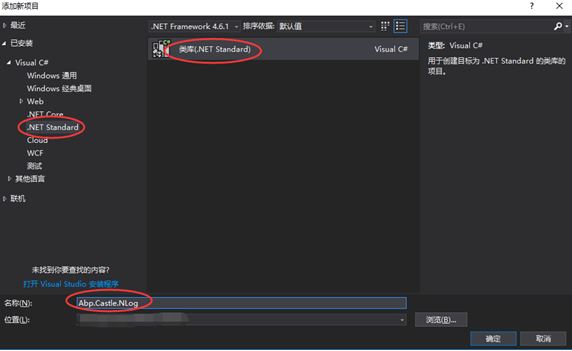
- 新建一个.NET Standard类库项目Abp.Castle.NLog
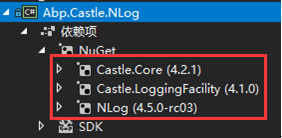
- 添加NuGet包Castle.Core, Castle.LoggingFacility, NLog
- 参考abp log4net(ABP源码)添加class NLogLogger继承MarshalByRefObject并实现接口Castle.Core.Logging.ILogger
 using System;

 using System.Globalization;

 using ILogger = Castle.Core.Logging.ILogger;

 using NLogCore = NLog;

 namespace Abp.Castle.Logging.NLog

 {

     [Serializable]

     public class NLogLogger :

         MarshalByRefObject,

         ILogger

     {

         protected internal NLogCore.ILogger Logger { get; set; }

         //protected internal NLogLoggerFactory Factory { get; set; }

         public NLogLogger(NLogCore.ILogger logger)

         {

             Logger = logger;

         }

         internal NLogLogger()

         {

         }

         public bool IsDebugEnabled => Logger.IsEnabled(NLogCore.LogLevel.Debug);

         public bool IsErrorEnabled => Logger.IsEnabled(NLogCore.LogLevel.Error);

         public bool IsFatalEnabled => Logger.IsEnabled(NLogCore.LogLevel.Fatal);

         public bool IsInfoEnabled => Logger.IsEnabled(NLogCore.LogLevel.Info);

         public bool IsWarnEnabled => Logger.IsEnabled(NLogCore.LogLevel.Warn);

         public ILogger CreateChildLogger(string loggerName)

         {

             return new NLogLogger(NLogCore.LogManager.GetLogger(Logger.Name + "." + loggerName));

         }

         public void Debug(string message)

         {

             Logger.Debug(message);

         }

         public void Debug(Func<string> messageFactory)

         {

             Logger.Debug(messageFactory);

         }

         public void Debug(string message, Exception exception)

         {

             Logger.Debug(exception, message);

         }

         public void DebugFormat(string format, params object[] args)

         {

             Logger.Debug(CultureInfo.InvariantCulture, format, args);

         }

         public void DebugFormat(Exception exception, string format, params object[] args)

         {

             Logger.Debug(exception, CultureInfo.InvariantCulture, format, args);

         }

         public void DebugFormat(IFormatProvider formatProvider, string format, params object[] args)

         {

             Logger.Debug(formatProvider, format, args);

         }

         public void DebugFormat(Exception exception, IFormatProvider formatProvider, string format, params object[] args)

         {

             Logger.Debug(exception, formatProvider, format, args);

         }

         public void Error(string message)

         {

             Logger.Error(message);

         }

         public void Error(Func<string> messageFactory)

         {

             Logger.Error(messageFactory);

         }

         public void Error(string message, Exception exception)

         {

             Logger.Error(exception, message);

         }

         public void ErrorFormat(string format, params object[] args)

         {

             Logger.Error(CultureInfo.InvariantCulture, format, args);

         }

         public void ErrorFormat(Exception exception, string format, params object[] args)

         {

             Logger.Error(exception, CultureInfo.InvariantCulture, format, args);

         }

         public void ErrorFormat(IFormatProvider formatProvider, string format, params object[] args)

         {

             Logger.Error(formatProvider, format, args);

         }

         public void ErrorFormat(Exception exception, IFormatProvider formatProvider, string format, params object[] args)

         {

             Logger.Error(exception, formatProvider, format, args);

         }

         public void Fatal(string message)

         {

             Logger.Fatal(message);

         }

         public void Fatal(Func<string> messageFactory)

         {

             Logger.Fatal(messageFactory);

         }

         public void Fatal(string message, Exception exception)

         {

             Logger.Fatal(exception, message);

         }

         public void FatalFormat(string format, params object[] args)

         {

             Logger.Fatal(CultureInfo.InvariantCulture, format, args);

         }

         public void FatalFormat(Exception exception, string format, params object[] args)

         {

             Logger.Fatal(exception, CultureInfo.InvariantCulture, format, args);

         }

         public void FatalFormat(IFormatProvider formatProvider, string format, params object[] args)

         {

             Logger.Fatal(formatProvider, format, args);

         }

         public void FatalFormat(Exception exception, IFormatProvider formatProvider, string format, params object[] args)

         {

             Logger.Fatal(exception, formatProvider, format, args);

         }

         public void Info(string message)

         {

             Logger.Info(message);

         }

         public void Info(Func<string> messageFactory)

         {

             Logger.Info(messageFactory);

         }

         public void Info(string message, Exception exception)

         {

             Logger.Info(exception, message);

         }

         public void InfoFormat(string format, params object[] args)

         {

             Logger.Info(CultureInfo.InvariantCulture, format, args);

         }

         public void InfoFormat(Exception exception, string format, params object[] args)

         {

             Logger.Info(exception, CultureInfo.InvariantCulture, format, args);

         }

         public void InfoFormat(IFormatProvider formatProvider, string format, params object[] args)

         {

             Logger.Info(formatProvider, format, args);

         }

         public void InfoFormat(Exception exception, IFormatProvider formatProvider, string format, params object[] args)

         {

             Logger.Info(exception, formatProvider, format, args);

         }

         public void Warn(string message)

         {

             Logger.Warn(message);

         }

         public void Warn(Func<string> messageFactory)

         {

             Logger.Warn(messageFactory);

         }

         public void Warn(string message, Exception exception)

         {

             Logger.Warn(exception, message);

         }

         public void WarnFormat(string format, params object[] args)

         {

             Logger.Warn(CultureInfo.InvariantCulture, format, args);

         }

         public void WarnFormat(Exception exception, string format, params object[] args)

         {

             Logger.Warn(exception, CultureInfo.InvariantCulture, format, args);

         }

         public void WarnFormat(IFormatProvider formatProvider, string format, params object[] args)

         {

             Logger.Warn(formatProvider, format, args);

         }

         public void WarnFormat(Exception exception, IFormatProvider formatProvider, string format, params object[] args)

         {

             Logger.Warn(exception, formatProvider, format, args);

         }

     }

} - 添加工厂类NLogLoggerFactory并实现抽象类Castle.Core.Logging.AbstractLoggerFactory
 using Castle.Core.Logging;

 using System;

 using System.IO;

 using NLogCore = NLog;

 namespace Abp.Castle.Logging.NLog

 {

     public class NLogLoggerFactory : AbstractLoggerFactory

     {

         internal const string DefaultConfigFileName = "nlog.config";

         //private readonly ILoggerRepository _loggerRepository;

         public NLogLoggerFactory()

        : this(DefaultConfigFileName)

         {

         }

         public NLogLoggerFactory(string configFileName)

         {

             if (!File.Exists(configFileName))

             {

                 throw new FileNotFoundException(configFileName);

             }

             NLogCore.LogManager.Configuration = new NLogCore.Config.XmlLoggingConfiguration(configFileName);

         }

         public override ILogger Create(string name)

         {

             if (name == null)

             {

                 throw new ArgumentNullException(nameof(name));

             }

             return new NLogLogger(NLogCore.LogManager.GetLogger(name));

         }

         public override ILogger Create(string name, LoggerLevel level)

         {

             throw new NotSupportedException("Logger levels cannot be set at runtime. Please review your configuration file.");

         }

     }

} - 添加LoggingFacility的扩展方法UseAbpNLog
 using Castle.Facilities.Logging;

 namespace Abp.Castle.Logging.NLog

 {

     public static class LoggingFacilityExtensions

     {

         public static LoggingFacility UseAbpNLog(this LoggingFacility loggingFacility)

         {

             return loggingFacility.LogUsing<NLogLoggerFactory>();

         }

     }

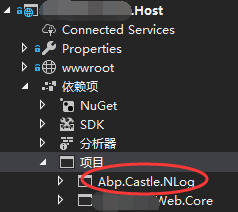
} - 移除Abp.Castle.Log4Net包,添加Abp.Castle.NLog到Host项目
- 添加配置文件nlog.config
 <?xml version="1.0" encoding="utf-8" ?>

 <nlog xmlns="http://www.nlog-project.org/schemas/NLog.xsd"

       xmlns:xsi="http://www.w3.org/2001/XMLSchema-instance"

       autoReload="true"

       internalLogLevel="Warn"

       internalLogFile="App_Data\Logs\nlogs.txt">

   <variable name="logDirectory" value="${basedir}\log\"/>

   <!--define various log targets-->

   <targets>

     <!--write logs to file-->

     <target xsi:type="File" name="allfile" fileName="${logDirectory}\nlog-all-${shortdate}.log"

                  layout="${longdate}|${logger}|${uppercase:${level}}|${message} ${exception}" />

     <target xsi:type="File" name="ownFile-web" fileName="nlog-my-${shortdate}.log"

                  layout="${longdate}|${logger}|${uppercase:${level}}|${message} ${exception}" />

     <target xsi:type="Null" name="blackhole" />

   </targets>

   <rules>

     <!--All logs, including from Microsoft-->

     <logger name="*" minlevel="Trace" writeTo="allfile" />

     <!--Skip Microsoft logs and so log only own logs-->

     <logger name="Microsoft.*" minlevel="Trace" writeTo="blackhole" final="true" />

     <logger name="*" minlevel="Trace" writeTo="ownFile-web" />

   </rules>

</nlog> - 修改Startup, 将原来的日志组件log4net替换为nlog
注释using Abp.Castle.Logging.Log4Net; 添加using Abp.Castle.Logging.NLog;
 //using Abp.Castle.Logging.Log4Net;

 using Abp.Castle.Logging.NLog;
修改ConfigureServices方法
  // Configure Abp and Dependency Injection

  return services.AddAbp<AbpBasicWebHostModule>(

      // Configure Log4Net logging

      //options => options.IocManager.IocContainer.AddFacility<LoggingFacility>(

      //    f => f.UseAbpLog4Net().WithConfig("log4net.config")

      //)

      // Configure Nlog Logging

       options => options.IocManager.IocContainer.AddFacility<LoggingFacility>(

       f => f.UseAbpNLog().WithConfig("nlog.config")

       )

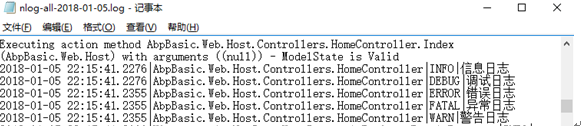
); - 测试
 public IActionResult Index()

 {

       //nlog test

        Logger.Info("信息日志");

        Logger.Debug("调试日志");

        Logger.Error("错误日志");

        Logger.Fatal("异常日志");

        Logger.Warn("警告日志");

        return Redirect("/swagger");

 }
测试结果
ABP .Net Core 日志组件集成使用NLog的更多相关文章
- net core体系-web应用程序-4net core2.0大白话带你入门-7asp.net core日志组件(Logger和Nlog)
asp.net core日志组件 日志介绍 Logging的使用 1. appsettings.json中Logging的介绍 Logging的配置信息是保存在appsettings.json配置 ...
- .Netcore之日志组件Log4net、Nlog性能比较
转载请注明出处http://www.cnblogs.com/supernebula/p/7506993.html .Netcore之Log4net.Nlog性能比较 最近在写一个开源.netcore ...
- 【框架学习与探究之日志组件--Log4Net与NLog】
前言 本文欢迎转载,作者原创地址:http://www.cnblogs.com/DjlNet/p/7604340.html 序 近日,天气渐冷,懒惰的脑虫又开始作祟了,导致近日内功修炼迟迟未能进步,依 ...
- .Net core2.0日志组件Log4net、Nlog简单性能测试
.Net core之Log4net.Nlog简单性能测试 比较log4net.nlog的文件写入性能(.netcore环境),涉及代码和配置如有不正确的地方,还请批评指正. 原创,转载请著名出处:ht ...
- asp.net core日志组件
日志介绍 Logging的使用 1. appsettings.json中Logging的介绍 Logging的配置信息是保存在appsettings.json配置文件中的.因为之前介绍配置文件的时候我 ...
- 基于DDD的.NET开发框架 - ABP日志Logger集成
返回ABP系列 ABP是“ASP.NET Boilerplate Project (ASP.NET样板项目)”的简称. ASP.NET Boilerplate是一个用最佳实践和流行技术开发现代WEB应 ...
- 玩转ASP.NET Core中的日志组件
简介 日志组件,作为程序员使用频率最高的组件,给程序员开发调试程序提供了必要的信息.ASP.NET Core中内置了一个通用日志接口ILogger,并实现了多种内置的日志提供器,例如 Console ...
- [.Net Core] 在 Mvc 中简单使用日志组件
在 Mvc 中简单使用日志组件 基于 .Net Core 2.0,本文只是蜻蜓点水,并非深入浅出. 目录 使用内置的日志组件 简单过渡到第三方组件 - NLog 使用内置的日志 下面使用控制器 Hom ...
- Asp.Net Core 2.0 项目实战(9) 日志记录,基于Nlog或Microsoft.Extensions.Logging的实现及调用实例
本文目录 1. Net下日志记录 2. NLog的使用 2.1 添加nuget引用NLog.Web.AspNetCore 2.2 配置文件设置 2.3 依赖配置及调用 ...
随机推荐
- Loadrunner手动编写包含事务、检查点、关联等元素的脚本实例
一.前言: 本文适合初学者,包含很多细节,包括 二.准备: 1.以虚拟机中的Linux系统作为服务器,开启bugfree服务. 2.以fiddler作为抓包工具,辅助脚本开发. 3.脚本流程:bugf ...
- TeamTalk安装测试
TeamTalk介绍 项目框架 TeamTalk是蘑菇街的开源项目,github维护的最后时间是2015但是仍然是一款值得学习的好项目,麻雀虽小五脏俱全,本项目涉及到多个平台.多种语言,简单关系如下图 ...
- PTA题---求两个有序序列中位数所体现的思想。
---恢复内容开始--- 近日,在做PTA题目时,遇到了一个这样的题,困扰了很久.题目如下:已知有两个等长的非降序序列S1, S2, 设计函数求S1与S2并集的中位数.有序序列A0,A1, ...
- PHP curl_setopt函数用法介绍
[导读] curl_setopt函数是php中一个重要的函数,它可以模仿用户的一些行为,如模仿用户登录,注册等等一些用户可操作的行为哦.bool curl_setopt (int ch, string ...
- 自己主动化 远程登陆linuxserver并运行命令 —— expect
原文地址:http://blog.csdn.net/wangyuling1234567890/article/details/41149429 LinuxserverA登陆LinuxserverB s ...
- wps 操作
wps选择视图-->文档结构图
- SSH中的免password登录
1:运行命令 ssh-keygen -t rsa 产生秘钥 ,位于~/.ssh目录下(假设在这期间有什么提示.一路敲击enter下去,什么都不用输入) 2:运行命令 cp ~/.ssh/id_rs ...
- java上传图片剪切工具类
package com.up.util; import java.awt.Rectangle; import java.awt.image.BufferedImage; import java.io. ...
- Intent及IntentFilter具体解释
Intent用于启动Activity, Service, 以及BroadcastReceiver三种组件, 同一时候还是组件之间通信的重要媒介. 使用Intent启动组件的优势 1, Intent为组 ...
- mapreduce作业reduce被大量kill掉
之前有一段时间.我们的hadoop2.4集群压力非常大.导致提交的job出现大量的reduce被kill掉.同样的job执行时间比在hadoop0.20.203上面长了非常多.这个问题事实上是redu ...