
Spring Cloud构建微服务架构(一)服务注册与发现
Spring Cloud简介
Spring Cloud是一个基于Spring Boot实现的云应用开发工具,它为基于JVM的云应用开发中的配置管理、服务发现、断路器、智能路由、微代理、控制总线、全局锁、决策竞选、分布式会话和集群状态管理等操作提供了一种简单的开发方式。
Spring Cloud包含了多个子项目(针对分布式系统中涉及的多个不同开源产品),比如:Spring Cloud Config、Spring Cloud Netflix、Spring Cloud CloudFoundry、Spring Cloud AWS、Spring Cloud Security、Spring Cloud Commons、Spring Cloud Zookeeper、Spring Cloud CLI等项目。
微服务架构
“微服务架构”在这几年非常的火热,以至于关于微服务架构相关的产品社区也变得越来越活跃(比如:netflix、dubbo),Spring Cloud也因Spring社区的强大知名度和影响力也被广大架构师与开发者备受关注。
那么什么是“微服务架构”呢?简单的说,微服务架构就是将一个完整的应用从数据存储开始垂直拆分成多个不同的服务,每个服务都能独立部署、独立维护、独立扩展,服务与服务间通过诸如RESTful API的方式互相调用。
对于“微服务架构”,大家在互联网可以搜索到很多相关的介绍和研究文章来进行学习和了解。也可以阅读始祖Martin Fowler的《Microservices》,本文不做更多的介绍和描述。
服务注册与发现
在简单介绍了Spring Cloud和微服务架构之后,下面回归本文的主旨内容,如何使用Spring Cloud搭建服务注册与发现模块。
这里我们会用到Spring Cloud Netflix,该项目是Spring Cloud的子项目之一,主要内容是对Netflix公司一系列开源产品的包装,它为Spring Boot应用提供了自配置的Netflix OSS整合。通过一些简单的注解,开发者就可以快速的在应用中配置一下常用模块并构建庞大的分布式系统。它主要提供的模块包括:服务发现(Eureka),断路器(Hystrix),智能路有(Zuul),客户端负载均衡(Ribbon)等。
所以,我们这里的核心内容就是服务发现模块:Eureka。下面我们动手来做一些尝试。
创建“服务注册中心”
创建一个基础的Spring Boot工程,并在pom.xml中引入需要的依赖内容:
<parent>

    <groupId>org.springframework.boot</groupId>

    <artifactId>spring-boot-starter-parent</artifactId>

    <version>1.3.5.RELEASE</version>

    <relativePath/> <!-- lookup parent from repository -->

</parent>

<dependencies>

    <dependency>

        <groupId>org.springframework.boot</groupId>

    <artifactId>spring-boot-starter-test</artifactId>

    <scope>test</scope>

    </dependency>

    <dependency>

        <groupId>org.springframework.cloud</groupId>

    <artifactId>spring-cloud-starter-eureka-server</artifactId>

    </dependency>

</dependencies>

<dependencyManagement>

    <dependencies>

        <dependency>

        <groupId>org.springframework.cloud</groupId>

        <artifactId>spring-cloud-dependencies</artifactId>

        <version>Brixton.RELEASE</version>

        <type>pom</type>

        <scope>import</scope>

    </dependency>

    </dependencies>

</dependencyManagement>
通过@EnableEurekaServer注解启动一个服务注册中心提供给其他应用进行对话。这一步非常的简单,只需要在一个普通的Spring Boot应用中添加这个注解就能开启此功能,比如下面的例子:
@EnableEurekaServer

@SpringBootApplication

public class Application {

public static void main(String[] args) {

new SpringApplicationBuilder(Application.class).web(true).run(args);

}

}
在默认设置下,该服务注册中心也会将自己作为客户端来尝试注册它自己,所以我们需要禁用它的客户端注册行为,只需要在application.properties中问增加如下配置:
server.port=1111

eureka.client.register-with-eureka=false

eureka.client.fetch-registry=false

eureka.client.serviceUrl.defaultZone=http://localhost:${server.port}/eureka/
为了与后续要进行注册的服务区分,这里将服务注册中心的端口通过server.port属性设置为1111。
启动工程后,访问:http://localhost:1111/
可以看到下面的页面,其中还没有发现任何服务
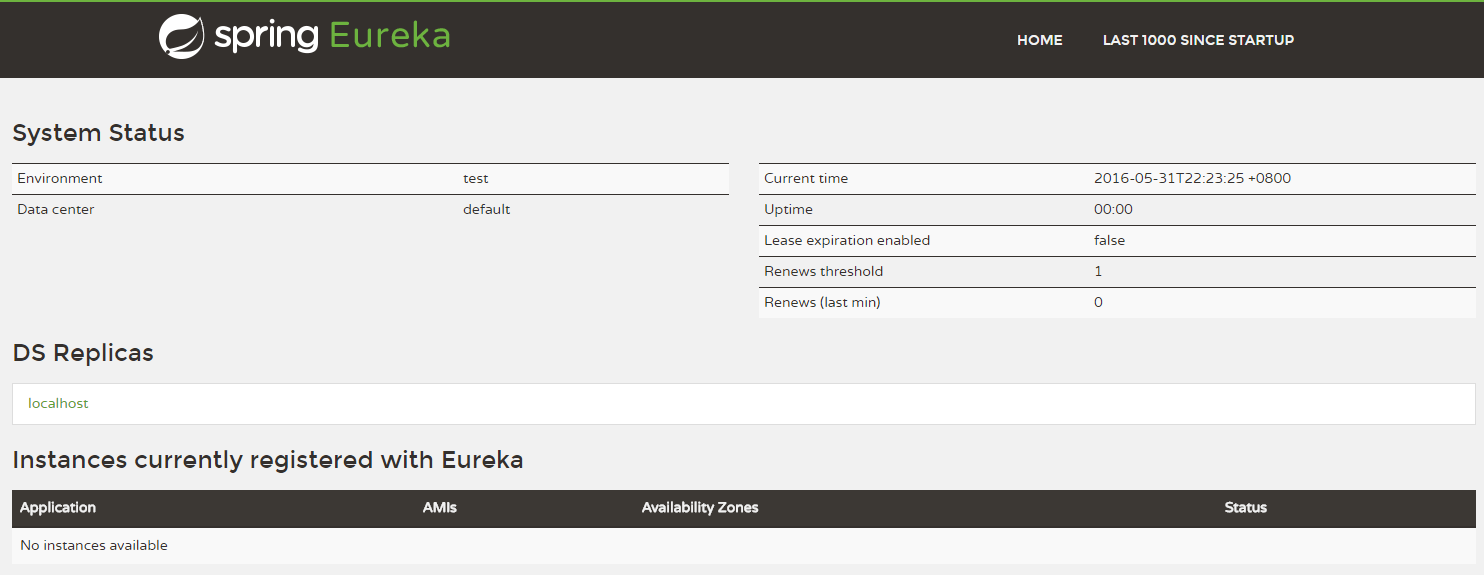
该工程可参见:Chapter9-1-1/eureka-server
创建“服务提供方”
下面我们创建提供服务的客户端,并向服务注册中心注册自己。
假设我们有一个提供计算功能的微服务模块,我们实现一个RESTful API,通过传入两个参数a和b,最后返回a + b的结果。
首先,创建一个基本的Spring Boot应用,在pom.xml中,加入如下配置:
<parent>

<groupId>org.springframework.boot</groupId>

<artifactId>spring-boot-starter-parent</artifactId>

<version>1.3.5.RELEASE</version>

<relativePath/> <!-- lookup parent from repository -->

</parent>

<dependencies>

<dependency>

<groupId>org.springframework.boot</groupId>

<artifactId>spring-boot-starter-test</artifactId>

<scope>test</scope>

</dependency>

<dependency>

<groupId>org.springframework.cloud</groupId>

<artifactId>spring-cloud-starter-eureka</artifactId>

</dependency>

</dependencies>

<dependencyManagement>

<dependencies>

<dependency>

<groupId>org.springframework.cloud</groupId>

<artifactId>spring-cloud-dependencies</artifactId>

<version>Brixton.RELEASE</version>

<type>pom</type>

<scope>import</scope>

</dependency>

</dependencies>

</dependencyManagement>
其次,实现/add请求处理接口,通过DiscoveryClient对象,在日志中打印出服务实例的相关内容。
 1 @RestController

 2 public class ComputeController {

 3

 4 private final Logger logger = Logger.getLogger(getClass());

 5

 6 @Autowired

 7 private DiscoveryClient client;

 8

 9 @RequestMapping(value = "/add" ,method = RequestMethod.GET)

10 public Integer add(@RequestParam Integer a, @RequestParam Integer b) {

11 ServiceInstance instance = client.getLocalServiceInstance();

12 Integer r = a + b;

13 logger.info("/add, host:" + instance.getHost() + ", service_id:" + instance.getServiceId() + ", result:" + r);

14 return r;

15 }

16

17 }
最后在主类中通过加上@EnableDiscoveryClient注解,该注解能激活Eureka中的DiscoveryClient实现,才能实现Controller中对服务信息的输出。
1 @EnableDiscoveryClient

2 @SpringBootApplication

3 public class ComputeServiceApplication {

4

5 public static void main(String[] args) {

6 new SpringApplicationBuilder(ComputeServiceApplication.class).web(true).run(args);

7 }

8

9 }
我们在完成了服务内容的实现之后,再继续对application.properties做一些配置工作,具体如下:
spring.application.name=compute-service

server.port=2222

eureka.client.serviceUrl.defaultZone=http://localhost:1111/eureka/
eureka.client.serviceUrl.defaultZone属性对应服务注册中心的配置内容,指定服务注册中心的位置。通过spring.application.name属性,我们可以指定微服务的名称后续在调用的时候只需要使用该名称就可以进行服务的访问。
为了在本机上测试区分服务提供方和服务注册中心,使用server.port属性设置不同的端口。
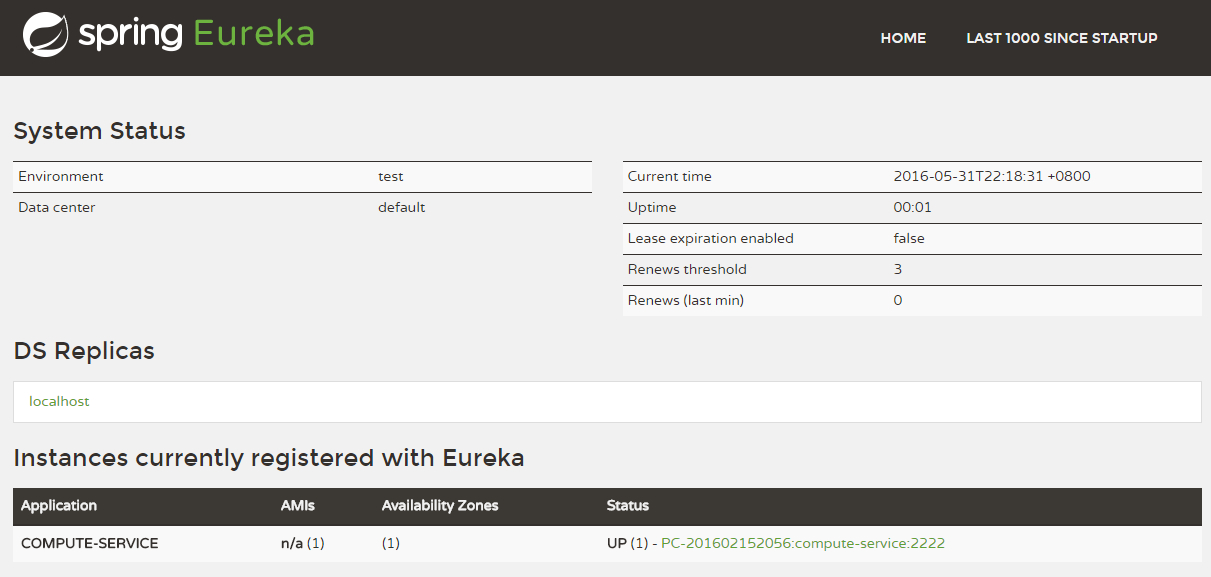
启动该工程后,再次访问:http://localhost:1111/
可以看到,我们定义的服务被注册了。
Spring Cloud构建微服务架构(一)服务注册与发现的更多相关文章
- Spring Cloud构建微服务架构(二)服务消费者
Netflix Ribbon is an Inter Process Communication (IPC) cloud library. Ribbon primarily provides clie ...
- Spring Cloud构建微服务架构:服务网关(路由配置)【Dalston版】
转载:http://blog.didispace.com/spring-cloud-starter-dalston-6-2/ 原创 2017-08-26 翟永超 Spring Cloud 被围观 ...
- Cola Cloud 基于 Spring Boot, Spring Cloud 构建微服务架构企业级开发平台
Cola Cloud 基于 Spring Boot, Spring Cloud 构建微服务架构企业级开发平台: https://gitee.com/leecho/cola-cloud
- Spring Cloud构建微服务架构(五)服务网关
通过之前几篇Spring Cloud中几个核心组件的介绍,我们已经可以构建一个简略的(不够完善)微服务架构了.比如下图所示: 我们使用Spring Cloud Netflix中的Eureka实现了服务 ...
- Spring Cloud构建微服务架构 - 服务网关
通过之前几篇Spring Cloud中几个核心组件的介绍,我们已经可以构建一个简略的(不够完善)微服务架构了.比如下图所示: alt 我们使用Spring Cloud Netflix中的Eureka实 ...
- Spring Cloud构建微服务架构
Dalston版本 由于Brixton和Camden版本的教程已经停止更新,所以笔者计划在2017年上半年完成Dalston版本的教程编写(原计划完成Camden版本教程,但由于写了两篇Dalston ...
- Spring Cloud构建微服务架构(三)消息总线
注:此文不适合0基础学习者直接阅读,请先完整的将作者关于微服务的博文全部阅读一遍,如果还有疑问,可以再来阅读此文,地址:http://blog.csdn.net/sosfnima/article/d ...
- 《Spring Cloud构建微服务架构》系列博文示例
SpringCloud-Learning 源码下载地址:http://download.csdn.net/detail/k21325/9650968 本项目内容为Spring Cloud教 ...
- 第1章 Spring Cloud 构建微服务架构(一)服务注册与发现
一.Spring Cloud 简介 Spring Cloud是一个基于Spring Boot实现的云应用开发工具,它为基于JVM的云应用开发中的配置管理.服务发现.断路器.智能路由.微代理.控制总 ...
随机推荐
- UT源码 005
NextDate函数问题 NextDate函数说明一种复杂的关系,即输入变量之间逻辑关系的复杂性 NextDate函数包含三个变量month.day和year,函数的输出为输入日期后一天的日期. 要求 ...
- FDG内存分配器笔记
FDG: 大规模并行系统中的动态内存分配器由于需要全局同步(记账) ,导致性能急剧下降. 代码解析 1.superblock 类中包含两个变量,两个函数.默认superblock大小为2048 ite ...
- cuda编程学习4——Julia
书上的例子编译会有错误,修改一下行即可. __device__ cuComplex(float a,float b):r(a),i(b){} /* ========================== ...
- smokeping安装部署最佳实践
1.1安装smokeping [root@linux-node2 ~]# cat /etc/redhat-release #查看服务器信息 CentOS release 6. ...
- Tcl与Design Compiler (十一)——其他的时序约束选项(二)
本文如果有错,欢迎留言更正:此外,转载请标明出处 http://www.cnblogs.com/IClearner/ ,作者:IC_learner 前面介绍的设计都不算很复杂,都是使用时钟的默认行为 ...
- MySQL(Navicat)运行.sql文件时报错[Err] 2006 - MySQL server has gone away 的解决方法
在my.ini里加上 max_allowed_packet=16M
- jquery之each遍历list列表
<!DOCTYPE html><html lang="en"><head> <meta charset="UTF-8&qu ...
- Visual Studio 2017无法加载Visual Studio 2015创建的SharePoint解决方案
前几天安装了最新的Visual Studio 2017企业版,发现无法打开之前使用Visual Studio 2015创建的SharePoint 2016解决方案,提示"需要更新" ...
- Hibernate基础学习(二)—Hibernate相关API介绍
一.Hibernate的核心接口 所有的Hibernate应用中都会访问Hibernate的5个核心接口. (1)Configuration接口: 配置Hibernate,启动Hi ...
- 设计模式的征途—2.简单工厂(Simple Factory)模式
工厂模式是最常用的一种创建型模式,通常所说的工厂模式一般是指工厂方法模式.本篇是是工厂方法模式的“小弟”,我们可以将其理解为工厂方法模式的预备知识,它不属于GoF 23种设计模式,但在软件开发中却也应 ...