
Unity3d—做一个年月日选择器(Scroll Rect拖动效果优化)— 无限滚动 + 锁定元素
效果图
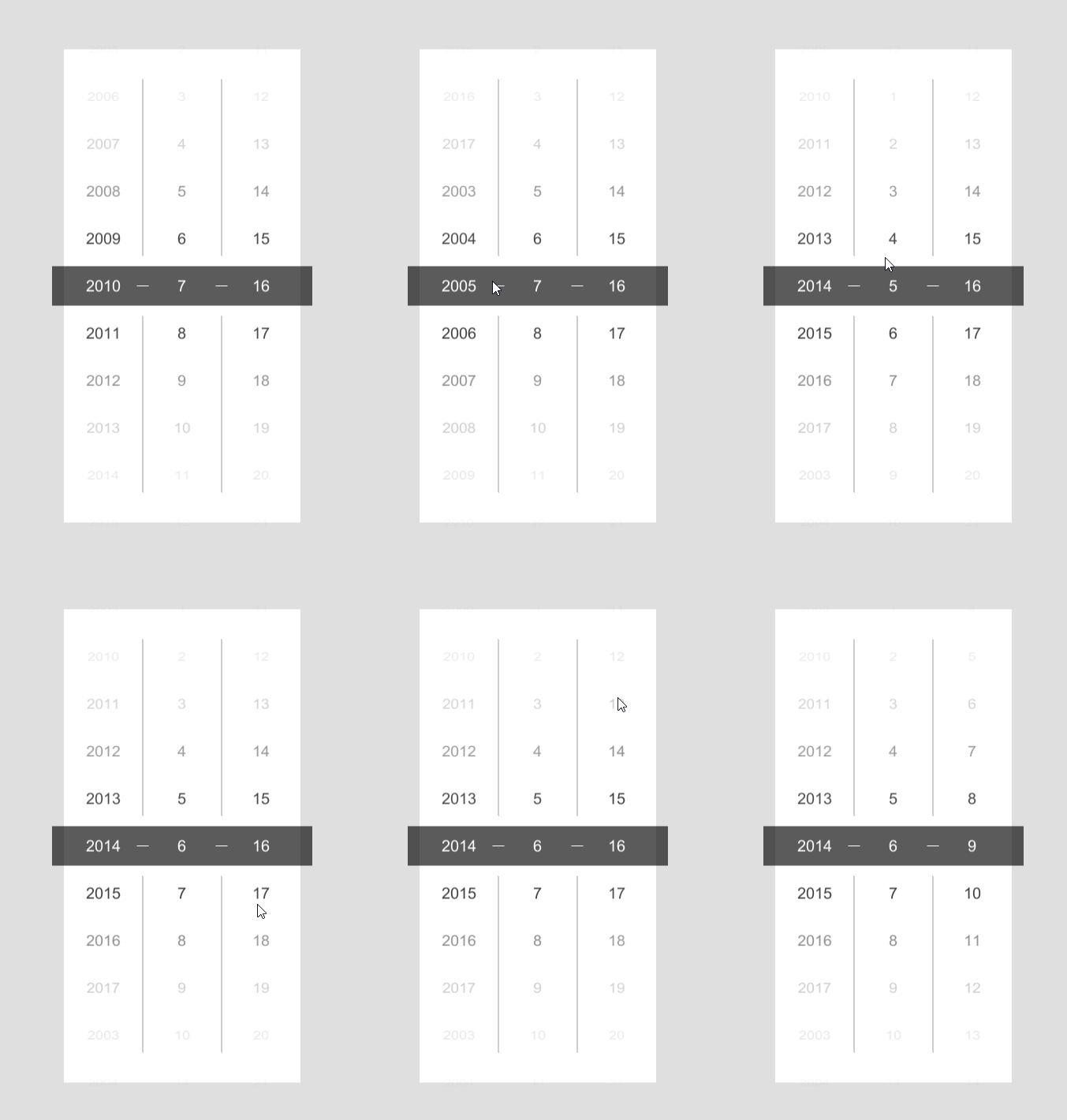
用的是UGUI
我先说思路
通过判断元素的位置信息来改变Hierarchy的顺序 实现无限滚动
改变位置的同时也要不断的调整Content的位置防止乱跳
元素锁定就是直接锁死的元素的移动范围 当只有拖动大于一定程度时才会发生改变
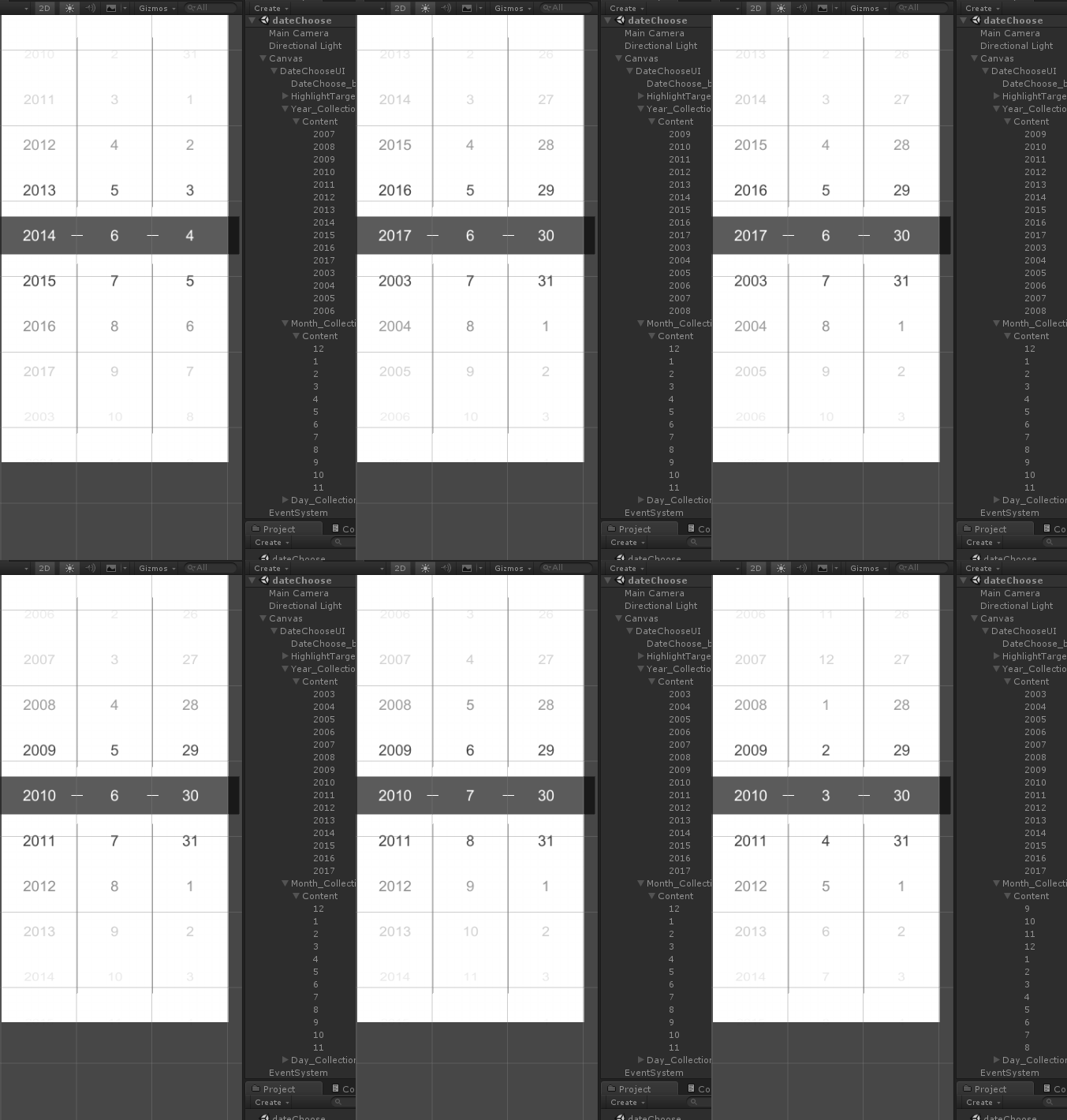
然后是面板设置
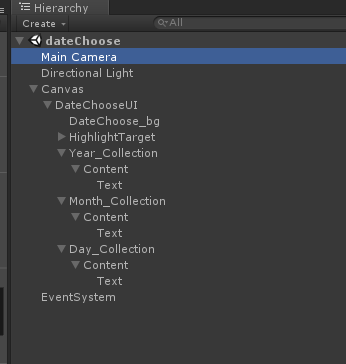
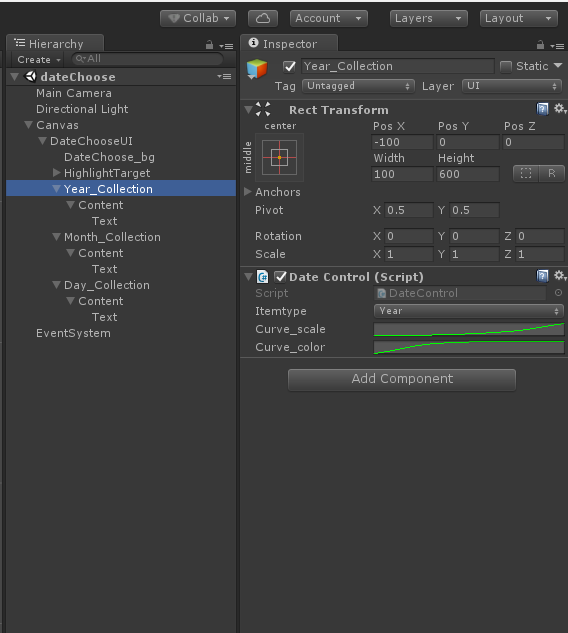
整体结构是这样子的
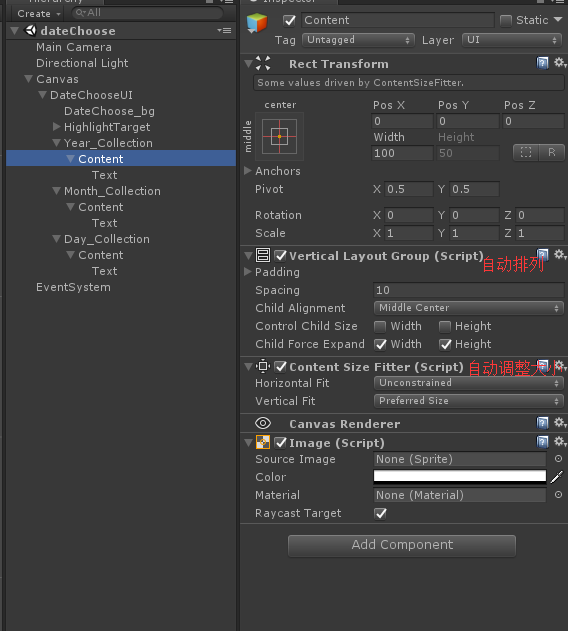
需要注意的是Content需要的两个组件
Content的爸爸只需要一个脚本
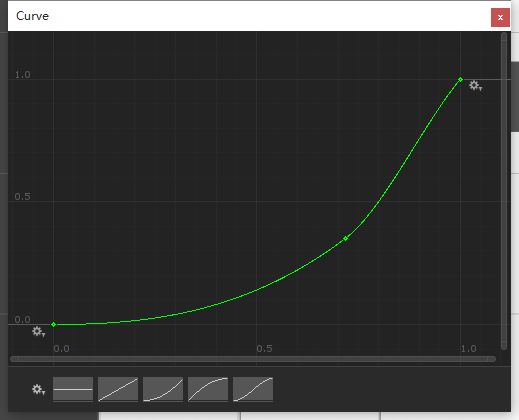
大小改变曲线(大致就行)
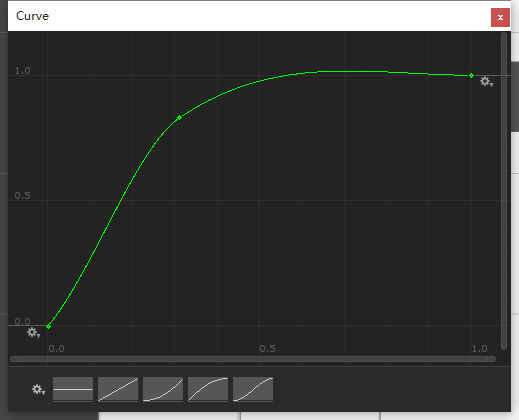
颜色渐变曲线
最后是脚本
 using System;

 using System.Collections;

 using System.Collections.Generic;

 using UnityEngine;

 using UnityEngine.EventSystems;

 using UnityEngine.UI;

 public class DateControl : MonoBehaviour, IBeginDragHandler, IDragHandler, IEndDragHandler {

     public enum ItemType { _year, _month, _day }

     public ItemType _itemtype;

     RectTransform conentRect;

     RectTransform targetRec;

     Vector3 oldDragPos;

     Vector3 newDragPos;

     public AnimationCurve curve_scale;//改变大小曲线

     public AnimationCurve curve_color;//渐变效果曲线

     List<Text> textList = new List<Text>();

     Button testBtn;

     float

         itemHeight,             //子项item的高

         contentParentHeight,    //Content爸爸的高

         itemNum,                //子项数量

         itemHeight_min,         //子项最小发生改变位置

         itemHeight_max,         //子项最大发生改变位置

         conentLimit,            //Conent纠正位置

         conentSpacing;          //子项间隔大小

     float deltaX, deltaY;

     [HideInInspector]

     public static int _year, _month, _day;

     [HideInInspector]

     int dateItemNum;

     Color itemColor_hig = new Color32(, , , );

     void Awake() {

         conentRect = transform.FindChild("Content").GetComponent<RectTransform>();

         targetRec = transform.parent.FindChild("HighlightTarget").GetComponent<RectTransform>();

     }

     void OnEnable() {

         ItemList();

     }

     void Start() {

         switch (_itemtype) {

             case ItemType._year: InstantiateData(, ); break;

             case ItemType._month: InstantiateData(, ); break;

             case ItemType._day: InstantiateData(, ); break;

         }

         itemNum = transform.FindChild("Content").childCount - ;

         contentParentHeight = conentRect.parent.GetComponent<RectTransform>().sizeDelta.y;

         conentSpacing = conentRect.GetComponent<VerticalLayoutGroup>().spacing / ;

         itemHeight = textList[].rectTransform.sizeDelta.y + conentSpacing;

         if (itemNum %  == ) conentLimit = (itemHeight + ) / ;

         else conentLimit = ;

         conentRect.anchoredPosition = new Vector2(conentRect.anchoredPosition.x, conentLimit);

         deltaX = textList[].GetComponent<RectTransform>().sizeDelta.x;

         deltaY = textList[].GetComponent<RectTransform>().sizeDelta.y;

         Invoke("ItemList", 0.05f);

     }

     /// <summary>

     /// 生成子项item

     /// </summary>

     /// <param name="itemNum">子项数量</param>

     /// <param name="dat">子项最大值</param>

     void InstantiateData(int itemNum, int dat) {

         GameObject go;

         Text testObj = conentRect.FindChild("Text").GetComponent<Text>();

         for (int i = dat - itemNum + ; i <= dat; i++) {

             go = Instantiate(testObj.gameObject, conentRect);

             go.GetComponent<Text>().text = i.ToString();

             go.name = i.ToString();

             textList.Add(go.GetComponent<Text>());

             ShowItem(true);

         }

         Destroy(conentRect.FindChild("Text").gameObject);

     }

     /// <summary>

     /// 是增加或减少

     /// </summary>

     /// <param name="isIncreaseOrdecrease"></param>

     void ShowItem(bool isIncreaseOrdecrease) {

         itemHeight_min = -itemHeight;

         if (_itemtype == ItemType._day) itemHeight_max = -itemHeight * itemNum - ;

         else itemHeight_max = -itemHeight * itemNum;

         if (isIncreaseOrdecrease) {

             foreach (Text rectItem in textList) {

                 if (rectItem.GetComponent<RectTransform>().anchoredPosition.y > itemHeight_min) {

                     print("+");

                     rectItem.transform.SetSiblingIndex((int)itemNum);

                 }

             }

             print(itemHeight_min);

         } else {

             foreach (Text rectItem in textList) {

                 if (rectItem.GetComponent<RectTransform>().anchoredPosition.y < itemHeight_max) {

                     print("-");

                     rectItem.transform.SetSiblingIndex();

                 }

             }

             print(itemHeight_max);

         }

     }

     /// <summary>

     /// 渐变效果,改变大小,高亮显示

     /// </summary>

     void ItemList() {

         foreach (Text item in textList) {

             float indexA = Mathf.Abs(item.GetComponent<RectTransform>().position.y - targetRec.position.y);

             float indexSc_scale = Mathf.Abs(curve_scale.Evaluate(indexA / contentParentHeight));

             float indexSc_color = Mathf.Abs(curve_color.Evaluate(indexA / contentParentHeight));

             if (indexA < ) {

                 item.color = itemColor_hig;

                 switch (_itemtype) {

                     case ItemType._year: _year = int.Parse(item.text); break;

                     case ItemType._month: _month = int.Parse(item.text); break;

                     case ItemType._day: _day = int.Parse(item.text); break;

                 }

             } else item.color = new Color(, , ,  - indexSc_color);

             item.GetComponent<RectTransform>().localScale = new Vector3( - indexSc_scale,  - indexSc_scale * ,  - indexSc_scale);

             //item.GetComponent<RectTransform>().sizeDelta = new Vector2(deltaX - (deltaX * indexSc), deltaY - (deltaY * indexSc));

         }

     }

     /// <summary>

     /// 获取int类型日期,并转换为指定格式

     /// </summary>

     /// <returns></returns>

     public static string GetDateInfo() { return _year + "-" + _month + "-" + _day; }

     /// <summary>

     /// 纠正Conent位置

     /// </summary>

     void UpdateEx() {

         if (conentRect.anchoredPosition.y > conentLimit) {

             ShowItem(true);

             conentRect.anchoredPosition = new Vector2(conentRect.anchoredPosition.x, conentRect.anchoredPosition.y - itemHeight);

         }

         if (conentRect.anchoredPosition.y < conentLimit) {

             ShowItem(false);

             conentRect.anchoredPosition = new Vector2(conentRect.anchoredPosition.x, conentRect.anchoredPosition.y + itemHeight);

         }

     }

     /// <summary>

     /// 获取拖拽信息并改变Conent位置

     /// </summary>

     /// <param name="eventData"></param>

     void SetDraggedPosition(PointerEventData eventData) {

         if (RectTransformUtility.ScreenPointToWorldPointInRectangle(conentRect, eventData.position, eventData.pressEventCamera, out newDragPos)) {

             newDragPos = eventData.position;

             if (Mathf.Abs(newDragPos.y - oldDragPos.y) >= itemHeight) {

                 if (newDragPos.y > oldDragPos.y) {

                     conentRect.anchoredPosition = new Vector2(conentRect.anchoredPosition.x, conentRect.anchoredPosition.y + itemHeight);

                     oldDragPos += new Vector3(, itemHeight, );

                     ItemList();

                 } else {

                     conentRect.anchoredPosition = new Vector2(conentRect.anchoredPosition.x, conentRect.anchoredPosition.y - itemHeight);

                     oldDragPos -= new Vector3(, itemHeight, );

                     ItemList();

                 }

             }

         }

     }

     /// <summary>

     /// 当开始拖拽

     /// </summary>

     /// <param name="eventData"></param>

     public void OnBeginDrag(PointerEventData eventData) {

         oldDragPos = eventData.position;

     }

     public void OnDrag(PointerEventData eventData) {

         SetDraggedPosition(eventData);

         UpdateEx();

     }

     public void OnEndDrag(PointerEventData eventData) {

         SetDraggedPosition(eventData);

         UpdateEx();

     }

 }
照着来的话基本没什么问题
因为赶时间所以很多地方写的简单粗暴请谅解
如果调整元素大小或者间隙大小 需要改变itemHeight_min 和 itemHeight_max 的值
他们分别为
itemHeight_min
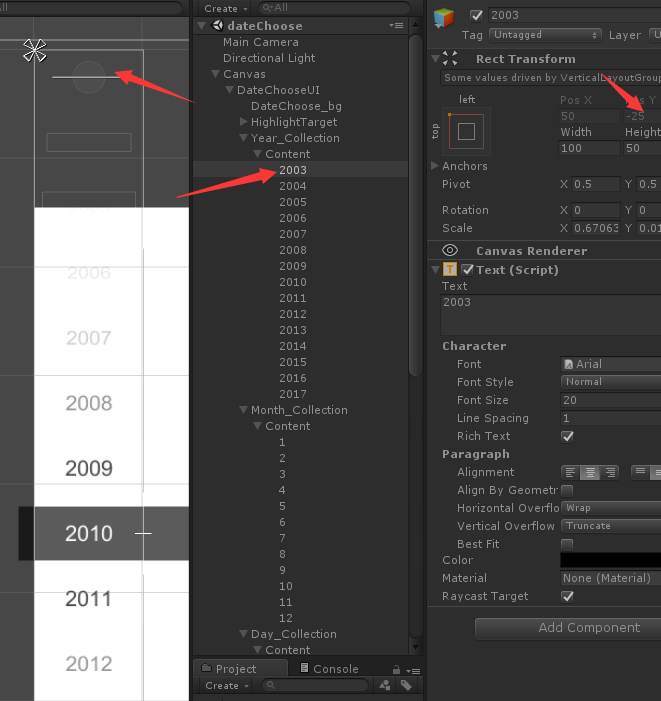
itemHeight_max
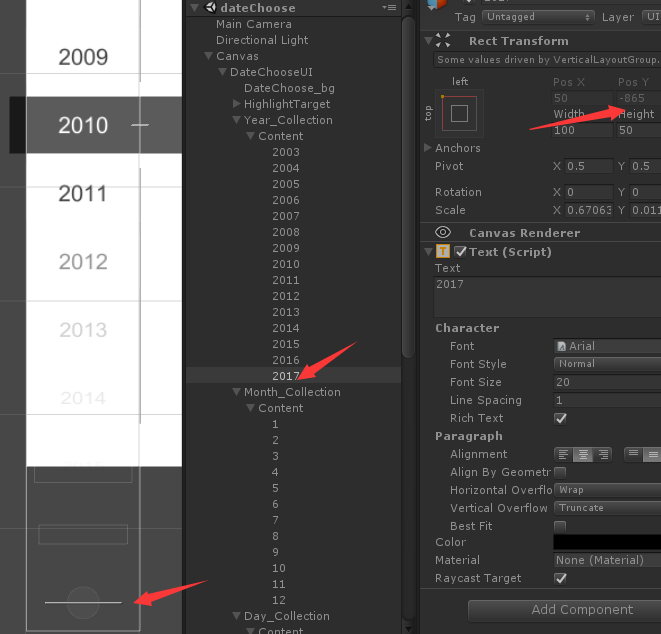
也就是元素的最顶层和最底层的Y值
以上就是年月日选择器的具体步骤
Unity3d—做一个年月日选择器(Scroll Rect拖动效果优化)— 无限滚动 + 锁定元素的更多相关文章
- 用Django做一个省份选择器
做一个省份选择器 使用django做后端, mysql数据库, jQuery 列出结构主要的文件, 其它配置比较简单 models.py 因为所有数据的结构基本一致, 把所有省份, 市和区全部存储一张 ...
- 关于longPressGesture做一个长按连加的效果(原创)
关于longPressGesture做一个长按连加的效果 解释一下什么意思呢?就是一个button长按之后其数字的一直累加.朋友们可能看起来很简单,无非就是加一个长按手势(longPressGestu ...
- WPF 自己做一个颜色选择器
程序开发过程中,经常会遇到需要支持动态配置主题颜色的问题,通常,一个程序会有多种不同的颜色风格主题供选 有时候,更细致一些的地方,会需要支持自己配置颜色,这样我们就需要一个颜色选择器啦,下面是我自己开 ...
- 做一个360度看车的效果玩玩(web)
前几天在 Lexus 官网看到有这样的一个效果:http://www.lexus.com.cn/models/es/360 于是顺手打开控制台看了下他们是怎么做的,发现使用的技术还是比较简单的,通过背 ...
- css3加js做一个简单的3D行星运转效果
前几天在园子里看到一篇关于CSS3D行星运转的文章,原文在这里,感觉这个效果也太酷炫了,于是自己也就心血来潮的来尝试的做了一下.因为懒得去用什么插件了,于是就原生的JS写,效果有点粗超,还有一些地方处 ...
- 做一个阅读管理APP
背景 由于最近在看的书有点多,所以一直想找一个能够管理阅读进度的书(鄙人记性不是很好,两天不看就忘了)可惜Android平台上一直找不到合适的APP: 有没有读书进度管理的网站或软件啊? 有没有记录读 ...
- Infinite Scroll - jQuery & WP 无限滚动插件
无限滚动(Infinite Scroll)也称为自动分页.滚动分页和无限分页.常用在图片.文章或其它列表形式的网页中,用来在滚动网页的时候自动加载下一页的内容.Infinite Scroll 这款 ...
- 用Jquery做一个时间日期选择器
今天我们就用Jquery做一个时间日期选择器,当打开网页时,文本框里面显示的是当前的日期,点击文本框可以出现年.月.日的下拉菜单,并且可以选择,会根据年份的选择判断是否是闰年,从而改变二月的天数,闰年 ...
- 【跟我一起学Unity3D】做一个2D的90坦克大战之AI系统
对于AI,我的初始想法非常easy,首先他要能动,而且是在地图里面动. 懂得撞墙后转弯,然后懂得射击,其它的没有了,基于这个想法,我首先创建了一个MyTank类,用于管理玩家的坦克的活动,然后创建AI ...
随机推荐
- 探讨.NET Core数据加密和解密问题
前言 一直困扰着我关于数据加密这一块,24号晚上用了接近3个小时去完成一项任务,本以为立马能解决,但是为了保证数据的安全性,我们开始去对数据进行加密,然后接下来3个小时专门去研究加密这一块,然而用着用 ...
- IDEA第二章----配置git、tomcat(热部署)、database,让你的项目跑起来
第一节:下载git客户端,整合idea 由于博主公司用的git版本管理,所以本系列都是基于git版本工具的,当然SVN与git配置类似.git同样支持安装版和解压版,支持各种操作系统,我这里下载的是W ...
- javaWeb项目(SSH框架+AJAX+百度地图API+Oracle数据库+MyEclipse+Tomcat)之一 基础Struts框架搭建篇
即将开始着手写这个项目,所以希望通过这篇博客来记录自己学习的过程 今天开学第一天,就上了软件工程实践课,自己也开始着手做这个大作业了.首先我的项目名称叫做智能班车管理系统. 项目的概况: 该软件产品是 ...
- mysql查询今天、昨天、7天、近30天、本月、上一月 数据
今天 select * from 表名 where to_days(时间字段名) = to_days(now()); 昨天 SELECT * FROM 表名 WHERE TO_DAYS( NOW( ) ...
- 基于Activiti的流程应用开发平台JSAAS-WF V5.3
第1章 产品概述及体系架构 1.1.概述 红迅JSAAS-WF工作流平台V5是广州红迅软件有限公司面向合作伙伴以及有IT运维团队中大型企业提供新一代的流程管理产品,它基于流行的JAVA开源技术上构建, ...
- 蓝桥杯-分小组-java
/* (程序头部注释开始) * 程序的版权和版本声明部分 * Copyright (c) 2016, 广州科技贸易职业学院信息工程系学生 * All rights reserved. * 文件名称: ...
- 学好php可以做的事情真多!
学好php能做什么?其实学好php能做的事情很多! 一. 学好php可以就业 1:大中小公司通吃. 现在几乎所有有前途的公司都会在互联网上安家.只要在网上安家,就需要找这些方面的技术人员,而且很多公司 ...
- 让Cocos2dx中的TestCPP中的Box2dTest运行起来
一般而言,如果你导入TestCPP到VS2012中去后,会编译十几分钟才会出现窗口界面,这是包含Cocos2dx所有功能的一个demo,功能非常齐全强大,里面有两个关于Box2d的测试案例,一个是Bo ...
- jQuery选择器的优点
jQuery选择器的优点 相信小伙伴们对选择器并不陌生,从css1到css3的选择器有很多,但是JQuery都能完美的支持,而且API操作起来也特别方便好用,在很大程度上精简了代码,节约了很多性能.那 ...
- [刷题]算法竞赛入门经典 3-12/UVa11809
书上具体所有题目:http://pan.baidu.com/s/1hssH0KO 题目:算法竞赛入门经典 3-4/UVa11809:Floating-Point Numbers 代码: //UVa11 ...