
FSM Code Generator
FSM Code Generator is a script code generator for Finite State Machine,
it has a viaual designer based on Animator Controller that helps you design an FSM.
First of all, I assume you know about what the Animator Controller is, if not, nvm. we just use it
as the tools of visual designer.(About Animator Controller : https://docs.unity3d.com/Manual/class-AnimatorController.html)
The Animator Controller is a state machine for play animation, it can make state transition, animation blending, avator mask, ect...
what we need for FSM designer is the transition.
Double click the Example Animator Controller in folder [Assets/FSM Code Generator/Example/Assets] you can see GameState and PlayerState examples,
and scenes to test them. see below

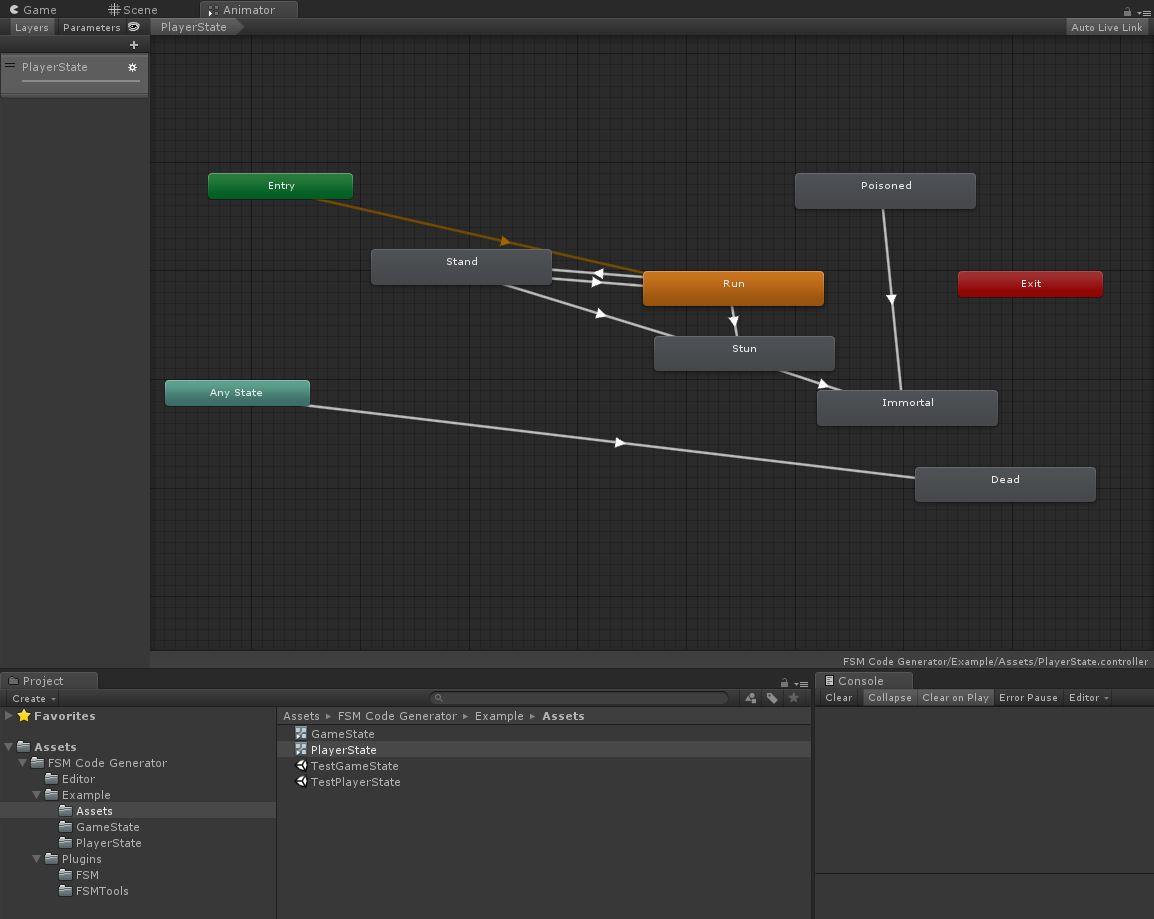
(GameState) (PlayerState)
these are 2 kinds of FSM situation that we most using,
GameState is a single state machine like gearbox of a car, it only runs a state in a time,
PlayerState is a multi state machine in common, player can have run/poisioned states at the same time, and can not have run/dead at the same time, right?
and if you noticed the transition lines linking states, you will guess what is it means? is it the same as Animator Controller means transferable?
No, the Transition link is not means transferable, it means conflict/mutex states
See PlayerState Animator Controller, [Stand] <--> [Run] is bin-linked, it means these two states are single state that only one can run in a time, if you add Run state, Stand state will be ended, if you add Stand state, Run state will be ended,
and [Run] --> [Stun], [Stand] --> [Stun] are single-linked, it means they are conflicted, if Run state exists then add Stun state, the Run state should be ended automatically, and if Stun state exists then add Run state will be FAILED, right? it make sense.
So how can this happaned? FSM Code Generator will generate priority for all states, the bottom-right states are higher priority than the top-left states,
so the Stun state will eliminate lower conflicted states such as Run or Stand states(single-linked, direction is no means, ignor it), but the Run or Stand states can not added if Stun state exists.
And please notice the bin-linked states are have diferent priority but equals to eachother logically, the exists state will be ended while add new state which bin-linked.
And you can see the special transition lines from [Entry] and [Any State], the transition from [Entry] is default, we don't use it, just leave it alone.
The [Any State] meas all other states linking to target just like Dead state in PlayerState, it is conflict to all states, it is syntax sugar :)
and you can see GameState's all states has transition from [Any State], logically they are all bin-linked states, so GameState is a gear box.
These above are all about the logic of FSM Code Generator and some Usage scenarios of state machine, Finally we will generate this FSM to code
let's see how to make it:
1. Open Editor panel on menu bar [Tools/FSM Code Generator]
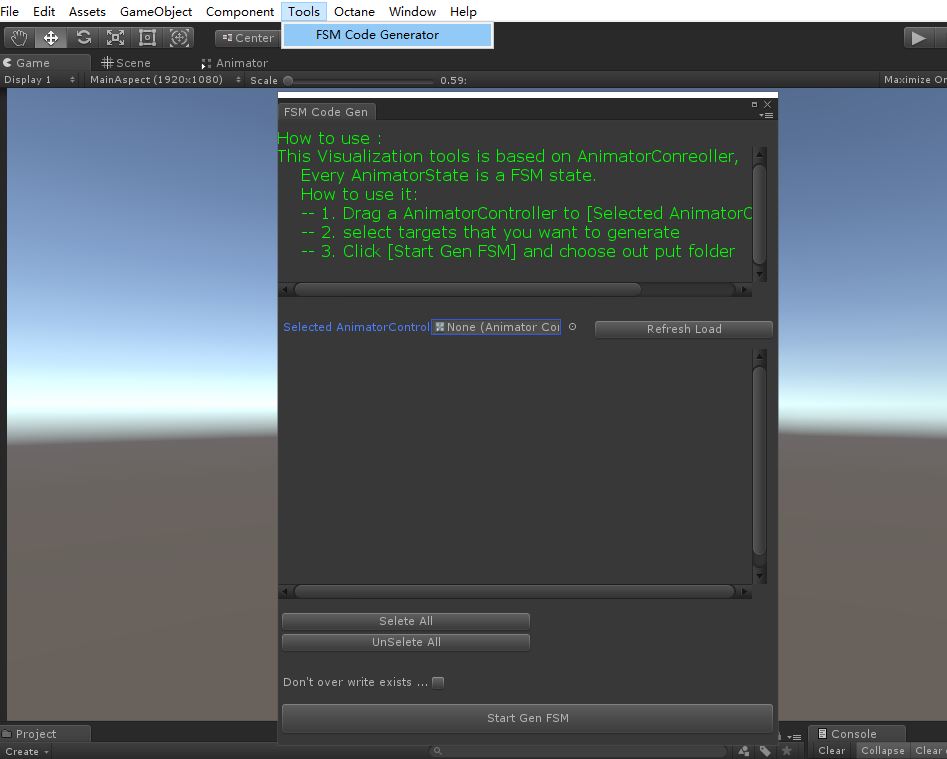
(FSM Code Generator Window)
2. Drag a Animator Controller to Selected AnimatorController field, like this
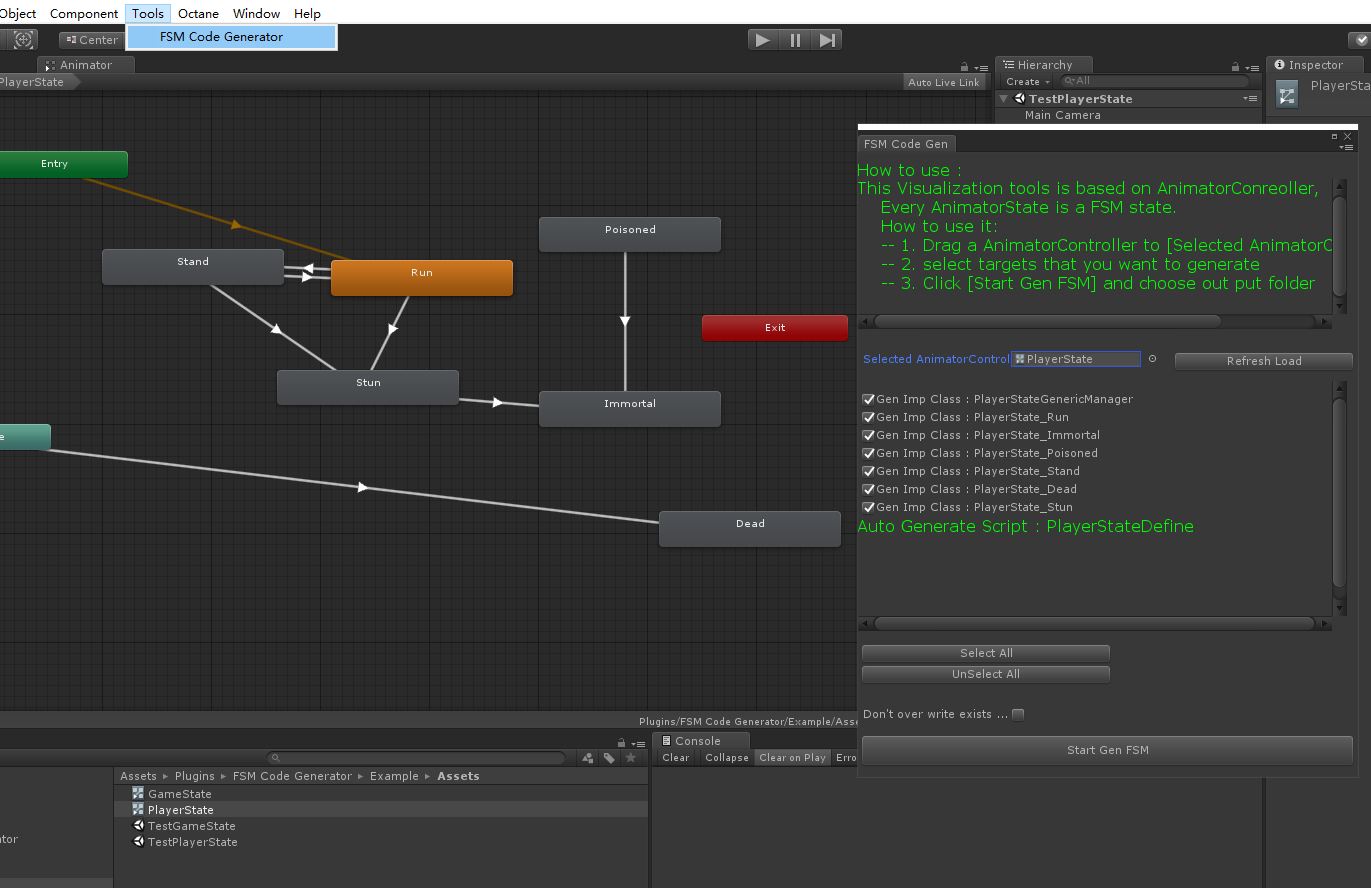
PlayerState was selected, the script file generate list is showing in the Editor Window, every state will generate a file named PlayerState_{StateName}.cs,
and generate state enum to PlayerStateDefine.cs file, And what's more a PlayerStateGenericManager.cs will be created, this is the state machine runtime manager, we will talk about it later.
you can choose which one to generate by check box, [Select All] [UnSelect All] button is used for it.(I found mistype of these words, I'll fix it later, don't worry)
[Don't over write exists...]check box is don't generate if file exists, whatever.
3. [Start Gen FSM] button is to start generate scripts. PlayerState and GameState were generated to [Assets/FSM Code Generator/Example/GameState] and [Assets/FSM Code Generator/Example/PlayerState] already.
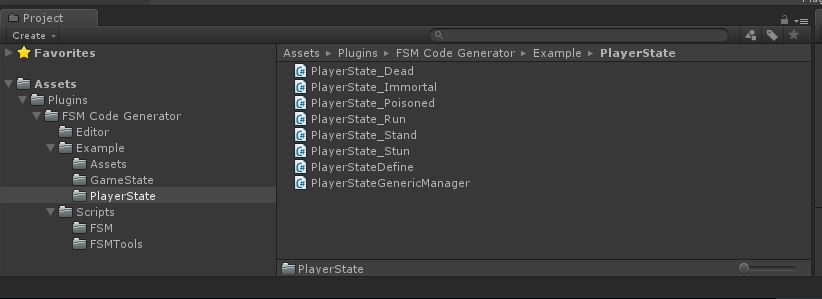
PlayerState generated codes, we can see files in PlayerState folder,
The PlayerStateDefine is state enum and mutex map defines, I'll talk about it later.
The PlayerState_{StateName} files is the state script, with life cycle impement
The PlayerStateGenericManager is controlling the states
You can open the example scene to see how the state machine runs, let's open the TestPlayerState scene at [Assets/FSM Code Generator/Example/Assets/TestPlayerState]
and run the scene:

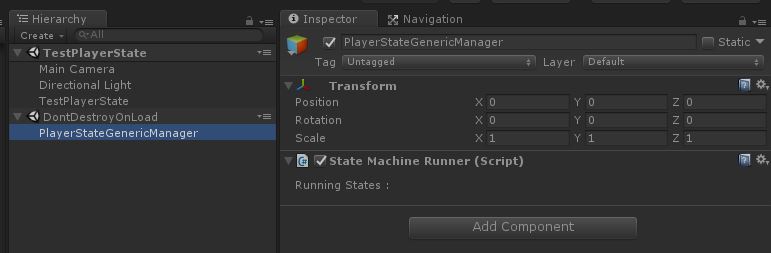
Screen shows all states of PlayerState, click them to see console output
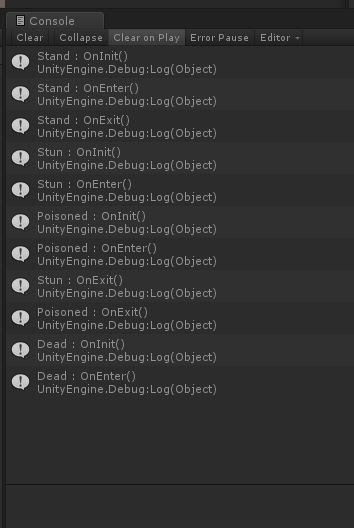
Check the logic is run according your design or not !
you can open TestPlayerState.cs file to see how to create PlayerStateGenericManager and how to create any state instance,
here is a quick veiw for run a state machine(PlayerState) :
 var playerStateManager = FSMCodeGenerator.FSM.PlayerStateFSM.PlayerStateGenericManager.Create();

            playerStateManager.AddState(FSMCodeGenerator.FSM.PlayerStateFSM.Stand.Create());

            playerStateManager.AddState(FSMCodeGenerator.FSM.PlayerStateFSM.Run.Create());

            playerStateManager.AddState(FSMCodeGenerator.FSM.PlayerStateFSM.Dead.Create());
They all have Factory to create instance, we do recommand to use it.
The generated code review(PlayerState) :
1. PlayerStateDefine.cs : is the enum of PlayerState, and muetxMap, state conflict logic and priority implement is based on it
using UnityEngine;

using System;

using System.Collections;

using System.Collections.Generic;

using FSMCodeGenerator.FSM;

namespace FSMCodeGenerator.FSM

{

    public sealed partial class PlayerStateFSM

    {

        public enum  PlayerStateEnum

        {

            Stand = ,

            Run = ,

            Stun = ,

            Poisoned = ,

            Immortal = ,

            Dead =

        }

        [UnityEngine.Scripting.Preserve]

        public static GenericStateTransitionMap<PlayerStateEnum> mutexMap =

              new GenericStateTransitionMap<PlayerStateEnum>(null,

                    (_mutexMap) =>

                    {

                        _mutexMap.Clear();

                        // mutex setting

                        _mutexMap[PlayerStateEnum.Run] = new HashSet<PlayerStateEnum>()

                        {

                            PlayerStateEnum.Dead,

                            PlayerStateEnum.Stand,

                            PlayerStateEnum.Stun,

                        };

                        _mutexMap[PlayerStateEnum.Immortal] = new HashSet<PlayerStateEnum>()

                        {

                            PlayerStateEnum.Dead,

                        };

                        _mutexMap[PlayerStateEnum.Poisoned] = new HashSet<PlayerStateEnum>()

                        {

                            PlayerStateEnum.Dead,

                            PlayerStateEnum.Immortal,

                        };

                        _mutexMap[PlayerStateEnum.Stand] = new HashSet<PlayerStateEnum>()

                        {

                            PlayerStateEnum.Dead,

                            PlayerStateEnum.Stun,

                            PlayerStateEnum.Run,

                        };

                        _mutexMap[PlayerStateEnum.Dead] = new HashSet<PlayerStateEnum>()

                        {

                            PlayerStateEnum.Dead,

                        };

                        _mutexMap[PlayerStateEnum.Stun] = new HashSet<PlayerStateEnum>()

                        {

                            PlayerStateEnum.Dead,

                            PlayerStateEnum.Immortal,

                        };

                    });

    }

}
2. PlayerState_{StateName}.cs : State Script with life cycle. below is Run State, if you don't care about the base class(Common.FSM.FSMState<T> which is a Generic State Machine),
you should just write your code in life cycle.
2.1 OnInit(object param) is first called if a state was added to GenericManager(here is PlayerStateGenericManager), and you can pass any object to it
2.2 OnEnter() is called after OnInit, and you can do test if this state can enter or not, if return false, GenericManager will end it
2.3 OnUpdate(float deltaTime) if state enter successed, this will be call every frame, if return false, GenericManager will end it
2.4 OnExit() if state will be ended, this will be called
using UnityEngine;

using System;

using System.Collections;

using System.Collections.Generic;

using FSMCodeGenerator.FSM;

namespace FSMCodeGenerator.FSM

{

    public sealed partial class PlayerStateFSM

    {

        public class Run : FSMCodeGenerator.FSM.FSMState<PlayerStateEnum>

        {

            public FSMCodeGenerator.FSM.GenericManager<PlayerStateEnum> fsmManager { get; private set; }

            // ctor

            public Run() { }

            // Factory

            [UnityEngine.Scripting.Preserve]

            public static Run Create(FSMCodeGenerator.FSM.GenericManager<PlayerStateEnum> mamager = null)

            {

                var comp = Create<Run>(PlayerStateEnum.Run);

                comp.fsmManager = mamager;

                return comp;

            }

            protected override void OnInit(object param)

            {

                Debug.Log(this.GetType().Name + " : OnInit()");

            }

            protected override bool OnEnter()

            {

                Debug.Log(this.GetType().Name + " : OnEnter()");

                return true;

            }

            protected override void OnExit()

            {

                Debug.Log(this.GetType().Name + " : OnExit()");

            }

            protected override bool OnUpdate(float deltaTime)

            {

                return true;

            }

        }

    }

}
3. PlayerStateGenericManager.cs : This is the manager for running all added states, control the life cycles, and tick states every frame
using UnityEngine;

using System;

using System.Collections;

using System.Collections.Generic;

using FSMCodeGenerator.FSM;

namespace FSMCodeGenerator.FSM

{

    public sealed partial class PlayerStateFSM

    {

        public class PlayerStateGenericManager : FSMCodeGenerator.FSM.GenericManager<PlayerStateEnum>

        {

            protected FSMCodeGenerator.Common.StateMachineRunner runner;

            // ctor

            public PlayerStateGenericManager() { }

            [UnityEngine.Scripting.Preserve]

            public static PlayerStateGenericManager Create()

            {

                var manager = Create<PlayerStateGenericManager>();

                manager.runner = (new GameObject()).AddComponent<FSMCodeGenerator.Common.StateMachineRunner>();

                manager.runner.Run(manager);

                return manager;

            }

        }

    }

}
Base class API : used for control the states, the quick veiw example shows how a state machine to add a state, these are other APIs.
public bool AddState(FSMState<ID> state, object param = null);

public bool AddState(ID id, System.Func<FSMState<ID>> stateCreator, object param = null);

public bool ContainsState(ID id);

public bool ContainsState(FSMState<ID> tagState);

public T GetState<T>(bool fromTail = false) where T : FSMState<ID>;

public List<T> GetAllStates<T>() where T : FSMState<ID>;

public void EndState(ID id, bool fromTail = false);

public void EndState(FSMState<ID> tagState, bool fromTail = false);

public void EndStates(ICollection<ID> endStateIDs, bool fromTail = false);

public void EndStates(ICollection<FSMState<ID>> endStates, bool fromTail = false);

public void EndStates(System.Func<FSMState<ID>, bool> predicate, bool fromTail = false);

public void EndAllStates(bool fromTail = false);
The AddState was used above in the quick view example. what you need to use are almost included.
1. AddState(...) is try to add a new state to state manager.
2. ContainsState(...) is to check a state was added.
3. EndState(...), EndStates(...), EndAllStates(...) is to end a state or states with predicate.
You can check the example script to see how's it works
Assets/Plugins/FSM Code Generator/Example/TestGameState.cs
Assets/Plugins/FSM Code Generator/Example/TestPlayerState.cs
These are all the FSM Code Generator do for you, visual FSM design based on Animator Controller, auto generate C# script,
very few API you should know, only to write code in life cycle, no other requirements. Enjoy it.
FSM Code Generator的更多相关文章
- ABP配套代码生成器(ABP Code Generator)帮助文档,实现快速开发
ABP代码生成器介绍 针对abp这个框架做了一个代码生成器,功能强大.分为两大功能点,一个是数据层,一个是视图层. 数据服务层:通过它,可以实现表设计.领域层初始化.多语言.automapper自动注 ...
- OData Client Code Generator
转发. [Tutorial & Sample] How to use OData Client Code Generator to generate client-side proxy cla ...
- Android项目实战(十九):Android Studio 优秀插件: Parcelable Code Generator
Android Studio 优秀插件系列: Android Studio 优秀插件(一):GsonFormat Android Studio 优秀插件(二): Parcelable Code Gen ...
- JAVA 调用Axis2 code generator 生成的webservice
以下代码为调用 JAVA 调用Axis2 code generator 生成的webservice的代码. package test; import java.rmi.RemoteException; ...
- DNN - Modules - QR Code Generator
Dotnetnuke 平台上的二维码模块.支持DNN 7.x平台的安装 QR码(快速响应码)是二维条形码.随着移动设备市场正以快速的步伐,QR码正在成为非常重要的营销工具.与移动电话或平板电脑的扫描, ...
- there was an error running the selected code generator unable to retrieve metadata for
there was an error running the selected code generator unable to retrieve metadata for PROBLEM: I ha ...
- Android开发的插件Code Generator与LayoutCreator的安装与使用,提升你的开发效率
前言 大家好,给大家带来Android开发的插件Code Generator与LayoutCreator的安装与使用,提升你的开发效率的概述,希望你们喜欢 学习目标 掌握两个插件的安装和使用,能够实现 ...
- 安卓自动生成代码插件-Android code Generator(转)
编辑推荐:稀土掘金,这是一个针对技术开发者的一个应用,你可以在掘金上获取最新最优质的技术干货,不仅仅是Android知识.前端.后端以至于产品和设计都有涉猎,想成为全栈工程师的朋友不要错过! 介绍 A ...
- 【2017年9月10日更新】ABP配套代码生成器(ABP Code Generator)帮助文档,实现快速开发
ABP代码生成器介绍 ABP Code Generator 针对abp这个框架做了一个代码生成器,功能强大.分为两大功能点,一个是数据层,一个是视图层. 数据服务层:通过它,可以实现表设计.领域层初始 ...
随机推荐
- cisco ASA ios升级或恢复
cisco ASA ios升级或恢复 一.升级前准备工作 1.准备好所要升级的IOS文件及对应的ASDM文件 2.在一台电脑上架设好tftp,设置好目录,与防火墙进行连接(假设电脑IP为192.168 ...
- GridBagLayout布局管理器应用详解
http://www.cnblogs.com/kungfupanda/p/7220217.html GridBagLayout布局管理器应用详解 很多情况下,我们已经不需要通过编写代码来实现一个应用程 ...
- 安装和配置Apache服务器(上)
首先,安装软件分安装版和压缩版,压缩版也就是我们现在所说的绿色安装包.安装板和压缩版的区别就是,安装板在安装的时候就已经自动给你配置好环境,压缩版安装之后还要自己配置环境.自己配置环境也是有好处的,知 ...
- oc 的 协变性与逆变性
?协变性与逆变性是类型关系在范畴论的定义.是类型的继承关系在高阶类型中的定义? __kindof只是在统一继承体系下方便了类型转化,提供了使用时语法上的便捷:但是对于类型转换是否正确不做判定: kin ...
- linux 的常用命令---------第七阶段
LVM 逻辑卷管理器 -----其作用为 :在线扩容 卷组 vG (也叫LVM卷组) ------------------→ 在此卷组vG上建立 : 逻辑卷组 LV ( ...
- 2018.4.26 Mac安装Redis5.0.3版本服务器
Mac安装Redis服务器 安装 1.到官网下载 选择稳定版本 打开官网:https://redis.io/ 2.下载完成后,打开命令行工具,执行解压命令 tar zxvf redis-5.0.3.t ...
- MetaMask/eth-block-tracker
https://github.com/MetaMask/eth-block-tracker A JS module for keeping track of the latest Ethereum b ...
- spring引入properties变量报错
通过properties配置文件配置数据源,代码如下: <bean class="org.springframework.beans.factory.config.PropertyPl ...
- oracle偏爱hostname
记住: 只要是在使用oracle他家的产品,比如oracle database , weblogic :或者诸如此类,等等,等等,随便别的什么东西 首先要查改: /etc/hosts 127.0.0. ...
- vector使用小结
1.创建vector容器: std::vector<int> data; std::vector<int> data(20);大小20,自动赋值为0 std::vector&l ...