
[Unity插件]Lua行为树(五):装饰节点Repeater
Repeater:重复执行子节点,直到一定次数
特点如下:
1.执行次数可以是无限循环,也可以是固定次数
2.一般来说,子节点的执行返回状态不会影响Repeater节点,但可以设置当子节点返回失败时,结束执行Repeater节点
Repeater的继承关系如下:
Repeater->Decorator->ParentTask->Task
因为继承装饰节点,所以其子节点只能有一个
Repeater.cs
 namespace BehaviorDesigner.Runtime.Tasks

 {

     [TaskDescription(@"The repeater task will repeat execution of its child task until the child task has been run a specified number of times. " +

                       "It has the option of continuing to execute the child task even if the child task returns a failure.")]

     [HelpURL("http://www.opsive.com/assets/BehaviorDesigner/documentation.php?id=37")]

     [TaskIcon("{SkinColor}RepeaterIcon.png")]

     public class Repeater : Decorator

     {

         [Tooltip("The number of times to repeat the execution of its child task")]

         public SharedInt count = ;

         [Tooltip("Allows the repeater to repeat forever")]

         public SharedBool repeatForever;

         [Tooltip("Should the task return if the child task returns a failure")]

         public SharedBool endOnFailure;

         // The number of times the child task has been run.

         private int executionCount = ;

         // The status of the child after it has finished running.

         private TaskStatus executionStatus = TaskStatus.Inactive;

         public override bool CanExecute()

         {

             // Continue executing until we've reached the count or the child task returned failure and we should stop on a failure.

             return (repeatForever.Value || executionCount < count.Value) && (!endOnFailure.Value || (endOnFailure.Value && executionStatus != TaskStatus.Failure));

         }

         public override void OnChildExecuted(TaskStatus childStatus)

         {

             // The child task has finished execution. Increase the execution count and update the execution status.

             executionCount++;

             executionStatus = childStatus;

         }

         public override void OnEnd()

         {

             // Reset the variables back to their starting values.

             executionCount = ;

             executionStatus = TaskStatus.Inactive;

         }

         public override void OnReset()

         {

             // Reset the public properties back to their original values.

             count = ;

             endOnFailure = true;

         }

     }

 }
BTDecorator.lua
 BTDecorator = BTParentTask:New();

 local this = BTDecorator;

 function this:New()

     local o = {};

     setmetatable(o, self);

     self.__index = self;

     return o;

 end

 function this:GetChild()

     if (self:GetChildCount() ~= ) then

         return nil;

     end

     return self.childTasks[];

 end
BTRepeater.lua
 BTRepeater = BTDecorator:New();

 local this = BTRepeater;

 function this:New(count, endOnFailure)

     local o = {};

     setmetatable(o, self);

     self.__index = self;

     o.executionStatus = BTTaskStatus.Inactive;

     o.count = count or -;                       --执行次数,-1为循环执行

     o.endOnFailure = endOnFailure or false;      --子节点返回Failure时,是否结束

     o.executionCount = ;                        --当前执行次数

     return o;

 end

 function this:OnUpdate()

     if (not self.currentChildTask) then

         self.currentChildTask = self:GetChild();

         if (not self.currentChildTask) then

             return BTTaskStatus.Failure;

         end

     end

     local canExecute = false;

     if (((self.count == -) or (self.executionCount < self.count)) and

         ((not self.endOnFailure) or (self.endOnFailure and self.executionStatus ~= BTTaskStatus.Failure))) then

         canExecute = true;

     end

     if (canExecute) then

         self.executionStatus = self.currentChildTask:OnUpdate();

         self.executionCount = self.executionCount + ;

     end

     if (self.endOnFailure and self.executionStatus == BTTaskStatus.Failure) then

         self:Reset();

         return BTTaskStatus.Success;

     elseif (self.executionCount == self.count) then

         self:Reset();

         return BTTaskStatus.Success;

     else

         return BTTaskStatus.Running;

     end

 end

 function this:Reset()

     self.executionStatus = BTTaskStatus.Inactive;

     self.executionCount = ;

     BTParentTask.Reset(self);

 end
测试:
 TestBehaviorTree = BTBehaviorTree:New();

 local this = TestBehaviorTree;

 function this:New()

     local o = {};

     setmetatable(o, self);

     self.__index = self;

     this:Init();

     return o;

 end

 function this:Init()

     --1.一定的执行次数

     local repeater = BTRepeater:New();

     local log = BTLog:New("This is a BTRepeater test");

     repeater:AddChild(log);

     --2.循环执行

     --[[local repeater = BTRepeater:New();

     local log = BTLog:New("This is a BTRepeater test");

     repeater:AddChild(log);--]]

     --3.endOnFailure false

     --[[local repeater = BTRepeater:New(3);

     local sequence = BTSequence:New();

     local log = BTLog:New("First Child");

     local isNullOrEmpty = BTIsNullOrEmpty:New("123");

     local log2 = BTLog:New("This is a empty string");

     sequence:AddChild(log);

     sequence:AddChild(isNullOrEmpty);

     sequence:AddChild(log2);

     repeater:AddChild(sequence);--]]

     --4.endOnFailure true

     --[[local repeater = BTRepeater:New(3, true);

     local sequence = BTSequence:New();

     local log = BTLog:New("First Child");

     local isNullOrEmpty = BTIsNullOrEmpty:New("123");

     local log2 = BTLog:New("This is a empty string");

     sequence:AddChild(log);

     sequence:AddChild(isNullOrEmpty);

     sequence:AddChild(log2);

     repeater:AddChild(sequence);--]]

     this:PushTask(repeater);

 end
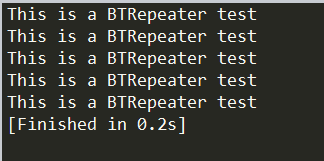
第一个输出:
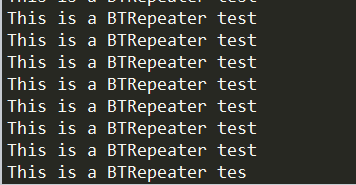
第二个输出(循环执行):
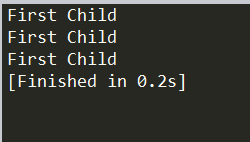
第三个输出:
第四个输出:

[Unity插件]Lua行为树(五):装饰节点Repeater的更多相关文章
- [Unity插件]Lua行为树(十三):装饰节点完善
之前介绍了组合节点中三大常用的节点:BTSequence.BTSelector和BTParallel,一般来说,这三种就够用了,可以满足很多的需求. 接下来可以完善一下装饰节点,增加几种新的节点. 1 ...
- [Unity插件]Lua行为树(七):行为树嵌套
在上一篇的基础上,可以测试下行为树的嵌套,所谓的行为树嵌套,就是在一棵行为树下的某一个分支,接入另一棵行为树. 以下面这棵行为树为例: TestBehaviorTree2.lua TestBehavi ...
- [Unity插件]Lua行为树(六):打印树结构
经过前面的文章,已经把行为树中的四种基本类型节点介绍了下.接下来可以整理一下,打印一下整棵行为树.注意点如下: 1.可以把BTBehaviorTree也当作一种节点,这样就可以方便地进行行为树嵌套了 ...
- [Unity插件]Lua行为树(二):树结构
参考链接:https://blog.csdn.net/u012740992/article/details/79366251 在行为树中,有四种最基本的节点,其继承结构如下: Action->T ...
- [Unity插件]Lua行为树(四):条件节点和行为节点
条件节点和行为节点,这两种节点本身的设计比较简单,项目中编写行为树节点一般就是扩展这两种节点,而Decorator和Composite节点只需要使用内置的就足够了. 它们的继承关系如下: Condit ...
- [Unity插件]Lua行为树(三):组合节点Sequence
Sequence的继承关系如下: Sequence->Composite->ParentTask->Task 上一篇已经实现了简单版本的ParentTask和Task(基于Behav ...
- [Unity插件]Lua行为树(十一):组合节点Parallel
Parallel节点类似Sequence节点,不同在于Parallel会每帧执行所有的节点.当所有节点返回成功时返回成功,当其中一个节点返回失败时,返回失败并且结束所有的子节点运行. 例如说,给Seq ...
- [Unity插件]Lua行为树(十):通用行为和通用条件节点
在行为树中,需要扩展的主要是行为节点和条件节点.一般来说,每当要创建一个节点时,就要新建一个节点文件.而对于一些简单的行为节点和条件节点,为了去掉新建文件的过程,可以写一个通用版本的行为节点和条件节点 ...
- [Unity插件]Lua行为树(九):条件节点调整
先看一下之前的条件节点是怎么设计的: BTConditional.lua BTConditional = BTTask:New(); local this = BTConditional; this. ...
随机推荐
- windows10中git-bash闪退的解决办法
windows10中git-bash闪退的解决办法 出现错误详情 Windows10 64位专业版安装git .18之后出现 Git闪退,报错信息:bash: /dev/null: No such d ...
- position 分层固定在屏幕某位置
很多网站我们看到在屏幕右下角有一个,返回顶部,始终在那儿,还有些网站顶部菜单栏永远也是固定的不动,就是通过今天学习的position来做的. 在style中加入 positon:fixed;top 0 ...
- Azure 认知服务 (3) 计算机视觉API - 分析图像,使用C#代码
<Windows Azure Platform 系列文章目录> 在上一节中Azure 认知服务 (2) 计算机视觉API - 分析图像,笔者介绍了如何使用API测试控制台进行调试. 本章将 ...
- Intellij Idea编译项目下的.java文件时的编码问题
Intellij Idea编译项目下的.java文件时的编码问题 原创 2015年07月22日 21:45:14 10510 由<编译.java文件时的编码问题>可知,在编译.java文件 ...
- [蓝桥杯]ALGO-124.算法训练_数字三角形
问题描述 (图3.1-1)示出了一个数字三角形. 请编一个程序计算从顶至底的某处的一条路 径,使该路径所经过的数字的总和最大. ●每一步可沿左斜线向下或右斜线向下走: ●<三角形行数≤: ●三角 ...
- nump库的简单函数介绍
1:ones函数(百度知道) ones()函数用以创建指定形状和类型的数组,默认情况下返回的类型是float64.但是,如果使用ones()函数时指定了数据类型,那么返回的就是该类型. 参考NumPy ...
- Oracle随机排序函数和行数字段
随机排序函数dbms_random.value()用法:select * from tablename order by dbms_random.value() 行数字段rownum用法:select ...
- hashMap为啥初始化容量为2的次幂
原文 https://blog.csdn.net/sd_csdn_scy/article/details/57083619hashMap源码获取元素的位置: static int indexFor(i ...
- centos7 搭建DHCP服务器
一.DHCP简单讲解 DHCP就是动态主机配置协议(Dynamic Host Configuration Protocol)是一种基于UDP协议且仅限用于局域网的网络协议,它的目的就是为了减轻TCP/ ...
- CentOS 7安装Oracle 11gR2以及设置自启动(1)
一.环境准备 1.正确无误的CentOS 7系统环境 虚拟机要求: 内存至少2G 处理器至少2个 根分区要大于20G(安装oracle很占空间,空闲空间要足够) 2.正确的JDK环境 CentOS 7 ...