
wpf 水波进度条 用户控件
之前看公司web前端做了个 圆形的水波纹 进度条,就想用wpf 做一个,奈何自己太菜 一直做不出来,在看过 “普通的地球人” 的 “
WPF实现三星手机充电界面 博客之后 我也来照葫芦画个瓢。
废话不多说 先贴一下效果图
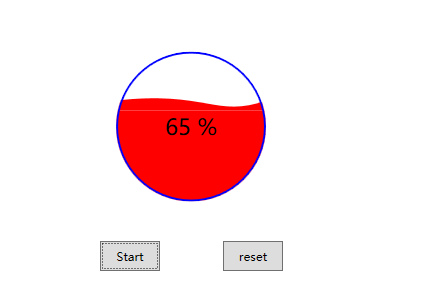
虽然样子 low 了些 但是基本满足我的需求了,下面是代码
前端
<UserControl x:Class="WaveProgress.UserControl.WaveProgressControl"

             xmlns="http://schemas.microsoft.com/winfx/2006/xaml/presentation"

             xmlns:x="http://schemas.microsoft.com/winfx/2006/xaml"

             xmlns:mc="http://schemas.openxmlformats.org/markup-compatibility/2006"

             xmlns:d="http://schemas.microsoft.com/expression/blend/2008"

             xmlns:local="clr-namespace:WaveProgress.UserControl"

             mc:Ignorable="d"

             Height="150" Width="150" x:Name="wave_control">

    <UserControl.Resources>

        <Storyboard x:Key="WaterStoryboard">

            <PointAnimation Storyboard.TargetName="bs_Water" DesiredFrameRate="20" Storyboard.TargetProperty="Point1" From="90,60" To="90,90" Duration="00:00:2" AutoReverse="True" RepeatBehavior="Forever"></PointAnimation>

            <PointAnimation Storyboard.TargetName="bs_Water" DesiredFrameRate="20" Storyboard.TargetProperty="Point2" From="100,110" To="100,95" Duration="00:00:1.8" AutoReverse="True" RepeatBehavior="Forever"></PointAnimation>

        </Storyboard>

    </UserControl.Resources>

    <Grid Width="{Binding ElementName=wave_control,Path=Width}" Height="{Binding ElementName=wave_control,Path=Height}"

          Background="{Binding WaveProgressBackground,Mode=TwoWay,UpdateSourceTrigger=PropertyChanged}">

        <Grid.Clip>

            <EllipseGeometry Center="75,75" RadiusX="75" RadiusY="75" ></EllipseGeometry>

        </Grid.Clip>

        <StackPanel Width="150" VerticalAlignment="Bottom">

            <Path Fill="{Binding WavePorgressBarColor,Mode=TwoWay,UpdateSourceTrigger=PropertyChanged}" >

                <Path.Data>

                    <PathGeometry FillRule="EvenOdd" >

                        <PathFigure StartPoint="0,90" >

                            <BezierSegment x:Name="bs_Water" Point1="90,60" Point2="100,110" Point3="150,90"></BezierSegment>

                            <PolyLineSegment Points="150,100 0,100"></PolyLineSegment>

                        </PathFigure>

                    </PathGeometry>

                </Path.Data>

                <Path.Triggers>

                    <EventTrigger RoutedEvent="Path.Loaded">

                        <BeginStoryboard Storyboard="{StaticResource WaterStoryboard}"></BeginStoryboard>

                    </EventTrigger>

                </Path.Triggers>

            </Path>

            <Rectangle Height="{Binding WaveProgressHeight,UpdateSourceTrigger=PropertyChanged}" Fill="{Binding WavePorgressBarColor,Mode=TwoWay,UpdateSourceTrigger=PropertyChanged}"/>

        </StackPanel>

        <Ellipse VerticalAlignment="Bottom" Width="150" Height="150" Stroke="{Binding WaveBorderBrush,Mode=TwoWay,UpdateSourceTrigger=PropertyChanged}" Fill="Transparent"

                 StrokeThickness="{Binding WaveBorderThickness,Mode=TwoWay,UpdateSourceTrigger=PropertyChanged}"/>

        <TextBlock VerticalAlignment="Center" HorizontalAlignment="Center" FontSize="22" Foreground="{Binding TextColor,Mode=TwoWay,UpdateSourceTrigger=PropertyChanged}">

            <Run Text="{Binding DisPlayValue,UpdateSourceTrigger=PropertyChanged}"></Run>

            <Run Text="%"></Run>

        </TextBlock>

    </Grid>

</UserControl>
后台
using System.Globalization;

using System.Windows;

using System.Windows.Media;

namespace WaveProgress.UserControl

{

    /// <summary>

    /// WaveProgressControl.xaml 的交互逻辑

    /// </summary>

    public partial class WaveProgressControl : System.Windows.Controls.UserControl

    {

        public WaveProgressControl()

        {

            InitializeComponent();

            this.DataContext = this;

        }

        public static readonly DependencyProperty WaveProgressBackgroundProperty = DependencyProperty.Register(

            "WaveProgressBackground", typeof(SolidColorBrush), typeof(WaveProgressControl), new PropertyMetadata(Brushes.White));

        /// <summary>

        /// 进度条背景色

        /// </summary>

        public SolidColorBrush WaveProgressBackground

        {

            get { return (SolidColorBrush) GetValue(WaveProgressBackgroundProperty); }

            set { SetValue(WaveProgressBackgroundProperty, value); }

        }

        public static readonly DependencyProperty WaveBorderBrushProperty = DependencyProperty.Register(

            "WaveBorderBrush", typeof(SolidColorBrush), typeof(WaveProgressControl), new PropertyMetadata(Brushes.Blue));

        /// <summary>

        /// 边框颜色

        /// </summary>

        public SolidColorBrush WaveBorderBrush

        {

            get { return (SolidColorBrush) GetValue(WaveBorderBrushProperty); }

            set { SetValue(WaveBorderBrushProperty, value); }

        }

        public static readonly DependencyProperty WaveBorderThicknessProperty = DependencyProperty.Register(

            "WaveBorderThickness", typeof(double), typeof(WaveProgressControl), new PropertyMetadata(2.0));

        /// <summary>

        /// 边框粗细

        /// </summary>

        public double WaveBorderThickness

        {

            get { return (double) GetValue(WaveBorderThicknessProperty); }

            set { SetValue(WaveBorderThicknessProperty, value); }

        }

        public static readonly DependencyProperty WavePorgressBarColorProperty = DependencyProperty.Register(

            "WavePorgressBarColor", typeof(SolidColorBrush), typeof(WaveProgressControl), new PropertyMetadata(Brushes.Red));

        /// <summary>

        /// 进度条颜色

        /// </summary>

        public SolidColorBrush WavePorgressBarColor

        {

            get { return (SolidColorBrush) GetValue(WavePorgressBarColorProperty); }

            set { SetValue(WavePorgressBarColorProperty, value); }

        }

        public static readonly DependencyProperty TextColorProperty = DependencyProperty.Register(

            "TextColor", typeof(SolidColorBrush), typeof(WaveProgressControl), new PropertyMetadata(Brushes.Black));

        /// <summary>

        /// 文字颜色

        /// </summary>

        public SolidColorBrush TextColor

        {

            get { return (SolidColorBrush) GetValue(TextColorProperty); }

            set { SetValue(TextColorProperty, value); }

        }

        public static readonly DependencyProperty ValueProperty = DependencyProperty.Register(

            "Value", typeof(double), typeof(WaveProgressControl), new PropertyMetadata(default(double)));

        /// <summary>

        /// 当前进度

        /// </summary>

        public double Value

        {

            get { return (double) GetValue(ValueProperty); }

            set { SetValue(ValueProperty, value); }

        }

        public static readonly DependencyProperty MaxValueProperty = DependencyProperty.Register(

            "MaxValue", typeof(double), typeof(WaveProgressControl), new PropertyMetadata(default(double)));

        public double MaxValue

        {

            get { return (double) GetValue(MaxValueProperty); }

            set { SetValue(MaxValueProperty, value); }

        }

        public static readonly DependencyProperty DisPlayValueProperty = DependencyProperty.Register(

            "DisPlayValue", typeof(string), typeof(WaveProgressControl), new PropertyMetadata(""));

        public string DisPlayValue

        {

            get { return (string) GetValue(DisPlayValueProperty); }

            set { SetValue(DisPlayValueProperty, value); }

        }

        public static readonly DependencyProperty WaveProgressHeightProperty = DependencyProperty.Register(

            "WaveProgressHeight", typeof(double), typeof(WaveProgressControl), new PropertyMetadata(default(double)));

        /// <summary>

        /// 次属性不要手动设置

        /// </summary>

        public double WaveProgressHeight

        {

            get { return (double) GetValue(WaveProgressHeightProperty); }

            set { SetValue(WaveProgressHeightProperty, value); }

        }

        protected override void OnPropertyChanged(DependencyPropertyChangedEventArgs e)

        {

            base.OnPropertyChanged(e);

            if (e.Property == ValueProperty)

            {

                double bl = Value / MaxValue;

                WaveProgressHeight =  * bl;

                DisPlayValue = (bl * ).ToString(CultureInfo.InvariantCulture);

            }

        }

    }

}
美中不足的是:
1、大小是我写死了的,因为里面那个水波是用path 写的 是个固定的
2、仔细看 中间有条白色的线(等有时间在解决吧)
学习到的知识:
1、学会用贝塞尔曲线,和它的动画
2、学会了Clip剪裁
3、看大佬的文章果然受益匪浅
附:解决有一条白线的问题
将水波纹进度条的 边线设置为0,代码为:
<Path SnapsToDevicePixels="True"

                  Fill="{Binding WavePorgressBarColor,Mode=TwoWay,UpdateSourceTrigger=PropertyChanged}"

                  Stroke="{Binding WavePorgressBarColor,Mode=TwoWay,UpdateSourceTrigger=PropertyChanged}"

                  StrokeThickness="0">

                <Path.Data>

                    <PathGeometry FillRule="EvenOdd" >

                        <PathFigure StartPoint="0,90" >

                            <BezierSegment x:Name="bs_Water" Point1="90,60" Point2="100,110" Point3="150,90"></BezierSegment>

                            <PolyLineSegment Points="150,100 0,100"></PolyLineSegment>

                        </PathFigure>

                    </PathGeometry>

                </Path.Data>

                <Path.Triggers>

                    <EventTrigger RoutedEvent="Path.Loaded">

                        <BeginStoryboard Storyboard="{StaticResource WaterStoryboard}"></BeginStoryboard>

                    </EventTrigger>

                </Path.Triggers>

            </Path>

            <Rectangle SnapsToDevicePixels="True" Height="{Binding WaveProgressHeight,UpdateSourceTrigger=PropertyChanged}" Fill="{Binding WavePorgressBarColor,Mode=TwoWay,UpdateSourceTrigger=PropertyChanged}"/>
将此代码直接覆盖 原有代码即可(StackPanel 中的那两个控件)
附源码:https://github.com/t115liyanpeng/WaveProgress
wpf 水波进度条 用户控件的更多相关文章
- .NET CORE(C#) WPF 方便的实现用户控件切换(祝大家新年快乐)
微信公众号:Dotnet9,网站:Dotnet9,问题或建议:请网站留言, 如果对您有所帮助:欢迎赞赏. .NET CORE(C#) WPF 方便的实现用户控件切换(祝大家新年快乐) 快到2020年了 ...
- 在wpf窗体上添加用户控件
1.引用用户控件的命名控件 xmlns:my="clr-namespace:WpfApplicationDemo.Control" 2.把用户控件添加到窗体中 <my:Use ...
- wpf研究之道-ProgressBar(进度条)控件
ProgressBar控件,非常有用.它在什么情况下有用呢?如何使用?带着这两个问题,我们探讨下. 如果程序需要很长时间来运行,用户在不知道的情况下,以为程序已经"卡死"了,没有响 ...
- JS实现 进度条 不用控件
demo1 <html> <head> <title>进度条</title> <style type="text/css"&g ...
- WPF MVVM 用户控件完成分页
项目中经常会有分页查询的情况,在WPF中我们可以通过用户控件完成分页 一下为分页控件的页面代码, <UserControl x:Class="Foundation.UCtrl.Next ...
- 浅尝辄止WPF自定义用户控件(实现颜色调制器)
主要利用用户控件实现一个自定义的颜色调制控件,实现一个小小的功能,具体实现界面如下. 首先自己新建一个wpf的用户控件类,我就放在我的wpf项目的一个文件夹下面,因为是一个很小的东西,所以就没有用mv ...
- 【WPF学习】第六十四章 构建基本的用户控件
创建一个简单用户控件是开始自定义控件的好方法.本章主要介绍创建一个基本的颜色拾取器.接下来分析如何将这个控件分解成功能更强大的基于模板的控件. 创建基本的颜色拾取器很容易.然而,创建自定义颜色拾取器仍 ...
- WPF自定义控件(五)の用户控件(完结)
用户控件,WPF中是继承自UserControl的控件,我们可以在里面融合我们的业务逻辑. 示例:(一个厌恶选择的用户控件) 后端: using iMicClassBase; using iMicCl ...
- WPF 用户控件嵌入网页
WPF使用用户控件嵌入网页,直接使用WebBrowser或Frame会产生报错,报错信息如下: 1.使用WebBrowser,<WebBrowser Source="http://19 ...
随机推荐
- Vue学习笔记:基础
Vue实例 每个 Vue 应用都是通过用 Vue 函数创建一个新的 Vue 实例开始的 插值 数据绑定最常见的形式就是使用“Mustache”语法(双大括号)的文本插值 指令 指令的定义:Direct ...
- canvas 实现太阳系效果
一:创建画布 <canvas width="1000" height="1000" id="solar" style="ba ...
- 2019.01.17 bzoj1854: [Scoi2010]游戏(二分图匹配)
传送门 二分图匹配菜题. 题意:nnn个二元组(xi,yi)(x_i,y_i)(xi,yi),每个二元组可以选一个数总共nnn个数aia_iai,问将aia_iai排好序之后从111开始最多可 ...
- 2018.12.15 bzoj3676: [Apio2014]回文串(后缀自动机)
传送门 对原串建立一个后缀自动机,然后用反串在上面匹配. 如果当前匹配的区间[l,r][l,r][l,r]包裹了当前状态的endposendposendpos中的最大值,那么[l,maxpos][l, ...
- 2018.06.27Firing(最大权闭合子图)
Firing Time Limit: 5000MS Memory Limit: 131072K Total Submissions: 11558 Accepted: 3494 Description ...
- Codeforces Round #541 (Div. 2) E 字符串 + 思维 + 猜性质
https://codeforces.com/contest/1131/problem/D 题意 给你n个字符串,字符串长度总和加起来不会超过1e5,定义字符串相乘为\(s*s1=s1+s[0]+s1 ...
- matlab 向量场线积分
syms t x y z F x=cos(t); y=sin(t); z=*sin(t)^-; F=[x^*y , (/)*x^,x*y ] ; %场函数 V=[diff(x,t),diff(y,t) ...
- java学习1ATM
package atm_1; import java.awt.SystemTray;import java.nio.charset.CharsetEncoder;import java.util.Sc ...
- SGU 271 Book Pile (双端队列)
题意:n,m,k,表示有一个长度为 n 的序列,有 m 个操作,操作有 2 种,第一种是 ADD 在前面添加一个串,第二种是把前 k 个进行翻转,问你最后的序列是什么样的. 析:很明显,如果直接模拟, ...
- mac环境下配置nginx
1.建议使用homebrew安装(ruby安装 brew install ruby) ruby -e "$(curl -fsSL https://raw.githubusercont ...