
centos7安装gitlab并汉化
一、基础环境准备
1.安装依赖包
 [root@gitlab-server ~]#yum install curl policycoreutils openssh-server openssh-clients postfix wget git patch -y

[root@gitlab-server ~]# systemctl start postfix
2.配置yum源(由于网络问题,国内用户,建议使用清华大学的镜像源进行安装)
[root@gitlab-server ~]# wget -O /etc/yum.repos.d/CentOS-Base.repo http://mirrors.aliyun.com/repo/Centos-7.repo

[root@gitlab-server ~]# wget -P /etc/yum.repos.d/ http://mirrors.aliyun.com/repo/epel-7.repo

[root@gitlab-server ~]#vim /etc/yum.repos.d/gitlab-ce.repo

[gitlab-ce]

name=gitlab-ce

baseurl=https://mirrors.tuna.tsinghua.edu.cn/gitlab-ce/yum/el7/

repo_gpgcheck=

gpgcheck=

enabled=

gpgkey=https://packages.gitlab.com/gpg.key

[root@gitlab-server ~]# yum clean all  && yum makecache
二、获取gitlab及汉化包
[root@gitlab-server ~]# wget https://mirrors.tuna.tsinghua.edu.cn/gitlab-ce/yum/el7/gitlab-ce-10.6.4-ce.0.el7.x86_64.rpm   #直接下载rpm包,因为测试发现无论是国外还是国内源速度都很感人

[root@gitlab-server ~]# git clone https://gitlab.com/xhang/gitlab.git -b v10.6.4-zh   #下载汉化包,汉化包和gitlab对应,如果是最新的,则不需要指定版本
三、安装gitlab
[root@gitlab-server ~]# yum localinstall gitlab-ce-10.6.-ce..el7.x86_64.rpm -y

[root@gitlab-server ~]# vim /etc/gitlab/gitlab.rb

 external_url 'http://192.168.0.104'  #修改为本机IP或者域名,重要

[root@gitlab-server ~]# gitlab-ctl reconfigure #配置并启动gitlab-ce

[root@gitlab-server ~]# gitlab-ctl status

[root@gitlab-server ~]# netstat -tnlp #查看端口,特别是80和8080,避免被其他程序占用
打开Web界面,首先需要配置管理员密码,密码不少于8位

修改完成后,刷新页面出现登录和注册的页面,使用root用户和密码登录(生产环境应当关闭页面的注册功能)

登录后,语言为英文,不习惯可以使用汉化包进行汉化

四、安装汉化包
[root@gitlab-server ~]# gitlab-ctl stop #停止服务,否则会出错

[root@gitlab-server ~]# cd /root/gitlab

[root@gitlab-server gitlab]# git diff v10.6.4 v10.6.4-zh > ../10.6.-zh.diff #比较汉化标签和原标签,导出 patch 用的 diff 文件到/root下

[root@gitlab-server gitlab]# cd

[root@gitlab-server ~]# patch -d /opt/gitlab/embedded/service/gitlab-rails -p1 < 10.6.-zh.diff  #将10.6.4-zh.diff作为补丁更新到gitlab中

[root@gitlab-server ~]# gitlab-ctl reconfigure #重新配置gitlab

[root@gitlab-server ~]# gitlab-ctl start
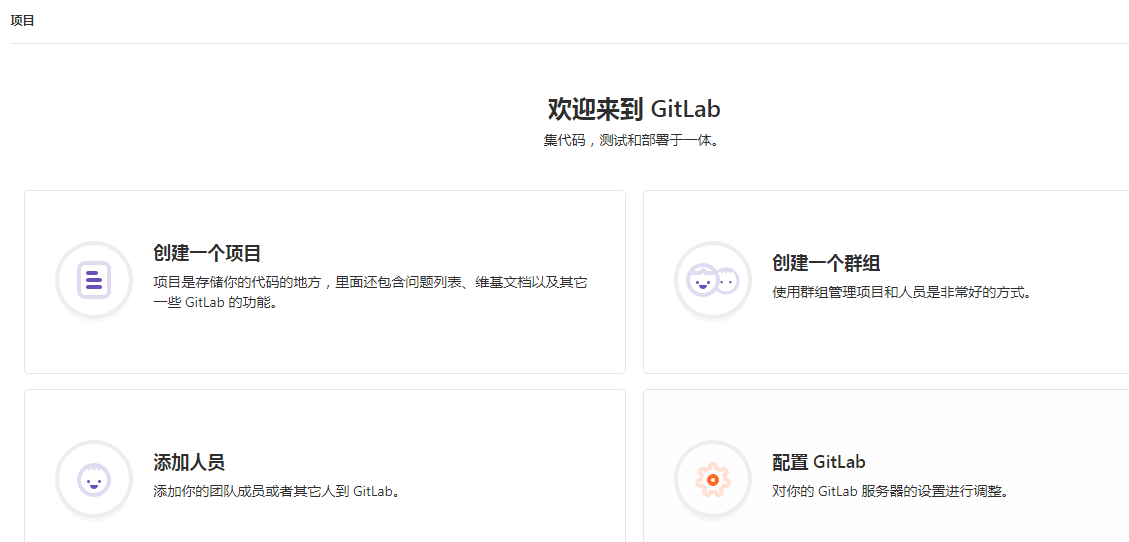
刷新Web页面,查看是否汉化成功
为了安全应当关闭用户注册的功能:
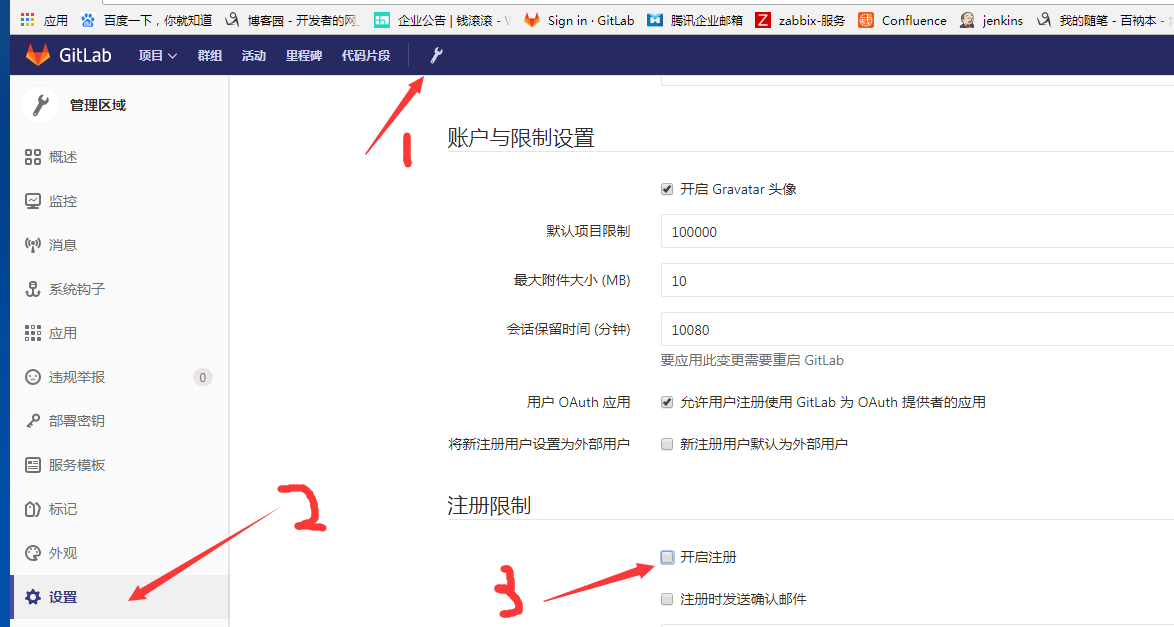
效果

只有登录界面啦!
其他:
生产环境gitlab的软硬件要求可以参考这篇文章:http://www.cnblogs.com/gnool/p/6128546.html
对git命令如果不是很熟悉,可以参照廖雪峰大神的文档 https://www.liaoxuefeng.com/wiki/0013739516305929606dd18361248578c67b8067c8c017b000
centos7安装gitlab并汉化的更多相关文章
- CentOS7安装GitLab、汉化及使用
同步首发:http://www.yuanrengu.com/index.php/20171112.html 一.GitLab简介 GitLab是利用Ruby On Rails开发的一个开源版本管理系统 ...
- CentOS7安装GitLab、汉化、邮箱配置及使用
同步首发:http://www.yuanrengu.com/index.php/20171112.html 一.GitLab简介 GitLab是利用Ruby On Rails开发的一个开源版本管理系统 ...
- CentOS7安装GitLab、汉化、邮箱配置及使用(转载)
同步首发: https://www.cnblogs.com/heyonggang/p/7778203.html http://www.yuanrengu.com/index.php/20171112. ...
- centos安装gitlab及汉化
GitLab 是一个用于仓库管理系统的开源项目,使用Git作为代码管理工具,并在此基础上搭建起来的web服务.今天,就记录一下centos部署gitlab及其汉化的操作方法. 1.下载安装 下载地址: ...
- CentOS7.5安装GitLab及汉化
一.GitLab英文版安装 1.下载gitlab安装包,然后安装 wget --content-disposition https://packages.gitlab.com/gitlab/gitla ...
- CentOS 7安装GitLab、汉化、配置邮件发送
1.更换国内yum源 1.1 备份 mv /etc/yum.repos.d/CentOS-Base.repo /etc/yum.repos.d/CentOS-Base.repo.backup 1.2 ...
- 安装gitlab并汉化
简介: GitLab是一个利用Ruby on Rails开发的开源应用程序,实现一个自托管的Git项目仓库,可通过Web界面进行访问公开的或者私人项目. 它拥有与GitHub类似的功能,能够浏览源代码 ...
- 快速安装 GitLab 并汉化
转载:http://www.jianshu.com/p/7a0d6917e009
- CentOs7安装gitlab(转!)
沧浪之水清兮,可以濯吾缨; 沧浪之水浊兮,可以濯吾足. ...
随机推荐
- python中in,not in,比较运算符,格式化输出,编码
一,python中的in,和not in python中in的作用是检测或查找,例如: c = ‘你好大号胡覅但是啊飞碟说’ b = ‘你好’ print(b in c ) 结果: True c = ...
- node inspector
- [转]Java之JMX 详解
一.JMX简介 JMX是一种JAVA的正式规范,它主要目的是让程序有被管理的功能,那么怎么理解所谓的“被管理”呢?试想你开发了一个软件(如WEB网站),它是在24小时不间断运行的,那么你可能会想要“监 ...
- mongo之 前后台创建索引 --noIndexBuildRetry
在数据量超大的情形下,任何数据库系统在创建索引时都是一个耗时的大工程.MongoDB也不例外.因此,MongoDB索引的创建有两个选择,一个是前台方式,一个是后台方式.那这两种方式有什么差异呢,在创建 ...
- ASP.NET AJAX入门系列(2):使用ScriptManager控件
ScriptManager控件包括在ASP.NET 2.0 AJAX Extensions中,它用来处理页面上的所有组件以及页面局部更新,生成相关的客户端代理脚本以便能够在JavaScript中访问W ...
- 关于Firedac的一点看法
Firedac集成在Delphi中已经有几个版本了,偶尔也拖到Form上试着用用,虽然知道Firedac有可能是最终的(或很很长时间内)数据访问技术,可一直不能接受它,其中最大的原因就是过于“复杂” ...
- Java WebService 简单实例[转载]
[注意,本文转载自 http://hyan.iteye.com/ ] 一.准备工作(以下为本实例使用工具) 1.MyEclipse10.7.1 2.JDK 1.6.0_22 二.创建服务端 1 ...
- java jvm设置http代理参数
-Dhttp.proxyHost=127.0.0.1 -Dhttp.proxyPort=1080
- 修改postfix smtp端口,防止公网扫描浪费你的服务器流量
邮件服务器的默认发送邮件端口是25,一些ISP会封锁25端口防止垃圾邮件的发送,这样就导致不能使用Foxmail.outlook等邮件客户端发送邮件.修改默认smtp端口就可以解决这个问题.下面的方法 ...
- DOM 讲解
DOM,全称documention,文档意思 ,就是把整个html文档当成一个对象来操作,里面有很多方法,如getElementByid(),getElementByid().innerText(); ...