
【Selenium-WebDriver自学】出现的问题和解决方案(十七)
==========================================================================================================
写在前面:
从开始学习Selenium和Webdriver开始,就会遇到各种问题,遇到问题就解决问题,所以这一个阶段也是不断的完善过程中。
==========================================================================================================
1. 报错:
org.openqa.selenium.firefox.NotConnectedException
原因:
FireFox和Selenium的版本不匹配导致
webdriver启动firefox时如果遇到以下错误,则说明selenium的版本和firefox不兼容了,需要升级selenium:
Selenium ->FireFox
2.25.0 -> 18
2.30.0 ->19
2.31.0 ->20
升级selenium jar包
正常启动firefox
http://blog.csdn.net/sinat_29741049/article/details/57405191
http://ftp.mozilla.org/pub/firefox/releases/
证明:
2.52.0->43.0Firefox
可以正常启动
2.alert处理
http://www.cnblogs.com/qiaoyeye/p/5593428.html
[org.openqa.selenium.UnhandledAlertException: unexpected alert open: {Alert text : 确认删除此客户吗?}
(Session info: chrome=59.0.3071.104)
(Driver info: chromedriver=2.30.477700 (0057494ad8732195794a7b32078424f92a5fce41),platform=Windows NT 6.1.7601 SP1 x86_64) (WARNING: The server did not provide any stacktrace information)
Command duration or timeout: 6 milliseconds: null
Build info: version: '2.52.0', revision: '4c2593c', time: '2016-02-11 19:03:33'
System info: host: 'WIN-UBMLJ97RGF8', ip: '172.16.0.108', os.name: 'Windows 7', os.arch: 'amd64', os.version: '6.1', java.version: '1.8.0_65'
Driver info: org.openqa.selenium.chrome.ChromeDriver
Capabilities [{applicationCacheEnabled=false, rotatable=false, mobileEmulationEnabled=false, networkConnectionEnabled=false, chrome={chromedriverVersion=2.30.477700 (0057494ad8732195794a7b32078424f92a5fce41), userDataDir=C:\Users\ADMINI~1\AppData\Local\Temp\scoped_dir16596_23783}, takesHeapSnapshot=true, pageLoadStrategy=normal, databaseEnabled=false, handlesAlerts=true, hasTouchScreen=false, version=59.0.3071.104, platform=XP, browserConnectionEnabled=false, nativeEvents=true, acceptSslCerts=true, locationContextEnabled=true, webStorageEnabled=true, browserName=chrome, takesScreenshot=true, javascriptEnabled=true, cssSelectorsEnabled=true, unexpectedAlertBehaviour=}]
Session ID: 5228d8eb9d66ab2a0d06aa25837dabb2]
3.@test的执行顺序问题:
http://blog.csdn.net/d6619309/article/details/52755578
在xml里面使用<include>指定需要执行的方法和顺序
<!DOCTYPE suite SYSTEM "http://testng.org/testng-1.0.dtd">
<suite name="Preserve order test runs">
<test name="Regression 1" preserve-order="true">
<classes>
<class name="com.pack.preserve.ClassOne">
<methods>
<include name="B" />
<include name="A" />
</methods>
</class>
</classes>
</test>
</suite>
4.Eclipse出现乱码问题解决
http://blog.csdn.net/tfy1332/article/details/22151491
是因为编码格式的问题引起的,GBK修改为UTF8格式。
5.Eclipse里,中文字体太小问题
http://jingyan.baidu.com/article/72ee561aa6bc28e16038df6e.html
6.上传图片的怎么写?
http://www.cnblogs.com/joewu/p/3701121.html
利用webdriver上传文件非常方便
/*上传文件
* element,上传按钮 例 ("//input[@type='file']")
* filePath,文件路径,例 C:\\testContent.pdf
*/
public void fileUpload(String element, String filePath){
driver.findElement(By.xpath(element)).sendKeys(filePath);
}
7.文件选择图片
http://blog.csdn.net/xie_0723/article/details/50617100
http://blog.csdn.net/lily_xl/article/details/51723407
http://blog.csdn.net/huilan_same/article/details/52208363
[2017-07-18 16:22:41:192] [videoyiTestCase.ProductManagerTest] [ERROR] [113] [org.openqa.selenium.ElementNotVisibleException: element not visible
(Session info: chrome=59.0.3071.104)
(Driver info: chromedriver=2.30.477700 (0057494ad8732195794a7b32078424f92a5fce41),platform=Windows NT 6.1.7601 SP1 x86_64) (WARNING: The server did not provide any stacktrace information)
Command duration or timeout: 50 milliseconds
Build info: version: '2.52.0', revision: '4c2593c', time: '2016-02-11 19:03:33'
System info: host: 'WIN-UBMLJ97RGF8', ip: '172.16.0.108', os.name: 'Windows 7', os.arch: 'amd64', os.version: '6.1', java.version: '1.8.0_65'
Driver info: org.openqa.selenium.chrome.ChromeDriver
Capabilities [{applicationCacheEnabled=false, rotatable=false, mobileEmulationEnabled=false, networkConnectionEnabled=false, chrome={chromedriverVersion=2.30.477700 (0057494ad8732195794a7b32078424f92a5fce41), userDataDir=C:\Users\ADMINI~1\AppData\Local\Temp\scoped_dir12900_16704}, takesHeapSnapshot=true, pageLoadStrategy=normal, databaseEnabled=false, handlesAlerts=true, hasTouchScreen=false, version=59.0.3071.104, platform=XP, browserConnectionEnabled=false, nativeEvents=true, acceptSslCerts=true, locationContextEnabled=true, webStorageEnabled=true, browserName=chrome, takesScreenshot=true, javascriptEnabled=true, cssSelectorsEnabled=true, unexpectedAlertBehaviour=}]
Session ID: 91aae86160d186c5daeec9631c25f830]
http://www.cnblogs.com/qixue/p/3928775.html
打开文件夹后,上传文件夹不能正常关闭。
http://blog.sina.com.cn/s/blog_539a70d30101ajsg.html
http://www.360doc.com/content/16/0627/09/31226932_571055470.shtml
http://www.360doc.com/content/15/1014/15/20107535_505596449.shtml
3:windows弹窗
例如:
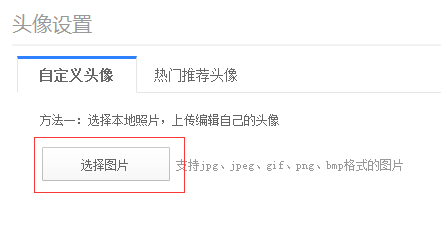
思路:
解决的方法可以通过第三方的工具:autoit 来处理。具体方法请自行百度搜索autoit。
http://www.cnblogs.com/fnng/p/4188162.html
java http://www.cnblogs.com/testlc/p/6069460.html
http://blog.csdn.net/lily_xl/article/details/51723407
将上传的文件地址参数化:
http://blog.csdn.net/huilan_same/article/details/52208363
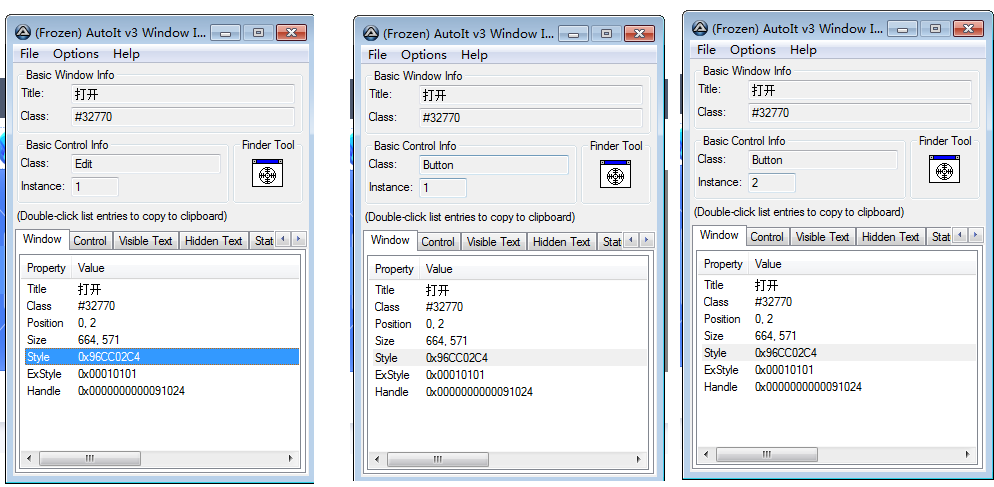
通过autoit的获取对象并编辑脚本:
ControlFocus("文件上传", "", "Edit1")
WinWait("[CLASS:#32770]", "", 10)
ControlSetText("文件上传" ,"", "Edit1", $CmdLine[1])
Sleep(2000)

使用方法不正确导致的错误
String strUploadExePath = "E:\\Yingpu\\000.SVNYP\\01.个人文件夹\\Renqiang\\04.AutoTest\\videoyiAutoTest\\lib\\uploadFile.exe";
String strResourcePath = "E:\\Yingpu\\000.SVNYP\\01.个人文件夹\\Renqiang\\04.AutoTest\\videoyiAutoTest\\resource\\百科展示图片_580_660.png";
Runtime.getRuntime().exec(strUploadExePath + " " + strResourcePath);
8.获得当前java运行的工作路径
方便拼接字符串等使用
http://blog.csdn.net/xionglangs/article/details/51085307
9.找不到元素时,报错
is not clickable at point (209, 606). Other element would receive the click
https://stackoverflow.com/questions/11908249/debugging-element-is-not-clickable-at-point-error
10.Chrome已经跑通的Case,在FireFox上上传文件时,跑不通
[org.openqa.selenium.NoSuchElementException: Element is not currently visible and so may not be interacted with
11.关闭子窗口
http://blog.csdn.net/gloria0610/article/details/54691685
public static void closeSubWindow(WebDriver driver){
// Get all window handles
Set<String> handles = driver.getWindowHandles();
// Save main Window
String mainWindowhandle = driver.getWindowHandle();
// sub window hanlde
String detailWindowHandle = null;
Iterator<String> iterator = handles.iterator();
while(iterator.hasNext()){
String key = iterator.next();
if (mainWindowhandle.equals(key)){
continue;
}
detailWindowHandle = key;
}
WebDriver detailWindow = driver.switchTo().window(detailWindowHandle);
detailWindow.close();
handles.remove(detailWindowHandle);
driver = driver.switchTo().window(mainWindowhandle);
}
12.WebDriver获得元素的禁用状态
以后遇到新的问题,还会记录。
【Selenium-WebDriver自学】出现的问题和解决方案(十七)的更多相关文章
- scrapy-redis+selenium+webdriver解决动态代理ip和user-agent的问题(全网唯一完整代码解决方案)
问题描述:在爬取一些反爬机制做的比较好的网站时,经常会遇见一个问题就网站代码是通过js写的,这种就无法直接使用一般的爬虫工具爬取,这种情况一般有两种解决方案 第一种:把js代码转为html代码,然后再 ...
- webdriver实用指南迁移至gitbbok并改名为selenium webdriver从入门到提高
背景 几年前我写了一本关于selenium webdriver的小册子,主要讲了一些selenium在进行测试过程中会遇到的场景以及解决方案,陆陆续续在github上收到了100+的star,在这里我 ...
- 转载 基于Selenium WebDriver的Web应用自动化测试
转载原地址: https://www.ibm.com/developerworks/cn/web/1306_chenlei_webdriver/ 对于 Web 应用,软件测试人员在日常的测试工作中, ...
- Python+Selenium+webdriver环境搭建(windows)以及相关资源下载链接
今天记录一下测试小菜鸟alter在测试入门的一点关于python+Selenium+webdriver环境搭建的经历以及资源分享.欢迎交流学习,批评指正. 一.Python的下载与安装 1.pytho ...
- selenium webdriver (python)大全
webdriver的简介 硒2.0的主要新功能是集成的webdriver的API.webdriver的设计除了解决一些seleniumr-RC API的一些限制,与webdriver 的整合,将提供一 ...
- selenium webdriver 如何添加cookie
一. webdriver中常用的cookie方法 webdriver中提供了操作cookie的相关方法: get_cookies() 获得cookie信息 add_c ...
- Selenium+PhantomJS使用时报错原因及解决方案
问题 今天在使用selenium+PhantomJS动态抓取网页时,出现如下报错信息: UserWarning: Selenium support for PhantomJS has been dep ...
- Selenium+PhantomJS使用时报错原因及解决方案(转)
Selenium+PhantomJS使用时报错原因及解决方案 问题 今天在使用selenium+PhantomJS动态抓取网页时,出现如下报错信息: UserWarning: Selenium ...
- selenium webdriver如何添加cookie
一. webdriver中常用的cookie方法 webdriver中提供了操作cookie的相关方法: get_cookies() 获得cookie信息 add_c ...
- Selenium+Webdriver被检测识别出来的应对方案
在写爬虫,面对很多js 加载的页面,很多人束手无策,更多的人喜欢用Senlenium+ Webdriver,古语有云:道高一尺魔高一丈.已淘宝为首,众多网站都针对 Selenium的js监测机制, 比 ...
随机推荐
- 在Android中创建一个下拉菜单
添加四个控件 TToolbar Alignment: alTop TSpeedButton Alignment: alRight StyleLookUp: detailstoolbutton Marg ...
- 引用 自动化测试基础篇--Selenium简介
原文链接:http://www.cnblogs.com/sanzangTst/p/7452636.html 鸣谢参藏法师 一.软件开发的一般流程 二.什么叫软件测试? 软件测试(英语:Software ...
- googletest--Test Fixture
前面博客中我们在单元测试之前会做一些变量初始化等工作,而同一个testcase的不同test之间往往会有一些初始化工作是相同的.我们不想做多余的重复的工作,当然同时也不想设置全局变量. 这个时候我们可 ...
- elasticsearch 口水篇(4)java客户端 - 原生esClient
上一篇(elasticsearch 口水篇(3)java客户端 - Jest)Jest是第三方客户端,基于REST Api进行调用(httpClient),本篇简单介绍下elasticsearch原生 ...
- java中遍历实体类,获取属性名和属性值
方式一(实体类): //java中遍历实体类,获取属性名和属性值 public static void testReflect(Object model) throws Exception{ for ...
- 三星GT-N8010刷机教程
本刷机教程只针对三星GT-N8010机器(以下简称GT-N8010),以下操作本人已在GT-N8010机器上亲测,且都成功,其它机器没有测试不能保证成功. 刷机有风险,请谨慎使用!请先备份资料和信息. ...
- javase每天内容总结(32期)
第一天 环境变量 编译与运行 dos命令 第二天 数据类型 运算符(三元) 第三天 引用数据类型(Scanner和Random) 流程控制语句 第四天 数组 第五天 方法(重载) 第六天 类 Arra ...
- java高并发编程(三)
java高并发主要有三块知识点: synchronizer:同步器,在多个线程之间互相之间怎么进行通讯,同步等: 同步容器:jdk提供了同步性的容器,比如concurrentMap,concurren ...
- 学习笔记之Bokeh Data Visualization | DataCamp
Bokeh Data Visualization | DataCamp https://www.datacamp.com/courses/interactive-data-visualization- ...
- 廖雪峰Java3异常处理-2断言和日志-3使用Commons Logging
Commons Logging是Apache创建的日志模块: 可以挂接不同的日志系统 可以通过配置文件指定挂接的日志系统 自动搜索并使用Log4j 如果Log4j不存在,使用JDK Logging(J ...