
JDK 之 NIO 2 WatchService、WatchKey(监控文件变化)
JDK 之 NIO 2 WatchService、WatchKey(监控文件变化)
JDK 规范目录(https://www.cnblogs.com/binarylei/p/10200503.html)
一、WatchService、WatchKey 使用
具体详见:https://blog.csdn.net/lirx_tech/article/details/51425364
public static void main(String[] args) throws Exception {

    // 1. 获取文件系统监控器,启动一个后台线程轮询

    WatchService watchService = FileSystems.getDefault().newWatchService();

    // 2. 注册要监听的事件类型,文件增、删、改

    Paths.get("C:\\Users\\len\\Desktop\\xdr").register(watchService,

            StandardWatchEventKinds.ENTRY_CREATE,

            StandardWatchEventKinds.ENTRY_DELETE,

            StandardWatchEventKinds.ENTRY_MODIFY);

    while (true) {

        // 3. 获取准备好的事件,pool() 立即返回、take() 阻塞

        WatchKey watchKey = watchService.poll(2, TimeUnit.SECONDS);

        if (Objects.isNull(watchKey)) {

            continue;

        }

        // 4. 处理准备好的事件

        List<WatchEvent<?>> watchEvents = watchKey.pollEvents();

        for (WatchEvent<?> event : watchEvents) {

            if (event.kind().name().equals(StandardWatchEventKinds.ENTRY_CREATE.name())) {

                System.out.println("create: " + event.context());

            } else if (event.kind().name().equals(StandardWatchEventKinds.ENTRY_MODIFY.name())) {

                System.out.println("modify: " + event.context());

            } else if (event.kind().name().equals(StandardWatchEventKinds.ENTRY_DELETE.name())) {

                System.out.println("delete: " + event.context());

            }

        }

        // 5. 重启该线程,因为处理文件可能是一个耗时的过程,因此调用 pool() 时需要阻塞监控器线程

        boolean valid = watchKey.reset();

        if (!valid) {

            break;

        }

    }

}
二、原理
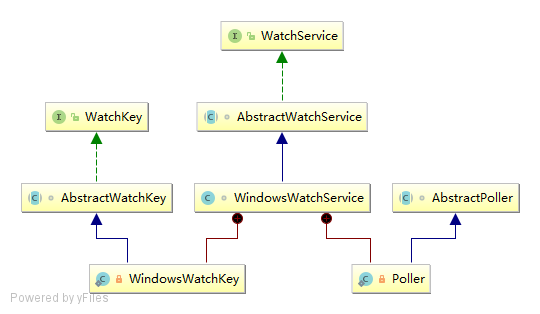
AbstractWatchService实现 WatchService 接口WindowsWatchService具体的实现,启动 Poller 线程Poller线程,轮询指定的目录
(1) AbstractWatchService
// 等待要处理的事件 signaled keys waiting to be dequeued

private final LinkedBlockingDeque<WatchKey> pendingKeys = new LinkedBlockingDeque<WatchKey>();

@Override

public final WatchKey poll(long timeout, TimeUnit unit) throws InterruptedException {

    checkOpen();

    WatchKey key = pendingKeys.poll(timeout, unit);

    checkKey(key);

    return key;

}
可以看到调用 poll 的时候直接从队列中取 key,那就必然有一个线程往 pendingKeys 中塞数据。在 AbstractWatchService 中有一个 enqueueKey 方法往 pendingKeys 中塞数据。
final void enqueueKey(WatchKey key) {

    pendingKeys.offer(key);

}
(2) WindowsWatchService
AbstractWatchService 有不同的实现,以 WindowsWatchService 为例。
WindowsWatchService(WindowsFileSystem fs) throws IOException {

    // create I/O completion port

    long port = 0L;

    try {

        port = CreateIoCompletionPort(INVALID_HANDLE_VALUE, 0, 0);

    } catch (WindowsException x) {

        throw new IOException(x.getMessage());

    }

    this.poller = new Poller(fs, this, port);

    this.poller.start();

}
Poller 是 WindowsWatchService 的内部类,开启了一个线程监控目录。
(3) Poller
重点关注 Poller 中的 run 方法。
@Override

public void run() {

    for (;;) {

        CompletionStatus info;

        try {

            info = GetQueuedCompletionStatus(port);

        } catch (WindowsException x) {

            return;

        }

        WindowsWatchKey key = ck2key.get((int)info.completionKey());

        if (key == null) {

            continue;

        }

        boolean criticalError = false;

        if (errorCode == ERROR_NOTIFY_ENUM_DIR) {

            key.signalEvent(StandardWatchEventKinds.OVERFLOW, null);

        } else if (errorCode != 0 && errorCode != ERROR_MORE_DATA) {

            criticalError = true;

        } else {

            // 省略... (处理 error)

        }

        // 一切正常则 criticalError = true,此时将这个 WatchKey 加入 pendingKeys 中

        if (criticalError) {

            implCancelKey(key);

            key.signal();

        }

    }

}
参考:
- 《NIO.2:WatchService、WatchKey(监控文件变化)》:(https://blog.csdn.net/lirx_tech/article/details/51425364)
每天用心记录一点点。内容也许不重要,但习惯很重要!
JDK 之 NIO 2 WatchService、WatchKey(监控文件变化)的更多相关文章
- 利用WatchService监听文件变化
在实现配置中心的多种方案中,有基于JDK7+的WatchService方法,其在单机应用中还是挺有实践的意义的. 代码如下: package com.longge.mytest; import jav ...
- Python监控文件变化:watchdog
Python监控文件变化有两种库:pyinotify和watchdog.pyinotify依赖于Linux平台的inotify,后者则对不同平台的的事件都进行了封装.也就是说,watchdog跨平台. ...
- mac 监控文件变化并重启php
自己撸一个框架,需要监控代码变化 安装fswatch brew install fswatch shell重启PHP脚本reload.sh #!/bin/sh do ps -ef | grep php ...
- linux 监控文件变化
介绍 有时候我们常需要当文件变化的时候便触发某些脚本操作,比如说有文件更新了就同步文件到远程机器.在实现这个操作上,主要用到两个工具,一个是rsync,一个是inotifywait .inotifyw ...
- inotifywait命令如何监控文件变化?
转载自:https://segmentfault.com/a/1190000038351925 文件监控可以配合rsync实现文件自动同步,例如监听某个目录,当文件变化时,使用rsync命令将变化的文 ...
- Gulp-前端进阶A-3---如何不刷新监控文件变化?
npm install --save-dev gulp-connect npm install --save-dev gulp-livereload npm其他,前面已有 var gulp = req ...
- 使用apache common-io 监控文件变化--转
package common.io; import org.apache.commons.io.filefilter.FileFilterUtils; import org.apache.common ...
- 利用nodejs监控文件变化并使用sftp上传到服务器
很久没写博客了,因为最近在用react+express做一个自己的工具型网站(其实就是夺宝岛抢拍器) 然后因为经常要改动,而且又要放到服务器上进行测试.总是要webpack,然后手动把文件上传上去,不 ...
- 使用apache common-io 监控文件变化
package common.io; import org.apache.commons.io.filefilter.FileFilterUtils; import org.apache.common ...
随机推荐
- BOM 表
';--查看BOM创建日期时间 SELECT * FROM SAPSR3.ZSTPO_OUT2011_1@SAP_SEP; SELECT * FROM SAPSR3.ZSTPO_OUT2012_1@S ...
- spring boot 中统一异常处理
基于 spring boot 对异常处理的不友好,现在通过其他的方式来统一处理异常 步骤一:自定义异常类 public class UserNotExistException extends Runt ...
- day30 UDP协议
本周安排 周二 socket编程 周三 粘包处理 周四 选课系统 并发编程 周五多道技术 多进程 周六 IPC 互斥锁 常用模块 os* 操作系统 多数是文件操作 os.path 处理文件路径 shu ...
- AttributeError: 'dict' object has no attribute 'iteritems'
在python3.6中运行 sortedClassCount = sorted(classCount.iteritems(), key=operator.itemgetter(1), reverse= ...
- python基础入门学习简单程序练习
1.简单的乘法程序 i = 256*256 print('The value of i is', i) 运行结果: The value of i is 65536 2.执行python脚本的两种方式 ...
- 安装程序遇到错误0x80240037
安装ie插件或者微软的一些其他程序等报错0x80240037,如下图所示: 解决办法: 下面我将以ie的插件IE11-Windows6.1-KB3008923-x64.msu安装为例: 1.把IE11 ...
- kraken-ejs创建一个项目【学习札记】
Keep in Touch. 保持联络. Who’s calling? 是哪一位? You did right. 你做得对. You set me up! 你出卖我! kraken-express-e ...
- 解决node-pre-gyp install --fallback-to-build 卡住不动
一般是因为需要下载国外的包,要么连VPN,要么使用淘宝的镜像: 使用cnpm: npm install -g cnpm --registry=https://registry.npm.taobao.o ...
- f5 2017.09.03故障
1.下午14点50左右有同事反应epm等系统登录有问题.自测登录也是有同样的报错. 2.测试发现内部IP直接访问正常,但是访问f5的vip的方式访问不了.此时oa.邮件等系统也开始有同事发现故障. 3 ...
- 项目总结12:bootstrap-select下拉框模糊搜索
bootstrap select下拉框模糊搜索 关键字 bootstrap-select 下拉框模糊搜索 正文(直接上源码) <%@ page language="java" ...