
Guava RateLimiter实现接口API限流

一、简介
Guava提供的RateLimiter可以限制物理或逻辑资源的被访问速率。RateLimit二的原理类似与令牌桶,它主要由许可发出的速率来定义,如果没有额外的配置,许可证将按每秒许可证规定的固定速度分配,许可将被平滑地分发,若请求超过permitsPerSecond则RateLimiter按照每秒1/permitsPerSecond的速率释放许可。
使用RateLimiter需要引入的jar包:
<!-- Guava是一种基于开源的Java库,谷歌很多项目使用它的很多核心库。这个库是为了方便编码,并减少编码错误 -->

<dependency>

     <groupId>com.google.guava</groupId>

     <artifactId>guava</artifactId>

     <version>${guava.version}</version>

</dependency>
注意:
Guava 20(将于2016年初发布)将是支持Java 6甚至Java 7的最终Guava版本.Guava 21(理想情况下是2016年中期)将需要Java 8。
在版本21中,我们还将启动一个新的分支,可能称为guava-android。它将保持Java 6兼容性,允许它用于支持最小版本Gingerbread的Android应用程序。
方法摘要:
参考地址:https://www.cnblogs.com/exceptioneye/p/4824394.html
| 返回类型 | 方法和描述 |
| static RateLimiter |
create(double permitsPerSecond) 根据指定的稳定吞吐率和预热期来创建RateLimiter,这里的吞吐率是指每秒多少许可数(通常是指QPS,每秒多少查询) |
| static RateLimiter |
create(double permitsPerSecond,Long warmupPeriod,TimeUnti unit) 根据指定的稳定吞吐率和预热期来创建RateLimiter,这里的吞吐率是指每秒多少许可数(通常是指QPS,每秒多少请求量),在这段预热时间内,RateLimiter每秒分配许可数会平稳的增长直到预热期结束是达到其最大速率。(只要存在足够请求数来时其饱和) |
| double |
acquire() 从RateLimiter获取一个许可,该方法会被阻塞直到获取到请求。 |
| double |
acquire(int permits) 从RateLimiter获取指定数量许可,该方法会被阻塞直到获取到请求。 |
| double |
getRate() 返回RateLimiter配置中的稳定速率,该速率单位是每秒多少许可数 |
| void |
setRate(double pemitsPerSecond) 更新RateLimiter的稳定速率,参数permitsPerSecond由构造RateLimiter的工厂方法提供。 |
| boolean |
tryAcquire() 从RateLimiter获取许可,如果该许可可以在无延迟下的情况下立即获取的话返回true,否则返回false。 |
| boolean |
tryAcquire(int permits) 从RateLimiter中获取指定数量许可,如果该 许可数可以在无延迟的情况下立即获取得到返回true,否则返回false |
| boolean |
tryAcquire(int permits,long timeout,TimeUnit unit) 从RateLimiter中获取指定数量许可,如果该许可可以在不超过timeout的时间内获取得到的话返回true,如果无法在timeout时间内获取到许可则返回false。 简述:在指定时间(timeout)内获取指定数量(permits)许可。 |
| boolean |
tryAcquire(long timeout,TimeUnit unit) 从RateLimiter中获取一个许可,如果该许可可以在不超过timeout的时间内获取得到的话返回true,如果无法在timeout时间内获取到许可则返回false 简述:在指定时间内获取一个许可。 |
二、Demo
@Test

public void  rateLimit(){

    String start = new SimpleDateFormat("yyyy-MM-dd HH:mm:ss").format(new Date());

    // 这里的1表示每秒允许处理的量为1个

    RateLimiter limiter = RateLimiter.create(1.0);

    for (int i = 1; i <= 10; i++) {

        // 请求RateLimiter, 超过permits会被阻塞

        limiter.acquire();

        System.out.println("count => " + i);

    }

    String end = new SimpleDateFormat("yyyy-MM-dd HH:mm:ss").format(new Date());

    System.out.println("start time:" + start);

    System.out.println("end time:" + end);

}
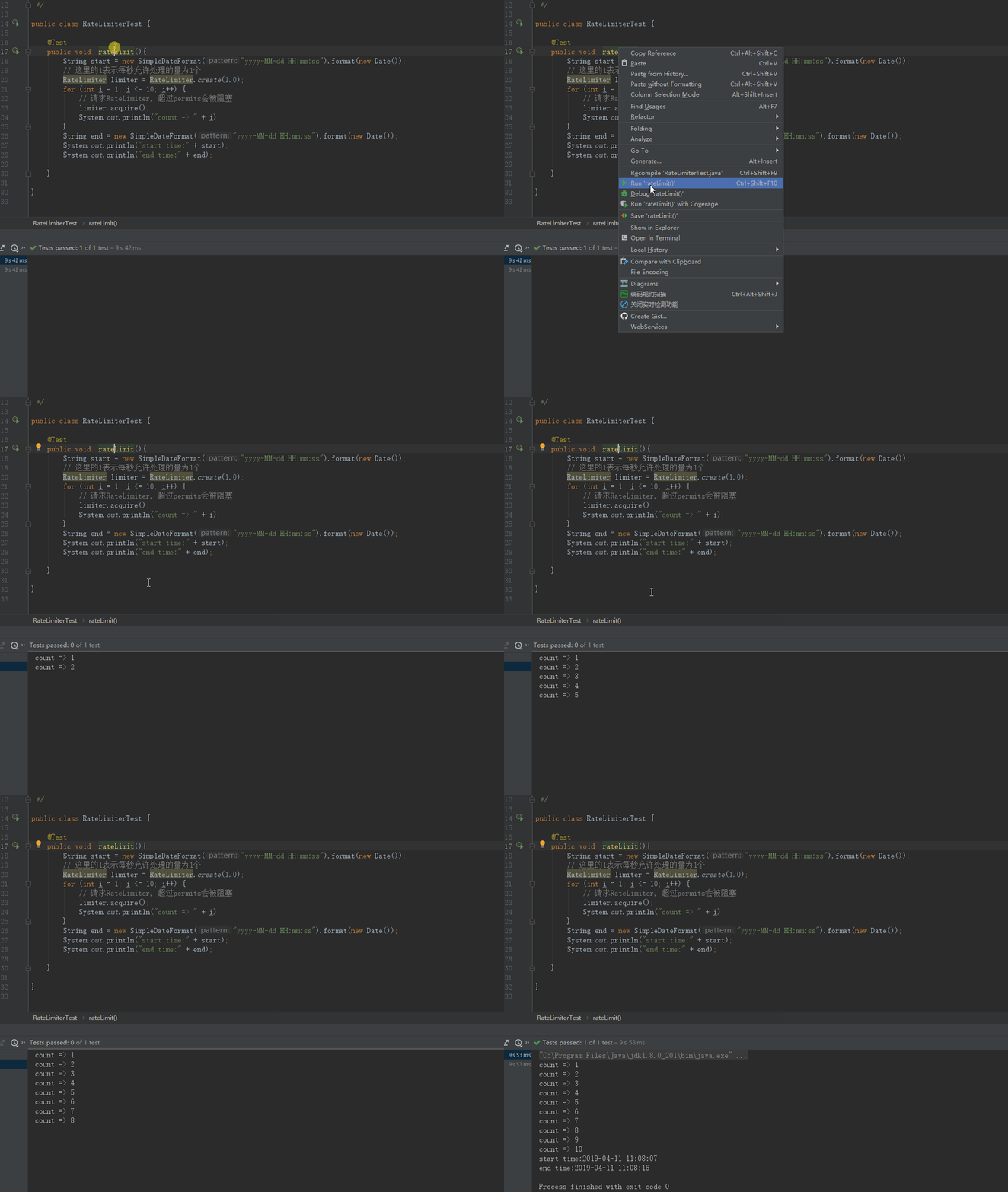
三、自定义注解
1.标识注解:
注解:
import java.lang.annotation.*;

/**

 * 自定义限流注解(标识注解)

 *

 * @Target:

 *          表示该注解可以用于什么地方,可能的ElementType参数有:

 *          CONSTRUCTOR:构造器的声明

 *          FIELD:域声明(包括enum实例)

 *          LOCAL_VARIABLE:局部变量声明

 *          METHOD:方法声明

 *          PACKAGE:包声明

 *          PARAMETER:参数声明

 *          TYPE:类、接口(包括注解类型)或enum声明

 *

 * @Retention

 *          表示需要在什么级别保存该注解信息。可选的RetentionPolicy参数包括:

 *          SOURCE:注解将被编译器丢弃

 *          CLASS:注解在class文件中可用,但会被VM丢弃

 *          RUNTIME:VM将在运行期间保留注解,因此可以通过反射机制读取注解的信息

 *

 * @Document

 *          将注解包含在Javadoc中

 *

 * @Inherited

 *          允许子类继承父类中的注解

 *

 * @Date: 2019-04-09 16:31

 */

@Inherited

@Documented

@Target(ElementType.METHOD)

@Retention(RetentionPolicy.RUNTIME)

public @interface Limiting {

}
切面:
import com.alibaba.fastjson.JSON;

import com.github.aspect.util.ResponseUtil;

import com.github.enums.http.HttpStatusEnum;

import com.github.vo.util.ResultUtil;

import com.google.common.util.concurrent.RateLimiter;

import lombok.extern.slf4j.Slf4j;

import org.aspectj.lang.ProceedingJoinPoint;

import org.aspectj.lang.annotation.Around;

import org.aspectj.lang.annotation.Aspect;

import org.aspectj.lang.annotation.Pointcut;

import org.springframework.beans.factory.annotation.Autowired;

import org.springframework.stereotype.Component;

import javax.servlet.http.HttpServletResponse;

/**

 * @Date: 2019-04-09 17:06

 */

@Slf4j

@Aspect

@Component

public class LimitingAspect {

    @Autowired

    public HttpServletResponse response;

    /**

     * 比如说,我这里设置"并发数"为5

     */

    private RateLimiter rateLimiter = RateLimiter.create(5.0);

    /**

     * 以注解为切入点

     */

    @Pointcut("@annotation(com.github.annotation.Limiting)")

    public void pointcut() {

    }

    @Around("pointcut()")

    public Object around(ProceedingJoinPoint joinPoint) {

        // 获取许可。如果有返回true,否则返回false

        Boolean flag = rateLimiter.tryAcquire();

        Object obj = null;

        try {

            if (flag) {

                obj = joinPoint.proceed();

            } else {

                // 失败返回客户端的信息,例如:{"code":500,"msg":"服务器繁忙,请稍后再试!"}

                String result = JSON.toJSONString(ResultUtil.fail(HttpStatusEnum.BUSY_SERVER));

                ResponseUtil.output(response, result);

            }

        } catch (Throwable e) {

            e.printStackTrace();

        }

        return obj;

    }

}
使用:
import com.github.annotation.Limiting;

import com.github.annotation.RateLimit;

import com.github.vo.Result;

import com.github.vo.util.ResultUtil;

import lombok.extern.slf4j.Slf4j;

import org.springframework.stereotype.Controller;

import org.springframework.web.bind.annotation.GetMapping;

import org.springframework.web.bind.annotation.ResponseBody;

import java.util.concurrent.atomic.AtomicInteger;

/**

 * 测试RateLimit限流(自定义注解+切面)

 * @Date: 2019-04-04 14:17

 */

@Slf4j

@Controller

public class AppController {

    /**

     * AtomicInteger是一个线程安全的具有原子性的能返回int类型的对象

     */

    private static AtomicInteger num = new AtomicInteger(0);

    @Limiting

    @GetMapping("app")

    @ResponseBody

    public Result app(){

        // num.incrementAndGet()表示先对自身进行+1操作,再返回

        log.info("app()  i = {}",num.incrementAndGet());

        return ResultUtil.success();

    }

}
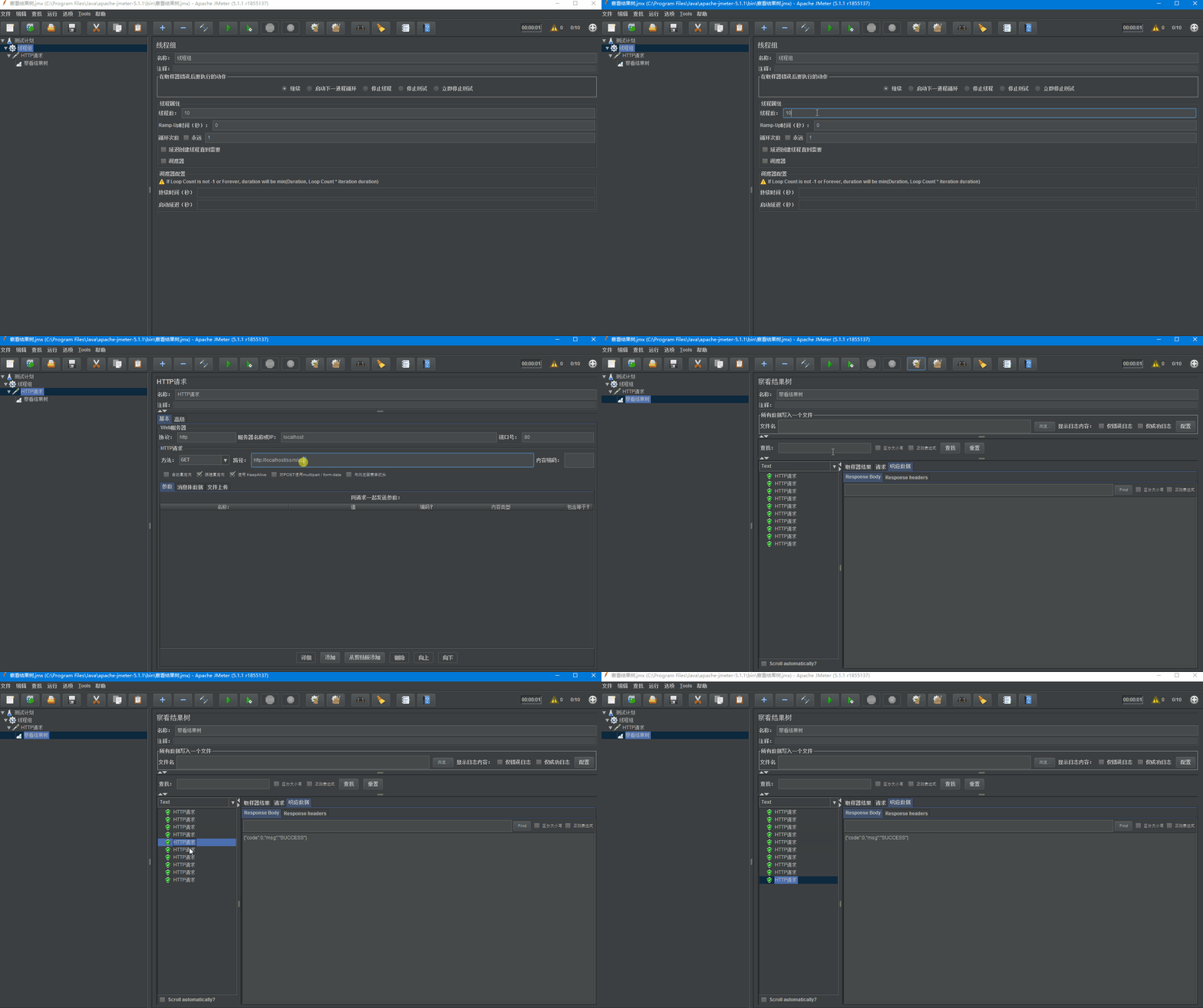
测压结果:
2.带参注解
注解:
import java.lang.annotation.*;

import java.util.concurrent.TimeUnit;

/**

 *

 * 可控的限流注解

 * 相对@Limiting来说高级一点

 *

 * @Date: 2019-04-10 10:35

 */

@Documented

@Target(ElementType.METHOD)

@Retention(RetentionPolicy.RUNTIME)

public @interface RateLimit {

    String value() default "";

    /**

     *  每秒放入桶中的令牌数,默认最大即不限流

     * @return

     */

    double perSecond() default Double.MAX_VALUE;

    /**

     * 获取令牌的等待时间  默认1

     * @return

     */

    int timeOut() default 1;

    /**

     * 超时时间单位 默认:秒

     * @return

     */

    TimeUnit timeOutUnit() default TimeUnit.SECONDS;

}
切面:
import com.alibaba.fastjson.JSON;

import com.github.annotation.RateLimit;

import com.github.aspect.util.ResponseUtil;

import com.github.enums.http.HttpStatusEnum;

import com.github.vo.util.ResultUtil;

import com.google.common.util.concurrent.RateLimiter;

import lombok.extern.slf4j.Slf4j;

import org.aspectj.lang.ProceedingJoinPoint;

import org.aspectj.lang.Signature;

import org.aspectj.lang.annotation.Around;

import org.aspectj.lang.annotation.Aspect;

import org.aspectj.lang.annotation.Pointcut;

import org.aspectj.lang.reflect.MethodSignature;

import org.springframework.beans.factory.annotation.Autowired;

import org.springframework.stereotype.Component;

import javax.servlet.http.HttpServletResponse;

import java.lang.reflect.Method;

/**

 * @Date: 2019-04-10 10:40

 */

@Slf4j

@Aspect

@Component

public class RateLimitAspect {

    @Autowired

    private HttpServletResponse response;

    private RateLimiter rateLimiter = RateLimiter.create(Double.MAX_VALUE);

    /**

     * 定义切入点

     * 两种方式可用:

     * 1.通过指定包或者指定类切入

     *      @Pointcut("execution(public * com.github.controller.*.*(..))")

     * 2.通过指定注解切入

     *      @Pointcut("@annotation(com.github.annotation.LxRateLimit)")

     */

    @Pointcut("@annotation(com.github.annotation.RateLimit)")

    public void pointcut() { }

    @Around("pointcut()")

    public Object around(ProceedingJoinPoint joinPoint) throws Throwable {

        log.info("拦截到了{}方法...", joinPoint.getSignature().getName());

        Object obj = null;

        // 获取目标方法

        Signature signature = joinPoint.getSignature();

        MethodSignature methodSignature = (MethodSignature)signature;

        Method targetMethod = methodSignature.getMethod();

        if (targetMethod.isAnnotationPresent(RateLimit.class)) {

            // 获取目标方法的@LxRateLimit注解

            RateLimit rateLimit = targetMethod.getAnnotation(RateLimit.class);

            rateLimiter.setRate(rateLimit.perSecond());

            // rateLimit.timeOut() = 1000

            // rateLimit.timeOutUnit() = TimeUnit.MILLISECONDS 毫秒

            // 判断能否在1秒内得到令牌,如果不能则立即返回false,不会阻塞程序

            if (!rateLimiter.tryAcquire(rateLimit.timeOut(), rateLimit.timeOutUnit())) {

                log.info("=====    接口并发量过大    =====");

                ResponseUtil.output(response, JSON.toJSONString(ResultUtil.fail(HttpStatusEnum.BUSY_SERVER)));

            }else{

                obj = joinPoint.proceed();

            }

        }

        return obj;

    }

}
使用:
import com.github.annotation.Limiting;

import com.github.annotation.RateLimit;

import com.github.vo.Result;

import com.github.vo.util.ResultUtil;

import lombok.extern.slf4j.Slf4j;

import org.springframework.stereotype.Controller;

import org.springframework.web.bind.annotation.GetMapping;

import org.springframework.web.bind.annotation.ResponseBody;

import javax.servlet.http.HttpServletRequest;

import java.util.concurrent.atomic.AtomicInteger;

/**

 * 测试RateLimit限流(自定义注解+切面)

 *

 * @Date: 2019-04-04 14:17

 */

@Slf4j

@Controller

public class AppController {

    /**

     * AtomicInteger是一个线程安全的具有原子性的能返回int类型的对象

     */

    private static AtomicInteger num = new AtomicInteger(0);

    /**

     * perSecond = 0.5:每秒创建0.5个

     * timeOut = 1:在一秒的时间内如果有许可则成功,没有则失败

     *

     *

     * @return

     */

    @RateLimit(perSecond = 0.5,timeOut = 1)

    @GetMapping("apps")

    @ResponseBody

    public Result apps(){

        log.info("app()  num = {}",num.incrementAndGet());

        return ResultUtil.success();

    }

}
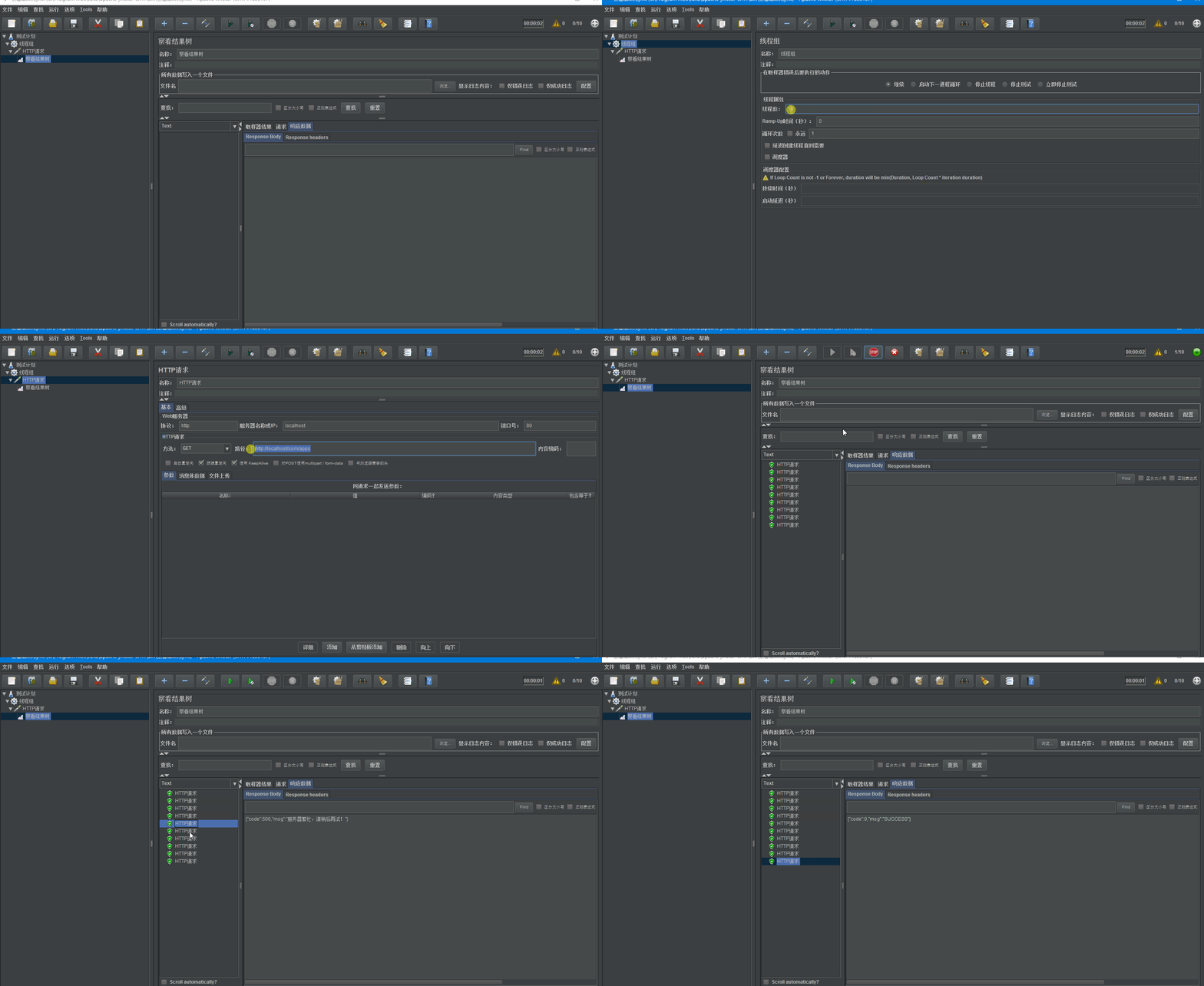
测压结果:
Guava RateLimiter实现接口API限流的更多相关文章
- 服务接口API限流 Rate Limit 续
一.前言 上一篇文章中粗浅的介绍使用Redis和基于令牌桶算法进行对服务接口API限流,本文介绍另一种算法---漏桶算法的应用.Nginx想必大家都有所了解是一个高性能的 HTTP 和反向代理服务器, ...
- Google Guava缓存实现接口的限流
一.项目背景 最近项目中需要进行接口保护,防止高并发的情况把系统搞崩,因此需要对一个查询接口进行限流,主要的目的就是限制单位时间内请求此查询的次数,例如1000次,来保护接口. 参考了 开涛的博客聊聊 ...
- 服务接口API限流 Rate Limit
一.场景描述 很多做服务接口的人或多或少的遇到这样的场景,由于业务应用系统的负载能力有限,为了防止非预期的请求对系统压力过大而拖垮业务应用系统. 也就是面对大流量时,如何进行流量控制? 服务接口的流量 ...
- java 服务接口API限流 Rate Limit
一.场景描述 很多做服务接口的人或多或少的遇到这样的场景,由于业务应用系统的负载能力有限,为了防止非预期的请求对系统压力过大而拖垮业务应用系统. 也就是面对大流量时,如何进行流量控制? 服务接口的流量 ...
- Springboot中使用redis进行api限流
api限流的场景 限流的需求出现在许多常见的场景中 秒杀活动,有人使用软件恶意刷单抢货,需要限流防止机器参与活动 某api被各式各样系统广泛调用,严重消耗网络.内存等资源,需要合理限流 淘宝获取ip所 ...
- AspNetCore添加API限流
最近发现有客户在大量的请求我们的接口,出于性能考虑遂添加了请求频率限制. 由于我们接口请求的是.Net Core写的API网关,所以可以直接添加一个中间件,中间件中使用请求的地址当key,通过配置中心 ...
- coding++:高并发解决方案限流技术-使用RateLimiter实现令牌桶限流-Demo
RateLimiter是guava提供的基于令牌桶算法的实现类,可以非常简单的完成限流特技,并且根据系统的实际情况来调整生成token的速率. 通常可应用于抢购限流防止冲垮系统:限制某接口.服务单位时 ...
- 高并发解决方案限流技术-----使用RateLimiter实现令牌桶限流
1,RateLimiter是guava提供的基于令牌桶算法的实现类,可以非常简单的完成限流特技,并且根据系统的实际情况来调整生成token的速率.通常可应用于抢购限流防止冲垮系统:限制某接口.服务单位 ...
- 使用AOP和Semaphore对项目中具体的某一个接口进行限流
整体思路: 一 具体接口,可以自定义一个注解,配置限流量,然后对需要限流的方法加上注解即可! 二 容器初始化的时候扫描所有所有controller,并找出需要限流的接口方法,获取对应的限流量 三 使用 ...
随机推荐
- VS2015+MySql+EF6采坑经验总结
背景:VS2015+MySql+EF6(DB First) 采坑顺序:按照以前的记忆,操作依次如下: 1,安装 MySQL Connector/NET(不用想,装最新的,8.0.12) 2.安装 My ...
- centoos 安装hadoop集群
环境准备 两台centoos系统服务器 H30(192.168.3.238) H31(192.168.3.237) H30为master,H31为slave,slave后续还可以再加机器: 先通过xs ...
- Android实战源码--围住神经猫
最终效果: AndroidManifest.xml <?xml version="1.0" encoding="utf-8"?> <manif ...
- centos清华源地址,ubuntu阿里云源
清华这个源挺好用,替换原先/etc/yum.repos.d/CentOS-Base.repo, 然后运行 sudo yum makecache 生成缓存 centos6 [base] name=Cen ...
- python粘包分析与解决
TCP与UDP协议 TCP(transport control protocol,传输控制协议)是面向连接的,面向流的,提供高可靠性服务.收发两端(客户端和服务器端)都要有一一成对的socket,因此 ...
- 7-STM32物联网开发WIFI(ESP8266)+GPRS(Air202)系统方案升级篇(TCP实现HTTP访问下载文件,明白底层如何实现的,地基稳才踏实)
看了好多文章.....唉,还是自己亲自动手用网络监控软件测试吧 先看这个节安装WEB服务器.....安装好以后就可以用HTTP访问电脑文件了 6-STM32物联网开发WIFI(ESP8266)+GPR ...
- vim常用命令总结(转)
vim常用命令 -------------------------------------------------------------------------------------------- ...
- 独立部署GlusterFS+Heketi实现Kubernetes共享存储
目录 环境 glusterfs配置 安装 测试 heketi配置 部署 简介 修改heketi配置文件 配置ssh密钥 启动heketi 生产案例 heketi添加glusterfs 添加cluste ...
- [转]cximage双缓冲绘图 .
1.起因 本来是想用gdi绘图的,但是一想到用gdi+libpng,还要自己处理一些比如alpha的效果之类的巨麻烦(而且涉及到处理每一个像素点的计算,一般都很耗时),我对自己处理像素点的能力一直持有 ...
- editplus tag
#T=HTML<!DOCTYPE html><html lang="zh-CN"><head><meta content="te ...