
HttpWebRequest Timeout
随着REST风格的流行,直接通过 HttpWebRequest 进行服务调用的客户端应用越来越多。这里总结一些可能需要费时调查的经验,希望能帮助大家。
1. 用完的HttpWebRequest要Abort()或者要把 Response.Close()
否则会导致请求Timeout。 (HttpWebRequest.Method默认是GET)
static   void  Main( string [] args)

{

for  ( int  i = ; i < ; i++)

    {

        Console.Write( "[{0}] Request - " , i + );

        TryGet( "https://login.live.com/" );

    }

    Console.Read();

}

static   void  TryGet( object  obj)

{

try

    {

        HttpWebRequest webReq =  null ;

string  url = ( string )obj;

        webReq = (HttpWebRequest)HttpWebRequest.Create(url);

        webReq.Timeout =  * ;

        var resp = webReq.GetResponse()  as  HttpWebResponse;

        resp.Close();

        Console.WriteLine( "Get Response StatusCode: {0}({1})" ,

            resp.StatusCode, ( int )resp.StatusCode);

    }

catch  (WebException we)

    {

        Console.WriteLine( "Get Response StatusCode: {0}({1})" ,

            we.Status, ( int )we.Status);

    }

catch  (Exception ex)

    {

        Console.WriteLine(ex);

    }

}
上面的代码,会从第3次Request开始出现Timeout,因为GetResponse 后 Stream打开未关闭。 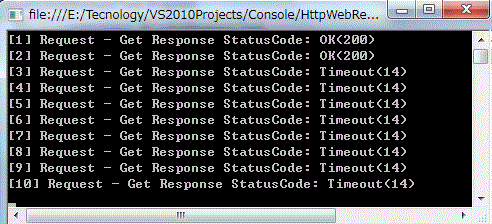
解决方法:上面的代码中加上 resp.Close(); 或者 webReq.Abort(); 就能解决。
2. 多线程中调用 HttpWebRequest 时,需要设置 ServicePointManager.DefaultConnectionLimit 数(默认连接数是 2)。
当多线程请求时,同时的连接数超过Limit时,GetResponse会抛出 Timeout WebException。
// 用多线程同时发出4个请求

WaitCallback methodTarget =  new  WaitCallback(TryGet);

ThreadPool.QueueUserWorkItem(methodTarget,  "https://login.live.com/" );

ThreadPool.QueueUserWorkItem(methodTarget,  "https://login.live.com/" );

ThreadPool.QueueUserWorkItem(methodTarget,  "https://login.live.com/" );

ThreadPool.QueueUserWorkItem(methodTarget,  "https://login.live.com/" );
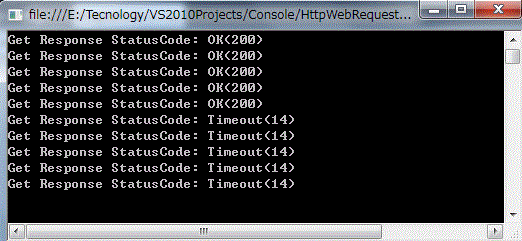
解决方法:在GetResponse()之前设置 ServicePointManager.DefaultConnectionLimit = 100;
3. 当请求一个基于SSL的服务时,默认的验证行为都在 ServicePointManager 定义:
ServicePointManager.CheckCertificateRevocationList = true;
如果请求的服务端证书没有第三方的认证支持,则请求会失败,如果要完全信任服务端证书,则可以将
CheckCertificateRevocationList 设为 false。
4. 可以在 <system.net> 配置节中配置 HttpWebRequest 的属性,包括 WebProxy
<system.net>

  <connectionManagement>

  </connectionManagement>

  <defaultProxy>

    <proxy proxyaddress= "http://xxx.xxx.xxx.xxx:xxx"  bypassonlocal= "False" />

  </defaultProxy>

  <settings>

      <httpWebRequest useUnsafeHeaderParsing= "true" />

      <servicePointManager checkCertificateName= "true"

                           checkCertificateRevocationList= "true"

                           enableDnsRoundRobin= "true"

                           expect100Continue= "true"

                           useNagleAlgorithm= "true" />

  </settings>

</system.net>
原文链接:https://www.cnblogs.com/1971ruru/archive/2012/04/11/2442589.html?tdsourcetag=s_pctim_aiomsg#
HttpWebRequest Timeout的更多相关文章
- HttpWebRequest的Timeout和ReadWriteTimeout
HttpWebRequest.Timeout在发起请求开始,如果未从远程请求的URL得到任何数据的情况下,超过Timeout后,触发超时异常 HttpWebRequest.ReadWriteTimeo ...
- HttpWebRequest的timeout和ReadWriteTimeout(转载)
公司[1]一牛人看我的代码,说我设置的timeout有误,还应该设置ReadWriteTimeout.本人很不服,于是上网查看了相关说明. HttpWebRequest httpWebRequest ...
- 通过WebClient/HttpWebRequest实现http的post/get方法
///<summary>/// 通过WebClient类Post数据到远程地址,需要Basic认证: /// 调用端自己处理异常 ///</summary>///<par ...
- C# post请求 HttpWebRequest
//body是要传递的参数,格式"roleId=1&uid=2" //post的cotentType填写: //"application/x-www-form-u ...
- HttpWebRequest和WebClient的区别
HttpWebRequest和WebClient的区别(From Linzheng): 1,HttpWebRequest是个抽象类,所以无法new的,需要调用HttpWebRequest.Creat ...
- HttpWebRequest 请求带OAuth2 授权的webapi
OAuth 2.0注意事项: 1. 获取access_token时,请使用POST private static string GetAuthorization(string username, st ...
- C#中HttpWebRequest的用法详解
原文链接:http://www.cnblogs.com/love201314/p/5029312.html 1.HttpWebRequest和HttpWebResponse类是用于发送和接收HTTP数 ...
- HttpWebRequest.ReadWriteTimeout 属性
获取或设置写入或读取流时的超时. 属性值在写入超时或读取超时之前的毫秒数.默认值为 300,000 毫秒(5 分钟). 备注 在写入由 GetRequestStream 方法返回的流时,或在读取由 G ...
- C#中HttpWebRequest的用法详解(转载)
1.HttpWebRequest和HttpWebResponse类是用于发送和接收HTTP数据的最好选择.2.命名空间:System.Net3.HttpWebRequest对象不是利用new关键字创建 ...
随机推荐
- c# ArrayList 类
- prometheus 告警规则
GitHub网址1 https://github.com/samber/awesome-prometheus-alerts 网址2 https://awesome-prometheus-alerts. ...
- PHP添加php-java-brideg模块(ubuntu环境)
1.下载php-java-bridge 下载地址:https://sourceforge.net/projects/php-java-bridge/files/Binary%20package/php ...
- yum 异常解决一例
http://mirrors.cloud.aliyuncs.com/centos/6/os/x86_64/repodata/repomd.xml: [Errno 14] PYCURL ERROR 22 ...
- java加密算法-DES
public class DESUtil { private static String strdefaultkey = "13456789abcd";//默认的key priva ...
- Linux 永久改变系统时间
Centos系统,必须同时修改系统时间和硬件时间,才可以保证修改有效,单纯的使用date命令修改系统时间,是立即生效,重启后系统还原.具体操作如下: 1.date {查看目前本地的时间}2.hwclo ...
- [Exception] java.util.MissingFormatArgumentException: Format specifier '%s'
java.util.MissingFormatArgumentException: Format specifier '%s' at java.util.Formatter.format(Format ...
- 《The One!团队》:BETA Scrum metting1
项目 内容 作业所属课程 所属课程 作业要求 作业要求 团队名称 < The One !> 作业学习目标 (1)掌握软件黑盒测试技术:(2)学会编制软件项目总结PPT.项目验收报告:(3) ...
- Maven安装及其IDEA的配置
相关内容网上很多,本文转载自csdn博主 击中我,https://blog.csdn.net/qq_36267611/article/details/85274885,内文略有修改. 一.下载安装前往 ...
- TP5.x——initialize()中如何return
前言 首先在tp框架中initialize中是无法直接通过return来返回任何值的,return并不会造成脚本的中断! 环境:PHP 7.0.4 | TP5.1 说明 initialize方法 首先 ...