
ZABBIX监控TCP连接状态
一、获取监控数据
# /bin/netstat -an|awk '/^tcp/{++S[$NF]}END{for(a in S) print a,S[a]}'

LISTEN

ESTABLISHED

TIME_WAIT
TCP各监控状态描述
ESTABLISHED       socket已经建立连接

CLOSED            socket没有被使用,无连接

CLOSING           服务器端和客户端都同时关闭连接

CLOSE_WAIT        等待关闭连接

TIME_WAIT         表示收到了对方的FIN报文,并发送出了ACK报文,等待2MSL后就可回到CLOSED状态

LAST_ACK          远端关闭,当前socket被动关闭后发送FIN报文,等待对方ACK报文

LISTEN            监听状态

SYN_RECV          接收到SYN报文

SYN_SENT          已经发送SYN报文

FIN_WAIT1         客户端调用close()关闭连接后,TCP发出FIN标记主动关闭连接,然后进入FIN_WAIT1状态,等待远程TCP连接中断或者确认

FIN_WAIT2         半关闭状态,主动关闭端(也就是客户端调用close()后)接收到ack确认后,此时进入FIN_WAIT2状态,该状态下,客户端应用程序依然能接收数据
二、监控脚本
# cat /etc/zabbix/tcp_conn_status.sh

#!/bin/bash

#this script is used to get tcp and udp connetion status

#tcp status

metric=$

tmp_file=/tmp/tcp_status.txt

/bin/netstat -an|awk '/^tcp/{++S[$NF]}END{for(a in S) print a,S[a]}' > $tmp_file

case $metric in

   closed)

          output=$(awk '/CLOSED/{print $2}' $tmp_file)

          if [ "$output" == "" ];then

             echo

          else

             echo $output

          fi

        ;;

   listen)

          output=$(awk '/LISTEN/{print $2}' $tmp_file)

          if [ "$output" == "" ];then

             echo

          else

             echo $output

          fi

        ;;

   synrecv)

          output=$(awk '/SYN_RECV/{print $2}' $tmp_file)

          if [ "$output" == "" ];then

             echo

          else

             echo $output

          fi

        ;;

   synsent)

          output=$(awk '/SYN_SENT/{print $2}' $tmp_file)

          if [ "$output" == "" ];then

             echo

          else

             echo $output

          fi

        ;;

   established)

          output=$(awk '/ESTABLISHED/{print $2}' $tmp_file)

          if [ "$output" == "" ];then

             echo

          else

             echo $output

          fi

        ;;

   timewait)

          output=$(awk '/TIME_WAIT/{print $2}' $tmp_file)

          if [ "$output" == "" ];then

             echo

          else

             echo $output

          fi

        ;;

   closing)

          output=$(awk '/CLOSING/{print $2}' $tmp_file)

          if [ "$output" == "" ];then

             echo

          else

             echo $output

          fi

        ;;

   closewait)

          output=$(awk '/CLOSE_WAIT/{print $2}' $tmp_file)

          if [ "$output" == "" ];then

             echo

          else

             echo $output

          fi

        ;;

   lastack)

          output=$(awk '/LAST_ACK/{print $2}' $tmp_file)

          if [ "$output" == "" ];then

             echo

          else

             echo $output

          fi

         ;;

   finwait1)

          output=$(awk '/FIN_WAIT1/{print $2}' $tmp_file)

          if [ "$output" == "" ];then

             echo

          else

             echo $output

          fi

         ;;

   finwait2)

          output=$(awk '/FIN_WAIT2/{print $2}' $tmp_file)

          if [ "$output" == "" ];then

             echo

          else

             echo $output

          fi

         ;;

         *)

          echo -e "\e[033mUsage: sh  $0 [closed|closing|closewait|synrecv|synsent|finwait1|finwait2|listen|established|lastack|timewait]\e[0m"

esac
三、修改zabbix_agentd.conf配置文件,并重启zabbix-agent服务
# cat /etc/zabbix/zabbix_agentd.conf

PidFile=/var/run/zabbix/zabbix_agentd.pid

LogFile=/var/log/zabbix/zabbix_agentd.log

LogFileSize=

Server=192.168.x.x

Hostname=192.168.x.x

Include=/etc/zabbix/zabbix_agentd.d/*.conf

UnsafeUserParameters=1

UserParameter=tcp.status[*],/etc/zabbix/tcp_conn_status.sh $1

# systemctl restart zabbix-agent

# 修改生成文件tc-_status.txt文件的权限
# chmod 777 /tmp/tcp_status.txt
四、在zabbix-master端进行测试,看看能否获取到数据
[root@zabbix-master ~]# zabbix_get -s 192.168.5.150 -p -k tcp.status[listen]
五、导入zabbix模板文件
文件名:tcp_export_templates.xml,内容如下 <?xml version="1.0" encoding="UTF-8"?>
<zabbix_export>
<version>2.0</version>
<date>--16T10::55Z</date>
<groups>
<group>
<name>Templates</name>
</group>
</groups>
<templates>
<template>
<template>Template TCP Connection Status</template>
<name>Template TCP Connection Status</name>
<groups>
<group>
<name>Templates</name>
</group>
</groups>
<applications>
<application>
<name>TCP Status</name>
</application>
</applications>
<items>
<item>
<name>CLOSED</name>
<type></type>
<snmp_community/>
<multiplier></multiplier>
<snmp_oid/>
<key>tcp.status[closed]</key>
<delay></delay>
<history></history>
<trends></trends>
<status></status>
<value_type></value_type>
<allowed_hosts/>
<units/>
<delta></delta>
<snmpv3_contextname/>
<snmpv3_securityname/>
<snmpv3_securitylevel></snmpv3_securitylevel>
<snmpv3_authprotocol></snmpv3_authprotocol>
<snmpv3_authpassphrase/>
<snmpv3_privprotocol></snmpv3_privprotocol>
<snmpv3_privpassphrase/>
<formula></formula>
<delay_flex/>
<params/>
<ipmi_sensor/>
<data_type></data_type>
<authtype></authtype>
<username/>
<password/>
<publickey/>
<privatekey/>
<port/>
<description/>
<inventory_link></inventory_link>
<applications>
<application>
<name>TCP Status</name>
</application>
</applications>
<valuemap/>
</item>
<item>
<name>CLOSE_WAIT</name>
<type></type>
<snmp_community/>
<multiplier></multiplier>
<snmp_oid/>
<key>tcp.status[closewait]</key>
<delay></delay>
<history></history>
<trends></trends>
<status></status>
<value_type></value_type>
<allowed_hosts/>
<units/>
<delta></delta>
<snmpv3_contextname/>
<snmpv3_securityname/>
<snmpv3_securitylevel></snmpv3_securitylevel>
<snmpv3_authprotocol></snmpv3_authprotocol>
<snmpv3_authpassphrase/>
<snmpv3_privprotocol></snmpv3_privprotocol>
<snmpv3_privpassphrase/>
<formula></formula>
<delay_flex/>
<params/>
<ipmi_sensor/>
<data_type></data_type>
<authtype></authtype>
<username/>
<password/>
<publickey/>
<privatekey/>
<port/>
<description/>
<inventory_link></inventory_link>
<applications>
<application>
<name>TCP Status</name>
</application>
</applications>
<valuemap/>
</item>
<item>
<name>CLOSING</name>
<type></type>
<snmp_community/>
<multiplier></multiplier>
<snmp_oid/>
<key>tcp.status[closing]</key>
<delay></delay>
<history></history>
<trends></trends>
<status></status>
<value_type></value_type>
<allowed_hosts/>
<units/>
<delta></delta>
<snmpv3_contextname/>
<snmpv3_securityname/>
<snmpv3_securitylevel></snmpv3_securitylevel>
<snmpv3_authprotocol></snmpv3_authprotocol>
<snmpv3_authpassphrase/>
<snmpv3_privprotocol></snmpv3_privprotocol>
<snmpv3_privpassphrase/>
<formula></formula>
<delay_flex/>
<params/>
<ipmi_sensor/>
<data_type></data_type>
<authtype></authtype>
<username/>
<password/>
<publickey/>
<privatekey/>
<port/>
<description/>
<inventory_link></inventory_link>
<applications>
<application>
<name>TCP Status</name>
</application>
</applications>
<valuemap/>
</item>
<item>
<name>ESTABLISHED</name>
<type></type>
<snmp_community/>
<multiplier></multiplier>
<snmp_oid/>
<key>tcp.status[established]</key>
<delay></delay>
<history></history>
<trends></trends>
<status></status>
<value_type></value_type>
<allowed_hosts/>
<units/>
<delta></delta>
<snmpv3_contextname/>
<snmpv3_securityname/>
<snmpv3_securitylevel></snmpv3_securitylevel>
<snmpv3_authprotocol></snmpv3_authprotocol>
<snmpv3_authpassphrase/>
<snmpv3_privprotocol></snmpv3_privprotocol>
<snmpv3_privpassphrase/>
<formula></formula>
<delay_flex/>
<params/>
<ipmi_sensor/>
<data_type></data_type>
<authtype></authtype>
<username/>
<password/>
<publickey/>
<privatekey/>
<port/>
<description/>
<inventory_link></inventory_link>
<applications>
<application>
<name>TCP Status</name>
</application>
</applications>
<valuemap/>
</item>
<item>
<name>FIN_WAIT1</name>
<type></type>
<snmp_community/>
<multiplier></multiplier>
<snmp_oid/>
<key>tcp.status[finwait1]</key>
<delay></delay>
<history></history>
<trends></trends>
<status></status>
<value_type></value_type>
<allowed_hosts/>
<units/>
<delta></delta>
<snmpv3_contextname/>
<snmpv3_securityname/>
<snmpv3_securitylevel></snmpv3_securitylevel>
<snmpv3_authprotocol></snmpv3_authprotocol>
<snmpv3_authpassphrase/>
<snmpv3_privprotocol></snmpv3_privprotocol>
<snmpv3_privpassphrase/>
<formula></formula>
<delay_flex/>
<params/>
<ipmi_sensor/>
<data_type></data_type>
<authtype></authtype>
<username/>
<password/>
<publickey/>
<privatekey/>
<port/>
<description/>
<inventory_link></inventory_link>
<applications>
<application>
<name>TCP Status</name>
</application>
</applications>
<valuemap/>
</item>
<item>
<name>FIN_WAIT2</name>
<type></type>
<snmp_community/>
<multiplier></multiplier>
<snmp_oid/>
<key>tcp.status[finwait2]</key>
<delay></delay>
<history></history>
<trends></trends>
<status></status>
<value_type></value_type>
<allowed_hosts/>
<units/>
<delta></delta>
<snmpv3_contextname/>
<snmpv3_securityname/>
<snmpv3_securitylevel></snmpv3_securitylevel>
<snmpv3_authprotocol></snmpv3_authprotocol>
<snmpv3_authpassphrase/>
<snmpv3_privprotocol></snmpv3_privprotocol>
<snmpv3_privpassphrase/>
<formula></formula>
<delay_flex/>
<params/>
<ipmi_sensor/>
<data_type></data_type>
<authtype></authtype>
<username/>
<password/>
<publickey/>
<privatekey/>
<port/>
<description/>
<inventory_link></inventory_link>
<applications>
<application>
<name>TCP Status</name>
</application>
</applications>
<valuemap/>
</item>
<item>
<name>LAST_ACK</name>
<type></type>
<snmp_community/>
<multiplier></multiplier>
<snmp_oid/>
<key>tcp.status[lastack]</key>
<delay></delay>
<history></history>
<trends></trends>
<status></status>
<value_type></value_type>
<allowed_hosts/>
<units/>
<delta></delta>
<snmpv3_contextname/>
<snmpv3_securityname/>
<snmpv3_securitylevel></snmpv3_securitylevel>
<snmpv3_authprotocol></snmpv3_authprotocol>
<snmpv3_authpassphrase/>
<snmpv3_privprotocol></snmpv3_privprotocol>
<snmpv3_privpassphrase/>
<formula></formula>
<delay_flex/>
<params/>
<ipmi_sensor/>
<data_type></data_type>
<authtype></authtype>
<username/>
<password/>
<publickey/>
<privatekey/>
<port/>
<description/>
<inventory_link></inventory_link>
<applications>
<application>
<name>TCP Status</name>
</application>
</applications>
<valuemap/>
</item>
<item>
<name>LISTEN</name>
<type></type>
<snmp_community/>
<multiplier></multiplier>
<snmp_oid/>
<key>tcp.status[listen]</key>
<delay></delay>
<history></history>
<trends></trends>
<status></status>
<value_type></value_type>
<allowed_hosts/>
<units/>
<delta></delta>
<snmpv3_contextname/>
<snmpv3_securityname/>
<snmpv3_securitylevel></snmpv3_securitylevel>
<snmpv3_authprotocol></snmpv3_authprotocol>
<snmpv3_authpassphrase/>
<snmpv3_privprotocol></snmpv3_privprotocol>
<snmpv3_privpassphrase/>
<formula></formula>
<delay_flex/>
<params/>
<ipmi_sensor/>
<data_type></data_type>
<authtype></authtype>
<username/>
<password/>
<publickey/>
<privatekey/>
<port/>
<description/>
<inventory_link></inventory_link>
<applications>
<application>
<name>TCP Status</name>
</application>
</applications>
<valuemap/>
</item>
<item>
<name>SYN_RECV</name>
<type></type>
<snmp_community/>
<multiplier></multiplier>
<snmp_oid/>
<key>tcp.status[synrecv]</key>
<delay></delay>
<history></history>
<trends></trends>
<status></status>
<value_type></value_type>
<allowed_hosts/>
<units/>
<delta></delta>
<snmpv3_contextname/>
<snmpv3_securityname/>
<snmpv3_securitylevel></snmpv3_securitylevel>
<snmpv3_authprotocol></snmpv3_authprotocol>
<snmpv3_authpassphrase/>
<snmpv3_privprotocol></snmpv3_privprotocol>
<snmpv3_privpassphrase/>
<formula></formula>
<delay_flex/>
<params/>
<ipmi_sensor/>
<data_type></data_type>
<authtype></authtype>
<username/>
<password/>
<publickey/>
<privatekey/>
<port/>
<description/>
<inventory_link></inventory_link>
<applications>
<application>
<name>TCP Status</name>
</application>
</applications>
<valuemap/>
</item>
<item>
<name>SYN_SENT</name>
<type></type>
<snmp_community/>
<multiplier></multiplier>
<snmp_oid/>
<key>tcp.status[synsent]</key>
<delay></delay>
<history></history>
<trends></trends>
<status></status>
<value_type></value_type>
<allowed_hosts/>
<units/>
<delta></delta>
<snmpv3_contextname/>
<snmpv3_securityname/>
<snmpv3_securitylevel></snmpv3_securitylevel>
<snmpv3_authprotocol></snmpv3_authprotocol>
<snmpv3_authpassphrase/>
<snmpv3_privprotocol></snmpv3_privprotocol>
<snmpv3_privpassphrase/>
<formula></formula>
<delay_flex/>
<params/>
<ipmi_sensor/>
<data_type></data_type>
<authtype></authtype>
<username/>
<password/>
<publickey/>
<privatekey/>
<port/>
<description/>
<inventory_link></inventory_link>
<applications>
<application>
<name>TCP Status</name>
</application>
</applications>
<valuemap/>
</item>
<item>
<name>TIME_WAIT</name>
<type></type>
<snmp_community/>
<multiplier></multiplier>
<snmp_oid/>
<key>tcp.status[timewait]</key>
<delay></delay>
<history></history>
<trends></trends>
<status></status>
<value_type></value_type>
<allowed_hosts/>
<units/>
<delta></delta>
<snmpv3_contextname/>
<snmpv3_securityname/>
<snmpv3_securitylevel></snmpv3_securitylevel>
<snmpv3_authprotocol></snmpv3_authprotocol>
<snmpv3_authpassphrase/>
<snmpv3_privprotocol></snmpv3_privprotocol>
<snmpv3_privpassphrase/>
<formula></formula>
<delay_flex/>
<params/>
<ipmi_sensor/>
<data_type></data_type>
<authtype></authtype>
<username/>
<password/>
<publickey/>
<privatekey/>
<port/>
<description/>
<inventory_link></inventory_link>
<applications>
<application>
<name>TCP Status</name>
</application>
</applications>
<valuemap/>
</item>
</items>
<discovery_rules/>
<macros/>
<templates/>
<screens/>
</template>
</templates>
<triggers>
<trigger>
<expression>{Template TCP Connection Status:tcp.status[timewait].last()}></expression>
<name>There are too many TCP TIME_WAIT status</name>
<url/>
<status></status>
<priority></priority>
<description/>
<type></type>
<dependencies/>
</trigger>
</triggers>
<graphs>
<graph>
<name>TCP Status</name>
<width></width>
<height></height>
<yaxismin>0.0000</yaxismin>
<yaxismax>100.0000</yaxismax>
<show_work_period></show_work_period>
<show_triggers></show_triggers>
<type></type>
<show_legend></show_legend>
<show_3d></show_3d>
<percent_left>0.0000</percent_left>
<percent_right>0.0000</percent_right>
<ymin_type_1></ymin_type_1>
<ymax_type_1></ymax_type_1>
<ymin_item_1></ymin_item_1>
<ymax_item_1></ymax_item_1>
<graph_items>
<graph_item>
<sortorder></sortorder>
<drawtype></drawtype>
<color>C80000</color>
<yaxisside></yaxisside>
<calc_fnc></calc_fnc>
<type></type>
<item>
<host>Template TCP Connection Status</host>
<key>tcp.status[closed]</key>
</item>
</graph_item>
<graph_item>
<sortorder></sortorder>
<drawtype></drawtype>
<color>00C800</color>
<yaxisside></yaxisside>
<calc_fnc></calc_fnc>
<type></type>
<item>
<host>Template TCP Connection Status</host>
<key>tcp.status[closewait]</key>
</item>
</graph_item>
<graph_item>
<sortorder></sortorder>
<drawtype></drawtype>
<color>0000C8</color>
<yaxisside></yaxisside>
<calc_fnc></calc_fnc>
<type></type>
<item>
<host>Template TCP Connection Status</host>
<key>tcp.status[closing]</key>
</item>
</graph_item>
<graph_item>
<sortorder></sortorder>
<drawtype></drawtype>
<color>C800C8</color>
<yaxisside></yaxisside>
<calc_fnc></calc_fnc>
<type></type>
<item>
<host>Template TCP Connection Status</host>
<key>tcp.status[established]</key>
</item>
</graph_item>
<graph_item>
<sortorder></sortorder>
<drawtype></drawtype>
<color>00C8C8</color>
<yaxisside></yaxisside>
<calc_fnc></calc_fnc>
<type></type>
<item>
<host>Template TCP Connection Status</host>
<key>tcp.status[finwait1]</key>
</item>
</graph_item>
<graph_item>
<sortorder></sortorder>
<drawtype></drawtype>
<color>C8C800</color>
<yaxisside></yaxisside>
<calc_fnc></calc_fnc>
<type></type>
<item>
<host>Template TCP Connection Status</host>
<key>tcp.status[finwait2]</key>
</item>
</graph_item>
<graph_item>
<sortorder></sortorder>
<drawtype></drawtype>
<color>C8C8C8</color>
<yaxisside></yaxisside>
<calc_fnc></calc_fnc>
<type></type>
<item>
<host>Template TCP Connection Status</host>
<key>tcp.status[lastack]</key>
</item>
</graph_item>
<graph_item>
<sortorder></sortorder>
<drawtype></drawtype>
<color></color>
<yaxisside></yaxisside>
<calc_fnc></calc_fnc>
<type></type>
<item>
<host>Template TCP Connection Status</host>
<key>tcp.status[listen]</key>
</item>
</graph_item>
<graph_item>
<sortorder></sortorder>
<drawtype></drawtype>
<color></color>
<yaxisside></yaxisside>
<calc_fnc></calc_fnc>
<type></type>
<item>
<host>Template TCP Connection Status</host>
<key>tcp.status[synrecv]</key>
</item>
</graph_item>
<graph_item>
<sortorder></sortorder>
<drawtype></drawtype>
<color></color>
<yaxisside></yaxisside>
<calc_fnc></calc_fnc>
<type></type>
<item>
<host>Template TCP Connection Status</host>
<key>tcp.status[synsent]</key>
</item>
</graph_item>
<graph_item>
<sortorder></sortorder>
<drawtype></drawtype>
<color></color>
<yaxisside></yaxisside>
<calc_fnc></calc_fnc>
<type></type>
<item>
<host>Template TCP Connection Status</host>
<key>tcp.status[timewait]</key>
</item>
</graph_item>
</graph_items>
</graph>
</graphs>
</zabbix_export>
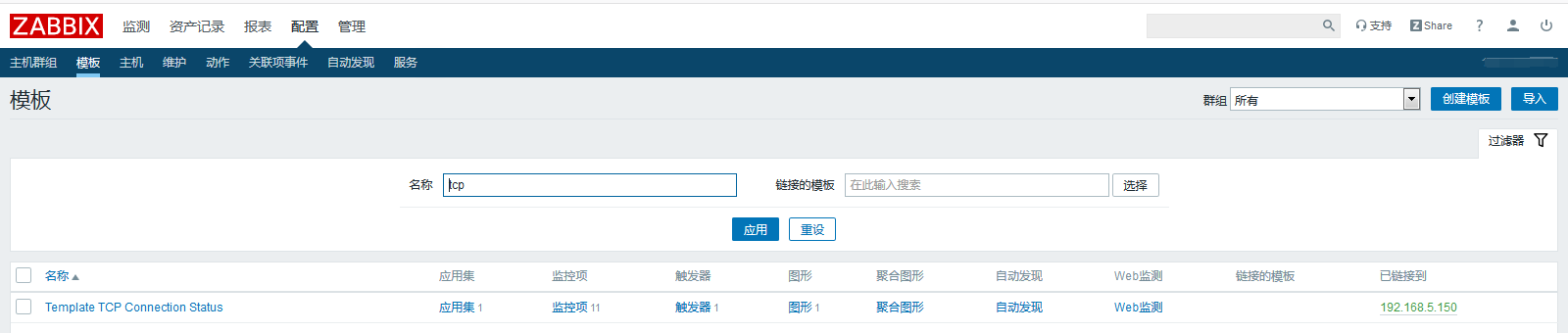
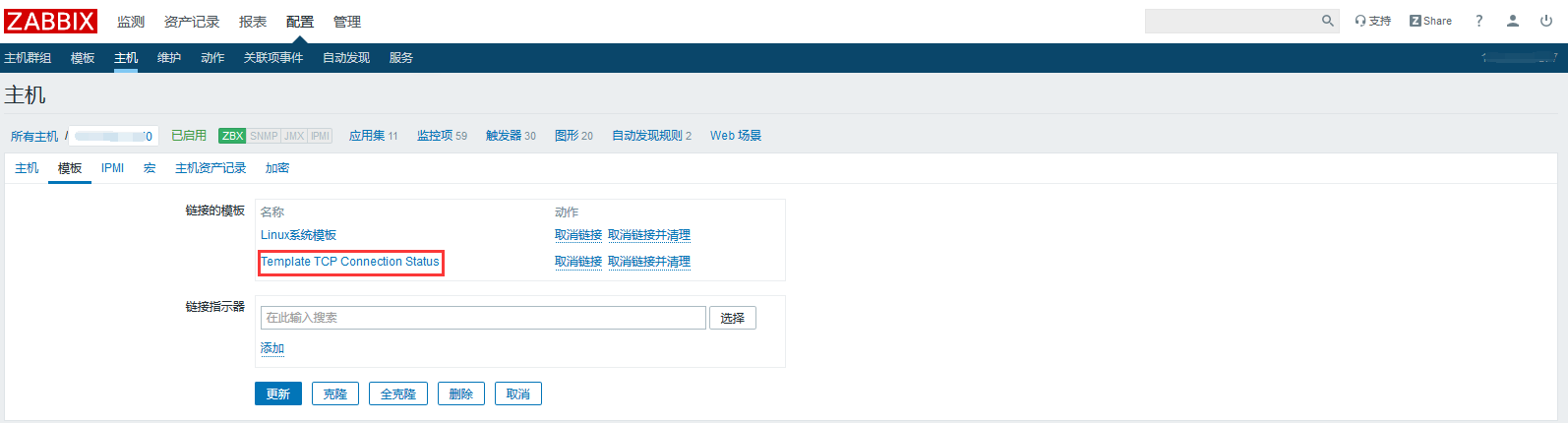
六、为主机添加此模板
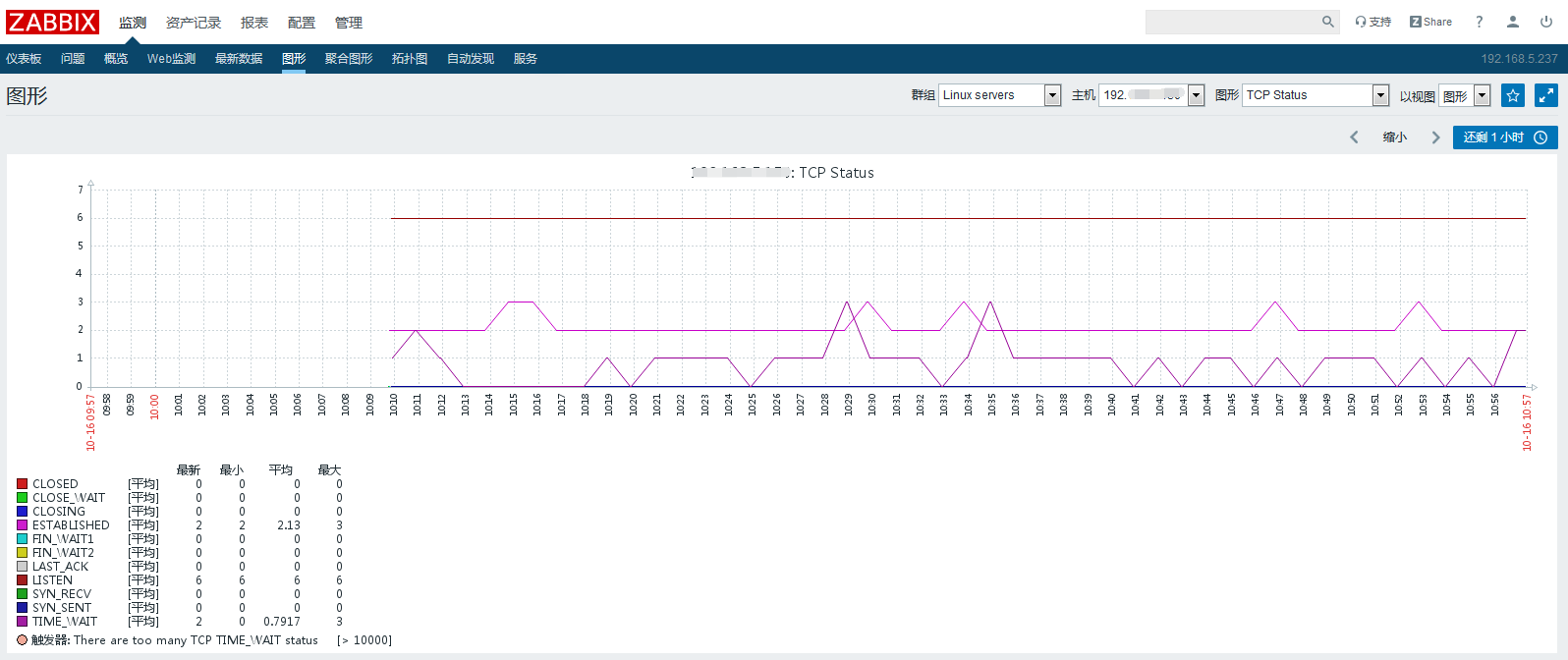
显示数据如下:
ZABBIX监控TCP连接状态的更多相关文章
- Zabbix设置自定义监控项之——监控tcp连接状态
目录 一.用户自定义参数 二.配置 监控 TCP 连接状态 在实际监控中,除了官方自带的一些监控项,我们很多时候有一些定制化监控,比如特定的服务.TCP 连接状态等等,这时候就需要自定义监控项.自定义 ...
- zabbix4.2配置监控TCP连接状态
1.使用命令查看TCP连接状态 (1)过去常用命令:netstat -antp [root@ansible-control zabbix]# netstat -antp Active Internet ...
- zabbix自定义模板——监控TCP连接状态
TCP十二种连接状态说明 可以使用man netstat查看 LISTEN - 侦听来自远方TCP端口的连接请求: SYN-SENT -在发送连接请求后等待匹配的连接请求: SYN-RECEIVED ...
- zabbix监控nginx连接状态(转)
zabbix监控nginx zabbix可以监控nginx的状态,关于一个服务的状态可以查看服务本身的状态(版本号.是否开启),还应该关注服务能力(例如以nginx的负载效果:连接数.请求数和句柄数) ...
- zabbix监控tcp连接并发数
第一步,想在zabbix的web监控tcp连接数,那么要看zabbix-server的版本和zabbix-agent版本是否一致,不然TCP-status图没有数据 也会报错.下图就是版本不符合报错的 ...
- zabbix监控 linux/windows 主机tcp连接状态
更新内容:1).增加了对windows主机的tcp连接状态的监控2).修改linux主机的监控配置,使linux与windwos主机能够使用相同的模板tcp的连接状态对于监控服务器,尤其是Web服务器 ...
- zabbix 监控TCP状态连接数
1.zabbix客户端,监控TCP状态脚本,并保存到的定路径.(/usr/local/zabbix-agent/shells) # cat zabbix_linux_plugin.sh #!/bin/ ...
- 查看 Apache并发请求数及其TCP连接状态
查看 Apache并发请求数及其TCP连接状态 (2011-06-27 15:08:36) 服务器上的一些统计数据: 1)统计80端口连接数 netstat -nat|grep -i "80 ...
- 查看 并发请求数及其TCP连接状态【转】
服务器上的一些统计数据: 1)统计80端口连接数netstat -nat|grep -i "80"|wc -l 2)统计httpd协议连接数ps -ef|grep httpd|wc ...
随机推荐
- [LeetCode] 465. Optimal Account Balancing 最优账户平衡
A group of friends went on holiday and sometimes lent each other money. For example, Alice paid for ...
- [LeetCode] 32. Longest Valid Parentheses 最长有效括号
Given a string containing just the characters '(' and ')', find the length of the longest valid (wel ...
- SpringBoot-dubbo自定义负载均衡实现简单灰度
本文介绍如何利用dubbo自定义负载实现简单灰度(用户纬度,部分用户访问一个服务,其余访问剩余服务). 其实在这之前,对dubbo了解的也不是很多,只是简单的使用过,跑了几个demo而已,但是得知接下 ...
- oracle--18C操作指南(一)
一,安装清单 用户环境配置 查看Oracle Inventory(oraInventory)和OINSTALL组要求 您指定为Oracle Inventory目录的物理组是系统上安装的Oracle软件 ...
- oracle 错误 ORA-00020问题解析
问题描述 [oracle@xiaowu ~]$ sqlplus / as sysdba SQL*Plus: Release Production on Wed Oct :: Copyright (c) ...
- GreenPlum 大数据平台--增加segment
01,增加机器的配置 需要增加的机器安装greenplum 软件(操作见greenplum安装部署章节) 02,分配机器存储区域 03,配置互信 使用gpssh-exkeys确保Segment主机能通 ...
- GreenPlum 大数据平台--常用命令
gpstate 命令 参数 作用 gpstate -b => 显示简要状态 gpstate -c => 显示主镜像映射 gpstart -d => 指定数据目录(默认值:$MASTE ...
- 企业级Nginx负载均衡与keepalived高可用实战(一)Nginx篇
1.集群简介 1.1.什么是集群 简单地说,集群就是指一组(若干个)相互独立的计算机,利用高速通信网络组成的一个较大的计算机服务系统,每个集群节点(即集群中的每台计算机)都是运行各自服务的独立服务器. ...
- 推荐一款万年历App 诸葛万年历
推荐一款万年历App 诸葛万年历 1 介绍 应用简介: 提供标准和专业的时间信息查询,记录和承载生活中的美好记忆,帮助用户高效快捷的管理个人时间.精美的日期展示和完善的重要事件提醒功能,可以方便安排日 ...
- jar解压后重新打包
因为一些原因修改了jar中的配置文件,但用WinRAR压缩成zip文件后该后缀名为jar,发现重新压缩的文件不可用,所有这些情况下我们必须用jar重新打包. 配置Java环境,让jar命令可用: ja ...