
04 .NET CORE 2.2 使用OCELOT -- identity认证授权
修改接口项目
在上次的项目基础上,分别修改两个api项目的startup.cs
 public void ConfigureServices(IServiceCollection services)

        {

            var audienceConfig = Configuration.GetSection("Audience");

            var signingKey = new SymmetricSecurityKey(Encoding.ASCII.GetBytes(audienceConfig["Secret"]));

            var tokenValidationParameters = new TokenValidationParameters

            {

                ValidateIssuerSigningKey = true,

                IssuerSigningKey = signingKey,

                ValidateIssuer = true,

                ValidIssuer = audienceConfig["Iss"],

                ValidateAudience = true,

                ValidAudience = audienceConfig["Aud"],

                ValidateLifetime = true,

                ClockSkew = TimeSpan.Zero,

                RequireExpirationTime = true,

            };

            services.AddAuthentication(o =>

                {

                    o.DefaultAuthenticateScheme = "TestKey";

                })

                .AddJwtBearer("TestKey", x =>

                {

                    x.RequireHttpsMetadata = false;

                    x.TokenValidationParameters = tokenValidationParameters;

                });

            //services.AddConsulConfig(Configuration);

            services.AddMvc().SetCompatibilityVersion(CompatibilityVersion.Version_2_2);

        }
修改配置文件
{

  "Logging": {

    "LogLevel": {

      "Default": "Warning"

    }

  },

  "AllowedHosts": "*",

  //"Consul": {

  //  "Host": "http://192.168.2.29:8500"

  //},

  "Service": {

    "Name": "ApiService",

    "IP": "192.168.2.16",

    "Port": ""

  },

  "Consul": {

    "IP": "192.168.2.29",

    "Port": ""

  },

  "Audience": {

    "Secret": "Y2F0Y2hlciUyMHdvbmclMjBsb3ZlJTIwLm5ldA==",

    "Iss": "http://www.c-sharpcorner.com/members/catcher-wong",

    "Aud": "Catcher Wong"

  }

}
在接口的action中加入[Authorize]属性
[Authorize]

        [HttpGet]

        public string Count()

        {

            return $"Count {++_count} from ApiServices1";

        }
加入Identity
新建webapi项目 。将authapi项目也加入到consul中。所以要新建health控制器,新建一个授权控制器,修改startup.cs
using System;

using System.Collections.Generic;

using System.Linq;

using System.Threading.Tasks;

using Microsoft.AspNetCore.Http;

using Microsoft.AspNetCore.Mvc;

namespace Test.WebApi.AuthServer.Controllers

{

    [Produces("application/json")]

    [Route("api/[controller]")]

    [ApiController]

    public class HealthController : ControllerBase

    {

        [HttpGet]

        public IActionResult Get() => Ok("ok");

    }

}
using System;

using System.Collections.Generic;

using System.IdentityModel.Tokens.Jwt;

using System.Linq;

using System.Security.Claims;

using System.Text;

using System.Threading.Tasks;

using Microsoft.AspNetCore.Http;

using Microsoft.AspNetCore.Mvc;

using Microsoft.Extensions.Options;

using Microsoft.IdentityModel.Tokens;

namespace Test.WebApi.AuthServer.Controllers

{

    [Route("authapi/[controller]")]

    [ApiController]

    public class AuthController : ControllerBase

    {

        private IOptions<Audience> _settings;

        public AuthController(IOptions<Audience> settings)

        {

            this._settings = settings;

        }

        [HttpGet]

        public ActionResult Get(string name, string pwd)

        {

            //just hard code here.

            if (name == "catcher" && pwd == "")

            {

                var now = DateTime.UtcNow;

                var claims = new Claim[]

                {

                    new Claim(JwtRegisteredClaimNames.Sub, name),

                    new Claim(JwtRegisteredClaimNames.Jti, Guid.NewGuid().ToString()),

                    new Claim(JwtRegisteredClaimNames.Iat, now.ToUniversalTime().ToString(), ClaimValueTypes.Integer64)

                };

                var signingKey = new SymmetricSecurityKey(Encoding.ASCII.GetBytes(_settings.Value.Secret));

                var tokenValidationParameters = new TokenValidationParameters

                {

                    ValidateIssuerSigningKey = true,

                    IssuerSigningKey = signingKey,

                    ValidateIssuer = true,

                    ValidIssuer = _settings.Value.Iss,

                    ValidateAudience = true,

                    ValidAudience = _settings.Value.Aud,

                    ValidateLifetime = true,

                    ClockSkew = TimeSpan.Zero,

                    RequireExpirationTime = true,

                };

                var jwt = new JwtSecurityToken(

                    issuer: _settings.Value.Iss,

                    audience: _settings.Value.Aud,

                    claims: claims,

                    notBefore: now,

                    expires: now.Add(TimeSpan.FromMinutes()),

                    signingCredentials: new SigningCredentials(signingKey, SecurityAlgorithms.HmacSha256)

                );

                var encodedJwt = new JwtSecurityTokenHandler().WriteToken(jwt);

                var responseJson = new

                {

                    access_token = encodedJwt,

                    expires_in = (int)TimeSpan.FromMinutes().TotalSeconds

                };

                return new JsonResult(responseJson);

            }

            else

            {

                return new JsonResult("");

            }

        }

    }

    public class Audience

    {

        public string Secret { get; set; }

        public string Iss { get; set; }

        public string Aud { get; set; }

    }

}
修改 startup.cs
  // This method gets called by the runtime. Use this method to add services to the container.

        public void ConfigureServices(IServiceCollection services)

        {

            services.AddMvc().SetCompatibilityVersion(CompatibilityVersion.Version_2_2);

            services.AddOptions();

            services.Configure<Controllers.Audience>(Configuration.GetSection("Audience"));

        }

        // This method gets called by the runtime. Use this method to configure the HTTP request pipeline.

        public void Configure(IApplicationBuilder app, IHostingEnvironment env, IApplicationLifetime lifetime)

        {

            if (env.IsDevelopment())

            {

                app.UseDeveloperExceptionPage();

            }

            else

            {

                // The default HSTS value is 30 days. You may want to change this for production scenarios, see https://aka.ms/aspnetcore-hsts.

                app.UseHsts();

            }

            ConsulService consulService = new ConsulService()

            {

                IP = Configuration["Consul:IP"],

                Port = Convert.ToInt32(Configuration["Consul:Port"])

            };

            HealthService healthService = new HealthService()

            {

                IP = Configuration["Service:IP"],

                Port = Convert.ToInt32(Configuration["Service:Port"]),

                Name = Configuration["Service:Name"],

            };

            app.RegisterConsul(lifetime, healthService, consulService);

            app.UseHttpsRedirection();

            app.UseMvc();

        }
配置文件
{

  "Logging": {

    "LogLevel": {

      "Default": "Warning"

    }

  },

  "AllowedHosts": "*",

  "Service": {

    "Name": "AuthService",

    "IP": "192.168.2.16",

    "Port": ""

  },

  "Consul": {

    "IP": "192.168.2.29",

    "Port": ""

  },

  "Audience": {

    "Secret": "Y2F0Y2hlciUyMHdvbmclMjBsb3ZlJTIwLm5ldA==",

    "Iss": "http://www.c-sharpcorner.com/members/catcher-wong",

    "Aud": "Catcher Wong"

  }

}
发布后,部署到IIS中,端口9003
参考链接:
https://www.cnblogs.com/xlxr45/p/11321134.html
修改网关项目
配置文件configuration.json
{

  "ReRoutes": [

    {

      "UseServiceDiscovery": true,

      "DownstreamPathTemplate": "/api/{url}",

      "DownstreamScheme": "http",

      "ServiceName": "ApiService",

      "LoadBalancerOptions": {

        "Type": "RoundRobin"

      },

      "UpstreamPathTemplate": "/api/{url}",

      "UpstreamHttpMethod": [ "Get" ],

      "ReRoutesCaseSensitive": false

    },

    {

      "UseServiceDiscovery": true,

      "DownstreamPathTemplate": "/authapi/{url}",

      "DownstreamScheme": "http",

      "ServiceName": "AuthService",

      "LoadBalancerOptions": {

        "Type": "RoundRobin"

      },

      "UpstreamPathTemplate": "/authapi/{url}",

      "UpstreamHttpMethod": [ "Get" ],

      "ReRoutesCaseSensitive": false

    }

  ],

  "GlobalConfiguration": {

    "ServiceDiscoveryProvider": {

      "Host": "192.168.2.29",

      "Port": ,

      "Type": "PollConsul",

      "PollingInterval":

    }

  }

}
运行效果
新建一个cmd项目,测试下
class Program

    {

        static void Main(string[] args)

        {

            HttpClient client = new HttpClient();

            client.DefaultRequestHeaders.Clear();

            client.BaseAddress = new Uri("http://localhost:9000");

            // 1. without access_token will not access the service

            //    and return 401 .

            var resWithoutToken = client.GetAsync("/api/Counter/Count").Result;

            Console.WriteLine($"Sending Request to /api/Counter/Count , without token.");

            Console.WriteLine($"Result : {resWithoutToken.StatusCode}");

            //2. with access_token will access the service

            //   and return result.

            client.DefaultRequestHeaders.Clear();

            Console.WriteLine("\nBegin Auth....");

            var jwt = GetJwt();

            Console.WriteLine("End Auth....");

            Console.WriteLine($"\nToken={jwt}");

            client.DefaultRequestHeaders.Add("Authorization", $"Bearer {jwt}");

            var resWithToken = client.GetAsync("/api/Counter/Count").Result;

            Console.WriteLine($"\nSend Request to /api/Counter/Count , with token.");

            Console.WriteLine($"Result : {resWithToken.StatusCode}");

            Console.WriteLine(resWithToken.Content.ReadAsStringAsync().Result);

            //3. visit no auth service

            Console.WriteLine("\nNo Auth Service Here ");

            client.DefaultRequestHeaders.Clear();

            var res = client.GetAsync("/api/Counter/Count").Result;

            Console.WriteLine($"Send Request to /api/Counter/Count");

            Console.WriteLine($"Result : {res.StatusCode}");

            Console.WriteLine(res.Content.ReadAsStringAsync().Result);

            Console.Read();

        }

        private static string GetJwt()

        {

            HttpClient client = new HttpClient();

            client.BaseAddress = new Uri( "http://localhost:9000");

            client.DefaultRequestHeaders.Clear();

            var res2 = client.GetAsync("/authapi/auth?name=catcher&pwd=123").Result;

            dynamic jwt = JsonConvert.DeserializeObject(res2.Content.ReadAsStringAsync().Result);

            return jwt.access_token;

        }

    }

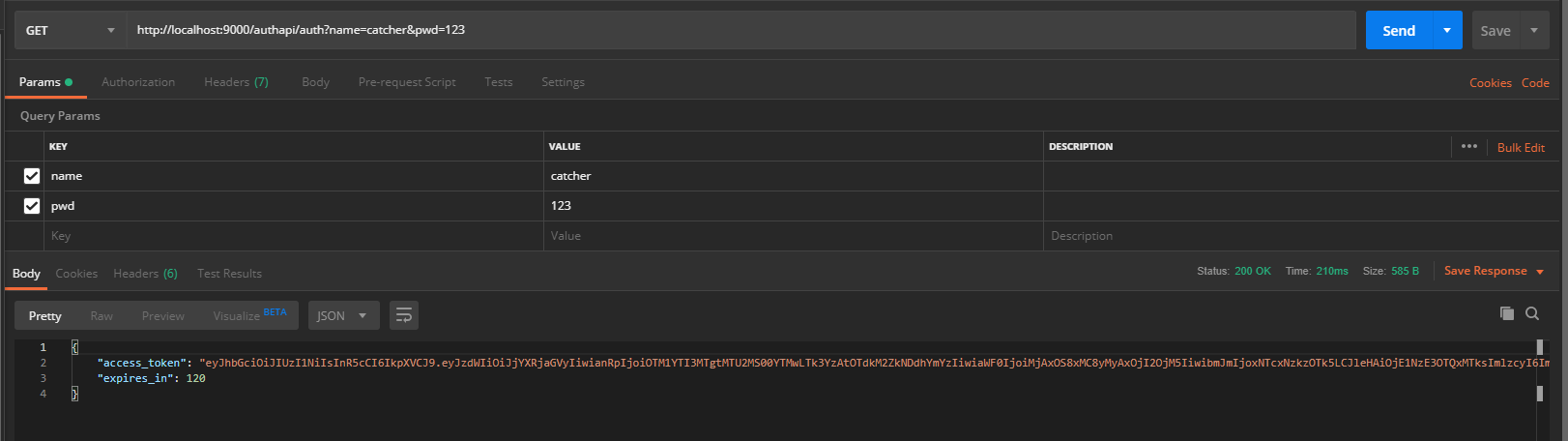
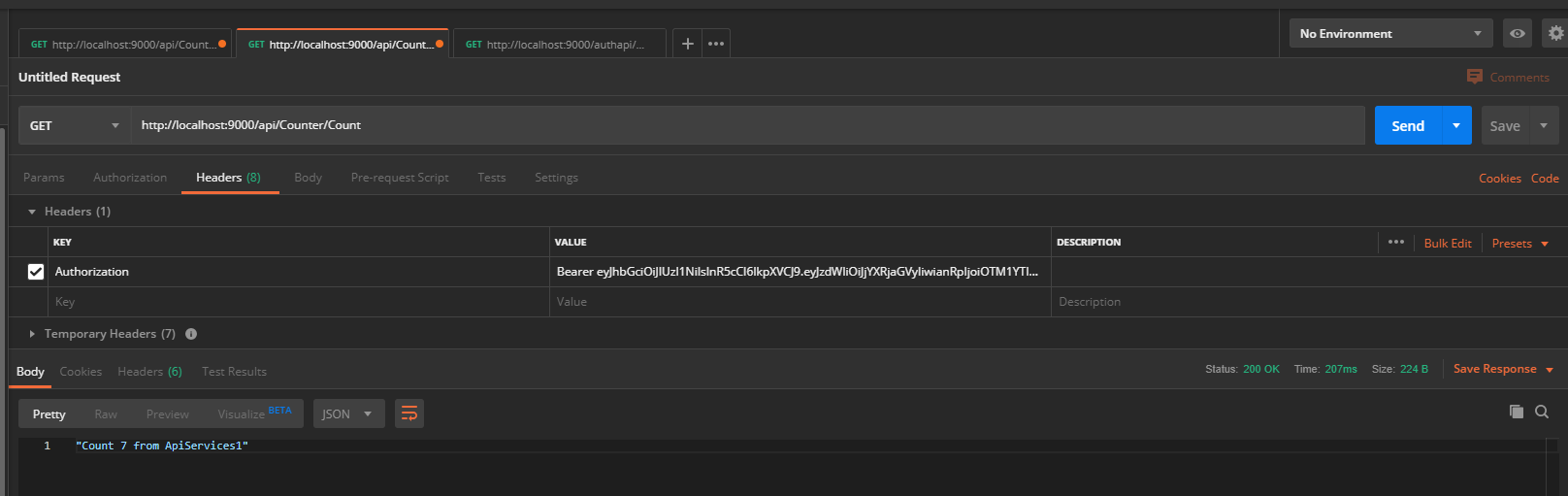
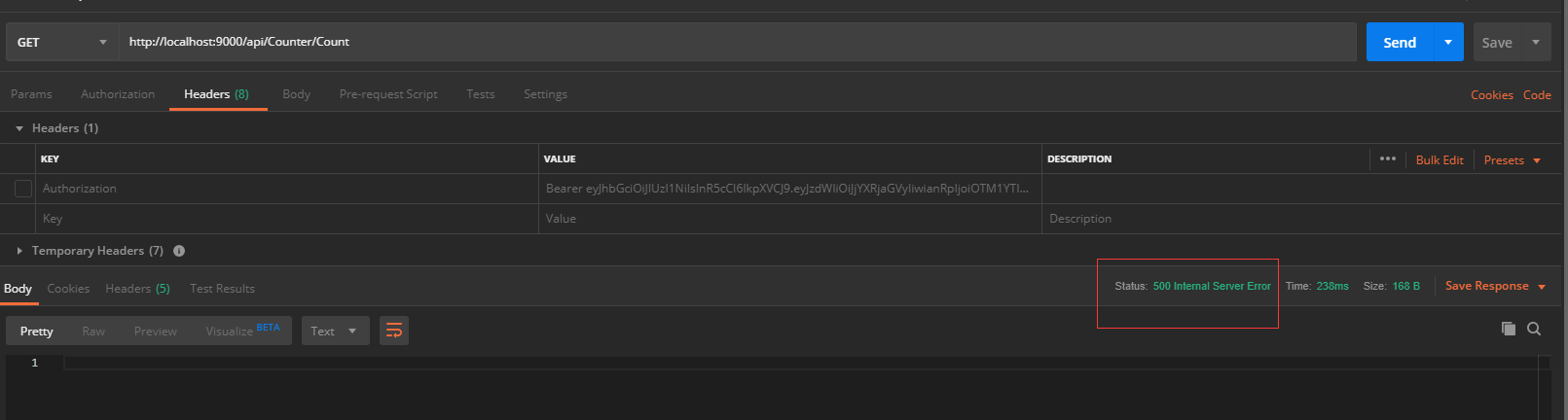
postman测试下。
先获取access_token
将access_token放到header中
如果不加入header中,则会报500错误
04 .NET CORE 2.2 使用OCELOT -- identity认证授权的更多相关文章
- (10)学习笔记 ) ASP.NET CORE微服务 Micro-Service ---- Ocelot+Identity Server
用 JWT 机制实现验证的原理如下图: 认证服务器负责颁发 Token(相当于 JWT 值)和校验 Token 的合法性. 一. 相关概念 API 资源(API Resource):微博服务器接口. ...
- ocelot 自定义认证和授权
ocelot 自定义认证和授权 Intro 最近又重新启动了网关项目,服务越来越多,每个服务都有一个地址,这无论是对于前端还是后端开发调试都是比较麻烦的,前端需要定义很多 baseUrl,而后端需要没 ...
- .net core gRPC与IdentityServer4集成认证授权
前言 随着.net core3.0的正式发布,gRPC服务被集成到了VS2019.本文主要演示如何对gRPC的服务进行认证授权. 分析 目前.net core使用最广的认证授权组件是基于OAuth2. ...
- .net core使用Ocelot+Identity Server统一网关验证
源码下载地址:下载 项目结构如下图: 在Identity Server授权中,实现IResourceOwnerPasswordValidator接口: public class IdentityVal ...
- asp.net core网关Ocelot的简单介绍& Ocelot集成Identity认证
文章简介 Ocelot网关简介 Ocelot集成Idnetity认证处理 Ocelot网关简介 Ocelot是一个基于netcore实现的API网关,本质是一组按特定顺序排列的中间件.Ocelot内 ...
- (8)学习笔记 ) ASP.NET CORE微服务 Micro-Service ---- Ocelot网关(Api GateWay)
说到现在现有微服务的几点不足: 1) 对于在微服务体系中.和 Consul 通讯的微服务来讲,使用服务名即可访问.但是对于手 机.web 端等外部访问者仍然需要和 N 多服务器交互,需要记忆他们的服务 ...
- ASP.NET Core Web API 索引 (更新Identity Server 4 视频教程)
GraphQL 使用ASP.NET Core开发GraphQL服务器 -- 预备知识(上) 使用ASP.NET Core开发GraphQL服务器 -- 预备知识(下) [视频] 使用ASP.NET C ...
- ASP.NET Core 2.1 Web API + Identity Server 4 + Angular 6 + Angular Material 实战小项目视频
视频简介 ASP.NET Core Web API + Angular 6的教学视频 我是后端开发人员, 前端的Angular部分讲的比较差一些, 可以直接看代码!!!! 这是一个小项目的实战视频, ...
- net core 2.0 web api + Identity Server 4 + angular 5
net core 2.0 web api + Identity Server 4 + angular 5前台使用angular 5, 后台是asp.net core 2.0 web api + ide ...
随机推荐
- [20190505]ts 命令在哪里.txt
[20190505]ts 命令在哪里.txt --//在论坛问一下ts命令在哪里?没人解答,自己也google看了一下:https://unix.stackexchange.com/questions ...
- [TCP/IP] TCP关闭连接为什么四次挥手
1.建立连接的时候, 服务器在LISTEN状态下,收到建立连接请求的SYN报文后,把ACK和SYN放在一个报文里发送给客户端. 2.而关闭连接时,服务器收到对方的FIN报文时,仅仅表示对方不再发送数据 ...
- Redis 3.2.x版本 redis.conf 的配置文件参数详解
[root@web01 blog]# egrep -v"#|^$" /application/redis/conf/6379.conf bind127.0.0.1 #绑定的主机地址 ...
- 从Sources构建nginx,编译安装nginx
从Sources构建nginx 使用configure命令配置构建,定义了系统的各个方面,包括允许nginx用于连接处理的方法,最后创建了一个Makefile. configure命令参数: --he ...
- APP自动化环境配置
做自动化很多人都不喜欢做app自动化,说实话,我也不喜欢做app自动化,但是没办法,老板给你钱,让你做,不得不做! 其实app自动化的难点就在于环境,环境OK了之后一切都和web自动化差不多,顶多就是 ...
- 如何下载Youtube的4K视频?这里有4款软件, 哪个适合你?
数字电影的最新分辨率标准是4k,4K分辨率的视频具有高图像清晰度质量.更好的快速动作.更大的投影表面可见度和更详细的图像质量等优点,受到了广大视频爱好者的好评.作为当前最火热的视频分享网站,YouTu ...
- VC 静态库与动态库(二)静态库创建与使用
1.新建项目,创建项目和解决方案 StaticLibrary 这是静态库项目 G:\C++Learn\Library Library文件夹用于存放库相关文件,包含静态库与后面的动态库工程和解决方案 ...
- 不使用已下载的package pip 安装 & 出现time out error
pip install XX + --no-cache-dir 安装出现time out error时: pip --default-timeout=10000 install XX
- js常用方法总结(以后遇到再进一步总结)
1.index() 返回指定元素相对于其他指定元素的 index 位置. <h1>店铺评价</h1> <div class="star starcd&qu ...
- CSS中@support的用法 及其calc、media用法
背景: 一次偶然的机会遇到一个朋友在刷css的库其中有这样一道题(css变量如何定义,calc, support, media),我看一眼熟悉而陌生,知其一而不知其二,叔可忍婶不可忍,马上就度娘起来, ...