
The difference between Virtual DOM and DOM
dom是结构化的文本信息的抽象,是结构化的文本信息在内存中的表示
是操作结构化文本信息的api。
React attacks us with the virtual DOM right away, on the main page. This feature seems to be very important!
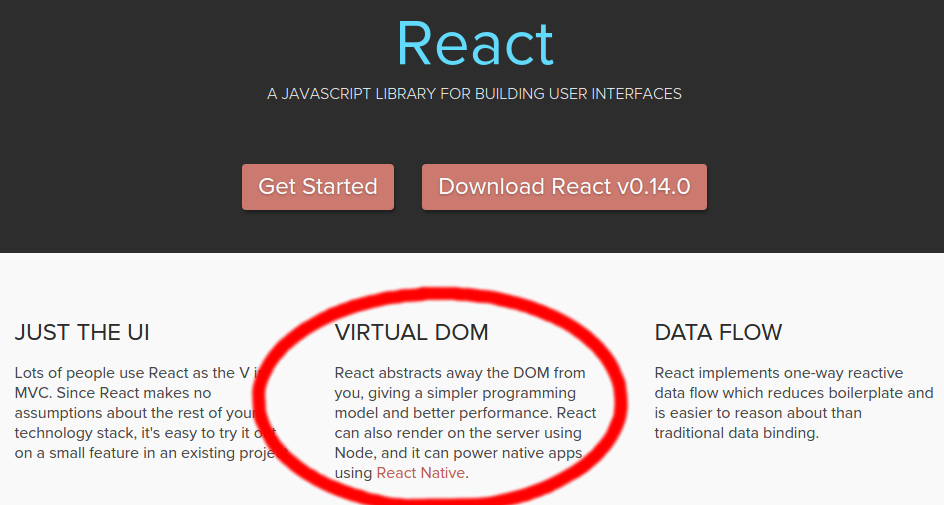
But what does “virtual DOM” mean exactly?
DOM
Just to get things straight - DOM stands for Document Object Model and is an abstraction of a structured text. For web developers, this text is an HTML code, and the DOM is simply called HTML DOM. Elements of HTML become nodes in the DOM.
So, while HTML is a text, the DOM is an in-memory representation of this text.
Compare it to a process being an instance of a program. You can have multiple processes of the same one program, just like you can have multiple DOMs of the same HTML (e.g. the same page loaded on many tabs).
The HTML DOM provides an interface (API) to traverse and modify the nodes. It contains methods like getElementById or removeChild. We usually use JavaScript language to work with the DOM, because… Well, nobody knows why :).
So, whenever we want to dynamicly change the content of the web page, we modify the DOM:
var item = document.getElementById("myLI");

item.parentNode.removeChild(item);
document is an abstraction of the root node, while getElementById, parentNode and removeChild are methods from HTML DOM API.
Issues
The HTML DOM is always tree-structured - which is allowed by the structure of HTML document. This is cool because we can traverse trees fairly easily. Unfortunately, easily doesn’t mean quickly here.
The DOM trees are huge nowadays. Since we are more and more pushed towards dynamic web apps (Single Page Applications - SPAs), we need to modify the DOM tree incessantly and a lot. And this is a real performance and development pain.
BTW. I myself managed to create a web page with a source of 5GB+. It wasn’t even that hard.
Consider a DOM made of thousands of divs. Remember, we are modern web developers, our app is very SPA! We have lots of methods that handle events - clicks, submits, type-ins… A typical jQuery-like event handler looks like this:
- find every node interested on an event
- update it if necessary
Which has two problems:
It’s hard to manage. Imagine that you have to tweak an event handler. If you lost the context, you have to dive really deep into the code to even know what’s going on. Both time-consuming and bug-risky.
It’s inefficient. Do we really need to do all this findings manually? Maybe we can be smarter and tell in advance which nodes are to-be-updated?
Once again, React comes with a helping hand. The solution to problem 1 is declarativeness. Instead of low-level techniques like traversing the DOM tree manually, you simple declare how a component should look like. React does the low-level job for you - the HTML DOM API methods are called under the hood. React doesn’t want you to worry about it - eventually, the component will look like it should.
But this doesn’t solve the performance issue. And this is exactly where the Virtual DOM comes into action.
Virtual DOM
First of all - the Virtual DOM was not invented by React, but React uses it and provides it for free.
The Virtual DOM is an abstraction of the HTML DOM. It is lightweight and detached from the browser-specific implementation details. Since the DOM itself was already an abstraction, the virtual DOM is, in fact, an abstraction of an abstraction.

Perhaps it’s better to think of the virtual DOM as React’s local and simplified copy of the HTML DOM. It allows React to do its computations within this abstract world and skip the “real” DOM operations, often slow and browser-specific.
There’s no big difference between the “regular” DOM and the virtual DOM. This is why the JSX parts of the React code can look almost like pure HTML:
var CommentBox = React.createClass({

  render: function() {

    return (

      <div className="commentBox">

        Hello, world! I am a CommentBox.

      </div>

    );

  }

});
In most cases, when you have an HTML code and you want to make it a static React component, all you have to do is:
- Return the HTML code in
render - Replace
classattribute name toclassName- becauseclassis a reserved word in JavaScript.
There are more, rather minor, differences between the DOMs:
- Three attributes of the virtual DOM that don’t appear in “real” DOM -
key,refanddangerouslySetInnerHTML. See more. - React-ish virtual DOM introduced a few more constraints.
ReactElement vs ReactComponent
When talking about the virtual DOM, it’s important to see the difference between these two.
ReactElement
This is the primary type in React. React docs say:
A
ReactElementis a light, stateless, immutable, virtual representation of a DOM Element.
ReactElements lives in the virtual DOM. They make the basic nodes here. Their immutability makes them easy and fast to compare and update. This is the reason of great React performance.
What can be a ReactElement? Almost every HTML tag - div, table, strong… If you wish, see the whole list.
Once defined, ReactElements can be render into the “real” DOM. This is the moment when React ceases to control the elements. They become slow, boring DOM nodes:
var root = React.createElement('div');

ReactDOM.render(root, document.getElementById('example'));

// If you are surprised by the fact that `render`

// comes from `ReactDOM` package, see the Post Scriptum.
JSX compiles HTML tags to ReactElements. So this is equivalent to the above:
var root = <div />;

ReactDOM.render(root, document.getElementById('example'));
Once again - ReactElements are the basic items in React-ish virtual DOM. However, they are stateless, therefore don’t seem to be very helpful for us, the programmers. We would rather work on the class-like pieces of HTML, with kind-of-variables and kind-of-constants - don’t we? And here we come to…
ReactComponent
What differs ReactComponent from ReactElement is - ReactComponents are stateful.
We usually use React.createClass method to define one:
var CommentBox = React.createClass({

  render: function() {

    return (

      <div className="commentBox">

        Hello, world! I am a CommentBox.

      </div>

    );

  }

});
Your HTML-like blocks returned from render method can have a state. And the best thing is (I bet you already know it, this is why React is so cool!) - whenever the state changes, the component is rerendered:
var Timer = React.createClass({

  getInitialState: function() {

    return {secondsElapsed: 0};

  },

  tick: function() {

    this.setState({secondsElapsed: this.state.secondsElapsed + 1});

  },

  componentDidMount: function() {

    this.interval = setInterval(this.tick, 1000);

  },

  componentWillUnmount: function() {

    clearInterval(this.interval);

  },

  render: function() {

    return (

      <div>Seconds Elapsed: {this.state.secondsElapsed}</div>

    );

  }

});
ReactComponents turned out to be a great tool for designing dynamic HTML. They don’t have the access to the virtual DOM, but they can be easily converted to ReactElements:
var element = React.createElement(MyComponent);

// or equivalently, with JSX

var element = <MyComponent />;
What makes the difference?
ReactComponents are great, we would love to have plenty of them since they are easy to manage. But they have no access to the virtual DOM - and we would like to do as much as possible there.
Whenever a ReactComponent is changing the state, we want to make as little changes to the “real” DOM as possible. So this is how React deals with it. The ReactComponent is converted to the ReactElement. Now the ReactElement can be inserted to the virtual DOM, compared and updated fast and easily. How exactly - well, that’s the job of the diff algorithm. The point is - it’s done faster than it would be in the “regular” DOM.
When React knows the diff - it’s converted to the low-level (HTML DOM) code, which is executed in the DOM. This code is optimised per browser.
Summary
Is virtual DOM really the feature to boast on the main page? I would say so. In practise, React performance is absolutely high, and the virtual DOM is surely very helpful here.
PS. In case you didn’t notice - since the last week, when React 0.14 was released, the DOM-related parts of React were extracted from the react package. Now there is a separate package react-dom. You can read more in the newest changelog.
https://reactkungfu.com/2015/10/the-difference-between-virtual-dom-and-dom/
The difference between Virtual DOM and DOM的更多相关文章
- React v16-alpha 从virtual dom 到 dom 源码简读
一.物料准备 1.克隆react源码, github 地址:https://github.com/facebook/react.git 2.安装gulp 3.在react源码根目录下: $npm in ...
- Virtual DOM 虚拟DOM的理解(转)
作者:戴嘉华 转载请注明出处并保留原文链接( #13 )和作者信息. 目录: 1 前言 2 对前端应用状态管理思考 3 Virtual DOM 算法 4 算法实现 4.1 步骤一:用JS对象模拟DOM ...
- DOM & Shadow DOM & Virtual DOM
DOM & Shadow DOM & Virtual DOM What is the difference between Shadow DOM and Virtual DOM? ht ...
- 虚拟DOM Vitural DOM Tree
提起Virtual DOM,总是给人一种高深莫测的感觉,大家都知道它比DOM快.那么Virtual DOM到底是何方神圣呢?在深入理解Virtual DOM之前,先让我们回顾一下DOM. 一.什么 ...
- -_-#【Dom Ready / Dom Load】
Dom Ready和Dom Load DOM Ready 详解 javascript的domReady 域名解析 - 加载html - 加载js和css - Dom Ready - 加载图片等其他信息 ...
- js 字符串转dom 和dom 转字符串
js 字符串转dom 和dom 转字符串 博客分类: JavaScript 前言: 在javascript里面动态创建标准dom对象一般使用: var obj = document.createE ...
- 【转载】#349 - The Difference Between Virtual and Non-Virtual Methods
In C#, virtual methods support polymorphism, by using a combination of the virtual and override keyw ...
- javascript DOM和DOM操作的四种基本方法
在了解了javascript的语言特性后,javascript真正大放光彩的地方来了——这就是javascript DOM Javascript DOM DOM(Document Object Mod ...
- 精讲 org.w3c.dom(java dom)解析XML文档
org.w3c.dom(java dom)解析XML文档 位于org.w3c.dom操作XML会比较简单,就是将XML看做是一颗树,DOM就是对这颗树的一个数据结构的描述,但对大型XML文件效果可能会 ...
- BOM与DOM之DOM操作
目录 一:DOM操作 1.DOM介绍 2.DOM标准规定HTML文档中的每个成分都是一个节点(node): 3.DOM操作需要用关键字 二:查找标签 1.id查找 类查找 标签查找(直接查找) 2.i ...
随机推荐
- inode是什么?
理解inode,要从文件储存说起. 文件储存在硬盘上,硬盘的最小存储单位叫做"扇区"(Sector).每个扇区储存512字节(相当于0.5KB). 操作系统读取硬盘的时候,不会一个 ...
- Java基础知识点总结(一)
1.源文件声明规则2.JAVA基本类型void3.数据类型默认值4.自动类型转换5.Java变量类型6.Java局部变量7.访问控制修饰符8.父类与子类的访问控制9.instanceof运算符 1.源 ...
- Jenkins首次进入的一些设置及配置
1.将Jenkins显示页面修改为中文环境 首先安装中文的插件:在manage Jenkins-Manage Plugins-可选插件 下载完成之后,在系统设置里边,修改为中文格式:manage Je ...
- English--七种句子成分概述
English|七种句子成分概述 现代英语的语法是非常严谨的,英语句子的成分与汉语的句子成分有很大的区别.所以在学习语法的开始,需要上文讲到的句型作为骨架支撑,还需要明白句子的成分是什么,以及个各自的 ...
- ReactiveObjC basic
基础-> https://www.jianshu.com/p/cd4031fbf8ff 在RAC中,万物皆信号. RAC 指的就是 RactiveCocoa ,是 Github 的一个开源框架, ...
- fatal: unable to connect to github.com npm install fail问题
解决方法 git config --global url."https://".insteadOf git://
- idea注释类,方法
1.添加类注释:file-settings-file and code Templates-Class #if (${PACKAGE_NAME} && ${PACKAGE_NAME} ...
- Kubernetes学习之路(28)之镜像仓库Harbor部署
Harbor的部署 官方文档 Harbor有两种安装的方式: 在线安装:直接从Docker Hub下载Harbor的镜像,并启动. 离线安装:在官网上下载离线安装包其地址为:https://githu ...
- Vim 中进行文件目录操作
Vim 中进行文件目录操作 当前文件名 我们知道Vim有48个寄存器,其中%只读寄存器中保存着当前文件路径. 例如在/home/harttle/下打开src/main.cpp,我们打印%的值: :ec ...
- 【Linux】linux之如何清理磁盘空间
相关命令: 1.查询磁盘空间占用情况df -h2.进入根目录,查询大文件与目录 cd /du -sh * | sort -n 查看上GB的目录并且排序,可以用这个命令du -h --max-depth ...