
【深度学习】Tensorflow学习(1)张量与常用函数
关于张量
张量可以表示0阶到N阶的数组
在TensorFlow中,张量(Tensor)表示某种相同数据类型的多维数据
因此张量有两个重要特征:
- 数据类型
- 数组形状(各个维度的大小)
张量的数据类型
tf.int,tf.float
tf.int32,tf.float32,tf.float64
tf.bool
tf.constant([True,False])
tf.string
tf.constant("Hello Wrold !")
创建Tensor
创建一个最简单的张量
tf.constant(张量内容,dtype=数据类型(可选))
import tensorflow as tf

a = tf.constant([1,5],dtype=tf.int64)

print(a)

print(a.dtype)

print(a.shape)
python 3.10 tensorflow-gpu 2.8 | 运行结果
tf.Tensor([1 5], shape=(2,), dtype=int64)

<dtype: 'int64'>

(2,)
将numpy数据类型转为tensor数据类型
tf.convert_to_tensor(a,dtype=tf.int64)
import tensorflow as tf

import numpy as np

a = np.arange(0,5)

b = tf.convert_to_tensor(a,dtype=tf.int64)

print(a)

print(b)
python 3.10 tensorflow-gpu 2.8 numpy 1.22.1 | 运行结果
[0 1 2 3 4]

tf.Tensor([0 1 2 3 4], shape=(5,), dtype=int64)
通过维度创建一个tensor
创建全为0的张量
tf.zeros(维度)
创建全为1的张量
tf.ones(维度)
创建全为指定值的张量
tf.fill(维度,指定值)
举例
import tensorflow as tf

a=tf.zeros([2,3])

b=tf.ones(4)

c=tf.fill([2,2],9)

print(a)

print(b)

print(c)
python 3.10 tensorflow-gpu 2.8 numpy 1.22.1 | 运行结果
tf.Tensor(

[[0. 0. 0.]

[0. 0. 0.]], shape=(2, 3), dtype=float32)

tf.Tensor([1. 1. 1. 1.], shape=(4,), dtype=float32)

tf.Tensor(

[[9 9]

[9 9]], shape=(2, 2), dtype=int32)
维度
一维 直接写个数
二维 用[行,列]
多维 用[n,m,j,k……]
生成随机数
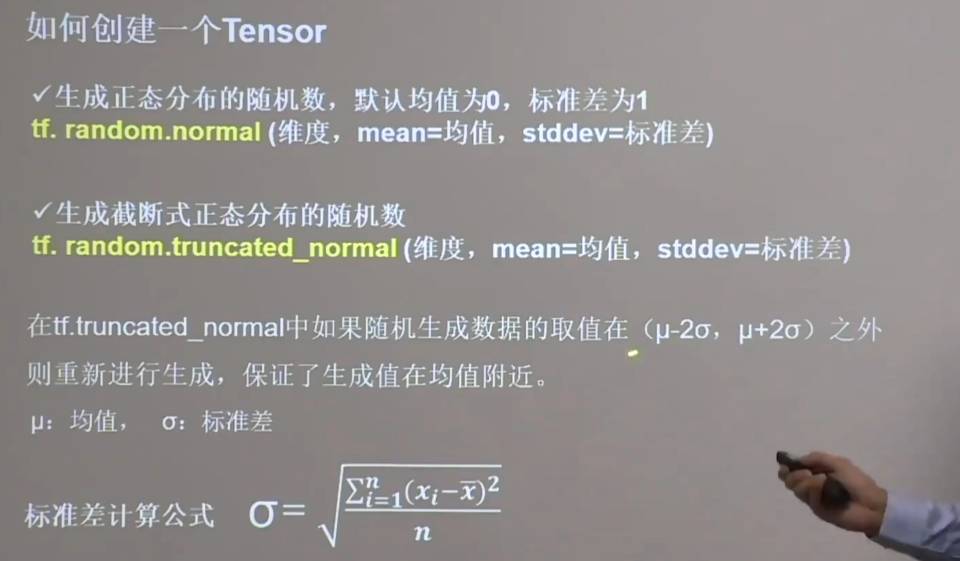
生成正态分布的随机数
默认均值为0,标准差为1
tf.random.normal(维度,mean=均值,stddev=标准差)
生成截断式正态分布的随机数(生成的随机数更集中一些)
tf.ranodm.truncated_normal(维度,mean=均值,sttdev=标准差)
举例 对比
import tensorflow as tf

d = tf.random.normal([2,3],mean=0.5,stddev=1) # stddev 标准差

e = tf.random.truncated_normal([2,2],mean=0.5,stddev=1)

print(d)

print(e)
python 3.10 tensorflow-gpu 2.8 numpy 1.22.1 | 运行结果
tf.Tensor(

[[ 2.1269822   1.2042918  -0.28122586]

[ 0.25896066  0.15369958  0.72224903]], shape=(2, 3), dtype=float32)

tf.Tensor(

[[ 1.900454    1.7232051 ]

[-0.5688374  -0.36629975]], shape=(2, 2), dtype=float32)
生成指定维度的均匀分布的随机数[minval,maxval)
tf.random.uniform(维度,minval=最小值,maxval=最大值) # 前闭后开区间
import tensorflow as tf

f = tf.random.uniform([2,3],minval=0,maxval=1) # stddev 标准差

print(f)
python 3.10 tensorflow-gpu 2.8 numpy 1.22.1 | 运行结果
tf.Tensor(

[[0.29363596 0.731918   0.8976741 ]

[0.13689423 0.53846407 0.23545396]], shape=(2, 3), dtype=float32)
常用函数
强制tensor转换为该数据类型
tf.cast(张量名称,dtype=数据类型)
计算张量维度上元素的最小值
tf.reduce_min(张量名)
计算张量维度上元素的最大值
tf.reduce_max(张量名)
import tensorflow as tf

x1=tf.constant([1.,2.,3.],dtype=tf.float64)

print(x1)

x2=tf.cast(x1,tf.int32)

print(x2)

print(tf.reduce_min(x2),'\n',tf.reduce_max(x2))
python 3.10 tensorflow-gpu 2.8 numpy 1.22.1 | 运行结果
tf.Tensor([1. 2. 3.], shape=(3,), dtype=float64)

tf.Tensor([1 2 3], shape=(3,), dtype=int32)

tf.Tensor(1, shape=(), dtype=int32)

tf.Tensor(3, shape=(), dtype=int32)
axis
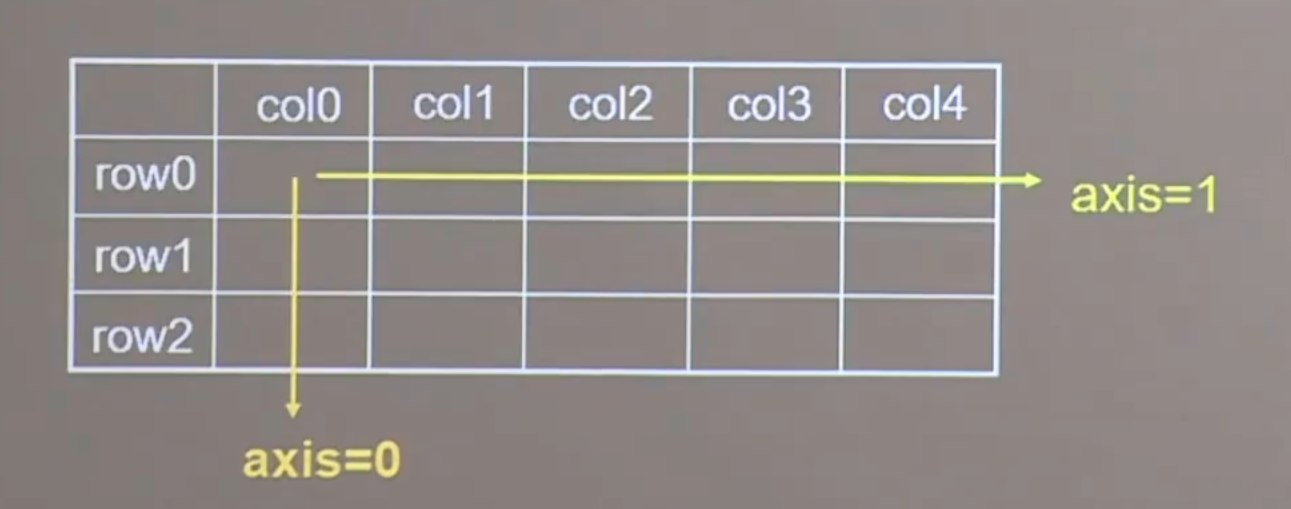
axis:用于指定操作方向
在一个二维张量或数组中,可以通过调整axis等于1或者0控制执行维度
- axis=0 代表跨行(经度,down)
- axis=1 代表跨列(维度,across)
- 不指定axis,则所有元素参与计算
计算张量沿着指定维度的平均值
tf.reduce_mean(张量名,axis=操作轴)
计算张量沿着指定维度的和
tf.reduce_sum(张量名,axis=操作轴)
import tensorflow as tf

x=tf.constant([

[1,2,3],

[4,5,6]

])

print(x)

print(tf.reduce_mean(x)) # 计算张量沿着指定维度的平均值 所有元素参与计算

print(tf.reduce_sum(x,axis=1)) #计算张量沿着指定维度的和  跨列操作
python 3.10 tensorflow-gpu 2.8 numpy 1.22.1 | 运行结果
tf.Tensor(

[[1 2 3]

[4 5 6]], shape=(2, 3), dtype=int32)

tf.Tensor(3, shape=(), dtype=int32)

tf.Tensor([ 6 15], shape=(2,), dtype=int32)
tf.Variable()
作用:将变量标记为“可训练”
被标记的变量会在反向传播中记录梯度信息。神经网络训练中,常用该函数标记待训练参数
tf.Variable(初始值)
import tensorflow as tf

# 神经网络初始化参数w

w = tf.Variable(tf.random.normal([2,2],mean=0,stddev=1)) # 生成正态分布的随机数 维度为[2,2] 均值为0 标准差为1

# 通过上述操作,就可以在反向传播中 通过梯度下降更新参数w
import tensorflow as tf

w = tf.Variable(tf.random.normal([2,2],mean=0,stddev=1))

print(w)
运行结果
<tf.Variable 'Variable:0' shape=(2, 2) dtype=float32, numpy=

array([[ 0.2049946 ,  0.1968063 ],

    [-0.29070154, -0.02642607]], dtype=float32)>
tensorflow中的数学运算
对应元素的四则运算:tf.add,tf.subtract,tf.multiply,tf.divide(加减乘除)
平方:tf.square
次方:tf.pow
开方:tf.sqrt
矩阵乘:tf.matmul
重要:只有两个维度相同的张量才可以做四则运算
实现两个张量对应元素相加
tf.add(张量1,张量2)
实现两个张量对应元素相减
tf.subtract(张量1,张量2)
实现两个张量对应元素相乘
tf.multiply(张量1,张量2)
实现两个张量对应元素相除
tf.divide(张量1,张量2)
import tensorflow as tf

a = tf.ones([1,3])

b = tf.fill([1,3],3.)

print(a)

print(b)

print(tf.add(a,b))

print(tf.subtract(a,b))

print(tf.multiply(a,b))

print(tf.divide(b,a))
python 3.10 tensorflow-gpu 2.8 numpy 1.22.1 | 运行结果
tf.Tensor([[1. 1. 1.]], shape=(1, 3), dtype=float32)

tf.Tensor([[3. 3. 3.]], shape=(1, 3), dtype=float32)

tf.Tensor([[4. 4. 4.]], shape=(1, 3), dtype=float32)

tf.Tensor([[-2. -2. -2.]], shape=(1, 3), dtype=float32)

tf.Tensor([[3. 3. 3.]], shape=(1, 3), dtype=float32)

tf.Tensor([[3. 3. 3.]], shape=(1, 3), dtype=float32)
计算某个张量的平方
ft.square(张量名)
计算某个张量的N次方
ft.pow(张量名,n次方数)
计算某个张量的开方
ft.sqrt(张量名)
import tensorflow as tf

a = tf.fill([1,3],3.)

print(a)

print(tf.pow(a,3)) # 三次方

print(tf.square(a)) # 平方

print(tf.sqrt(a)) # 开方
python 3.10 tensorflow-gpu 2.8 numpy 1.22.1 | 运行结果
tf.Tensor([[3. 3. 3.]], shape=(1, 3), dtype=float32)

tf.Tensor([[27. 27. 27.]], shape=(1, 3), dtype=float32)

tf.Tensor([[9. 9. 9.]], shape=(1, 3), dtype=float32)

tf.Tensor([[1.7320508 1.7320508 1.7320508]], shape=(1, 3), dtype=float32)
矩阵乘
tf.matmul(矩阵1,矩阵2)
import tensorflow as tf

a = tf.ones([3,2])

b = tf.fill([2,3],3.)

print(a)

print(b)

print(tf.matmul(a,b))
python 3.10 tensorflow-gpu 2.8 numpy 1.22.1 | 运行结果
tf.Tensor(

[[1. 1.]

[1. 1.]

[1. 1.]], shape=(3, 2), dtype=float32)

tf.Tensor(

[[3. 3. 3.]

[3. 3. 3.]], shape=(2, 3), dtype=float32)

tf.Tensor(

[[6. 6. 6.]

[6. 6. 6.]

[6. 6. 6.]], shape=(3, 3), dtype=float32)
tf.data.Dataset.from_tensor_slices
切分传入张量的第一维度,生成输入 特征/标签 对,构建数据集
data =tf.data.Dataset.from_tensor_slices((输入特征,标签))
Numpy和Tensor格式都可以用该语句读入数据
import tensorflow as tf

features = tf.constant([12, 23, 10, 17])

labels = tf.constant([0, 1, 1, 0])

dataset = tf.data.Dataset.from_tensor_slices((features, labels))

print(dataset)

for element in dataset:

    print(element)
python 3.10 tensorflow-gpu 2.8 numpy 1.22.1 | 运行结果
<TensorSliceDataset element_spec=(TensorSpec(shape=(), dtype=tf.int32, name=None), TensorSpec(shape=(), dtype=tf.int32, name=None))>

(<tf.Tensor: shape=(), dtype=int32, numpy=12>, <tf.Tensor: shape=(), dtype=int32, numpy=0>)

(<tf.Tensor: shape=(), dtype=int32, numpy=23>, <tf.Tensor: shape=(), dtype=int32, numpy=1>)

(<tf.Tensor: shape=(), dtype=int32, numpy=10>, <tf.Tensor: shape=(), dtype=int32, numpy=1>)

(<tf.Tensor: shape=(), dtype=int32, numpy=17>, <tf.Tensor: shape=(), dtype=int32, numpy=0>)
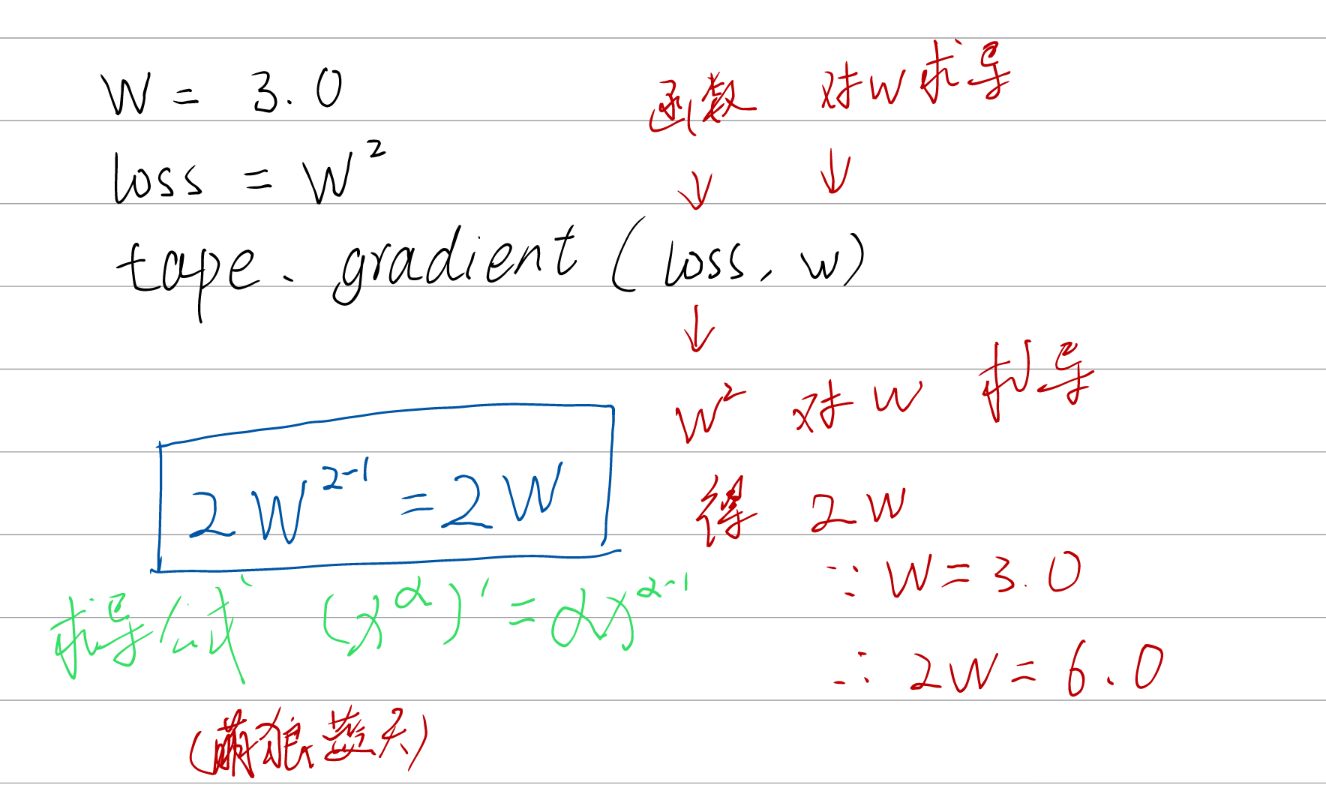
实现某个函数对指定参数的求导运算
tf.GradientTape
with结构计算过程,gradient求出张量的梯度
with tf.GradientTape() as tape:

	若干个计算过程

grad=tape.gradient(函数,对谁求导)
import tensorflow as tf

with tf.GradientTape() as tape:

    w = tf.Variable(tf.constant(3.0))  # 标记为“可训练”

    loss = tf.pow(w, 2)  # 求w的2次方

	# 损失函数loss 对 参数w 的求导数运算

grad = tape.gradient(loss,w)

 print(grad)
python 3.10 tensorflow-gpu 2.8 numpy 1.22.1 | 运行结果
tf.Tensor(6.0, shape=(), dtype=float32)
枚举 enumerate
enumerate是python的内建函数,它可以遍历每个元素(如列表、元组或者字符串),组合为 索引 元素。常在for循环中使用
enumerate 列表名
import tensorflow as tf

seq = ['one','two','three']

for i,element in enumerate(seq):

	print(i,element)
python 3.10 tensorflow-gpu 2.8 numpy 1.22.1 | 运行结果
0 one

1 two

2 three
独热编码(one-hot encoding)
在分类问题中,常用独热编码做标签
标记类别:1表示是,0表示非
tf.one_hot()
该函数将待转换数据。转换为one-hot形式的数据输出
tf.one_hot(待转化数据,depth=几分类)
import tensorflow as tf

classes = 3

labels = tf.constant([1,0,2]) # 输入元素的最小值为0,最大值为2

output = tf.one_hot(labels,depth=classes)

print(output)
python 3.10 tensorflow-gpu 2.8 numpy 1.22.1 | 运行结果
tf.Tensor(

[[0. 1. 0.]

[1. 0. 0.]

[0. 0. 1.]], shape=(3, 3), dtype=float32)
tf.nn.softmax(x)
作用:使输出符合概率分布
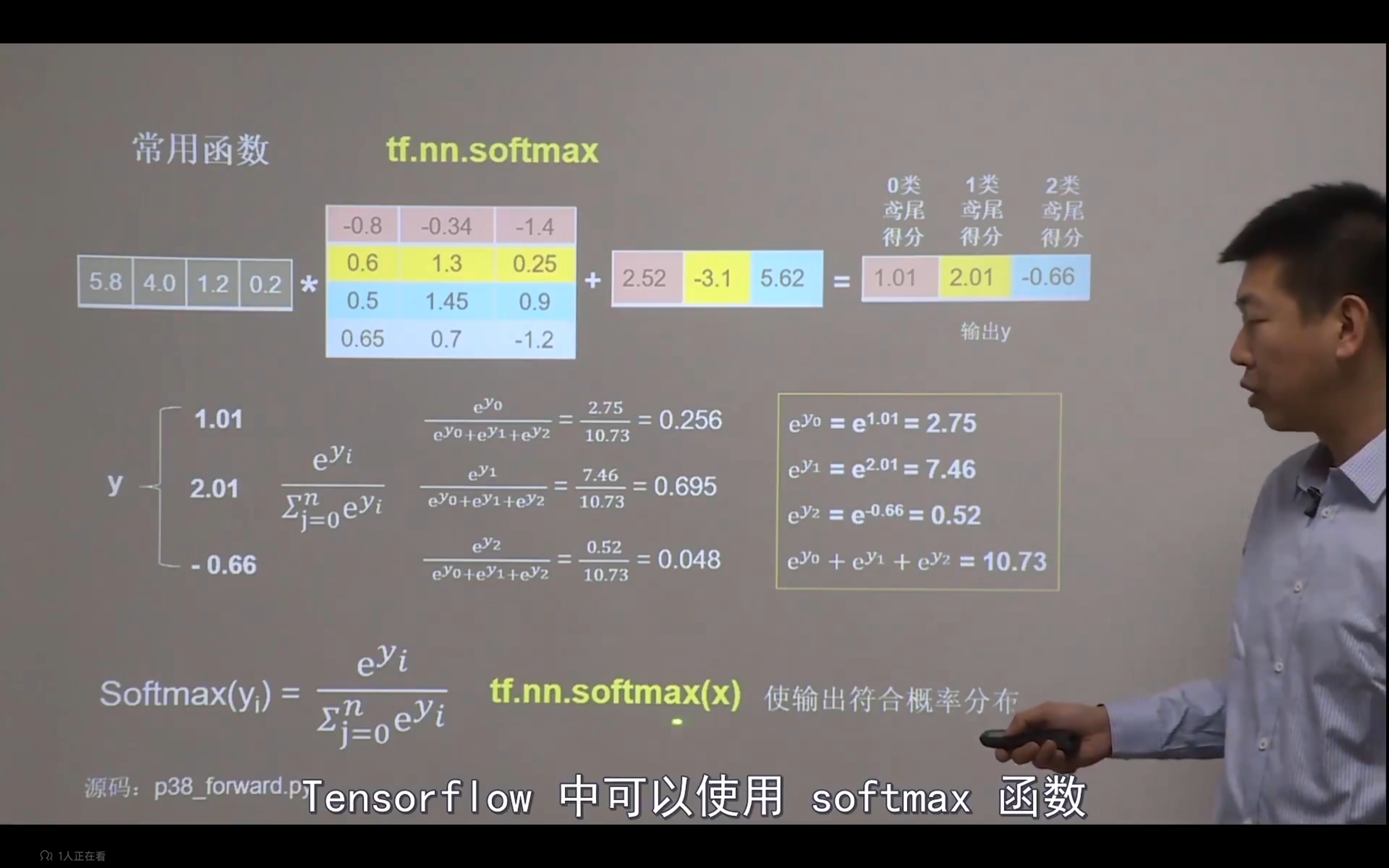
当n分类的n个输出(y0,y1 …… yn-1)通过softmax()函数
便符合概率分布了。
import tensorflow as tf

y = tf.constant([1.01,2.01,-0.66])

y_pro  =tf.nn.softmax(y)

print("After softmax , y_pro is :",y_pro)
python 3.10 tensorflow-gpu 2.8 numpy 1.22.1 | 运行结果
After softmax , y_pro is : tf.Tensor([0.25598174 0.6958304 0.0481878 ], shape=(3,), dtype=float32)
assign_sub
作用:常用于参数自更新
- 赋值操作,更新参数的返回值并返回
- 调用
assign_sub前,先使用tf.Variable定义变量w为可训练(可自更新)
w.assign_sub(w要自减的内容)
import tensorflow as tf

w = tf.Variable(4)

w.assign_sub(1) #  w-=1 即是 w=w-1

print(w)
python 3.10 tensorflow-gpu 2.8 numpy 1.22.1 | 运行结果
<tf.Variable 'Variable:0' shape=() dtype=int32, numpy=3>
tf.argmax
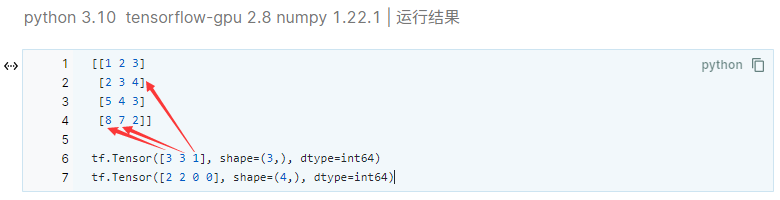
作用:返回张量沿指定维度最大值的索引
tf.argmax(张量名,axis=操作轴)
import tensorflow as tf

import numpy as np

test = np.array([[1,2,3],[2,3,4],[5,4,3],[8,7,2]])

print(test)

print(tf.argmax(test,axis=0)) # 返回每一行(经度)最大值的索引

print(tf.argmax(test,axis=1)) # 返回每一行(维度)最大值的索引
python 3.10 tensorflow-gpu 2.8 numpy 1.22.1 | 运行结果
[[1 2 3]

[2 3 4]

[5 4 3]

[8 7 2]]

tf.Tensor([3 3 1], shape=(3,), dtype=int64)

tf.Tensor([2 2 0 0], shape=(4,), dtype=int64)
【深度学习】Tensorflow学习(1)张量与常用函数的更多相关文章
- 深度学习-tensorflow学习笔记(1)-MNIST手写字体识别预备知识
深度学习-tensorflow学习笔记(1)-MNIST手写字体识别预备知识 在tf第一个例子的时候需要很多预备知识. tf基本知识 香农熵 交叉熵代价函数cross-entropy 卷积神经网络 s ...
- 深度学习-tensorflow学习笔记(2)-MNIST手写字体识别
深度学习-tensorflow学习笔记(2)-MNIST手写字体识别超级详细版 这是tf入门的第一个例子.minst应该是内置的数据集. 前置知识在学习笔记(1)里面讲过了 这里直接上代码 # -*- ...
- oracle学习笔记(九) SQL常用函数说明以及使用
SQL常用函数说明以及使用 以下补充以下常用的函数,更多的请看oracle函数API文档 to_char to_char(8.58,'9.99') to_char(8.50,'9.00') to_ch ...
- python学习笔记3.1_数据读取常用函数参数
一.read_table/read_csv常用函数参数 1.path:表明文件系统位置的字符串.url或文件型对象 2.sep或delimiter:用于分隔每行字段的字符序列或正则表达式 3.head ...
- Tensorflow的基本概念与常用函数
Tensorflow一些常用基本概念与函数(一) 1.tensorflow的基本运作 为了快速的熟悉TensorFlow编程,下面从一段简单的代码开始: import tensorflow as tf ...
- JavaScript学习总结(9)——JS常用函数(一)
本文中,收集了一些比较常用的Javascript函数,希望对学习JS的朋友们有所帮助. 1. 字符串长度截取 ? 1 2 3 4 5 6 7 8 9 10 11 12 13 14 15 16 17 1 ...
- Python学习笔记之—— File(文件) 对象常用函数
file 对象使用 open 函数来创建,下表列出了 file 对象常用的函数: 1.file.close() close() 方法用于关闭一个已打开的文件.关闭后的文件不能再进行读写操作, 否则会触 ...
- Mysql学习总结(5)——MySql常用函数大全讲解
MySQL数据库中提供了很丰富的函数.MySQL函数包括数学函数.字符串函数.日期和时间函数.条件判断函数.系统信息函数.加密函数.格式化函数等.通过这些函数,可以简化用户的操作.例如,字符串连接函数 ...
- JavaScript学习总结(11)——JS常用函数(二)
37. getElementsByClassName ? 1 2 3 4 5 6 7 8 9 10 11 12 13 14 15 16 function getElementsByClassName( ...
- QT学习笔记2:QT中常用函数
一.QString转number QString number() QString number() QString number() QString number() QString number( ...
随机推荐
- XYD1006CSPS
T1 密钥 [关键结论,模拟,枚举] Description 给定两个长度为 \(n\) 的 \(01\) 序列 \(a\),\(b\),每个位置都有一个权值 \(c\), 每次操作可以将 \(a\) ...
- PHP运算符优先级(摘自在线工具)
PHP运算符优先级 结合方向 运算符 附加信息 非结合 clone new clone 和 new 左 [ array() 非结合 ++ -- 递增/递减运算符 非结合 ~ - (int) (floa ...
- 数组 findIndex 方法去重
思路:先使用 findIndex 找到重复元素的下标,然后使用 splice 方法删除 :
- kubernetes的Deployment
Deployment 在我们发布容器中的服务时,总共有一下几种方式: 将旧的pod停掉,创建新的pod并发布 创建新的pod,然后将旧的pod停掉 滚动式升级.创建一个新的pod,删除一个旧的pod, ...
- 使用nacos上传配置文件报错
1.使用nacos导入配置文件报错:未读取到合法数据,请检查导入的数据文件. 对比在naocs server中导出的文件,发现是少了一级目录.需要创建一个文件夹,名称为组的名称.因为在nacos上传文 ...
- 洛谷P1381单词背诵
单词背诵 题目描述 灵梦有 \(n\) 个单词想要背,但她想通过一篇文章中的一段来记住这些单词. 文章由 \(m\) 个单词构成,她想在文章中找出连续的一段,其中包含最多的她想要背的单词(重复的只算一 ...
- SaaS架构:应用服务、应用结构设计
大家好,我是汤师爷~ 应用架构设计通常包括以下步骤: 根据业务架构,将业务需求转化为IT系统,识别核心应用服务. 划分应用结构,设计应用结构与业务流程.数据之间的关系. 设计应用结构之间的交互和集成关 ...
- KubeSphere 在直播应用中的实践
本文是上海站 Meetup 讲师唐明根据其分享内容整理的文章. 引言 目前媒体的主流传播渠道已从传统的报纸.广播.电视转向了互联网,各种视频及社交 App 成为了人们获取资讯的首选途径.苏州市广播电视 ...
- 深度解读RDS for MySQL 审计日志功能和原理
本文分享自华为云社区<[华为云MySQL技术专栏]RDS for MySQL 审计日志功能介绍>,作者:GaussDB数据库. 1. 背景 在生产环境中,当数据库出现故障或问题时,运维人员 ...
- @RequestBody注解转对象中驼峰格式的参数无法接收到数据的问题解决方法
1.问题:驼峰格式的参数传递到后端,@RequestBody注解标注的实体对象参数没有接收到对应的数据 前端传参:执行结果:请求参数实体: import lombok.Data; /** * 请求参数 ...