
games101_Homework2
完成函数static bool insideTriangle(): 测试点是否在三角形内。
一段优雅的easy代码,没什么好说的。(但是需要修改这里传入的xy的类型为float,默认为int是想让我通过修改返回值的方式来实现MSAA:例如返回一个int值,这里传入单个像素坐标后在insideTriangle函数中实现超采样,然后返回k,再在设置颜色时* k/4)


static bool insideTriangle(float x, float y, const Vector3f* _v)

{

    // TODO : Implement this function to check if the point p(x, y) is inside the triangle represented by _v[0], _v[1], _v[2] (a, b, c)

    // 如果p(x,y)与三点a、b、c构成的向量x乘同向(z坐标都为正)则在其内部

    // 构建向量

    Vector3f p = Vector3f(x, y, 1);

    Vector3f ap = p - _v[0];

    Vector3f bp = p - _v[1];

    Vector3f cp = p - _v[2];

    Vector3f ab = _v[1] - _v[0];

    Vector3f bc = _v[2] - _v[1];

    Vector3f ca = _v[0] - _v[2];

    // 运算x乘结果的z值

    float z1 = ab.cross(ap).z();  //ab x ap

    float z2 = bc.cross(bp).z();  //bc x bp

    float z3 = ca.cross(cp).z();  //ca x cp

    // in Triangle

    return (z1 > 0 && z2 > 0 && z3 > 0) || (z1 < 0 && z2 < 0 && z3 < 0);

}
rasterize_triangle(): 执行三角形栅格化算法
在采样点在三角形内部时更新z_buffer和frame_buffer(这里使用了MSAA,故颜色值需乘以一个float的k)
//Screen space rasterization

void rst::rasterizer::rasterize_triangle(const Triangle& t) {

    auto v = t.toVector4();

    // 获取三角形数据并分别传入 insideTriangle()

    Vector3f triangle[3];

    for(int i = 0; i < 3; i++){

        triangle[i] = Vector3f(v[i].x(), v[i].y(), v[i].z());

    }

    // TODO : Find out the bounding box of current triangle.

    float min_x = std::min(v[0].x(), std::min(v[1].x(), v[2].x()));

    float max_x = std::max(v[0].x(), std::max(v[1].x(), v[2].x()));

    float min_y = std::min(v[0].y(), std::min(v[1].y(), v[2].y()));

    float max_y = std::max(v[0].y(), std::max(v[1].y(), v[2].y()));

    // iterate through the pixel and find if the current pixel is inside the triangle

    // frame_buffer 和 z_buffer早已定义好

    for(int x = min_x; x <= max_x; x++){

        for(int y = min_y; y <= max_y; y++){

            // MSAA version

            float k = 0;

            if(insideTriangle(0.25 + x, 0.25 + y, triangle)) k += 0.25;

            if(insideTriangle(0.75 + x, 0.25 + y, triangle)) k += 0.25;

            if(insideTriangle(0.25 + x, 0.75 + y, triangle)) k += 0.25;

            if(insideTriangle(0.75 + x, 0.75 + y, triangle)) k += 0.25;

            if(k != 0){

            // Simple Sampling

            //if(insideTriangle(x + 0.5, y + 0.5, triangle)){

                // If so, use the following code to get the interpolated z value.

                auto[alpha, beta, gamma] = computeBarycentric2D(x, y, t.v);

                float w_reciprocal = 1.0/(alpha / v[0].w() + beta / v[1].w() + gamma / v[2].w());

                float z_interpolated = alpha * v[0].z() / v[0].w() + beta * v[1].z() / v[1].w() + gamma * v[2].z() / v[2].w();

                z_interpolated *= w_reciprocal;

                if(z_interpolated < depth_buf[get_index(x, y)]){

                    // TODO : set the current pixel (use the set_pixel function) to the color of the triangle (use getColor function) if it should be painted.

                    depth_buf[get_index(x, y)] = z_interpolated;

                    //set_pixel(Vector3f(x, y, 1), t.getColor());

                    set_pixel(Vector3f(x, y, 1),k * t.getColor());

                }

            }

        }

    }

}
值得注意的是,这里zNear和zFar使用的是正值,故在main.cpp中需要修改float t = -1 * abs(zNear) * tanf(eye_fov / 2);将其y轴颠倒一下才能做出正确图形(第八节课讲这是左手右手系的原因)
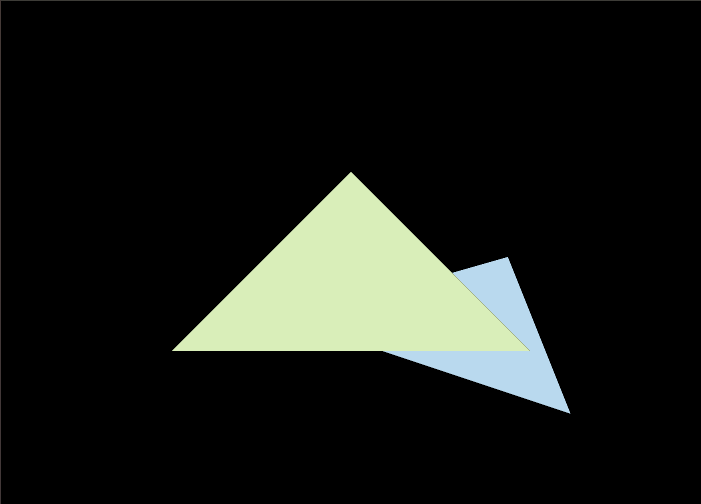
注:MSAA将会导致黑线是正常的,因为我们在计算边缘像素时他的z是高于下方三角形的,但实际可能覆盖面积过小导致0.25*color,故出现黑线
随机推荐
- 【牛客刷题】HJ3 明明的随机数
题目链接 这题有两个要编码解决的问题,首先是去重,其次是排序. 最开始想着就用Java的TreeSet解决了,简单好用,去重排序都一并解决了,编码只需要考虑input的逻辑就可以,代码如下: impo ...
- 3. 从0开始学ARM-ARM模式、寄存器、流水线
关于ARM的一些基本概念,大家可以参考我之前的文章: <到底什么是Cortex.ARMv8.arm架构.ARM指令集.soc?一文帮你梳理基础概念[科普]> 关于ARM指令用到的IDE开发 ...
- wifi基础(一):无线电波与WIFI信号干扰、衰减
liwen01 2024.08.18 前言 无论是在产品开发还是在日常生活中,在使用无线网络的时候,都会经常遇到一些信号不好的问题,也会产生不少疑问: 为什么我们在高速移动的高铁上网络会变慢? 为什么 ...
- SpringBoot 用的 spring-jcl 打印日志,与 LoggingSystem 有鸡毛关系?
开心一刻 现实中,我有一个异性游戏好友,昨天我心情不好,找她聊天 我:我们两个都好久没有坐下来好好聊天了 她:你不是有女朋友吗 我:人家不需要我这种穷人啊 她:难道我需要吗 前情回顾 从源码分析 Sp ...
- 使用 reloadNuxtApp 强制刷新 Nuxt 应用
title: 使用 reloadNuxtApp 强制刷新 Nuxt 应用 date: 2024/8/22 updated: 2024/8/22 author: cmdragon excerpt: re ...
- Kubernetes-3:使用kubeadm部署k8s环境及常见报错解决方法
k8s集群安装 环境说明: k8s-Master-Centos8 ip:192.168.152.53 k8s-Node1-Centos7 ip:192.168.152.253 k8s-Node2-Ce ...
- 小程序bindinput和bindblur赋值延迟问题解决
小程序bindinput和bindblur赋值延迟问题解决 问题链接:https://developers.weixin.qq.com/community/develop/doc/000a0ebdc4 ...
- 【JS设计模式笔记】-观察者模式(即发布-订阅模式)(结构型)
发布-订阅模式的作用 比如常见的发送短信就是一个典型的发布-订阅模式,例如,小明.小红去售楼处购买房子,但是售楼处的工作人员告诉小明.小红当前楼盘已经售罄,新楼盘还没有开售,这个时候,小明.小红把自己 ...
- Node.js开发博客项目笔记-初始化路由(博客列表、新增、更新、删除、详情、登录)(3)
工程目录 如图所示,工程目录如下: 我们在工程下新建src的目录,src目录下新建三个文件夹: controller:交互数据放到该目录下: model:model类放到该目录下: router:路由 ...
- TimesURL: 用于通用时间序列表征学习的自监督对比学习《TimesURL: Self-supervised Contrastive Learning for Universal Time Series Representation Learning》模型代码运行解析
现在是2024年3月25日16:17,打算好好的跑一个模型的代码,之前都没有系统性的过一遍,打算拿这个模型的代码开刀,Go,环境和乱七八糟的已经配好了. 关于这篇论文,之前写了博客,里面也有Githu ...